Invoify: a free invoice generator that keeps every invoice in your own browser
An invoice generator app built using Next.js, Typescript, and Shadcn
At a glance
- What is it?
- A Next.js application that turns a form into a real PDF with no account and no database, at the cost of losing shared state and Firefox support.
- Who is it for?
- Invoify fits a specific job: one person or a very small team producing a PDF invoice without an account, a subscription or a database to administer. The browser-local storage model is the reason it needs none of that, and also the reason two people cannot see the same saved invoice.
- Can I use it commercially?
- Yes. MIT is a permissive licence: you can use, modify and sell software built on it, as long as you keep its copyright and licence notices.
- Is it still maintained?
- Yes. The repository last received commits 68 days ago.
- What is it written in?
- Mainly TypeScript, according to GitHub's language statistics.
Answers come from the project's GitHub data, last synced on October 30, 2026, and from our analysis. They are not legal advice.
Star history
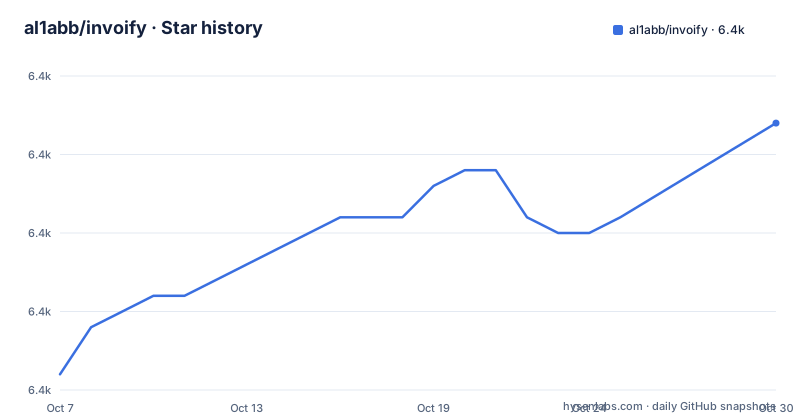
- al1abb/invoify6,382 ★ · +16
| Repository | 2026-10-07 | 2026-10-30 |
|---|---|---|
| al1abb/invoify | 6.4k | 6.4k |
16 Stars in the last 23 days, measured from the daily GitHub snapshot. Compare with other projects
Editorial analysis
Filling a form and getting a PDF without creating an account
The pitch in the repository description is short: an invoice generator built with Next.js, TypeScript and shadcn. The README is more specific about what that means in practice. Fill in a form, pick one of thirteen templates, and receive a PDF. No account, no subscription, and nothing about your customers stored on a server. There is a live demo at invoify.vercel.app and a walkthrough of each part on the guide page.
The feature list is broader than a single-page form toy. There is a live preview that updates as you type, email delivery of the finished PDF, an address book for reusing senders and clients, export of invoice data as JSON, CSV or XML, and per-invoice tax, discount and shipping on custom line items. Signatures and logos are supported. The README counts eighteen languages covering both the interface and the generated document, and says right-to-left layouts work for Arabic and Hebrew, while noting that some PDF translations are still incomplete and fall back to English.
Those thirteen templates are named in the README, which is useful when you are deciding whether to fork: Classic, Modern, Sidebar, Bold Header, Minimal, Letterhead, Compact, Two-Tone, Bordered, Left Rail, Statement, Corner and Column. A responsive layout is claimed for phones as well as desktops.
The repository tree shows a conventional Next.js App Router layout rather than a single page: `app/` for routes, `components/` for the shadcn-built interface, `contexts/`, `hooks/`, `i18n/` for next-intl routing, `services/` for the API calls, `lib/`, `e2e/` for Playwright, and `scripts/` for build helpers. There is also a `Dockerfile` at the root, so container deployment was considered.
Why the invoice data never reaches a server
This is the most interesting decision in the project, and the README is unusually honest about its limits. Invoify has no accounts and no database. The address book, the autosave draft and saved invoices all live locally in the browser, encrypted at rest with AES-GCM 256 under a key the browser generates as non-extractable, which means the key itself cannot be copied out of the origin.
The README then states plainly what that does and does not buy you. It protects against someone reading the browser profile off disk: a shared or stolen machine, a filesystem backup, a synced profile, another OS account on the same machine. It does not protect against a script injected into the page, because that script holds the same key handle the application does. The README says defending against that would require a passphrase the app never stores. That is the correct trade for a tool whose selling point is zero setup, and it is the trade you would probably not make for invoices worth thousands of dollars.
The other half of the promise is about data movement. The only time invoice data leaves the machine is when you generate a PDF or send one by email, and it is not retained afterwards.
The practical consequence is that there is no shared state. Your saved invoices are reachable from that browser profile and nowhere else, so there is no multi-user workspace, no audit trail, no recurring invoice schedule and no payment status tracking. Anything that needs those things belongs in a system with a backend.
Server-side Chromium is what makes the PDF trustworthy
The README states that PDFs are rendered with headless Chromium, not a screenshot of the page. That distinction is the whole argument for building on Puppeteer rather than a print stylesheet: the layout engine that produces the file is a real browser, so line breaks, fonts and table rendering match what a reader would see if they opened the HTML.
The cost shows up in the dependency tree and the container image. `package.json` lists `puppeteer-core` at version 24.9.0 as a runtime dependency, and comments in the `Dockerfile` explain the split: the `puppeteer` devDependency bundles its own Chromium, which is hundreds of megabytes and which production never uses, so the build stage runs `npm ci` and then `npm prune --omit=dev` before the runtime image is assembled.
The runtime stage is a `node:22-alpine` base, and the image installs the shared libraries Chromium needs on Alpine, which does not ship them: `chromium`, `nss`, `freetype`, `harfbuzz`, `ca-certificates` and `ttf-freefont`. It then drops to a non-root user, uid 1001, and exposes port 3000. That is a careful image, and the comments read like someone who hit the size problem and wrote down what they did about it.
One loose end worth naming: the comment says production runs puppeteer-core with `@sparticuz/chromium`, while the runtime image installs Alpine's own `chromium` package. The README does not say which binary is actually used. If you are sizing an image or hitting a font problem, that is the first question to resolve in the source.
PDF styling also has its own build step. `predev` and `prebuild` run `scripts/build-pdf-css.mjs`, which compiles the stylesheet the PDF renderer inlines, so the document's typography is not read from Tailwind at runtime.
Running it locally needs four commands and no configuration
The prerequisite is Node.js 20 or later and npm. Installation is a clone, an install, and a dev server:
git clone https://github.com/al1abb/invoify.git
cd invoify
Then dependencies:
npm installThe README makes an `.env.local` file optional, which is worth pausing on, because most applications of this shape need configuration before they start. Here the only two variables exist to enable email delivery, so you can skip the file entirely and still create and download invoices. `NODEMAILER_EMAIL` is the Gmail address that sends the mail, and `NODEMAILER_PW` is a Gmail App Password rather than your account password, which means 2-Step Verification has to be on.
Start the development server:
npm run devThe application is then at http://localhost:3000. Because `predev` runs the PDF stylesheet build, the first start does more work than later ones.
The scripts table in the README covers the rest: `npm run build` for a production build, `npm run start` to serve it, `npm run lint` for ESLint, `npm run format` for Prettier, `npm run analyze` for a build with the bundle analyzer, and `npx tsc --noEmit` for a typecheck. There is no `test` script beyond the Playwright end-to-end pair, `npm run test:e2e` and `npm run test:e2e:ui`, so unit testing is not part of this repository's story.
End-to-end tests run against a real production build
The test setup is short enough to reproduce, which is a good sign. It needs a Chromium build for Playwright first:
npx playwright install --with-deps chromium
npm run test:e2e
The README says the suite builds and serves the production bundle, then runs against it in a desktop and a mobile viewport. Testing the built artifact rather than the dev server is the right choice for an application whose output is a PDF, because the PDF path and the CSS compilation step only exist in a real build.
It also documents the coverage gap plainly, which is rarer than it should be. Issue #11 reports PDF generation problems in Mozilla Firefox and is still open. The automated tests run against Chromium only, so the current state in Firefox is untested. The README says this in a callout rather than burying it.
What the suite does not cover is equally relevant. There is no unit test layer, no tests around the encryption or the export formats, and no check that a PDF rendered from a given invoice data structure still matches the template it was designed for. The templates are thirteen separate visual designs, and a change to shared line item or tax logic can plausibly break one of them without failing a Chromium smoke test.
CI runs the same typecheck, lint and test steps on every push and pull request, defined in `.github/workflows/ci.yml`.
Forks and contributors who need to change PDF output should build locally and inspect a generated invoice before opening a pull request.
Where the README stops and the codebase begins
The README is thorough about installation, features and known problems, and it says nothing about releases. The repository publishes no GitHub releases, so there is no version history to read and no upgrade notes to compare against. The last push was on 2026-08-24, and the application version in `package.json` is still 0.1.0, which is the sort of placeholder a project keeps when it is deployed continuously rather than released.
Several implementation details a reader would want are only in the source. The `Dockerfile` explains the Puppeteer and Chromium split, the build comment explains why `npm ci` is used instead of `npm install` for reproducibility, and the `services/` directory is where the email and PDF calls live. The README's guide page at invoify.vercel.app/en/guide covers the product side.
`package.json` also lists `@react-email/components` alongside Nodemailer, so email is built from React components and sent through Nodemailer rather than sent as a plain attachment, though the README only credits Nodemailer.
Licensing is MIT, with the text in `LICENSE`, which makes forking into a branded internal tool uncomplicated. There is a Discord link in the README, and 38 open issues on the repository, which for a project of this type is a normal amount of small bug reports rather than a backlog of design debates.
The honest summary is that Invoify is unusually well documented for a small application, and unusually clear about where it does not work. Firefox and shared state are the two places where that clarity turns into a decision for the reader rather than a reassurance.
Editorial conclusion
Invoify fits a specific job: one person or a very small team producing a PDF invoice without an account, a subscription or a database to administer. The browser-local storage model is the reason it needs none of that, and also the reason two people cannot see the same saved invoice. Rendering runs through headless Chromium on the server, which is what makes the output trustworthy but also what puts Puppeteer in the dependency tree. For shared invoicing with recurring customers, sequences and payment tracking, this is the wrong tool and a hosted service with a real backend is the right one. Start with the four-command local install, check the PDF against your own templates, and read issue #11 before committing to Firefox.
Frequently asked questions
What is the best free invoice generator?
Invoify describes itself as free and web-based, with no account, no subscription and no server-side storage, which puts it in the tier of tools a single user can adopt with nothing to administer. The catch is that the free design and the privacy design are the same decision: without a database there is no shared workspace, no recurring invoicing and no payment status tracking. Tools with those features need a backend, so the right choice depends on whether one person or a team needs them.
Does Invoify need configuration or an account to send invoices by email?
An account is never needed. Configuration is only needed for email delivery: `NODEMAILER_EMAIL` for the Gmail address that sends the mail and `NODEMAILER_PW` for a Gmail App Password, which requires 2-Step Verification. Creating, previewing, downloading and exporting invoices works without any environment variables at all.
How does Invoify turn the form into a PDF?
Server-side headless Chromium through Puppeteer, and the README is explicit that the output is a rendered document rather than a screenshot of the page. Production runs `puppeteer-core` against a Chromium binary, and a build step called `scripts/build-pdf-css.mjs` compiles the stylesheet the renderer inlines. PDF generation in Firefox is tracked as open issue #11, and the automated tests exercise Chromium only.
Official sources
Add this badge to your README
If you maintain this project, the badge below links readers to this analysis and shows its maintenance status from the daily GitHub snapshot. Paste the markdown into your README; add ?metric=license or ?metric=stars to the image URL for a different field.

[](https://hysenlabs.com/projects/al1abb-invoify)Star history chart for your README
[](https://hysenlabs.com/projects/al1abb-invoify)Was this useful?