markdown-it: a CommonMark parser you configure by swapping rules
Markdown parser, done right. 100% CommonMark support, extensions, syntax plugins & high speed
At a glance
- What is it?
- markdown-it is an MIT-licensed Markdown parser for JavaScript and TypeScript that follows CommonMark and lets you replace individual parsing rules. It suits teams that need to bend Markdown syntax without forking a parser.
- Who is it for?
- Adopt markdown-it when you need CommonMark output plus control over individual syntax rules, and you are working in JavaScript or TypeScript. Do not adopt it if you need the parser to be the same code that runs in Python or another runtime, or if your Markdown is fixed and any CommonMark parser would do.
- Can I use it commercially?
- Yes. MIT is a permissive licence: you can use, modify and sell software built on it, as long as you keep its copyright and licence notices.
- Is it still maintained?
- Yes. The repository last received commits 22 days ago.
- What is it written in?
- Mainly TypeScript, according to GitHub's language statistics.
Answers come from the project's GitHub data, last synced on November 13, 2026, and from our analysis. They are not legal advice.
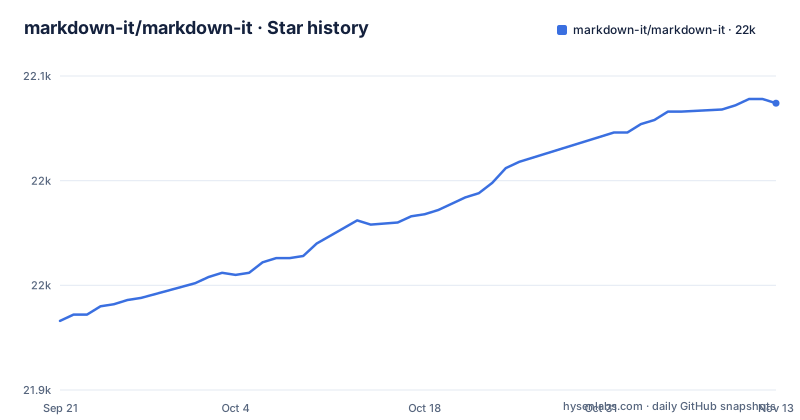
Star history
- markdown-it/markdown-it22,037 ★ · +104
| Repository | 2026-09-21 | 2026-11-13 |
|---|---|---|
| markdown-it/markdown-it | 21.9k | 22k |
104 Stars in the last 53 days, measured from the daily GitHub snapshot. Compare with other projects
Editorial analysis
What markdown-it is for, and who ends up using it
markdown-it is a Markdown parser written in TypeScript and published to npm. Its README describes it as following the CommonMark spec and adding syntax extensions and sugar, specifically URL autolinking and a typographer. The package is MIT-licensed, and the repository is not archived; the last push was on 2026-10-23.
The audience is narrow and specific. If you render Markdown inside a JavaScript or TypeScript program and you want the output to match the CommonMark spec, markdown-it is aimed at you. The second audience is the one that matters more in practice: people who need to change how Markdown parses. The README states that syntax is configurable, that you can add new rules, and that you can replace existing ones. That is a different promise from "parses Markdown correctly". Most parsers in this space give you options; markdown-it exposes the rule chain itself.
That flexibility is the reason the project has a plugin ecosystem rather than a large built-in feature list. The README points at community-written plugins and other packages on npm under the markdown-it-plugin keyword. Anything beyond CommonMark plus autolinking and typographer is expected to arrive as a plugin, not as a core option.
How the rule chain and plugin model actually work
The core object is the parser instance. In the usage example the README gives, you construct it and call render on a string:
import MarkdownIt from 'markdown-it'
const md = new MarkdownIt()
const result = md.render('# markdown-it rulezz!')
The design choice that separates markdown-it from a single-pass parser is that parsing is a chain of named rules rather than one function. The README frames configuration as adding new rules and replacing existing ones. A plugin is therefore not a wrapper around the renderer; it is code that inserts itself into that chain, and it can substitute its own implementation for a built-in rule.
Two consequences follow from that architecture. First, plugin ordering matters, because rules that run earlier in the chain see the input before rules that run later. The documentation does not spell this out in the README itself; it points to a separate documentation site at markdown-it.github.io/markdown-it/ and to docs/usage.md for more usage examples. Second, the parser is not a black box you can only feed strings to. If a plugin misbehaves, the failure is a rule producing the wrong tokens, not an opaque rendering bug.
The README also lists "safe by default" as a property. It states the claim; the README does not detail the escaping behaviour behind it, so treat that line as a pointer to the documentation rather than a specification.
Installing markdown-it and rendering your first document
The README gives one install command, for Node.js:
npm install markdown-itAfter that, the package resolves through its exports map. The package.json declares a main entry of ./dist/markdown-it.cjs.js, a module entry of ./dist/markdown-it.mjs, and types at ./dist/markdown-it.d.cts, with separate import and require conditions. In practice that means a modern bundler or a Node.js ESM project picks up the .mjs build and a CommonJS project picks up the .cjs build without you choosing. A TypeScript project gets declarations for both.
The first real use is the three-line example from the README. Create a file, import the default export, instantiate it, and render a string. The result you should see is an HTML string containing an h1 element with the text from the input. The parser returns a string, not a DOM node, so it works the same in Node.js and in the browser.
For a browser build without a bundler, package.json exposes a ./browser subpath with dist/browser/markdown-it.esm.min.mjs and dist/browser/markdown-it.umd.min.js. The README also notes that unpkg.com, esm.sh or any other CDN mirroring the npm registry can serve the package, and points at unpkg.com/markdown-it/ for a look at the dist folder contents.
There is also a command line entry. package.json declares a bin named markdown-it pointing at bin/markdown-it.mjs, so installing the package gives you a markdown-it executable. The README does not document its flags, so check the bin file or the documentation site before relying on any option.
Where markdown-it is the wrong choice
The clearest boundary is runtime. markdown-it is a JavaScript package. If your rendering happens in Python, Go or Rust, markdown-it is not the tool, and a port is not the same thing as this project. A Python port may share the design idea of a configurable rule chain, but it is a separate codebase with its own release cadence.
The second boundary is version churn. The README carries a note telling readers upgrading to v15 to consult docs/migration/migration_v15.md. The current package.json version is 15.0.3. A migration guide existing at all means the API has moved in ways that require reading before upgrading. If you are pinned to an older major version and your project has plugins layered on top, an upgrade is a code change, not a version bump.
The third boundary is scope. If your Markdown is authored by people you trust and rendered once, a parser with fewer moving parts is easier to reason about. The rule chain that makes markdown-it extensible is also a surface you have to understand when a plugin and a built-in rule disagree. The README does not document a plugin conflict resolution mechanism, so debugging a conflict means reading the rules involved.
markdown-it against marked and react-markdown
Compared with marked and with react-markdown, the difference is architectural rather than a matter of output quality.
marked is the other long-standing JavaScript Markdown parser in this space. The practical distinction is where extension happens. markdown-it's README describes configuration as adding rules and replacing existing ones, with plugins published on npm under a keyword. That model assumes you may want to change parsing behaviour itself, not just the rendered output. If your requirement is to turn a Markdown string into HTML and nothing more, that rule chain is machinery you are paying for without using.
react-markdown sits at a different layer. It is a React component, so it fits when the output needs to be a React tree rather than an HTML string. markdown-it returns a string from render, as the README example shows. If your application needs to map Markdown elements onto React components, a string-returning parser means an extra step. If your application needs an HTML string for a server response or a file, that extra step is exactly what react-markdown would add instead.
The honest summary is that these are not competing on correctness. They are competing on where in your stack the parsing result needs to land, and on whether you need to change the grammar.
Maintenance cost, licence and what to check before upgrading
The licence is MIT, declared in package.json and present as a LICENSE file at the repository root. MIT is permissive: it allows use, modification and redistribution with the licence and copyright notice retained. That is a statement about the licence text, not legal advice about your situation.
On maintenance, the repository is not archived and the last push was on 2026-10-23, which is recent. The project also lists funding entries in package.json pointing at GitHub Sponsors for puzrin and for the markdown-it organisation, which is a signal about how the work is supported rather than a statement about release frequency. The repository has no published GitHub releases, so the version to trust is the one in package.json, 15.0.3.
The upgrade cost concentrates in two places. The first is the migration guide at docs/migration/migration_v15.md, which the README links for anyone moving to v15. The second is your plugin set. Because plugins hook into the rule chain, a change to how rules are registered or ordered propagates into every plugin you use. The repository layout includes a test directory with separate test:cmspec, test:markdown-it and test:build scripts, which tells you the project tests against the CommonMark spec and against its own suite, but it tells you nothing about whether a third-party plugin still works on a new major version. That is yours to verify.
Editorial conclusion
Adopt markdown-it when you need CommonMark output plus control over individual syntax rules, and you are working in JavaScript or TypeScript. Do not adopt it if you need the parser to be the same code that runs in Python or another runtime, or if your Markdown is fixed and any CommonMark parser would do. Before committing, check the v15 migration guide in docs/migration/migration_v15.md against the version you are currently pinned to, and confirm that the plugins you depend on are published on npm under the markdown-it-plugin keyword.
Frequently asked questions
What is markdown-it?
It is a Markdown parser written in TypeScript and published to npm, described in its README as following the CommonMark spec and adding syntax extensions such as URL autolinking and a typographer. It is MIT-licensed and configurable, so new parsing rules can be added and existing ones replaced.
How do I install markdown-it?
The README gives a single Node.js command, npm install markdown-it. For browsers without a bundler, package.json exposes a ./browser subpath, and the README notes that unpkg.com, esm.sh or another CDN mirroring the npm registry can serve the package.
How do I use markdown-it to render a Markdown string?
Import the default export, create an instance, and call render on your string. The README example constructs the parser with new MarkdownIt() and calls md.render('# markdown-it rulezz!'), which returns an HTML string.
Does markdown-it work with TypeScript?
Yes. The package is written in TypeScript and package.json declares type declaration files for both the import and require conditions, at ./dist/markdown-it.d.mts and ./dist/markdown-it.d.cts respectively.
How does markdown-it compare with marked?
The difference is where extension happens. markdown-it's README describes configuration as adding new rules and replacing existing ones, with plugins published on npm under the markdown-it-plugin keyword. If you only need a Markdown string converted to HTML, that rule chain is unused machinery.
Official sources
Add this badge to your README
If you maintain this project, the badge below links readers to this analysis and shows its maintenance status from the daily GitHub snapshot. Paste the markdown into your README; add ?metric=license or ?metric=stars to the image URL for a different field.

[](https://hysenlabs.com/projects/markdown-it-markdown-it)Star history chart for your README
[](https://hysenlabs.com/projects/markdown-it-markdown-it)Was this useful?