huashu-motion: a coding agent that makes launch films with sound
让你的agent一键直出商业级产品宣传片:会作曲,能指着画面改。Commercial-grade launch films by your coding agent — point at the frame to change it.
At a glance
- What is it?
- huashu-motion is an agent skill that turns a coding agent into a small motion graphics studio: it reads your product, writes a score in ABC notation, produces the film as a single index.html, renders it through the Chrome already on your machine, and lets you point at a frame to change just that frame. It is MIT licensed, days old at version 0.1.1, and tested only on macOS.
- Who is it for?
- Adopt huashu-motion when you need a product launch film and would rather describe it to an agent than learn a timeline tool, and when your machine has Node 22, a Chromium browser and FFmpeg installed, because all three are hard requirements and the project has only been tested on macOS.
- Can I use it commercially?
- Yes. MIT is a permissive licence: you can use, modify and sell software built on it, as long as you keep its copyright and licence notices.
- Is it still maintained?
- Yes. The repository last received commits 17 days ago.
- What is it written in?
- Mainly JavaScript, according to GitHub's language statistics.
Answers come from the project's GitHub data, last synced on November 7, 2026, and from our analysis. They are not legal advice.
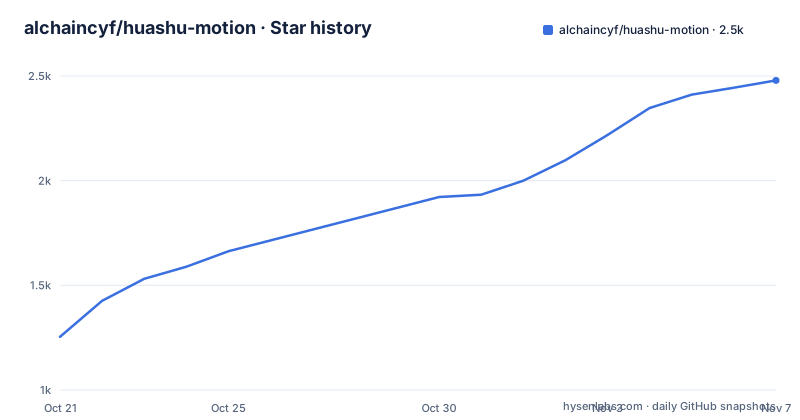
Star history
- alchaincyf/huashu-motion2,479 ★ · +1,225
| Repository | 2026-10-21 | 2026-11-07 |
|---|---|---|
| alchaincyf/huashu-motion | 1.3k | 2.5k |
1,225 Stars in the last 17 days, measured from the daily GitHub snapshot. Compare with other projects
Editorial analysis
An agent skill that treats a film as a web page
The pitch in the repository description is one sentence: let your agent produce a commercial grade launch film in one go, composing music and changing what you point at. The README expands it into a sequence. You tell Claude Code, Codex or another agent to make a thirty second launch film for your product. The agent reads your product, offers three directions to choose from, writes the whole film, composes the score, and then opens an editor in the browser and waits. Where you are not happy, you click on the frame, write what should change, and it changes that one place.
The architectural decision underneath is the interesting part. A film is a single index.html. The visuals are written in code with GSAP, Canvas, Three.js and SVG, and no video generation model is called, so every frame is determined by code and by time. There is no proprietary format, and the film is a web page you can take with you.
The loop between the agent and the editor is drawn in the README as a diagram. The agent writes my-film/index.html, the editor in the browser watches it, and when you click on the frame and type a comment, the comment goes into a .om/inbox.jsonl file that the agent picks up with an inbox command in wait mode. The agent then makes the change and the preview refreshes in place.
The package is a Node package named huashu-motion with two binaries, om and huashu-motion, both pointing at cli/om.js, and it requires Node 22 or newer. The repository holds the skill itself under skills/, the command line tool under cli/, the runtime helpers and the frame rendering engine under runtime/, the browser editor under studio/, ten starting templates under templates/, a fonts directory with the bundled open source fonts, examples, and tests.
The point of calling it a skill rather than an application is that the agent is the user interface. You do not learn a timeline editor, you describe what you want and you inspect the result.
Installing it as a skill for whichever agent you use
There are three documented ways in, and the first is the recommended one: ask your agent to do it.
The one line command uses the skills installer:
npx skills add alchaincyf/huashu-motionThe skills tool recognises which agent you are using and puts the skill in the matching directory, and you can name the agent explicitly with an argument such as -a claude-code or -a codex. The project follows the Agent Skills protocol at agentskills.io, so any agent that supports skills can install it. The README names Claude Code, Codex, WorkBuddy, Grok Bot, Muse and Dots as products it runs on, and the badge in the README header lists the same set as the supported runtime.
The manual route is a clone and a symlink, which the README recommends over a copy so that the skill and the repository stay the same files:
git clone https://github.com/alchaincyf/huashu-motion.git
ln -s "$PWD/huashu-motion/skills/huashu-motion" ~/.claude/skills/huashu-motion   # Codex换成~/.codex/skills/
The comment in that snippet is the Codex variant of the path, since Codex looks under its own directory. The reason the symlink matters is stated right after: the bin/om inside the skill calls the repository's command line tool directly, so editing the repository edits the skill and there is only one copy on the machine.
That is the whole installation story, and it is a very different proposition from a desktop application. There is no installer, no account and no telemetry, but there is also no graphical launcher, which means the tool only works inside an agent session that can run commands.
Node, a browser, FFmpeg, and the optional heavy pieces
The requirements section is short and honest, and the optional parts are heavier than the mandatory ones.
Node 22 or newer is the baseline. A Chromium browser, which can be Chrome, Chromium or Edge, is required because the tool uses the browser already installed on your machine for screenshots, checking and export, and does not download a separate renderer. FFmpeg is required for video export and for mixing the music. Those three are the whole mandatory list.
The optional list is where the disk and time go. Real instrument timbres, a sampled triangle piano, strings and a drum kit, need one command from the agent:
om samples buildThat downloads about 55MB of free samples under CC0 and CC-BY licences, and without it the films use synthesised timbres instead. Word level voiceover alignment needs whisper-cli, installed on macOS with:
brew install whisper-cppReading a Chinese script aloud with the Kokoro voice is a separate install that needs uv and Python 3.12, and the model is about 325MB. The macOS system voice needs nothing installed.
The practical summary of the optional set is that a full setup pulls close to half a gigabyte of models and samples, and a minimal setup produces films with synthetic sound and no voiceover alignment. Which of those you need depends entirely on whether the film is for a launch post or for internal review.
Two operational details are worth knowing. The doctor command reports what is missing, and the README says the agent can install the missing pieces for you. And the project has only been tested on macOS, which is stated plainly and is the most important caveat in the whole document, since a tool that drives a local browser, spawns parallel renderers and shells out to FFmpeg is exactly the kind of tool that behaves differently on another system. The README also notes that the Codex sandbox blocks local preview and the browser, and that you have to approve those manually.
Composer mode: a score in ABC notation, played by samples
The audio approach is the most unusual part of the project, and it starts with the order of work. The composer mode works score first. The agent writes a score in ABC notation, which is plain text, and the markers in the score are aligned to the scenes of the film, so the cut points in the picture land on the beats. The score is then performed by the sampled instruments, and each thing that lands on screen gets a sound effect on the same line of animation code, so the effects are aligned automatically at export.
The README calls out the cost and the benefit of that order. Writing the rhythm first is what produces a film whose cuts are on the beat rather than near it, and it is why the picture is cut on the beat the demo shows. The repository ships three annotated example scores, and the agent writes more of them.
If you do not want music composed, there is a fallback: twelve product categories with three music directions each, selected from a seed derived from the film, and you can reroll if the choice is wrong. The README describes the selection as seeded, which means the same film gets the same music unless the seed changes, and that matters when you are iterating on the visuals and do not want the music to move underneath you.
There are twenty three sound effects, listed by what they represent, landing, camera whip, typing, stamping, glitch and so on. They are attached to the animation line where the event happens, which is a good design, because the effect cannot drift out of sync with the thing it belongs to.
The voiceover path accepts a system voice, your own recording, or the Kokoro voice, and supports word level alignment, so the picture can land on a particular word. The README also mentions that the music steps aside while someone is speaking, which is the sort of detail that separates a soundtrack from a loop.
All of the audio is generated locally. The README states that the music is produced on the machine and that no paid interface is called, which is a real constraint for a tool whose output is a commercial launch film, since a licence question on the audio is a licence question on the film.
Point at the frame and change only that frame
The editing interaction is what the project description leads with, and it is a good design. You press C in the editor, click a point on the frame, and write what should change. The comment that reaches the agent carries the time point, the scene, the element you clicked and where it lives in the source. The agent looks at that frame and at an enlarged crop of the small region you pointed at, changes that one place, and answers in plain language, and the preview refreshes where you were looking.
The detail that makes this usable is that the comment travels with the context. A comment that says the opening effect is weak and the focus should be on the typing has to be actionable by an agent that is not looking at the screen, and the time code, the scene name, the element under the cursor and the source location are what turn it into a precise instruction.
Every version is kept and can be undone, so a change that makes things worse is reversible. And the values that are pure data, titles, numbers, colours and dwell times, are exposed as input fields on the right of the editor, so you can change them yourself without waiting for the agent. That split is well judged: a text change does not need a model, and sending it through the agent would be slower and less precise.
The editor is not a timeline. It is a live preview with a scene strip, direct value editing and a way to leave comments on the picture. The commands table makes the division of labour between the person and the agent explicit, with om studio for the editor and om inbox --wait, om look and om done on the agent side for taking a comment, seeing where you pointed, and reporting what was changed.
The README notes that the editor and terminal shown in that particular demo were rebuilt to resemble the real interface and that the code details are illustrative, while the comments shown are ones that were actually given. That distinction is worth keeping in mind when reading the demos: the workflow is real, the visuals are a reconstruction.
The rendering engine and the two checks before delivery
The project does not use a video generation model, and it does not use a headless rendering service either. It drives the Chrome already on your computer. The renderer opens several browser instances at once, up to eight by default, based on the number of CPU cores, and encodes the music and the picture in parallel, reusing the music unchanged when it has not been edited. The README reports that a thirty second film renders in roughly twelve to fifteen seconds on a fourteen core Mac, and that adding motion blur takes about one to one and a half minutes.
Those numbers are the author's own on his own machine, and the practical implication is that iteration is cheap. A film can be re-rendered, inspected and re-rendered many times in a session, which is what makes the point and edit loop worth having.
Two checks sit in front of delivery, and they are separate tools with separate jobs. The check command runs before rendering: it looks for errors in the script, missing files and animation patterns that break the rules, and it samples frames to catch text that is cropped, covered or has too little contrast. The qa command looks at the finished film: single frames that flash by, gaps where nothing moves, hard cuts, and the motion curve of the whole piece.
The skill also requires the agent to actually watch the frames and to watch the finished film at normal speed before handing it over, and to send a separate agent to review it cold if one is available. That instruction to the agent is part of the deliverable, and it is a reasonable way to catch the class of problem that a tool cannot see for itself.
For the file layout, a film is a web page, and the export options are MP4, MOV with transparency, WebM and GIF, plus a share page with a player and the source. The README also describes a package for an editing tool, an overlay with transparency that can be dropped into a video editor, and a vertical reformat that copies the project at 1080 by 1920 and re-flows the layout.
Honest limits, licences and a project three weeks old
The project has a section called honest boundaries, and it is short enough to quote in spirit. The tool cannot hear. The agent can look at the waveform, the energy curve and the spectrum of the music and check it, but the final judgement has to be made by a person with ears. It cannot invent real people or live action footage, because every frame is drawn in code, and for real footage you supply your own assets and it handles the composition and packaging. The result depends on the model, with the author mainly using Opus in Claude Code and noting that a cheaper model also produced a good result but that the difference in taste between models is real. And the whole thing needs an environment where commands can run, with Node, Chrome and FFmpeg on the machine.
The cost example is instructive. A twenty two second motion graphics film was made with DeepSeek V4.1 Flash, with three rounds of feedback, in under half an hour, for 1.95 in the currency of the author, with a cache hit rate of 99.4 per cent. The author attributes the consistent palette, the motif running through the film and the music locked to 124 BPM to the skill rather than to the prompts.
The licence is MIT, and the package metadata records it. There is a THIRD_PARTY.md file at the root, which is where the bundled assets are accounted for: the fonts are open source and are shipped in the fonts directory, twenty seven of them including Chinese weights from 500 to 900, serif faces and display faces, and the instrument samples are CC0 and CC-BY.
The version is 0.1.1, released on 2026-10-19, with 0.1.0 a day earlier, and the last push was on 2026-10-19. This is a project of days rather than months, and the README structure reflects that, with a roadmap-like list of what it can do. The reference library of twenty motion languages, ten templates, twenty three sound effects, three example scores and the method documents are the parts that will still be useful in a year, because they are the parts that encode taste rather than plumbing. The method documents are the actual contribution: the director rules were derived by measuring twenty one real launch films with FFmpeg, cut points, beats, loudness and energy curves, and by breaking down a hundred and forty two high interaction films into twenty motion languages grouped by product type, and they are the reason a cheap model can produce a coherent film. The rest is a very good wrapper around the browser you already have.
Editorial conclusion
Adopt huashu-motion when you need a product launch film and would rather describe it to an agent than learn a timeline tool, and when your machine has Node 22, a Chromium browser and FFmpeg installed, because all three are hard requirements and the project has only been tested on macOS. It is the wrong tool for live action footage or talking heads, since every frame is drawn in code, and the wrong tool when you need to hear and judge the result yourself, because the project says plainly that it cannot hear. Before adopting, run om doctor to see which optional pieces are missing, decide whether you want the sampled instruments, which need about 55MB of CC0 and CC-BY downloads, or the synthesised fallback, and pin the version because 0.1.x is early.
Frequently asked questions
What is huashu-motion and what does it produce?
It is an agent skill that gives a coding agent the ability to make motion graphics and launch films. Each film is a single index.html written with GSAP, Canvas, Three.js and SVG, with the score composed by the agent and rendered through the browser on your machine.
How do I install huashu-motion for my agent?
Run npx skills add alchaincyf/huashu-motion, and the skills tool puts the skill in the right directory for the agent you use, or you can clone the repository and symlink skills/huashu-motion into the agent's skills directory, such as ~/.claude/skills/huashu-motion or ~/.codex/skills/. It follows the Agent Skills protocol.
What does huashu-motion need installed?
Node 22 or newer, a Chromium browser such as Chrome, Chromium or Edge, and FFmpeg. Optional pieces include about 55MB of sampled instruments via om samples build, the Kokoro Chinese voice which needs uv and Python 3.12 with a model of about 325MB, and whisper-cli for word level voiceover alignment.
How does the point and edit interaction work?
You press C in the editor, click a point on the frame and write what should change. The comment carries the time point, the scene, the element you clicked and its location in the source, so the agent can change that one place and refresh the preview where you were looking. Every version is kept and can be undone.
What are the limits of huashu-motion?
The project states that it cannot hear, that it cannot produce real people or live action footage because every frame is drawn in code, that the result depends on the model, and that it needs an environment where commands can run with Node, Chrome and FFmpeg. It has only been tested on macOS.
Official sources
Add this badge to your README
If you maintain this project, the badge below links readers to this analysis and shows its maintenance status from the daily GitHub snapshot. Paste the markdown into your README; add ?metric=license or ?metric=stars to the image URL for a different field.

[](https://hysenlabs.com/projects/alchaincyf-huashu-motion)Star history chart for your README
[](https://hysenlabs.com/projects/alchaincyf-huashu-motion)Was this useful?