SDR++: a bloat-free, cross-platform SDR application built on a modular core
Cross-Platform SDR Software
At a glance
- What is it?
- SDR++ is an open source SDR program for Windows, Linux, macOS and BSD, distributed as release archives and nightly builds, with hardware support split into loadable modules. It is a good fit when you want a small, plugin-driven receiver rather than an all-in-one suite.
- Who is it for?
- Adopt SDR++ if you want a small receiver with a plugin model and you are willing to install your SDR's own driver separately, and on Debian-based systems you should install the release .deb rather than the sdrpp package from the package manager, which the README calls incomplete and incompatible with official and out-of-tree modules. Skip it if you need a packaged build for a distribution other than Debian-based ones.
- Can I use it commercially?
- Yes, with conditions. GPL-3.0 is a copyleft licence: if you distribute software that includes it, you must release that software's source code under the same licence. Running it internally without distributing it does not trigger that obligation.
- Is it still maintained?
- Yes. The repository last received commits 8 days ago.
- What is it written in?
- Mainly C++, according to GitHub's language statistics.
Answers come from the project's GitHub data, last synced on November 14, 2026, and from our analysis. They are not legal advice.
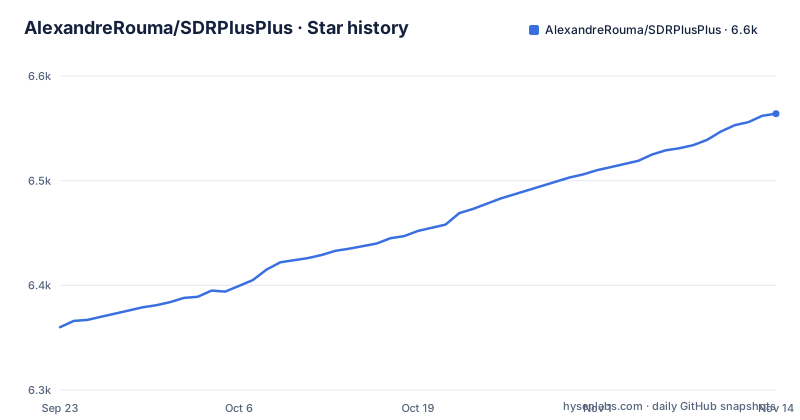
Star history
- AlexandreRouma/SDRPlusPlus6,564 ★ · +204
| Repository | 2026-09-23 | 2026-11-14 |
|---|---|---|
| AlexandreRouma/SDRPlusPlus | 6.4k | 6.6k |
204 Stars in the last 52 days, measured from the daily GitHub snapshot. Compare with other projects
Editorial analysis
What SDR++ is for, and who it is aimed at
SDR++ is a cross-platform SDR application written in C++ and released under GPL-3.0. The README states the aim plainly: to be bloat free and simple to use. That framing matters more than it sounds, because it describes a product decision rather than a feature list. The program is a receiver front end with a multi-VFO layout, a waterfall that the README says updates fully when possible, and SIMD accelerated DSP. Hardware is not baked into the core. Sources arrive either through SoapySDR or through dedicated modules, which is why the repository has separate source_modules, sink_modules, decoder_modules and misc_modules directories rather than one monolithic driver layer.
The intended user is someone who already owns an SDR and wants a lighter interface than a full suite. The README points to a Discord server, a subreddit and an IRC channel that it marks as no longer active, and it links a Patreon page, so the project has a community around it. If you are choosing a first SDR application and you have never installed a driver, the split between the application and the hardware module is the first thing you will meet.
The modular core: how sources, sinks and decoders fit together
The architecture is visible in the repository layout. A core directory holds the application itself, src holds the main program, and the module families sit beside it: source_modules for hardware input, sink_modules for output such as audio, decoder_modules for signal decoding, and misc_modules for everything else. Each module is a shared library that the application loads at startup, and the README's development instructions confirm this by listing built DLL paths inside a modules array in config.json.
That design has a concrete consequence. Adding hardware support does not mean rebuilding the application; it means dropping a module in place and listing it in the configuration file. The cost is that the module and the core have to agree on an interface, and the README warns that the Debian package manager's sdrpp package is incompatible with all official and out-of-tree modules, which suggests module compatibility is tied to how the application was built.
Installing SDR++ on Windows, Linux and macOS
On Windows the README gives no installer. You download the latest release from the Releases page and extract it to a directory of your choice. To create a desktop shortcut, right-click the exe, choose Send to, then Desktop (create shortcut), and rename it. That is the whole procedure.
On Debian-based distributions the README is emphatic: do not use the sdrpp package from the package manager, because it is incomplete and incompatible with official and out-of-tree modules. Download the release archive, extract it, and install the .deb that ships inside:
sudo apt install path/to/the/sdrpp_debian_amd64.debThe README then adds a second instruction that is easy to skip: you must install the drivers for your SDR, following the manufacturer's instructions for your distribution. SDR++ does not install them for you. On Arch-based systems the README tells you to build from source and states that the sdrpp-git AUR package is no longer official and is not recommended. For other distributions there are no packages, so building from source is the only route. On macOS you download the app bundle from the latest nightly build. BSD has no packages either and points to the Linux and BSD build instructions.
Nightly builds are the other distribution channel. The README says they contain the latest features and bugfixes and are usually about as stable as normal releases, appearing minutes to hours after a change is pushed. They are downloaded from sdrpp.org/nightly, which redirects to the latest nightly on GitHub, where you scroll to Artifacts and pick your OS. One practical catch: GitHub requires an account for those files to be downloadable.
A first build from source and a development run
Building on Linux or BSD starts with a choice: which modules you want, because each one pulls its own dependencies. The README says to refer to the module list table further down in the readme for the names, dependencies and build options of each module, and that build options are passed to the cmake command. Read that table before you configure anything.
On Windows the README names the preferred IDE as VS Code, with CMake driven from the command line. The dependencies are cmake, vcpkg, PothosSDR installed at C:/Program Files/PothosSDR, and RtAudio built and installed at C:/Program Files (x86)/RtAudio/. The vcpkg packages are fftw3, glfw3 and zstd, installed per architecture, for example with the :x64-windows triplet. The configure and build step, with the vcpkg install directory substituted in, is:
mkdir build
cd build
cmake .. "-DCMAKE_TOOLCHAIN_FILE=<vcpkg install directory>/scripts/buildsystems/vcpkg.cmake" -G "Visual Studio 16 2019"
cmake --build . --config Release
For a development run you first create a configuration root:
./create_root.batThat produces root_dev, which holds the application and module configuration. You then edit root_dev/config.json so the modules array points at the libraries you built, and set modulesDirectory and resourcesDirectory, which the README recommends as root_dev/modules and root_dev/res for development. Paths are relative to the run directory. The application is then started with:
./build/Release/sdrpp.exe -r root_dev -cThe -r flag sets the root directory and -c keeps the console active so you can read error messages. If config.json is missing, running the application once creates it with default values.
Where SDR++ is the wrong tool
The packaging situation is the clearest limitation. Debian-based users are told to avoid the distribution package, Arch users are told the AUR package is no longer official, and every other distribution has no package at all. If your workflow depends on your package manager tracking and upgrading the application, SDR++ does not fit it on most systems.
The nightly channel carries its own friction. The files sit behind a GitHub account requirement, so an unattended or scripted install cannot fetch them anonymously. The release list tells its own story: the most recent release entry is a nightly labelled 1.3.2 from 2022-11-22, and the last push to the repository was on 2026-10-23. Code has moved since the last tagged release, which means the release page is not a reliable picture of the current state. That is not a criticism of the project, but it does mean you should decide deliberately whether you are running a release or a nightly, because the two are different artifacts with different provenance.
Finally, SDR++ is a receiver application. It is not a driver installer, and the README places driver installation squarely on you and your hardware vendor. If you want a program that detects and configures your device end to end, this is the wrong layer.
How SDR++ differs from SDR#
SDR# is the obvious comparison. The difference in approach is platform and packaging. SDR# is a Windows application, while SDR++ builds for Windows, Linux, macOS and BSD from one codebase and ships separate artifacts for each. If you are on Linux, that alone decides the question.
The second difference is the extension model. SDR++ splits hardware support into loadable modules with a documented configuration file listing them, and the README describes the design as modular with the explicit goal that you can easily write your own plugins. That is a different posture from a program where support is compiled in. The trade-off is that you inherit the module compatibility problem, which the README's warning about the Debian package makes concrete. Neither approach is strictly better; one centralizes support and the other distributes it.
Licence and the cost of keeping up
SDR++ is GPL-3.0. The repository carries a license file at the top level, and the licence identifier is the one GitHub reports for the project. For ordinary use as a receiver application this is unremarkable. It becomes relevant if you plan to write a module and distribute it, because a plugin loaded into a GPL-3.0 program raises questions about how your module is licensed. That is a question for a lawyer, not for this article, but it is worth settling before you invest in a module rather than after.
Upgrade cost depends on which channel you chose. Release archives are extracted in place, so upgrading means replacing a directory. Nightly builds change frequently by design, which the README frames as a feature: fixes appear minutes to hours after a change is pushed. The practical consequence is that a nightly is a moving target, and if you need a fixed artifact for a deployment you should pin a specific release rather than follow the nightly redirect. The last push was on 2026-10-23, so the repository is not archived, but the top of the release list is a 2022 nightly.
Editorial conclusion
Adopt SDR++ if you want a small receiver with a plugin model and you are willing to install your SDR's own driver separately, and on Debian-based systems you should install the release .deb rather than the sdrpp package from the package manager, which the README calls incomplete and incompatible with official and out-of-tree modules. Skip it if you need a packaged build for a distribution other than Debian-based ones. Before committing, check that your specific SDR has a module in source_modules and that a current nightly artifact exists for your platform, since the release list only goes up to the 2022 nightly labelled 1.3.2.
Frequently asked questions
What is SDR++?
It is a cross-platform, open source SDR application written in C++ and licensed under GPL-3.0. The README describes its aim as being bloat free and simple to use, with multi-VFO support, a waterfall, SIMD accelerated DSP and a modular design for plugins.
How do I install SDR++?
On Windows you download the latest release and extract it to a directory of your choice. On Debian-based systems you download the release, extract it and install the .deb with apt, and the README warns against the sdrpp package from the package manager. On macOS you download the app bundle from the latest nightly build.
How do I use SDR++?
You start it with a root directory, for example ./build/Release/sdrpp.exe -r root_dev -c, where -c keeps the console active for error messages. The modules array in config.json lists the modules to load, and modulesDirectory and resourcesDirectory set where the application looks for them.
Is SDR software free?
SDR++ itself is open source under GPL-3.0 and is distributed as free downloads from its Releases page and nightly build page. The project also links a Patreon page for support, which is separate from the software licence.
What are the differences between SDR and SDR++?
SDR is the general term for software defined radio, while SDR++ is one specific application in that category. Compared with a Windows-only program such as SDR#, SDR++ builds for Windows, Linux, macOS and BSD and loads hardware support as modules listed in config.json.
Official sources
Add this badge to your README
If you maintain this project, the badge below links readers to this analysis and shows its maintenance status from the daily GitHub snapshot. Paste the markdown into your README; add ?metric=license or ?metric=stars to the image URL for a different field.

[](https://hysenlabs.com/projects/alexandrerouma-sdrplusplus)Star history chart for your README
[](https://hysenlabs.com/projects/alexandrerouma-sdrplusplus)Was this useful?