SuperCollider: two servers, one language, and the Linux build gap
An audio server, programming language, and IDE for sound synthesis and algorithmic composition.
At a glance
- What is it?
- SuperCollider is a C++ audio server pair, an interpreted language and an IDE kept in one repository. The interesting part is where it hands the work back to you: which server you run, which platforms get binaries, and which questions the root README never answers.
- Who is it for?
- Adopt SuperCollider if algorithmic composition is the task and you can live inside a GPL-3.0 project whose audio path is a separate process you have to start yourself. Skip it if you want a one-step installer on Linux, a measured answer on scsynth versus supernova, or documentation of a headless run, because none of those ship in the root README.
- Can I use it commercially?
- Yes, with conditions. GPL-3.0 is a copyleft licence: if you distribute software that includes it, you must release that software's source code under the same licence. Running it internally without distributing it does not trigger that obligation.
- Is it still maintained?
- Yes. The repository last received commits 2 days ago.
- What is it written in?
- Mainly C++, according to GitHub's language statistics.
Answers come from the project's GitHub data, last synced on November 14, 2026, and from our analysis. They are not legal advice.
Star history
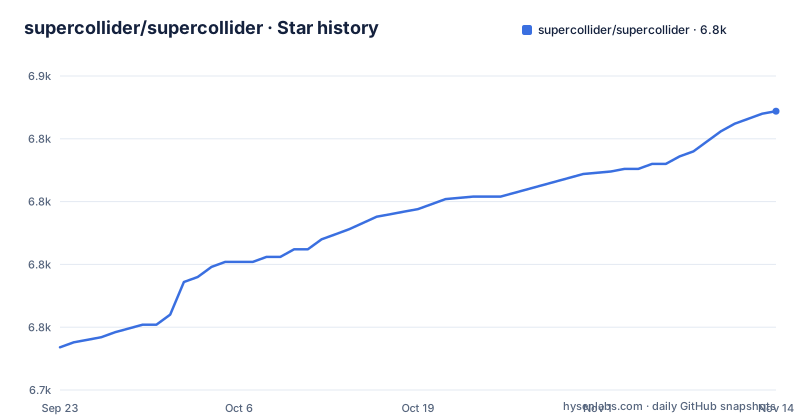
- supercollider/supercollider6,836 ★ · +94
| Repository | 2026-09-23 | 2026-11-14 |
|---|---|---|
| supercollider/supercollider | 6.7k | 6.8k |
94 Stars in the last 52 days, measured from the daily GitHub snapshot. Compare with other projects
Editorial analysis
sclang drives the servers across two processes
SuperCollider ships as four programs that split along one line: where the sound happens versus where the code lives. sclang is an interpreted programming language that controls the servers. scsynth is the real-time audio server, carrying hundreds of unit generators for audio analysis, synthesis and processing. supernova is a second server, offered as an alternative, that adds parallel DSP on multi-core processors. scide is the editing environment for sclang, with an integrated help system, which is why the IDE sits in this repository instead of arriving separately. Everything is written in C++17 on top of third-party libraries including Qt and Boost. The practical consequence is that sclang is not the audio engine. A script that compiles and runs can still be wrong in ways only the server would reveal.
Where the downloads page stops and the build begins
macOS and Windows stable releases are binaries from the project downloads page, and README_MACOS.md and README_WINDOWS.md carry the usage and build instructions for those two. Linux has no such path: to get the latest stable version a Linux user builds SuperCollider themselves or takes the Flatpak build, with README_LINUX.md for the steps. Raspberry Pi, Bela and WebAssembly each have a README as well. The compiler floor matters if you build, and the guarantees read as minimums rather than wishes:
gcc >= 13
clang >= 18
Qt >= 6.2
MSVC 2022, 2026
Qt 5.15 still has only limited support, so a distribution pinned to Qt 5 sits outside what the project promises. Xcode 16 and 26 are the guaranteed macOS compilers, not the 15.2 used for testing. Fedora is guaranteed from 40 to 44 and Debian from 11 upward.
The first run is scide, and its doc browser is local
First use happens inside scide, whose built-in documentation browser serves the official docs without a network round trip. The same docs live online, and the development version is published under its own host, which matters because the default branch is develop rather than a release tag:
https://supercollider.github.io/downloads
http://doc.sccode.org/
https://dev.docs.supercollider.online
http://sccode.org/
Where the docs leave a gap, the repository names a fixed reading order instead of one manual: A Gentle Introduction to SuperCollider by Bruno Ruviaro, Eli Fieldsteel's video tutorials, the Getting Started with SC tutorial, Nick Collins' SC tutorial, and sccode.org as a repository of user-submitted examples. Discussion runs on the scsynth.org forum and a Slack channel, with the sc-users and sc-dev mailing list archives still readable for older threads.
supernova changes the DSP threading, not the language
Once sclang is in place, the server choice is the real fork in the road, and the difference is narrow. Both scsynth and supernova accept third-party plugins through the same C and C++ APIs, so a plugin does not force one server over the other. What changes is the DSP threading: supernova adds parallel DSP on multi-core processors, while scsynth keeps the model it has shipped with. What the README does not give you is any measurement of that difference. There is no latency figure, no buffer size, no core count at which the crossover happens, and no note on whether the two servers expose identical language methods. Picking between them is a bet on your own patch structure, made without numbers in hand.
Audio interface setup is not in the root README
Expect to look outside the root file for anything touching hardware. The root README does not document audio interface selection, sample rates, buffer sizes, or how sclang finds and starts a server, and it does not say what to do when scsynth fails to claim a device. The root README points to README_MACOS.md, README_WINDOWS.md and README_LINUX.md for usage and build instructions. Elsewhere the root file is thinner still: for the browser build it names README_WASM.md and stops. There is no headless recipe either, which means running scsynth or supernova without scide means combining a platform README with the server directory yourself, with no sanctioned command to copy.
Quarks covers sclang, not the compiled unit generators
sclang has a package manager called Quarks, and that fact tends to get read as a platform-wide one. It is not. Quarks handles the sclang side; the unit generators that live inside scsynth or supernova arrive as compiled plugins through the C and C++ APIs, and nothing in the repository describes how they are discovered, versioned, or matched to a server build. The layout shows where the two halves sit:
SCClassLibrary/
HelpSource/
lang/
server/
QtCollider/
testsuite/
Alongside them, external_libraries/ and vcpkg/ with vcpkg.json show that the C++ dependencies arrive through git submodules and a vcpkg manifest, with .clang-format, .pre-commit-config.yaml and .git-blame-ignore-revs keeping the code tidy. A patch that needs a native library is a build-time exercise, not a one-line install.
A fresh 3.14.1 tag on top of a moving develop branch
SuperCollider is not archived, and the last push landed on 2026-11-02 on the default branch develop. The release cadence runs at a different pace. The most recent release is Version-3.14.1, published on 2025-11-24, and it was preceded eight days earlier by Version-3.14.1-rc2 and Version-3.14.1-rc1, both dated 2025-11-16. Two candidates eight days before the final tag is a short window to read release notes against a branch that keeps moving. Contributors get a labelled list of good-first-issues described as relatively limited in scope, a contributing guide in the wiki, and separate sc-users and sc-dev list archives. The tree keeps a CHANGELOG.md next to CHANGELOG_archive.md. Everything is GPL-3.0, and no CLA file appears anywhere in the repository.
Editorial conclusion
Adopt SuperCollider if algorithmic composition is the task and you can live inside a GPL-3.0 project whose audio path is a separate process you have to start yourself. Skip it if you want a one-step installer on Linux, a measured answer on scsynth versus supernova, or documentation of a headless run, because none of those ship in the root README. Before committing, check three things: the compiler floor your platform needs (gcc >= 13, clang >= 18, Qt >= 6.2), whether the Qt 5.15 path you are on still counts as supported, and which branch your plugins will be built against.
Frequently asked questions
How do I install SuperCollider?
On macOS and Windows you take a stable build from the project downloads page and follow README_MACOS.md or README_WINDOWS.md. On Linux the latest stable version means building it yourself or taking the Flatpak build, with README_LINUX.md for the steps. Raspberry Pi, Bela and WebAssembly each have their own README.
What is SuperCollider used for?
It is a platform for audio synthesis and algorithmic composition, used by musicians, artists and researchers working with sound. In practice that means scsynth or supernova running hundreds of unit generators for audio analysis, synthesis and processing, driven by sclang, with scide as the editing environment.
What kind of software is SuperCollider?
It is a C++17 codebase built on third-party libraries including Qt and Boost, running on Windows, macOS, a variety of Linux and BSD distributions, Raspberry Pi, the Bela platform and the browser via WebAssembly. One repository holds the servers, the language, the IDE and the class library, under GPL-3.0.
How do I start using SuperCollider?
Open scide, the editing environment for sclang, where the built-in documentation browser serves the official docs. The same docs are online at doc.sccode.org, and the development version is published at dev.docs.supercollider.online. New users are pointed at A Gentle Introduction to SuperCollider by Bruno Ruviaro and at sccode.org for user-submitted examples.
Official sources
Add this badge to your README
If you maintain this project, the badge below links readers to this analysis and shows its maintenance status from the daily GitHub snapshot. Paste the markdown into your README; add ?metric=license or ?metric=stars to the image URL for a different field.

[](https://hysenlabs.com/projects/supercollider-supercollider)Star history chart for your README
[](https://hysenlabs.com/projects/supercollider-supercollider)Was this useful?