DocSearch: a hosted index and a dropdown box, not a search engine
:blue_book: The easiest way to add search to your documentation.
At a glance
- What is it?
- Algolia DocSearch pairs a crawler that pushes your documentation into an Algolia index with a dropdown widget you drop into any page. It suits documentation sites that want search this week, and it suits nobody who needs to control the index itself.
- Who is it for?
- Adopt DocSearch when your documentation is public, when Algolia will run the crawler for you, and when a modal dropdown over a hosted index is the exact search experience you want. Do not adopt it if the docs are private, if search has to keep working without a call to Algolia, or if you need ranking rules you cannot express through a hosted index schema.
- Can I use it commercially?
- Yes. MIT is a permissive licence: you can use, modify and sell software built on it, as long as you keep its copyright and licence notices.
- Is it still maintained?
- Yes. The repository last received commits 2 days ago.
- What is it written in?
- Mainly TypeScript, according to GitHub's language statistics.
Answers come from the project's GitHub data, last synced on November 14, 2026, and from our analysis. They are not legal advice.
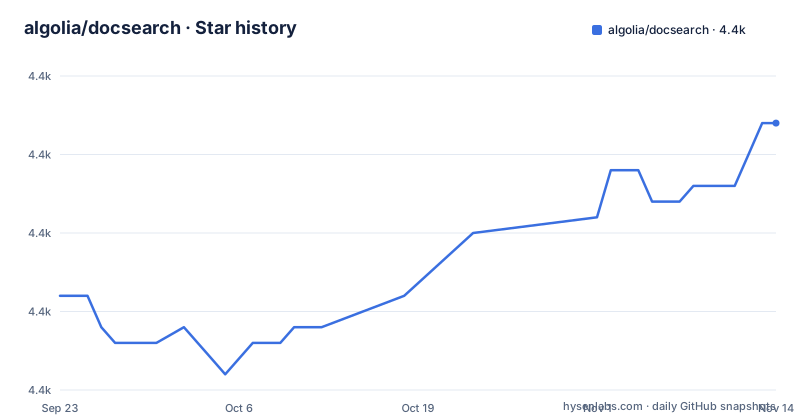
Star history
- algolia/docsearch4,392 ★ · +11
| Repository | 2026-09-23 | 2026-11-14 |
|---|---|---|
| algolia/docsearch | 4.4k | 4.4k |
11 Stars in the last 52 days, measured from the daily GitHub snapshot. Compare with other projects
Editorial analysis
Two halves that live in different repositories
The most important thing to understand about DocSearch is that the search half is not in this repository. Installing `@docsearch/js@5` adds a dropdown, nothing else. Your pages have to reach an Algolia index first, and the code that walks your site and writes those records lives in a separate repository, algolia/docsearch-scraper. A third repository, algolia/docsearch-configs, holds the per-site configuration for the sites Algolia hosts, and packages/website, inside this repository, holds the documentation site itself.
So the decision you are making has two parts. The first part is whether Algolia will run a crawler against your documentation for free. The second part is whether you want a modal-style dropdown that talks to Algolia's API from the browser. DocSearch gives you the second part unconditionally and the first part conditionally. The repository layout is the honest answer: `mcp/plugins/docsearch`, `adapters/`, `packages/` and `examples/` are all client-side or documentation concerns. Nothing in the top-level tree crawls your site.
The widget is four values and a container
Mounting the search box takes an appId, an apiKey, an array of indices and a container selector. That is the whole JavaScript API surface for a first integration. The README is explicit that the container must be a `div`, not an `input`, because DocSearch generates the entire accessible search box itself, including the keyboard behaviour and the ARIA wiring. Passing your own text input and expecting it to be enhanced is a common misreading.
```js app.js import docsearch from '@docsearch/js';
import '@docsearch/css';
docsearch({ container: '#docsearch', appId: 'YOUR_APP_ID', indices: ['YOUR_INDEX_NAME'], apiKey: 'YOUR_SEARCH_API_KEY', }); ```
The `indices` array being plural is worth a pause. DocSearch is not bound to one index, so a docs site with separate per-product indices can be searched as one surface by passing several names. The apiKey you pass is a search-only key, and it ships to every browser that loads your page. Treat it as public and constrain it in the Algolia dashboard, not in this config.
Install paths: package manager or jsDelivr, with a version pin that matters
There are two ways to get the script, and the README pins the major version in both.
bun add @docsearch/js@5
# or
npm install @docsearch/js@5
The package-free route loads the same code from a CDN, which is convenient for a docs site built as a single static file:
<script src="https://cdn.jsdelivr.net/npm/@docsearch/js@5"></script>React sites install `@docsearch/react@5` instead and render a DocSearch component with the same three credentials as props. The stylesheet is a separate import in both cases, `@docsearch/css`.
The sidepanel packages widen the versioning story
The widget you install is no longer the only moving part. Recent releases added `@docsearch/sidepanel` and `@docsearch/sidepanel-js`, each with its own release line, alongside `@docsearch/core`, `@docsearch/modal`, `@docsearch/css` and `@docsearch/cli` in the build scripts. A monorepo this wide means the major version in your `package.json` does not describe everything that runs. The last push was on 2026-11-02 and the repository is not archived.
Where the stylesheet, not the script, decides the look
Visual customisation is deliberately kept out of this repository. The README links to a separate styling page instead of enumerating CSS custom properties or theme keys, which tells you the widget is meant to be restyled globally rather than component by component. That leaves two practical routes.
You override the shipped CSS in your own build, which keeps the dropdown visually consistent with your site but means you own every selector the stylesheet uses and every one it may add later. Or you let the default theme stand, which is faster to ship and is what most documentation sites do.
A third option is writing to your own markup from the start. Because the component takes a container you choose, you can place it inside your own header or nav and add data attributes around it.
Where the free tier stops and the apply form starts
Pricing is the first question every team asks, and the answer lives in one line of the README: the project bills itself as search for documentation, for free, and anyone without credentials is pointed at an application form at `docsearch.algolia.com/apply`. Read carefully what that means. Free here means Algolia runs the crawler and hosts the index for sites it has accepted. It does not mean the widget will query an index you create yourself with your own plan, and it does not mean an application is granted.
That is the real constraint, and it shapes the failure mode people hit. At that point the honest comparison is against building the same thing on your own infrastructure. The README points at algolia/docsearch-scraper as the crawler.
The two real alternatives approach the problem from opposite ends. A self-hosted crawler such as Pagefind indexes static output at build time and ships the index with the site, so search works with no network call and no vendor account, at the cost of a build-time step and full control of ranking. Lunr or FlexSearch run entirely in the browser over a JSON dump of your content, which removes the hosted dependency entirely but moves index size onto your users. DocSearch trades both of those for zero infrastructure on your side and an application approval.
Records come from a crawler, so your markup decides your results
Everything the dropdown can show, the title, the URL, the highlighted snippet and the hierarchical section labels, comes out of a record that algolia/docsearch-scraper produced from your HTML. There is no post-install step in this repository that fixes a bad extraction. If your headings are not structured the way the crawler expects, or your page hierarchy is flat, the result is records with weak section context and worse ranking, and the widget will render exactly what it was given.
The README does not document custom record attributes, per-level faceting, or how to override a record after extraction, so anyone needing those is already past what is written down here.
One contradiction is worth naming. The README sells DocSearch as the easiest way to add search to your documentation, and simultaneously the repo you cloned contains no crawler, no indexer and no code that fetches your pages. Ease of adoption is real, but it is conditional on Algolia accepting your site. Check that before you plan around the dropdown.
Editorial conclusion
Adopt DocSearch when your documentation is public, when Algolia will run the crawler for you, and when a modal dropdown over a hosted index is the exact search experience you want. Do not adopt it if the docs are private, if search has to keep working without a call to Algolia, or if you need ranking rules you cannot express through a hosted index schema. Before writing any integration code, confirm that algolia/docsearch-scraper can extract your page structure into useful records, because that record shape sets the ceiling on every result your visitors will ever see.
Frequently asked questions
Is Algolia DocSearch free?
The README presents DocSearch as search for documentation, for free, and directs anyone without credentials to an application form at docsearch.algolia.com/apply.
What is a DocSearch alternative?
The most direct alternative is a build-time static indexer such as Pagefind, which indexes your built site and ships the index with the output, so search needs no network call and no vendor account. Lunr and Flexsearch run the search entirely in the browser over a JSON dump of your content. DocSearch differs by keeping both the crawl and the index on Algolia's side.
Which npm package do I install for a React documentation site?
Install @docsearch/react@5 with bun add or npm install, then import the DocSearch component together with the @docsearch/css stylesheet and pass appId, apiKey and indices as props. A standalone script is also published at cdn.jsdelivr.net/npm/@docsearch/react@5 if you avoid a package manager.
Official sources
Add this badge to your README
If you maintain this project, the badge below links readers to this analysis and shows its maintenance status from the daily GitHub snapshot. Paste the markdown into your README; add ?metric=license or ?metric=stars to the image URL for a different field.

[](https://hysenlabs.com/projects/algolia-docsearch)Star history chart for your README
[](https://hysenlabs.com/projects/algolia-docsearch)Was this useful?