OptiLLM: An OpenAI-Compatible Proxy That Spends Extra Compute to Boost Reasoning Accuracy
Optimizing inference proxy for LLMs
At a glance
- What is it?
- OptiLLM is an OpenAI API-compatible inference proxy that applies 20+ reasoning techniques like MARS, CePO, and PlanSearch to any LLM endpoint without training. It trades latency and cost for accuracy gains, but you need to verify whether those gains hold for your own tasks.
- Who is it for?
- Adopt OptiLLM if you need quick accuracy gains on math, coding, or logical reasoning tasks and can afford the extra compute and latency. It is a drop-in proxy that works with any OpenAI-compatible endpoint, so it is easy to test on your own benchmarks.
- Can I use it commercially?
- Yes. Apache-2.0 is a permissive licence: you can use, modify and sell software built on it, as long as you keep its copyright and licence notices.
- Is it still maintained?
- Yes. The repository last received commits 13 days ago.
- What is it written in?
- Mainly Python, according to GitHub's language statistics.
Answers come from the project's GitHub data, last synced on November 13, 2026, and from our analysis. They are not legal advice.
Star history
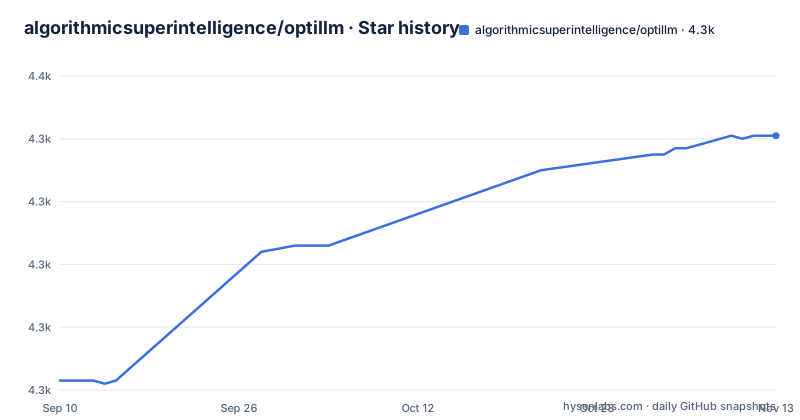
- algorithmicsuperintelligence/optillm4,341 ★ · +78
| Repository | 2026-09-10 | 2026-11-13 |
|---|---|---|
| algorithmicsuperintelligence/optillm | 4.3k | 4.3k |
78 Stars in the last 64 days, measured from the daily GitHub snapshot. Compare with other projects
Editorial analysis
What OptiLLM Actually Sits Between
OptiLLM is not a model. It is a proxy server that sits between your existing OpenAI client and any LLM API endpoint. You point your client at http://localhost:8000/v1, and OptiLLM intercepts the request, applies one of its optimization techniques, and forwards the work to the upstream model. The README calls it an 'optimizing inference proxy' and claims it implements 20+ techniques that improve accuracy on reasoning tasks without training. The target user is a developer or researcher who already uses an OpenAI-compatible API and wants better results on math, coding, or logical reasoning without switching models or fine-tuning. The proxy model means you can add it to an existing codebase by changing only the base URL and the model name, which is a low-friction entry point.
The Mechanics: Prefixes, Approaches, and Extra Compute
The core mechanism is simple: you prepend a slug to the model name in your API call. For example, the README shows model="moa-gpt-4o-mini" to trigger Mixture of Agents. Other techniques appear in the README under names like re2, cot_reflection, bon and mcts. Each slug routes the request to a different algorithm. The README points to CePO, from Cerebras, as a good example of how to combine such techniques. The common thread is that these methods spend additional inference compute to produce a better final answer. That is the trade-off: you are not getting a better model, you are spending more tokens and more time to squeeze better accuracy out of the same model. The README's benchmark table shows gains like +30 points on AIME 2025 for MARS with Gemini 2.5 Flash Lite, but those numbers are specific to the listed base models and tasks.
Getting It Running: Commands and Configuration
Installation is straightforward. The README gives three paths. The quickest is pip install optillm, then export OPENAI_API_KEY="your-key-here" and run optillm. By default the server runs with the `auto` approach. There is also a Docker image: docker pull ghcr.io/algorithmicsuperintelligence/optillm:latest and docker run -p 8000:8000 ghcr.io/algorithmicsuperintelligence/optillm:latest. Three Docker variants exist: full, proxy-only, and offline. The proxy-only image is smaller and excludes local inference capabilities; the offline image includes pre-downloaded spaCy models. For source installs, you clone the repo, create a virtual environment, and pip install -r requirements.txt. Configuration is mostly via environment variables and command-line flags. SSL settings have their own document, SSL_CONFIGURATION.md, at the repository root. With the default `auto` approach, the README says a technique is selected, in order of preference, by a model name prefix, an `optillm_approach` field in `extra_body`, or an `<optillm_approach>` tag in the prompt; starting the server with `--approach` fixes one technique, and docker-compose.yaml shows an `OPTILLM_APPROACH` variable.
The Accuracy Claims and the Missing Evidence
The README opens with a bold claim: '2-10x accuracy improvements on reasoning tasks with zero training.' It then shows a table with specific benchmark improvements. For example, MARS with Gemini 2.5 Flash Lite goes from 43.3 to 73.3 on AIME 2025, and CePO with Llama 3.3 70B goes from 51.0 to 69.6 on Math-L5. These are concrete numbers, and the README points to a benchmark results section for the full tables. The claim that MOA with GPT-4o-mini 'Matches GPT-4' on Arena-Hard-Auto is vague because 'matches' is not a quantified improvement. The README also says the project is 'used in production by companies and researchers worldwide,' without naming any in the key features list. The benchmark table is useful as a starting point, but you must treat it as marketing material until you run your own tests.
Latency and Cost: The Hidden Price of Extra Compute
The biggest limitation is not in the README's feature list; it is the logical consequence of the approach. Techniques that spend additional compute at inference time, such as best-of-N or mixture of agents, mean each user request can generate more upstream work. If you are using a paid API, that directly increases cost per request. If you are using a local model, it increases latency and GPU utilization. The README says 'additional compute at inference time' is the way to beat frontier models. That is honest, but it means OptiLLM is the wrong tool for latency-sensitive applications like real-time chat or interactive coding assistants where a user expects a response in under a second. It is also wrong for simple factual queries where a single call is enough. The proxy adds an extra network hop, and the optimization techniques add many more. You should only use OptiLLM where accuracy is worth the wait and the expense.
Alternatives: Other Ways to Spend Compute on Reasoning
OptiLLM is not the only project that wraps LLM APIs with reasoning techniques. A direct alternative is to use a framework like LangChain or LlamaIndex, which include built-in chains for self-reflection, ReAct, and plan-and-execute. The difference is architectural. LangChain is a general-purpose orchestration library where you write code to define the sequence of LLM calls. OptiLLM is a proxy that hides that orchestration behind a model-name prefix. With LangChain you have full control over the logic, but you must write and maintain it. With OptiLLM you get a ready-made set of techniques, but you cannot easily modify the internal steps without editing the project's source. Another alternative is to use a model that already has built-in reasoning, like OpenAI's o1 or DeepSeek-R1, which spend their own internal compute on chain-of-thought. That requires no proxy at all, but it ties you to a specific model provider. OptiLLM's advantage is model-agnosticism: it works with any OpenAI-compatible endpoint, so you can apply these techniques to models that do not have native reasoning modes.
Maintenance, Licensing, and the Release Cadence
OptiLLM is licensed under Apache-2.0, which is permissive for commercial use, but you should read the license text yourself for any obligations. The repository is actively maintained: the last push was 2026-11-02, and recent releases are v0.3.22 (2026-07-18), v0.4.0 (2026-09-28) and v0.4.1 (2026-11-02). That rapid release cadence suggests active development, but it also means the API may change between versions. You should pin the exact version you deploy and test upgrades in a staging environment. The project is a Python package, so upgrading is as simple as pip install --upgrade optillm, but the underlying algorithms may change their prompt formats or default parameters, which could affect your results.
Editorial conclusion
Adopt OptiLLM if you need quick accuracy gains on math, coding, or logical reasoning tasks and can afford the extra compute and latency. It is a drop-in proxy that works with any OpenAI-compatible endpoint, so it is easy to test on your own benchmarks. Do not adopt it if you need guaranteed latency or if your tasks are not reasoning-heavy. Before committing, verify the claimed improvements on your own dataset, measure the cost per request, and check the specific technique's documentation for any hidden prompt-format requirements. The project is under active development with frequent releases, so pin a version and test upgrades before deploying to production.
Frequently asked questions
what is optillm
OptiLLM is an Apache-2.0, OpenAI API-compatible optimizing inference proxy that implements more than 20 techniques, from best-of-N up to MCTS and planning, aimed at reasoning accuracy without any model training or fine-tuning. You point an OpenAI client at http://localhost:8000/v1 and change the model name to pick a technique.
Does OptiLLM need to retrain or fine-tune the model?
No. The stated design is zero training required: you proxy existing API calls through the server and select a technique through the model name prefix, with each approach exposed under its own slug such as moa, re2 or cot_reflection.
What is the difference between the OptiLLM docker image variants?
latest is the full image with all dependencies for local inference and plugins, latest-proxy is the lightweight one without local inference capabilities, and latest-offline is self-contained, shipping pre-downloaded models including spaCy for fully offline operation. Separate Dockerfile.proxy_only and Dockerfile.offline builds produce the variants.
How do I configure OptiLLM without editing code?
Through OPTILLM_ prefixed environment variables. docker-compose.yaml ships commented examples for OPTILLM_APPROACH, OPTILLM_MODEL, OPTILLM_SIMULATIONS, OPTILLM_EXPLORATION, OPTILLM_DEPTH, OPTILLM_BEST_OF_N, OPTILLM_RSTAR_MAX_DEPTH, OPTILLM_RSTAR_NUM_ROLLOUTS, OPTILLM_RSTAR_C, OPTILLM_N and OPTILLM_RETURN_FULL_RESPONSE, plus OPTILLM_BASE_URL and OPTILLM_API_KEY.
Can OptiLLM work behind a corporate proxy with a custom CA?
The repository has a dedicated SSL_CONFIGURATION.md file at its root; read it for the certificate and verification options.
How much slower are requests through OptiLLM?
The README results table reports accuracy gains per technique. The levers that increase the number of calls are visible as configuration: OPTILLM_SIMULATIONS, OPTILLM_BEST_OF_N, OPTILLM_N, OPTILLM_RSTAR_NUM_ROLLOUTS and OPTILLM_EXPLORATION, so measure on your own traffic before enabling an aggressive approach.
Official sources
Add this badge to your README
If you maintain this project, the badge below links readers to this analysis and shows its maintenance status from the daily GitHub snapshot. Paste the markdown into your README; add ?metric=license or ?metric=stars to the image URL for a different field.

[](https://hysenlabs.com/projects/algorithmicsuperintelligence-optillm)Star history chart for your README
[](https://hysenlabs.com/projects/algorithmicsuperintelligence-optillm)Was this useful?