Vox Director: an agent skill that turns one topic line into a paper-collage explainer MP4
Turn one topic into a finished Vox-style paper-collage explainer/ad video — automated end to end on Atlas Cloud + ffmpeg. An agent skill.
At a glance
- What is it?
- Vox Director chains Atlas Cloud image, video, TTS and music models behind an ffmpeg assembler, with two human approval gates. It is a workflow wrapper, not a renderer, and its output quality is set at the keyframe step.
- Who is it for?
- Adopt Vox Director if you already have an Atlas Cloud key, ffmpeg on the machine and a coding agent that can follow SKILL.md, and if a 15 to 60 second collage explainer is the format you actually need. Skip it if you want a deterministic renderer you can run in CI without a human looking at intermediate frames, or if you cannot accept per-project model spend.
- Can I use it commercially?
- Yes. MIT is a permissive licence: you can use, modify and sell software built on it, as long as you keep its copyright and licence notices.
- Is it still maintained?
- Yes. The repository last received commits 48 days ago.
- What is it written in?
- Mainly Python, according to GitHub's language statistics.
Answers come from the project's GitHub data, last synced on November 22, 2026, and from our analysis. They are not legal advice.
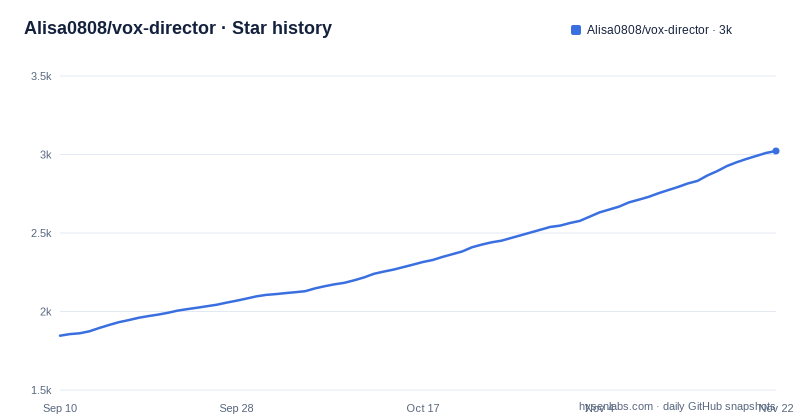
Star history
- Alisa0808/vox-director3,022 ★ · +1,176
| Repository | 2026-09-10 | 2026-11-22 |
|---|---|---|
| Alisa0808/vox-director | 1.8k | 3k |
1,176 Stars in the last 73 days, measured from the daily GitHub snapshot. Compare with other projects
Editorial analysis
The gap Vox Director fills: a look, not a model
Text-to-video models generate clips. They do not generate a house style. The paper-collage look associated with Vox explainers depends on specific visual grammar: hand-cut paper cut-outs, torn edges, tape, halftone dots, newspaper clippings, one bold flat color per beat, and large cut-out headlines. Vox Director's README is explicit that this look is decided in the image step and nowhere else. Each beat becomes a finished collage poster before any motion exists. If the poster is not a rich collage, the README states plainly that nothing downstream saves it. That single design commitment is what separates the project from a generic image-to-video pipeline with a style prompt bolted on. The audience is therefore narrow and identifiable: people who need a short editorial explainer or ad in that specific visual register and who are willing to run a coding agent to get it. It is not a tool for long-form documentary, not a tool for photoreal footage, and not a tool for anyone who wants a single button.
Three input modalities sharing one engine
The default path, called B-roll, takes a topic string and generates everything. Two other paths reuse the same downstream engine with different front ends. A-roll starts from a talking-head video you already own: it is ASR-segmented into beats and restyled into the collage look, with the README claiming the real face, lip-sync and gestures are preserved frame-for-frame through `google/gemini-omni-flash/video-edit`, auto-retrying on `seedance-2.0/reference-to-video` if that call fails. C-roll starts from one still photo, a selfie or a product shot. The subject is cut out as a photographic sticker and, per the README, never redrawn; each beat's poster is then generated around it via `google/nano-banana-2/edit`. Narration can be cloned into the subject's own voice using `bytedance/seed-audio-1.0`. The distinction matters because the three paths have very different failure surfaces. B-roll fails in the keyframe step. A-roll fails if the restyle breaks the frame-for-frame promise. C-roll fails if the cut-out edges do not sit convincingly inside a paper collage. Only the B-roll path is described in enough detail in the README to reason about confidently.
The pipeline, gate by gate
The README gives the flow as a diagram. A topic enters stage one, the beat map, where a narrative arc is chosen and a `beats.json` is written. That file is the single source of truth for the project; every later stage is described as one script per stage driven by it. Gate 1 is human approval of the beat map. Stage two renders the same beat in three to four themes as a style bake-off, and Gate 2 is a human picking the look by eye. From there the pipeline is unattended: keyframes via `google/nano-banana-2/text-to-image`, motion via `google/gemini-omni-flash/image-to-video` for non-real content or `kwaivgi/kling-video-o3-pro/image-to-video` for real people and brands, narration via `xai/tts-v1`, music via `minimax/music-2.6`, then ffmpeg concatenates, ducks the music under the voice-over, and burns captions and a watermark. The two gates are the most interesting architectural decision here. They concede that automated taste is not reliable enough to ship, and they place the cost of that concession early, before the expensive generation stages run.
Installing it and the first command you actually type
There is no package on PyPI. Installation is a clone into the skills directory: `git clone https://github.com/Alisa0808/vox-director.git ~/.claude/skills/vox-director`. A packaged `vox-director.skill` file is offered as an alternative for install through the Claude skills UI. The only environment variable named in the README is `ATLASCLOUD_API_KEY`, set with `export ATLASCLOUD_API_KEY="sk-..."`. Local requirements are ffmpeg and ffprobe (the README suggests `brew install ffmpeg`), Python 3, and Pillow via `pip install pillow` for caption and watermark overlays. Claude Code auto-discovers the skill; other agents are expected to read `AGENTS.md` and then `SKILL.md`. The documented quick start is not a command at all. It is a natural-language request to your coding agent, for example asking it to make a Vox-style collage video introducing Mexican street food in English, 16:9, 15 seconds. Output lands at `out/<project>/final.mp4`. Anyone expecting a CLI with flags will be surprised; the interface is the agent conversation plus `beats.json`.
Model IDs drift, and the skill knows it
The README carries a warning that model IDs drift and that the skill fetches the live list from `GET https://api.atlascloud.ai/api/v1/models` before running. That is a sensible mitigation, but it also tells you something about the project's dependency posture. The pipeline is bound to a specific hosted provider and to a table of model identifiers that the author describes as verified at time of writing. The table lists nine model roles, from `google/nano-banana-2/text-to-image` for keyframes to `youchuan/v8.1/remove-background` for the advanced cut-out path. There is no local fallback for any of them. If Atlas Cloud changes a model ID, deprecates a model, or the account hits a quota, the pipeline stops at that stage. The live-list fetch reduces the chance of a hard-coded stale ID, but it does not remove the provider dependency, and it does not make the output reproducible across time. A video generated today and the same topic generated in six months may not match, because the underlying models may not be the same models.
Where the pipeline breaks, and what it is the wrong tool for
The most honest limitation is stated by the project itself: the look is born in the image step, and nothing downstream saves a weak poster. That means the quality ceiling is set by `nano-banana-2` plus the prompt structure in `references/prompt-guide.md`, and the motion stage can only animate what it is given. A second limitation is the local keyframe engine. The README describes an optional local path that cuts the poster into parts and drives them frame-by-frame, and it names the reasons: no content filters and pixel-exact results, which it says is great for real people. Read that as a signal. The default AI video models carry content filters, so if your subject matter trips them, you fall back to a local engine that is more predictable but, by the project's own framing, a different visual result. Third, this is the wrong tool for anything that needs to be deterministic and unattended. Two human gates are mandatory in the described flow, and the README presents them as a feature rather than a configuration option. A CI job that renders a video per commit has no place to put Gate 1 or Gate 2.
What it is not: Remotion, Motion Canvas, plain ffmpeg
The obvious alternative for anyone who wants programmatic short video is a code-driven animation framework such as Remotion or Motion Canvas, where you write the composition as code and render deterministically. The difference in approach is fundamental. Remotion and Motion Canvas give you frame-accurate control and repeatable output, and they give you nothing in the way of generated imagery: you supply or draw every asset. Vox Director does the opposite. It generates the assets and accepts non-determinism in exchange, and it gives you almost no per-frame control except through the optional local keyframe engine. A second alternative is assembling the same pipeline yourself out of ffmpeg plus direct API calls, which is what Vox Director is under the hood. The value it adds is the beat map abstraction, the 14 narrative arcs and 9 theme presets described as living in `references/beat-layer.md` and `references/prompt-guide.md`, and the two gates wired into the flow. If you would rather own that orchestration, the README is detailed enough to reimplement the shape of it, and you lose the curated prompt vocabulary.
Licence, upkeep, and what the MIT grant does not cover
The repository is MIT licensed, which covers the skill files, the Python scripts and the reference documents. It does not cover anything the pipeline calls. Every generated frame, voice track and music bed comes from a paid Atlas Cloud model, and the terms attached to those outputs are set by the model providers, not by this repository. The README does not discuss commercial use of generated video, voice cloning consent, or watermarking policy beyond the fact that a watermark is burned in during assembly. Those are questions for the provider terms and, depending on your jurisdiction and your subject, for a lawyer. On upkeep: the repository has no published GitHub releases, so there is no versioned artefact to pin. The default branch is `main` and the last push recorded is 2026-08-11. Upgrading means pulling the branch again, and the practical upgrade risk is concentrated in two places, the model table and the prompt guides. A change to `references/prompt-guide.md` can shift your visual output without any change to the code you reviewed. The live model-list fetch at `GET https://api.atlascloud.ai/api/v1/models` is the one piece of the project that is designed to absorb upstream churn rather than break on it.
Editorial conclusion
Adopt Vox Director if you already have an Atlas Cloud key, ffmpeg on the machine and a coding agent that can follow SKILL.md, and if a 15 to 60 second collage explainer is the format you actually need. Skip it if you want a deterministic renderer you can run in CI without a human looking at intermediate frames, or if you cannot accept per-project model spend. Before committing, verify three things: that GET https://api.atlascloud.ai/api/v1/models still returns the model IDs the skill expects, that you can install Pillow and ffprobe alongside ffmpeg, and that your chosen theme survives the style bake-off on your own topic rather than on the demo topics.
Frequently asked questions
What is Alisa0808/vox-director?
It is an MIT-licensed agent skill that turns one topic into a finished short explainer or advert video in a paper-collage style: script, collage keyframes, motion, voice-over, music and captions, assembled with a local video tool. It is not an application. The package manifest declares no dependencies, and the repository contains skill files, an agent entry file, reference documents and scripts.
How do I install vox-director?
Two ways. Clone the repository directly into your agent's skills directory, which makes the clone the installation, or download the packaged skill archive and install it through your agent's interface. Either way you then set the provider API key in an environment variable and ask your agent for a video.
What does vox-director need to run?
A coding agent that can follow a workflow and run scripts, a provider API key, the local video tool and its probing companion, and Python with an imaging library used for the caption and watermark overlays. Two of the four are local command line programs, and the assembly stage is the only part that runs on your machine.
Which models does vox-director use?
Nine jobs are mapped to models: one for the collage poster, two different ones for animation depending on whether the content is real people or not, one for re-styling a talking-head video, one for anchoring a photograph, one for narration, one for narration cloned into a real person's voice, one for music, and one for cutting out an element on the advanced path. The skill fetches the live model list from the provider before running rather than pinning identifiers.
What are A-roll and C-roll in vox-director?
Two alternative inputs to the same engine. A-roll is footage you already have: a talking-head video is segmented into beats by speech recognition and re-styled into the collage look, keeping the real face, lip-sync and gestures frame for frame. C-roll is a single still photograph, where the subject is cut out as a photographic sticker and never redrawn, and each beat's poster is generated around that cut-out, with narration optionally cloned into the subject's voice.
Official sources
Add this badge to your README
If you maintain this project, the badge below links readers to this analysis and shows its maintenance status from the daily GitHub snapshot. Paste the markdown into your README; add ?metric=license or ?metric=stars to the image URL for a different field.

[](https://hysenlabs.com/projects/alisa0808-vox-director)Star history chart for your README
[](https://hysenlabs.com/projects/alisa0808-vox-director)Was this useful?