DocsGPT self-hosts document-grounded agents behind one docsgpt command, and leaves you running the whole stack
Private AI platform for agents, assistants and enterprise search. Built-in Agent Builder, Deep research, Document analysis, Multi-model support, and API connectivity for agents.
At a glance
- What is it?
- DocsGPT from Arc53 turns documents, sites and connected apps into agents that answer with cited sources, reachable through a web app, a widget, an OpenAI-compatible API or an MCP server. The one-line installer makes starting easy; operating the API, worker, Postgres, Redis and vector store afterwards is your job.
- Who is it for?
- DocsGPT suits teams that want document-grounded agents with cited answers inside their own environment, under an MIT license that also covers SSO, teams and quotas, and that can operate a Docker stack with Postgres, Redis and a vector store. It is the wrong choice for anyone who wants a hosted service with no operations work; DocsGPT Cloud exists for that.
- Can I use it commercially?
- Yes. MIT is a permissive licence: you can use, modify and sell software built on it, as long as you keep its copyright and licence notices.
- Is it still maintained?
- Yes. The repository received new commits within the last day.
- What is it written in?
- Mainly Python, according to GitHub's language statistics.
Answers come from the project's GitHub data, last synced on November 13, 2026, and from our analysis. They are not legal advice.
Star history
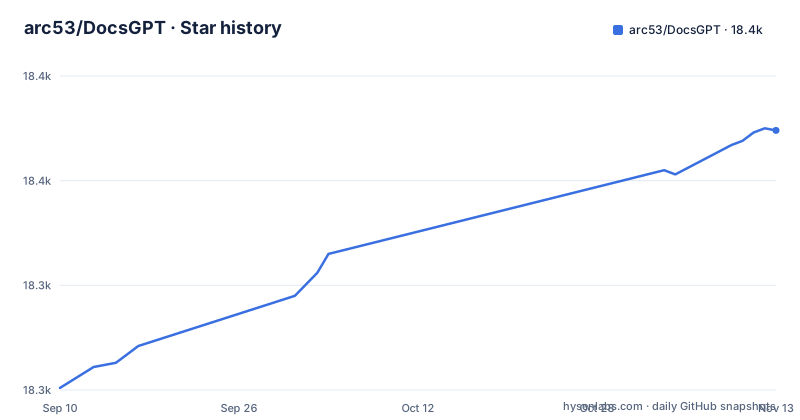
- arc53/DocsGPT18,374 ★ · +123
| Repository | 2026-09-10 | 2026-11-13 |
|---|---|---|
| arc53/DocsGPT | 18.3k | 18.4k |
123 Stars in the last 64 days, measured from the daily GitHub snapshot. Compare with other projects
Editorial analysis
The one-line installer depends on Docker and hands off to docsgpt up
The fastest route on macOS and Linux is a piped installer script:
curl -fsSL https://docs.ac/install | bashOn Windows the PowerShell equivalent is irm https://docs.ac/install.ps1 | iex. Either way, the script checks for Docker, installs a docsgpt command and runs docsgpt up. That last step is interactive: it asks who should reach DocsGPT and which model to use. A local install then opens at http://localhost:7091.
Two consequences follow. Docker is a hard prerequisite for this path, so a machine where you cannot run Docker needs one of the other options. And the installer runs a remote script with your shell's permissions, so anyone with a policy against piping scripts into bash should read it first or pick another route.
Those other routes exist: Docker Compose, pip, Kubernetes and an air-gapped install are all listed under Choose a deployment in the docs. The repository root also carries setup.sh and setup.ps1, a deployment/ directory and a devcontainer. For a trial without installing anything, DocsGPT Cloud at app.docsgpt.cloud is the hosted option.
docsgpt status, logs, upgrade, backup and down manage the running stack
Once the installer has finished, day-to-day operation goes through the same command:
docsgpt status     # version, address and health
docsgpt logs       # follow the logs
docsgpt upgrade    # upgrade and restart on the new version
docsgpt backup     # back up the database and uploaded data
docsgpt down       # stop (data and settings stay)
The distinctions matter. docsgpt down stops the services but keeps data and settings, so it is safe for a pause. docsgpt upgrade does two things in one step, upgrading and restarting on the new version, which means an upgrade is also a restart; schedule it when an interruption is acceptable. docsgpt backup covers the database and uploaded data, and running it before every upgrade is the cheap insurance against a release that changes stored state.
Release pace makes that habit relevant. v0.21.0 shipped on 2026-09-16, v1.0.0 on 2026-10-08 and v1.1.0 on 2026-10-25, including a major version change in that span. The last push to the main branch was on 2026-10-04 and the repository is not archived. Anyone tracking upgrades closely should read the release notes for a major bump before running docsgpt upgrade on a deployment people depend on.
Private by design means you operate the API, worker, Postgres, Redis and vector store
The privacy claim is concrete: the API, the worker, Postgres, Redis, the vector store and your files all run inside your environment. Users reach the DocsGPT API from the web app, widgets, API clients and MCP clients. The API talks to Redis, Redis connects to a worker that handles ingestion and embeddings, and both the API and the worker write to Postgres, the vector store and file storage. Models are an optional edge: a cloud provider, local models, or both.
The flip side is that every one of those components becomes yours to run. Disk growth in Postgres and the vector store, Redis availability, worker capacity during large ingestions and backups are operational concerns that the docsgpt command helps with but does not remove. Choosing local models and embeddings, including the air-gapped option, keeps data off third-party providers at the cost of serving those models yourself.
The project explicitly asks you to read its architecture guide and security checklist before exposing DocsGPT beyond your machine. That instruction is the line between a laptop trial and a shared deployment. Treat skipping it as shipping an unreviewed internal service to a network.
Knowledge is ingested by the worker and kept in sync from connected services
Sources include PDFs, Office files, web pages, audio and more. Instead of uploading once, connected services can stay in sync: Google Drive, SharePoint, Confluence, GitHub and S3 are named, along with others. The worker handles ingestion and embeddings, and retrieval includes GraphRAG.
Every answer cites the documents it came from. That is the core value for document search, because a reader can check a claim against its source instead of trusting a model's summary. The guardrails list adds a related check: DocsGPT can flag, redact or block ungrounded answers, alongside PII, secrets and prompt injection.
The Python dependency list in pyproject.toml names faiss-cpu, beautifulsoup4, docx2txt, defusedxml, celery, celery-redbeat and croniter among its direct dependencies. Agents can also run on a timer or be triggered by a webhook from any system that can send an HTTP request, so a scheduled agent can query sources that the worker keeps in sync. The consequence of the sync model is that freshness depends on the worker keeping up: a large Confluence space or S3 bucket is ingestion and embedding work your own hardware or model provider has to absorb before its contents are answerable.
A widget, an OpenAI-compatible /v1 endpoint and an MCP server are the ways in
DocsGPT exposes agents through several surfaces, each aimed at a different consumer. The web app holds chat, agents, knowledge and settings. Chat and search widgets drop an agent into any site with a script tag or a React package. The OpenAI-compatible API lets any OpenAI SDK point at /v1, and there is a separate Agent API plus webhooks for event-driven calls. The MCP server lets Claude, Cursor or any MCP client search an agent's knowledge.
Beyond the core repository, Arc53 keeps separate bots for Discord, Slack and Telegram and a DocsGPT CLI in their own repositories, with more listed as community integrations. Those live outside this codebase, so check each one's own repository rather than DocsGPT's releases when you depend on it.
The OpenAI-compatible endpoint is the low-friction option for existing code: an application already built on an OpenAI SDK can switch its base URL to DocsGPT and gain document grounding. Model choice stays open on the backend, with OpenAI, Anthropic, Google, Groq and OpenRouter named, and local models through Ollama, vLLM and other OpenAI-compatible servers.
Agent tools reach shells and sandboxes, so the guardrails and permissions carry weight
Agents in DocsGPT get their own prompt, knowledge, tools and model, and the tool list goes well past search. It includes web search, calls to any REST API, MCP servers, artifacts and code in a sandbox, and shell on paired devices. Visual workflows chain agents, conditions, state and sandboxed code on a drag-and-drop canvas, and a deep research mode handles multi-step answers.
This reach changes the risk profile. An agent with shell access on a paired device can act on that device, and an agent that calls arbitrary REST APIs can change data elsewhere. The guardrails can flag, redact or block PII, secrets, prompt injection and ungrounded answers, but configuring what each agent is allowed to call remains your decision, made per agent.
For a deployment that only answers questions from documents, the safest setup gives agents knowledge and no action tools. Add shell, sandbox or API tools only to agents whose users you trust, and review the security checklist before any agent with those tools is reachable from outside your machine.
The PyPI package requires Python 3.12 and follows a uv lock file
The backend is a Flask application packaged as docsgpt on PyPI, built with hatchling and marked Development Status 5, Production/Stable. pyproject.toml sets requires-python to 3.12 or newer, and the classifiers list Python 3.12 and 3.13. A host still on an older Python cannot install the package directly and needs the Docker route instead.
The dependency policy is spelled out in comments. Direct dependencies are declared as compatible ranges whose floor is the version pinned in uv.lock and whose ceiling is the next major version, or the next minor below 1.0, so the package can install next to other packages. Docker, CI and a source checkout install the exact locked versions through requirements files under docsgpt/, which scripts/export_requirements.sh generates from the lock and which must not be edited by hand.
For contributors this means dependency changes go through uv.lock and the export script, not through a requirements file. The version number is read from docsgpt/version.py, which the release workflow reads too, so a version bump happens there. Contributors should also check AGENTS.md and CONTRIBUTING.md at the repository root before opening a pull request.
Editorial conclusion
DocsGPT suits teams that want document-grounded agents with cited answers inside their own environment, under an MIT license that also covers SSO, teams and quotas, and that can operate a Docker stack with Postgres, Redis and a vector store. It is the wrong choice for anyone who wants a hosted service with no operations work; DocsGPT Cloud exists for that. Before exposing it beyond one machine, work through the project's security checklist, decide which tools and paired devices an agent may touch, and check that your connectors and model provider fit the deployment option you pick.
Frequently asked questions
What is DocsGPT?
DocsGPT is an MIT-licensed platform from Arc53 that turns documents, sites and connected apps into AI agents that answer with sources. It runs in your own environment with a cloud or local model, and a hosted version is available as DocsGPT Cloud.
Is DocsGPT an open source alternative to a hosted ChatGPT-style assistant?
DocsGPT is open source under the MIT license, including SSO, teams and quotas, and can be self-hosted with one installer command. It works with OpenAI, Anthropic, Google, Groq, OpenRouter or local models through Ollama and vLLM.
What does document AI mean in DocsGPT?
In DocsGPT it means agents that ingest PDFs, Office files, web pages and audio, keep sources in sync from services such as Google Drive or Confluence, and cite the documents behind every answer.
Official sources
Add this badge to your README
If you maintain this project, the badge below links readers to this analysis and shows its maintenance status from the daily GitHub snapshot. Paste the markdown into your README; add ?metric=license or ?metric=stars to the image URL for a different field.

[](https://hysenlabs.com/projects/arc53-docsgpt)Star history chart for your README
[](https://hysenlabs.com/projects/arc53-docsgpt)Was this useful?