Free Claude Code: A Local Proxy That Routes Coding Agents Across 61 Free and Paid Providers
GitHub describes it as Use Claude Code, Codex and Pi for free from your terminal, app, IDE, or phone like OpenClaw (voice supported). The repository metadata lists Python as its primary language. The metadata lists the MIT license. This article stays within the project description and details documented in the GitHub repository README.
At a glance
- What is it?
- Free Claude Code (FCC) is a Python-based local proxy that lets Claude Code, Codex, Pi, and nine other coding agents use models from dozens of providers, including free tiers. It trades setup complexity and provider volatility for flexibility and cost savings.
- Who is it for?
- Adopt Free Claude Code if you want a single local proxy to run multiple coding agents against free or subscription-based models, and you accept the risk of provider term changes. Do not adopt it if you need guaranteed uptime or a stable provider list, because free tiers can disappear.
- Can I use it commercially?
- Check first. The repository uses a licence we do not classify automatically, so read its LICENSE file before any commercial use.
- Is it still maintained?
- Yes. The repository received new commits within the last day.
- What is it written in?
- Mainly Python, according to GitHub's language statistics.
Answers come from the project's GitHub data, last synced on November 15, 2026, and from our analysis. They are not legal advice.
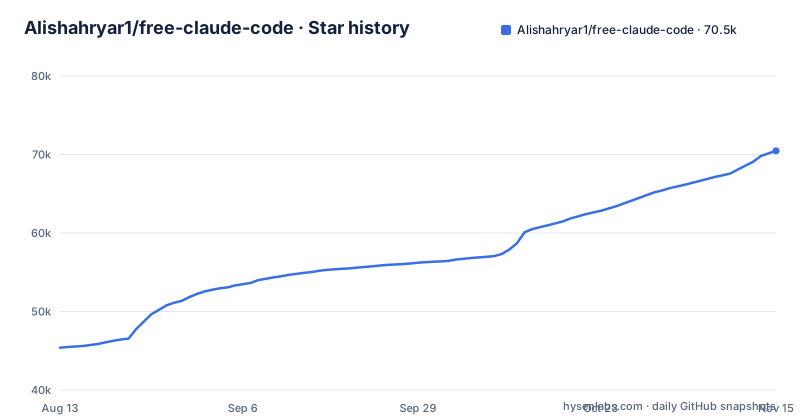
Star history
- Alishahryar1/free-claude-code70,477 ★ · +25,093
| Repository | 2026-08-13 | 2026-11-15 |
|---|---|---|
| Alishahryar1/free-claude-code | 45.4k | 70.5k |
25,093 Stars in the last 94 days, measured from the daily GitHub snapshot. Compare with other projects
Editorial analysis
What FCC Actually Solves
The target user is a developer who wants to try different coding agents without paying for multiple subscriptions. It is also for someone who wants to use a local Whisper transcription to talk to their agent, which is a niche but real feature. The project explicitly states it is not affiliated with Anthropic, so it is an independent third-party tool. That means you are relying on the project maintainers to keep the proxy working as Claude Code and other agents update their APIs.
The Proxy Architecture and Data Flow
The data flow is: your agent sends a request to the proxy, the proxy applies the model selection and fallback logic, then forwards to the provider API. The response streams back through the proxy to the agent. The README also lists automatic retries, configurable rate limits and concurrency control, automatic model/provider fallback and multi-API key fallback, and says native streaming, tool use and interleaved thinking are preserved. Because the proxy sits between agent and provider, it the proxy can break if an agent changes its protocol.
Installation and First Run: Commands and Config
Configuration happens in the Admin UI. For NVIDIA NIM, you create an API key at build.nvidia.com, paste it into the `NVIDIA_NIM_API_KEY` field, and leave the model on the default `nvidia_nim/nvidia/nemotron-3-ultra-550b-a55b` or pick another. You can also enable Proxy Authentication to protect the local proxy with a bearer token. For OpenAI, you connect a ChatGPT account through the Admin UI instead of entering an API key. For most other providers, you paste an API key into the matching setting, such as `OPENROUTER_API_KEY` or `GROQ_API_KEY`. Then you select a model from the dropdown or enter `<provider-id>/<exact-provider-model-id>` manually if the provider cannot list models. Finally, you click Apply.
The Model Picker and Fallback Mechanism
The model picker is also notable. The README shows Claude Code's native `/model` picker, meaning FCC integrates with the agent's own interface. You can select a model from the dropdown, and for providers that do not list models, you enter the model ID manually. This is a clean design because it does not require you to learn a new UI. An optional ordered Fallback Models list under Model Config applies to every connected client, and a failed request may reach and consume usage from more than one provider before succeeding.
Supported Agents and Clients: More Than Claude Code
The README lists 12 supported harnesses, including Claude Code, Codex, Pi, OpenCode, Cline, Hermes, DeepSeek Harness, Grok Build, Muse Code, Aider, Antigravity CLI and VS Code Chat. The voice feature is another differentiator: voice notes are supported for Discord and Telegram using local Whisper or NVIDIA NIM. This is a niche feature, but it shows the project is not just a thin wrapper.
Token Optimization: RTK and Five Built-in Filters
These optimizations are a double-edged sword. They can save money and reduce latency, but they also add a layer of complexity. If you are debugging a strange behavior, you may need to dig into the source code. The package metadata declares AGPL-3.0-only, so you can read the code, but that is a maintenance cost.
Provider Volatility and ToS Compliance: The Real Risk
Another risk is the remote install script. The README tells you to pipe a script into your shell, which is a common but risky pattern. The project does give you the option to review the scripts, and it names them in the repository, so you can audit them. But if you do not, you are trusting the maintainer. The AGPL-3.0-only licence declared in the package metadata lets you read the code, but it does not protect you from a compromised script. Before running the installer, you should at least skim the script for anything that sends data to an unknown server.
Alternatives: Direct APIs and Other Proxies
There is also the option of using a single agent with its native model, such as Claude Code with a Claude subscription. This is the most stable option, but it locks you into one provider and one pricing model. FCC is for people who want to mix and match. The trade-off is that you trade stability for flexibility. If you need a reliable coding agent for work, a direct API or a paid subscription is safer. If you are experimenting or on a budget, FCC is worth trying.
Maintenance and License Implications
Updating FCC is simple: re-run the install command. The README says re-running the same command updates the installation. That is convenient, but it also means you are re-running a remote script each time. The install script may change between runs, so you should review it again. The project also depends on Python and the `uv` package manager, so you need a Python environment. If you do not have Python installed, the installer may fail. The package metadata pins requires-python to exactly 3.14.10, so check your interpreter before you start.
Editorial conclusion
Adopt Free Claude Code if you want a single local proxy to run multiple coding agents against free or subscription-based models, and you accept the risk of provider term changes. Do not adopt it if you need guaranteed uptime or a stable provider list, because free tiers can disappear. Before adopting, verify the current provider catalog and check the install scripts for any changes, since you are executing remote code. Also confirm that each provider you plan to use allows this type of proxying, as FCC states it removes integrations when they stop being allowed. For a production environment, consider a paid provider or a direct API instead, but for personal experimentation and cost savings, FCC is a practical option.
Frequently asked questions
How do I install free claude code?
On macOS and Linux the installer is a shell script piped into sh, and Windows uses the PowerShell equivalent. When prompted you choose at least one coding agent and optionally RTK, and the README links install.sh and install.ps1 so you can read them first. The package metadata pins requires-python to exactly 3.14.10, so check your interpreter before you start.
How do I set up free claude code?
Start the server with fcc-server on Linux or from the desktop app on Windows and macOS, and the Admin UI opens. Configure a provider in Admin, select a model from the MODEL dropdown or enter <provider-id>/<exact-provider-model-id> by hand when the provider cannot list models, click Apply, and add an ordered Fallback Models list only if you want retries to cross providers.
How do I use free claude code?
Every supported agent has its own launcher, including fcc-claude, fcc-codex, fcc-pi, fcc-opencode, fcc-cline, fcc-hermes, fcc-dsh, fcc-grok, fcc-muse and fcc-aider, and you can pick a model from Claude Code's native /model picker. With OpenCode, fcc-opencode is for coding and sessions while plain opencode handles upgrades, service management, ACP and MCP setup.
How do I get a free claude code api key?
Keys come from the provider rather than from this project. The NVIDIA NIM steps send you to build.nvidia.com/settings/api-keys to create a key, then to open NVIDIA NIM under Providers in the Admin UI, click Add key, paste the key and click Save, while OpenAI or ChatGPT subscription access is configured through Providers and OAuth providers instead.
Is it possible to use the Claude code for free?
The project advertises 61 supported providers and 1.3B+ free tokens every month, combining free, paid, subscription and local models, and states that free-tier availability and limits are controlled by each provider and may change. It also says it follows provider terms and removes integrations if they stop being allowed.
Official sources
Add this badge to your README
If you maintain this project, the badge below links readers to this analysis and shows its maintenance status from the daily GitHub snapshot. Paste the markdown into your README; add ?metric=license or ?metric=stars to the image URL for a different field.

[](https://hysenlabs.com/projects/alishahryar1-free-claude-code)Star history chart for your README
[](https://hysenlabs.com/projects/alishahryar1-free-claude-code)Was this useful?