frida-ios-dump: pulling a decrypted IPA off a jailbroken device
pull decrypted ipa from jailbreak device
At a glance
- What is it?
- frida-ios-dump scripts the whole extraction path for an iOS app already running on a jailbroken phone: Frida injection, parallel binary and resource download over SSH, then IPA assembly. Its interesting engineering is in the version pinning and the Frida 17 bridge workaround.
- Who is it for?
- Adopt frida-ios-dump if you own the jailbroken device, you already have the app installed, and you need a decrypted IPA for analysis or local sideloading, because it collapses a manual per-binary procedure into one command. Do not adopt it for a non-jailbroken device, for an app you have not launched, or as part of an automated pipeline, since the README requires an unlocked device with Frida and SSH running and does not document unattended operation.
- Can I use it commercially?
- Yes. MIT is a permissive licence: you can use, modify and sell software built on it, as long as you keep its copyright and licence notices.
- Is it still maintained?
- Yes. The repository last received commits 1 day ago.
- What is it written in?
- Mainly Python, according to GitHub's language statistics.
Answers come from the project's GitHub data, last synced on October 23, 2026, and from our analysis. They are not legal advice.
Star history
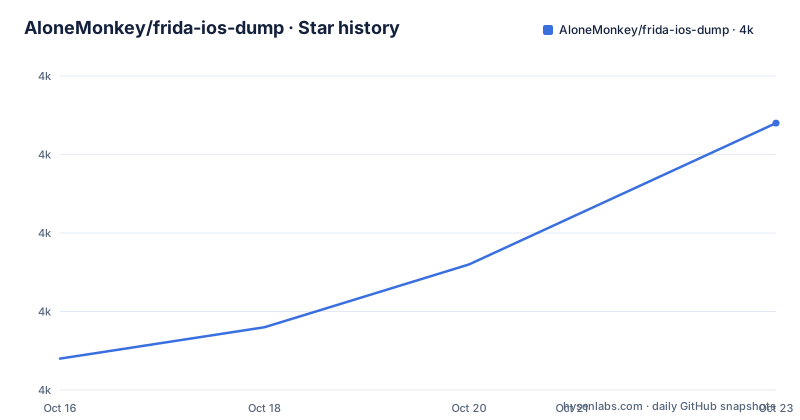
- AloneMonkey/frida-ios-dump3,972 ★ · +15
| Repository | 2026-10-16 | 2026-10-23 |
|---|---|---|
| AloneMonkey/frida-ios-dump | 4k | 4k |
15 Stars in the last 7 days, measured from the daily GitHub snapshot. Compare with other projects
Editorial analysis
What the tool actually automates
App Store binaries on iOS arrive encrypted with FairPlay, and the decrypted code exists in memory only while the app runs. frida-ios-dump exists to turn that transient memory image back into a normal .ipa archive you can open with a disassembler. The repository description says it plainly: "pull decrypted ipa from jailbreak device". The topics list, which includes `decrypted`, `dumpdecrypted`, `ios`, `ipa` and `reverse-engineering`, places it squarely in the reverse engineering category rather than in deployment or signing.
The scope is one app per run. You pass either a display name or a bundle identifier, the script finds the app's container under /var/containers/Bundle/Application with a UUID directory, and it then walks the .app bundle dumping the main executable plus every framework and dylib it finds inside Frameworks. The sample session in the README shows exactly that shape: one start line for the app binary, then a long run of start lines for AFNetworking.framework, several vendor SDK frameworks, and the libswiftCore family of shared libraries. After that comes a single "Generating" line and Done.
So the value is not any single clever trick. It is that a process most people do by hand, attaching to one binary at a time and copying it off the device, is turned into a repeatable command. Anyone who has done that manually recognises the list of frameworks as the tedious part.
Frida 17 broke the bundled Objective-C bridge, and dump.py works around it
The most consequential engineering detail in the repository is a compatibility shim. The README states that Frida 17 no longer includes the Objective-C bridge in scripts loaded through the Python API. The fix is in the Python side: the agent explicitly imports `frida-objc-bridge`, and `dump.py` bundles that module together with `frida.Compiler` before injection. No separate agent build step is needed.
That requirement is visible in package.json, which is not an application manifest but a one-dependency file whose stated description is "Objective-C bridge dependency for the Frida dump agent", pinned to `frida-objc-bridge` at `^8.0.0`. A repository checkout therefore needs a JavaScript package manager as well as Python, which is why the setup instructions include `npm install` and the file `pnpm-lock.yaml` sits at the root next to a pnpm lockfile.
The dependency set in requirements.txt is small and tightly bounded:
frida>=17.23.3,<18
frida-tools>=14
paramiko>=3
scp>=0.15
tqdm>=4.66
The upper bound on frida is deliberate. The support section names Python 3.10+ and Frida 17.23.3 / 17.x, and states that Python 2 is no longer supported. Version skew here is the most common failure, and the troubleshooting table treats it as one: check that frida-server is running and that the host and device Frida versions match.
Setup: venv, npm install, unlocked device on USB
The documented sequence is short. Create a virtual environment, install the Python requirements, install the bridge:
python3 -m venv .venv
source .venv/bin/activate
python -m pip install --upgrade -r requirements.txt
npm install
Alternatively, `pnpm install --frozen-lockfile` installs the bridge from the included lockfile, which is the reproducible option if you already use pnpm.
The hardware conditions matter as much as the packages. The device must be jailbroken with Frida installed, and the same Frida version must run on the device and the host, with 17.23.3 given as the current target. Connect the unlocked device over USB and ensure its SSH service is running. The script connects directly to the device SSH port 22 through Frida's USB channel, so no local port forwarding and no `iproxy` are required. The README warns to keep the device unlocked during startup and dumping, and the troubleshooting table says to unlock the device and open the target app manually before retrying when it cannot start or attach.
Once the environment is in place, the first real command lists what is installed:
python dump.py -lThen name the app, by display name or by bundle identifier:
python dump.py 'Display name'
python dump.py Bundle.identifier
The host regression tests, if you want to check your setup before touching a device, run with `python -m unittest discover -s tests -v`.
Transport selection is decided by the -H argument, not by iproxy
Transport is where this tool differs from the older scripts it descends from, and the rule is easy to get wrong. An explicit remote hostname or IP address makes the connection go over TCP. A localhost alias on port 22 uses the USB transport instead. The `-p` option selects the device SSH port. There is no separate flag for USB versus network.
SSH aliases from ~/.ssh/config are supported, and `-H` will read `HostName`, `Port`, `User` and `IdentityFile` from the matching block, with command-line options taking precedence:
Host iphone
    HostName 127.0.0.1
    Port 22
    User mobile
    IdentityFile ~/.ssh/frida_ios_dump_ed25519
With that in place the run is `./dump.py -H iphone Bundle.identifier`. The README flags a subtlety here that is easy to misread: the USB transport is provided by `dump.py` itself, so the alias alone does not establish a USB connection for the system `ssh` command. If you drop to a plain `ssh` for a manual step, the localhost alias will not carry the Frida tunnel.
Credentials default to `root` / `alpine`. For another account, pass `-u mobile -P 'YOUR_SSH_PASSWORD'`, or supply a private key with `-K`. Keys are tried first and the password path stays available as a fallback, which matters on jailbreaks where SSH is still exposed with a default credential. The README also notes that for plain SSH or SCP use, your public key has to be in the device's ~/.ssh/authorized_keys.
Four parallel downloads, then a resource scan that ignores the binaries
The download strategy is the part of the design that shows real thought about slow transfers over a phone's USB link. Dumped binaries are downloaded once, with up to four downloads running in parallel as the agent finishes each module. Once every binary download completes, the script scans the app directories and immediately queues discovered resource files for up to four parallel downloads, using the Paramiko SFTP dependency that is already in requirements.txt, and skipping the exact paths of the binaries it has already taken.
The progress reporting is described precisely enough to be worth noting: during scanning it shows downloaded bytes and the number of scanned entries, and once the total size is known it switches to an overall percentage without resetting the byte counter. That last detail is small, but it is the kind of thing that makes a long dump legible.
Assembly is the final step. Directory structure, permissions and symbolic links are preserved before the decrypted binaries are placed into the IPA. Symlink preservation matters more than it sounds: framework bundles on iOS are laid out with symlinked versioned dylibs, and flattening them produces an IPA that may refuse to install even though the code is intact.
What it does not do, and when it is the wrong tool
The constraints are structural. A jailbroken device with Frida and SSH running is a hard prerequisite, so there is no path here for an unmodified phone, and none for a device where you cannot unlock the screen during the run. There is also no batch mode. Each invocation targets one app named on the command line, so exporting a fleet of apps means a loop you have to write and babysit, with the device unlocked throughout.
Validation is described rather than automated. The README records a test on a jailbroken iPhone X running iOS 16.7.16 with Frida 17.23.3, covering app enumeration, agent injection, module dumping, direct USB SSH/SCP download using the `mobile` user and an SSH alias, and IPA packaging. The exported IPA passed ZIP integrity checks and the main executable's encryption flag moved from `cryptid=1` to `cryptid=0`. That is a single documented environment on one iOS version. Nothing in the README claims coverage of current iOS releases, so treat compatibility on a newer device as something to check yourself.
And this tool stops at the archive. It produces a decrypted IPA and does not install it. The README points at MonkeyDev for that step, which is a separate repository with its own requirements. Any workflow that assumes dump and sideload happen in one command will be disappointed.
SKILL.md turns the manual steps into an agent instruction file
The repository contains a SKILL.md that the README describes as an AI automation entry point. Given that file, an AI tool is supposed to follow the instructions to set up the environment and export a chosen app, and the file is said to cover repository download, dependencies, direct USB SSH, SSH aliases, optional key setup and IPA validation.
That is a genuinely different approach from the manual README path, not a restatement of it. The README is a checklist for a person: run these commands, wire these aliases, watch for these errors. SKILL.md packages the same sequence as instructions an agent can execute, including the validation step that a manual reader would otherwise skip. If your pipeline is agent driven, that file is the interface, and the human README is the reference behind it.
The maintenance picture is healthy on its face. The repository is not archived, the last push was on 2026-10-14, and package.json reads version 3.0.0, which is consistent with the Frida 17 migration described in the README. There are no GitHub releases, so version history lives in the commit log and the package.json field rather than in tagged artefacts. The licence is MIT, which is permissive, and it covers the tool rather than the app you extract; what you are legally permitted to do with a decrypted IPA is a separate question that the README does not address.
Editorial conclusion
Adopt frida-ios-dump if you own the jailbroken device, you already have the app installed, and you need a decrypted IPA for analysis or local sideloading, because it collapses a manual per-binary procedure into one command. Do not adopt it for a non-jailbroken device, for an app you have not launched, or as part of an automated pipeline, since the README requires an unlocked device with Frida and SSH running and does not document unattended operation. Verify first that your host and device Frida versions match, that `python dump.py -l` enumerates apps on your hardware, and that your SSH alias in ~/.ssh/config points at the device credentials you intend to use.
Frequently asked questions
What are the requirements for frida-ios-dump?
The support section states Python 3.10+ and Frida 17.23.3 / 17.x, with Python 2 no longer supported. The device must be jailbroken, running frida-server, unlocked, and reachable over SSH, and the host and device Frida versions must match.
Why do I get "ObjC is not defined" when running dump.py?
That error points at a missing Objective-C bridge. The troubleshooting table says to run `npm install` in the repository and use the bundled version of dump.py, which imports frida-objc-bridge and compiles it with frida.Compiler before injection.
Do I need iproxy or local port forwarding to use frida-ios-dump?
No. The script connects directly to the device SSH port 22 through Frida's USB channel. An explicit remote hostname or IP uses TCP, while a localhost alias on port 22 uses USB, and `-p` selects the device SSH port.
How do I install the decrypted IPA frida-ios-dump produces?
The tool stops at generating the .ipa file. The README points at MonkeyDev as the next step for installation, which is a separate project with its own requirements, so the dump and the sideload are two separate steps.
Which SSH credentials does frida-ios-dump use by default?
The defaults are `root` / `alpine`. Use `-u mobile -P 'YOUR_SSH_PASSWORD'` for another account, or `-K` to supply a private key; keys are tried first and the password path remains as a fallback.
Official sources
Add this badge to your README
If you maintain this project, the badge below links readers to this analysis and shows its maintenance status from the daily GitHub snapshot. Paste the markdown into your README; add ?metric=license or ?metric=stars to the image URL for a different field.

[](https://hysenlabs.com/projects/alonemonkey-frida-ios-dump)Star history chart for your README
[](https://hysenlabs.com/projects/alonemonkey-frida-ios-dump)Was this useful?