Codex-Manager guarantees one platform, patches its WebSocket stack to a fork, and sells readme slots
A tool for managing and switching Codex CLI accounts, providing local gateway forwarding for Codex CLI.
At a glance
- What is it?
- A Rust workspace that manages and switches local Codex CLI accounts behind a forwarding gateway. Its readme states plainly that only the Windows desktop build is guaranteed and that it must not be used to bypass rate limits, and then spends most of its length on paid placements for subscription resellers, API relays and virtual card issuers, each with a referral code.
- Who is it for?
- Read the upstream terms before anything else. The readme's own disclaimer requires you to comply with the service terms of the platforms involved and explicitly forbids using the tool to bypass rate limits or service limits, and that condition is not satisfied by having your own accounts.
- Can I use it commercially?
- Yes. MIT is a permissive licence: you can use, modify and sell software built on it, as long as you keep its copyright and licence notices.
- Is it still maintained?
- Yes. The repository received new commits within the last day.
- What is it written in?
- Mainly Rust, according to GitHub's language statistics.
Answers come from the project's GitHub data, last synced on November 15, 2026, and from our analysis. They are not legal advice.
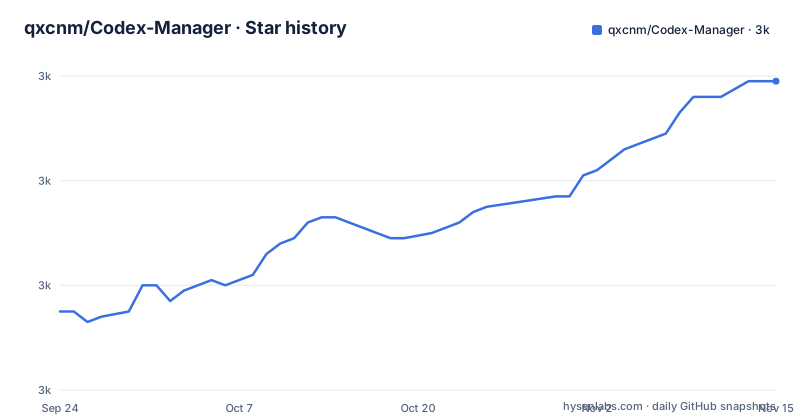
Star history
- qxcnm/Codex-Manager3,039 ★ · +44
| Repository | 2026-09-24 | 2026-11-15 |
|---|---|---|
| qxcnm/Codex-Manager | 3k | 3k |
44 Stars in the last 52 days, measured from the daily GitHub snapshot. Compare with other projects
Editorial analysis
The readme is mostly paid placements for subscription resellers
The single largest thing in this readme is a sponsorship section, and it is worth reading closely because it says more about the project's ecosystem than the code documentation does.
Sponsorship is sold. The terms are that a sponsor gets a logo, a description and an official link in the readme and in a sponsor area inside the application, with wording, position, duration and start date agreed by both sides. Enquiries go through a messaging app, a chat service, or an email address, and the instruction is to note sponsorship in a message when adding the contact.
The placements that follow are consistent in kind: several API relay services offering model access at deep discounts, with referral codes and commission described in the copy, including a stated two-way referral reward and a stated percentage back for inviting buyers. One is a virtual card issuing platform whose stated customers are AI account platforms, API resellers and subscription teams buying at volume, selling card segments and bulk issuance. One is a domestic top-up service for personal ChatGPT subscription tiers, which promotes itself as needing no overseas bank card, and whose sponsored tutorial points at a third-party repository about account top-up rather than at the project's own documentation.
The readme also links its official site and a sponsor anchor next to each other at the top, and carries two payment options for direct tips with both image cells empty in this copy.
None of that is hidden. It is all plainly labelled, and several links carry sponsored and nofollow attributes. The observation worth making is proportion: the commercial material outweighs the description of what the software does.
Only the Windows desktop build is guaranteed
The readme contains a source statement, and it is the most useful paragraph in the document for anyone deciding whether to depend on this.
It says the product was built by the author directing an AI, split ninety-eight percent Codex and two percent Gemini. It says that if problems appear, please communicate reasonably, because the code was open-sourced on the view that someone might find it usable, and that the basic functions are not expected to be broken.
Then the scope statement: the author does not have enough environment to verify that every package works, has a day job, cannot afford a machine of the kind needed to test the other platforms properly, and therefore guarantees only the usability of the Windows desktop version. For other platforms, the instruction is to test thoroughly and then file an issue, and the author says they will get to them when there is time.
That is an unusually honest statement of support scope, and it changes what the issue tracker means. An issue filed from macOS or Linux is not a claim that a shipped path is broken; it is a report from an untested combination. The three most recent releases are three patch versions in a single week, so the code is moving quickly, and the readme asks for patience rather than promising a response time.
The statement also explains why the build instructions are in a separate guide with a per-platform table rather than in the readme itself.
The guide tells macOS users to bypass Gatekeeper, and the author has never run a Mac
The readme's navigation table maps what you want to do to where to go, and the first row covers first launch, deployment, Docker, and macOS permission granting, all pointing at one guide.
That last item is the interesting one. Permission granting on macOS is the step where a downloaded desktop application is an unsigned or unnotarised binary that the operating system refuses to open, and the usual resolution is telling the user to allow it in system settings or to remove the quarantine attribute. It is a documented workaround, not a bug.
Set against the source statement, the tension is direct. The author writes that they cannot afford a machine of that kind and guarantee only the Windows desktop build, while the documentation tells macOS users to work around a security check to run a build the author has never executed.
Nothing here suggests the macOS path is broken, and the guide being a separate document means it can be updated independently. But the combination means the strongest support claim and the least-tested instruction are on the same platform, and a reader who trusts the first will be misled by the second.
The same row also covers deployment, so a first-time user following the guide is being walked through the container path before they have read anything about it, and that path is where the next few sections are relevant.
The WebSocket stack is patched to forks hosted under another organisation
The workspace manifest overrides two crates on the registry with builds from a git host, each pinned to an exact commit rather than a branch or a tag. Both point at an organisation whose name describes them as forks maintained alongside the upstream project.
Overriding a dependency this way means the compiled code does not come from the registry. It comes from a git repository at a specific revision, fetched at build time, which means the build needs network access to that host and the integrity of the result rests on the commit hash rather than on a registry checksum.
Pinning to a commit rather than a branch is the right instinct, since a branch could move. What it does not do is make the fork reviewable from this repository. A reader has to go and look at what changed between the registry version and that commit, and there is no note in the manifest about why the fork is needed. Given that the project forwards a streaming protocol, the reason is plausible. It is still an unpinned-in-review dependency.
There is a third entry that patches the same second crate again under a different key, one written as a secure shell URL rather than an https address. That duplication is a workaround rather than a mistake: a dependency can arrive in the graph through either spelling, and patching only one leaves the other resolved from the registry. It is the kind of fix that is easy to miss and impossible to remove without understanding why it was added.
Both listeners bind every interface and only one port is published
The compose file sets two addresses. One listener, described as the service, binds to all interfaces on one port. The other, described as the web listener, binds to all interfaces on the adjacent port. Neither is bound to loopback inside the container.
What the published ports section does show is that only the web port is mapped to the host. So the service port is reachable from anything inside the container's network, and from the host only if you publish it yourself.
That distinction matters more than the addresses alone suggest. A container on a bridge network is not directly reachable from the host without a mapping, but anything else sharing that network can reach both listeners, and binding to all interfaces means the service does not restrict itself to loopback even inside the container. If you move the service onto a shared network, or run anything else alongside it, the assumption changes.
The authentication surface is one variable and one file. A flag suppresses the application trying to open a browser on start, and an environment variable names a file the service reads a token from. The default timezone is set to a city rather than left to the host, which will matter to anyone reading logs from outside that region.
There is also an optional upstream proxy variable in the comments, pointing at a host gateway address on a conventional local proxy port, which tells you the gateway is expected to sit behind something else in some deployments.
Requests sharing a key, path and model queue behind a gate with no default timeout
One commented-out variable in the compose file is the most interesting line in it.
It is described as an optional mitigation for head-of-line gate waits on the same key, path and model. The variable that sets the timeout is commented out, and its example value is five thousand milliseconds.
What that describes is a request gate: requests that share an identity, an endpoint and a model are serialised rather than run concurrently, which is what stops one long request from interleaving with another on the same upstream session. The cost of that design is that a slow request delays every other request behind it in the same group, and the mitigation is a bound on how long a request will wait for the gate.
The fact that the bound is commented out in the shipped file means the default configuration has no such bound. That is a deliberate choice rather than an oversight, since a timeout would turn a slow request into a failed one, and for streaming traffic a client may prefer to wait indefinitely rather than be disconnected. But it means the default behaviour under load is a queue with no escape, and the person who needs the bound has to know the variable exists.
The comment is written in English in an otherwise Chinese file, which suggests it was added for exactly that audience.
The container runs as root and the automatic updater only watches
Two settings in the compose file are deliberate and both are explained in comments, which is the right way to do it.
The first is the user. It is set to root, and the comment gives the reason: NAS management panels often create bind-mounted folders with host-only ownership and do not expose the tools needed to change it, so running as root keeps the data directory writable. A second comment says that on ordinary Linux servers you can instead run as a fixed non-root identifier and change ownership of the folder yourself, and that NAS appliances are the case where root is easier.
So the shipped posture is root, for a stated compatibility reason, with the safer alternative documented rather than offered as the default. That is a fair trade and it is honestly explained, but it means anyone copying the file onto a normal server inherits root unless they read the second comment.
The second is the updater. A second service runs a container-updating tool behind a profile flag, so it only starts when that profile is selected. Its command enables label-based watching on an interval, cleans up, and does a rolling restart, but it is passed a monitor-only flag, which means it reports that a new image exists and stops there. The main service separately pulls its image on every start. So the arrangement detects updates and applies none of them automatically.
That updater is also given the host's Docker socket, mounted read-only. Read-only prevents writing to the socket file itself, and the socket is what lets a container ask the host to do things.
Debug information is reduced to line tables for development and tests
The workspace manifest configures two build profiles, and both set debug information to line tables only with incremental compilation switched off. A comment above the first explains the intent: keep local development artifacts compact while retaining file and line backtraces.
That is a real trade-off rather than a free saving. Line tables let a stack trace name a file and a line, which is enough to find the crash site. They do not carry variable values, types or the contents of local state, so stepping through code in a debugger loses most of what a debugger is for. Turning incremental compilation off costs rebuild speed on every change rather than once.
For a project whose author describes not having the environment to verify every package, reduced local debug output is a reasonable way to keep iteration fast on modest hardware. It is also the kind of setting that is easy to inherit and never revisit, and it applies to the test profile as well, so a failing test gives you a line number rather than a picture.
The rest of the manifest describes a six-crate workspace, with a separate crate for the SQLite layer, one for the storage abstraction built on an entity-relation toolkit, one for the service, one for the web layer, one for startup, and one core. The desktop application's native shell is explicitly excluded from the workspace, so it builds outside the two profiles configured here.
Two root-level documents are artefacts of the same kind: one named after a merged pull request about reconnecting a WebSocket preamble, kept as a file rather than folded into a change log, and one on design questions.
Editorial conclusion
Read the upstream terms before anything else. The readme's own disclaimer requires you to comply with the service terms of the platforms involved and explicitly forbids using the tool to bypass rate limits or service limits, and that condition is not satisfied by having your own accounts. Beyond that, this suits someone on Windows running several of their own Codex CLI accounts who wants local switching without editing configuration by hand, and who is willing to build from source. Before deploying the container, check three things. Both listeners bind every network interface, and only the web port is published to the host, so do not assume the service port is unreachable from outside the container. The container runs as root by design for NAS panel compatibility, with a non-root alternative documented for ordinary servers. And the automatic updater only monitors: it reports a new image without applying it, so you are the one who decides when to pull.
Frequently asked questions
What does Codex-Manager do?
It manages and switches Codex CLI accounts locally and provides a local forwarding gateway for the CLI. The workspace is six Rust crates covering the core, a SQLite layer, a storage abstraction, the service, the web layer and startup, with the desktop shell built outside the workspace.
Is it allowed to use Codex-Manager to get around rate limits?
The readme says no, explicitly, and separately requires users to comply with the service terms of the platforms involved. It also states that the author neither provides nor distributes accounts, API keys or proxy services. Those conditions are on the user and are not met by holding your own accounts.
Which platforms does Codex-Manager support?
Only the Windows desktop build is guaranteed. The author states they lack the environment to verify every package, cannot afford the hardware needed for the other platforms, and asks that issues from elsewhere be tested thoroughly before filing.
Does the Codex-Manager container publish its gateway port to the host?
No. Both the service and web listeners bind all interfaces inside the container, but only the web port is mapped to the host, and the service reads a token from a file. A commented variable also offers an upstream proxy address for deployments behind one.
Does the Codex-Manager container update itself?
No. The updater service runs with a monitor-only flag behind a profile flag, so it reports that a new image exists without applying it, while the main service pulls its image on every start. The updater is given the host's Docker socket, mounted read-only.
How are sponsorship placements arranged in Codex-Manager?
They are sold, with the sponsor receiving a logo, description and link in the readme and in an in-application sponsor area, and wording, position, duration and timing agreed case by case. Enquiries are directed to a messaging app, a chat service, or an email address, with a request to note sponsorship when making contact.
Official sources
Add this badge to your README
If you maintain this project, the badge below links readers to this analysis and shows its maintenance status from the daily GitHub snapshot. Paste the markdown into your README; add ?metric=license or ?metric=stars to the image URL for a different field.

[](https://hysenlabs.com/projects/qxcnm-codex-manager)Star history chart for your README
[](https://hysenlabs.com/projects/qxcnm-codex-manager)Was this useful?