X Comment Blocker: A Local-First Filter for X Comment Spam
A browser extension for blocking specific comments and usernames on X.
At a glance
- What is it?
- X Comment Blocker is a browser extension that hides specific comments and usernames on X, with cloud and custom wordlists, whitelist support, and auto-blocking. It runs entirely in the browser, but its reliance on user-maintained wordlists and manual sync limits its scope.
- Who is it for?
- Adopt X Comment Blocker if you spend significant time on X and want a lightweight, privacy-respecting way to hide spam comments without giving up control over your blocklist. It suits users who are comfortable managing wordlists and who accept that blocking is only as good as the words you feed it.
- Can I use it commercially?
- Yes. MIT is a permissive licence: you can use, modify and sell software built on it, as long as you keep its copyright and licence notices.
- Is it still maintained?
- Yes. The repository last received commits 16 days ago.
- What is it written in?
- Mainly JavaScript, according to GitHub's language statistics.
Answers come from the project's GitHub data, last synced on October 10, 2026, and from our analysis. They are not legal advice.
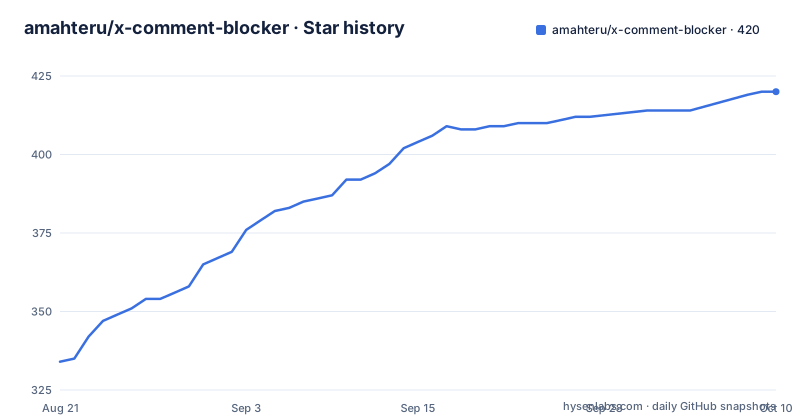
Star history
- amahteru/x-comment-blocker420 ★ · +86
| Repository | 2026-08-21 | 2026-10-10 |
|---|---|---|
| amahteru/x-comment-blocker | 334 | 420 |
86 Stars in the last 50 days, measured from the daily GitHub snapshot. Compare with other projects
Editorial analysis
What It Solves and Who It Is For
X (formerly Twitter) is full of reply spam: accounts that paste the same pitch under trending posts, bots that reply with fake engagement, and users who tag others to push scams. X Comment Blocker targets this specific nuisance. It is a browser extension for Chrome, Edge, and Firefox that hides comments matching a wordlist and can also block entire accounts by username. The intended user is someone who reads X replies regularly and wants to cut noise without leaving the site. It is not a general ad blocker or a content filter for your whole feed. It only works on X, and only on comments, not on posts in your timeline. The README positions it as a tool against '垃圾信息与引流机器人', which translates to spam and traffic-driving bots. That is the problem it solves, and it solves it narrowly.
How the Filtering Mechanism Works
The extension works by matching comment text and usernames against a list of blocked words. You can add words manually, import them from a file, or enable a cloud wordlist that syncs periodically. The matching is simple string containment: if a comment contains a blocked word, or if the author's username contains a blocked word, the comment is hidden. There is also a whitelist: comments from whitelisted users are never blocked, which prevents over-filtering when a legitimate user happens to use a blocked term. The extension can filter by special characters or emoji, which is useful for catching spam that uses odd punctuation to evade text filters. It can also block comments that include Grok share cards, a specific X feature. The data flow is local: all filtering happens in your browser. The only network requests are to fetch the cloud wordlist and to call X's official API when you use the block function. That is a clean separation, but it means the extension cannot catch anything that is not in your wordlist.
Installation and Setup: Real Commands and Config Keys
Installation is straightforward. For Chrome or Edge, you go to the Chrome Web Store or the Edge Add-ons page. For Firefox, you use the Mozilla Add-ons site. There is also a manual install path for Chromium browsers: download or clone the repository, open `chrome://extensions/` or `edge://extensions/`, enable Developer mode, then click 'Load unpacked' and select the `x-comment-blocker` folder. A separate Tampermonkey script version exists under the name X Comment Blocker Lite, aimed at mobile browsers like Safari or Via. After installation, you click the extension icon to toggle it on or off. The popup panel is where you manage wordlists. You can add or delete words, import or export a JSON backup of all settings and history, and click a sync button to pull the latest cloud wordlist. The '编辑自动拉黑词' (edit auto-block words) icon lets you specify which words, when matched, should automatically block the comment's author. The README does not give exact configuration keys or a JSON schema, so you rely on the UI rather than a config file.
Advanced Features: Auto-Block and History
Beyond simple hiding, the extension can block accounts. You can manually block a user from the interception history, or batch-block all historical users at once. You can also enable auto-block for specific words, so any comment containing that word results in the author being blocked automatically. This is a powerful feature, but it is also dangerous: a false positive on a common word could block a legitimate user without your intervention. The extension keeps a history of the last 5000 blocked comments, which you can review to undo mistakes. The history is useful for auditing, but 5000 entries is a finite buffer. If you block more than that, older records are presumably dropped, though the README does not specify the exact behavior. The backup feature exports everything, including the history, so you can preserve a longer trail manually.
Privacy and Data Handling: Local by Default
The privacy section is explicit: all filtering rules and data are processed locally in the browser. The extension does not collect account information, browsing history, or custom wordlist contents. Network requests are limited to fetching the public cloud wordlist and, when you actively use the block function, calling X's official API. That is a strong privacy posture for a browser extension. However, it also means the cloud wordlist is a single point of trust. If the list is poorly maintained or contains overly broad terms, you will see false positives. The README does not reveal where the cloud wordlist is hosted or how often it updates, only that it syncs periodically. For a privacy-conscious user, the local processing is a plus, but you should verify that the extension does not phone home beyond what is stated, by inspecting the network tab or the source code.
Limitations and When It Is the Wrong Tool
The biggest limitation is that the extension only works on comments, not on your main timeline or on other sites. If you want to filter all of X, this is not the tool. It also depends entirely on wordlists. Spam evolves, and if the cloud wordlist is not updated frequently, new spam will slip through. The auto-block feature can be a liability if you enable it on a broad word like 'free' or 'check', because it could block a real user who happens to use that word. The extension has no machine learning or heuristic detection; it is pure string matching. That is both a strength (predictable) and a weakness (easily bypassed by misspellings like 'f-r-e-e'). For users who want a set-and-forget solution, this extension requires periodic attention: you must review the history, adjust wordlists, and decide whether to trust the cloud list. If you are not willing to do that, the extension will not serve you well.
Alternatives and Maintenance Considerations
A common alternative is a dedicated X client or a third-party app that offers mute filters, such as TweetDeck (now X Pro) or open-source clients like Nitter. Those tools filter at the account or keyword level across the entire feed, not just comments, and they do so on the server side or via a different rendering pipeline. The difference in approach is that X Comment Blocker is a lightweight DOM manipulator that runs in your browser, while a client like Nitter fetches tweets through a proxy and filters before rendering. That means the extension can work on the official X site without changing your workflow, but it cannot filter content that is not loaded into the DOM. Maintenance-wise, the project has a recent release history (v1.5.0 in August 2026, with patch releases before that), which suggests active upkeep. The MIT license means you can modify and redistribute it freely, but you are responsible for keeping your fork in sync with upstream changes. The extension's reliance on X's DOM structure is a fragility: if X changes its markup, the extension may break until a new release is published.
Editorial conclusion
Adopt X Comment Blocker if you spend significant time on X and want a lightweight, privacy-respecting way to hide spam comments without giving up control over your blocklist. It suits users who are comfortable managing wordlists and who accept that blocking is only as good as the words you feed it. Do not use it if you need server-side filtering, cross-device sync without manual export, or if you expect it to catch every spam comment without tuning. Before adopting, verify that the cloud wordlist is updated regularly, test the auto-block feature on a non-critical account, and confirm that the extension's local-only data handling matches your threat model. The project is MIT-licensed and actively maintained, but its effectiveness depends on your willingness to curate words and review the 5000-entry history log.
Frequently asked questions
How do I block comments on X without turning off replies for everyone?
x-comment-blocker filters at the page level instead. It matches comment text against a cloud or custom blocklist, can match usernames too, and has separate switches for special characters or emoji and for Grok share cards, so you can keep replies enabled and drop only the matches.
Does x-comment-blocker send my browsing data anywhere?
The privacy note states that all filter rules and data are processed locally and that no account information, browsing records or custom blocklist content are collected. It names two network requests: fetching the public cloud blocklist, and calling the X official interface when you actively use the block feature.
What is the difference between the cloud blocklist and the custom blocklist in x-comment-blocker?
The cloud blocklist is a shared public list that syncs and updates automatically once you tick its checkbox, and it has a sync button for an immediate pull. The custom blocklist is yours to add, edit and delete entries in, and it can be imported from or exported to a local file.
Can I use x-comment-blocker on Safari or on a phone?
On Android, Firefox Add-ons carries the extension. For Safari, Via and other extension free mobile environments, the project points to a separate lightweight userscript repository, amahteru/x-comment-blocker-lite, for Tampermonkey or Greasemonkey, rather than shipping an extension build for those browsers.
What happens when x-comment-blocker auto-blocks a user?
You choose which blockwords trigger it, in the custom or the cloud list, and any comment author matching one is blocked automatically. That is different from hiding a comment, because it is an action against an account taken without a click per case, so broad terms are the risk.
Official sources
Add this badge to your README
If you maintain this project, the badge below links readers to this analysis and shows its maintenance status from the daily GitHub snapshot. Paste the markdown into your README; add ?metric=license or ?metric=stars to the image URL for a different field.

[](https://hysenlabs.com/projects/amahteru-x-comment-blocker)Star history chart for your README
[](https://hysenlabs.com/projects/amahteru-x-comment-blocker)