video-recap-skills: seven agent skills that turn video into a Chinese narrated recap, and where ffmpeg can stop you
Claude Code / Codex skills that turn a video into a Chinese narration recap: scene detection, ASR, VLM, script, TTS, ffmpeg assembly, and optional editable JianYing / CapCut draft export. Runs on local ffmpeg plus one MiMo key, no GPU needed.
At a glance
- What is it?
- zenstory-ai/video-recap-skills packages scene detection, ASR, VLM, scriptwriting, TTS and ffmpeg assembly as skills for Claude Code, Codex CLI, OpenCode and OpenClaw. It needs only local ffmpeg and one MiMo key, but subtitle burn-in, the ClawHub route and the Fish Audio swap each have limits.
- Who is it for?
- Choose video-recap-skills if you want a Chinese narrated recap, already work inside Claude Code, Codex, OpenCode or OpenClaw, and can install an ffmpeg build with libass. Skip it if you need narration in another language, or if you expect the ClawHub listing to install the full pipeline; confirm your ffmpeg with the built-in environment check first.
- Can I use it commercially?
- Yes. MIT is a permissive licence: you can use, modify and sell software built on it, as long as you keep its copyright and licence notices.
- Is it still maintained?
- Yes. The repository received new commits within the last day.
- What is it written in?
- Mainly Python, according to GitHub's language statistics.
Answers come from the project's GitHub data, last synced on November 14, 2026, and from our analysis. They are not legal advice.
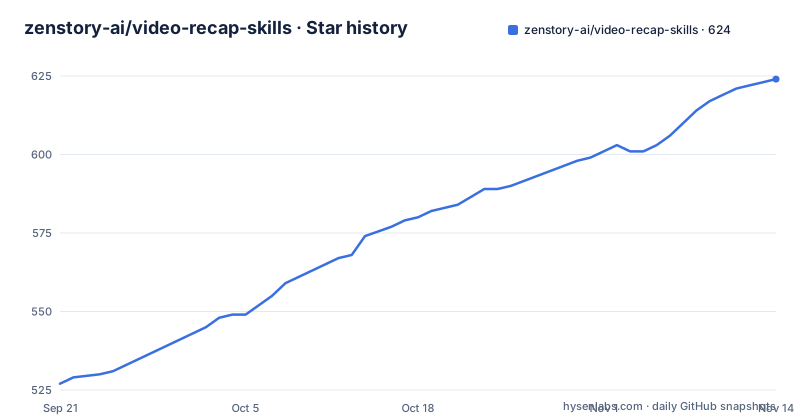
Star history
- zenstory-ai/video-recap-skills624 ★ · +97
| Repository | 2026-09-21 | 2026-11-14 |
|---|---|---|
| zenstory-ai/video-recap-skills | 527 | 624 |
97 Stars in the last 54 days, measured from the daily GitHub snapshot. Compare with other projects
Editorial analysis
Homebrew ffmpeg has no libass, so default subtitle burn-in does not run
The one local dependency is ffmpeg, and the build matters. By default the pipeline burns subtitles into the picture, which needs an ffmpeg compiled with libass. The Homebrew ffmpeg package does not have libass. When your ffmpeg lacks it, the default run skips burning, writes a same-named .srt file next to the finished video and records a warning in final_qc.json. If you explicitly pass --burn-subtitles, the run fails before it starts instead of degrading quietly.
A second filter has the same shape. When the narration contains on-screen text overlays, written as visual_overlays, you need an ffmpeg with drawtext, and without it the run stops with an error before voice generation begins. On macOS the suggested fix is brew install ffmpeg-full, which is keg-only, so you must put its bin directory ahead of the standard one on your PATH. The practical consequence is that a plain brew install ffmpeg gives you working video but sidecar subtitles, which is easy to miss if you only open the video file.
One MiMo key covers ASR, VLM and TTS, and the Token Plan key needs a cluster
Speech recognition, visual understanding and speech synthesis all go through Xiaomi MiMo, so there is one credential and no model download. Locally the pipeline uses the Python standard library and ffmpeg, with no GPU and no pip install. Python 3.10 or newer is required.
brew install ffmpeg                        # macOS;Debian/Ubuntu 用 apt,Windows 用 choco / scoop / winget
export MIMO_API_KEY=your-mimo-key          # Windows PowerShell:$env:MIMO_API_KEY="your-mimo-key"
export MIMO_TOKEN_PLAN_CLUSTER=cn          # 仅 tp-* Token Plan key 需要:cn | sgp | ams
MIMO_TOKEN_PLAN_CLUSTER is only for keys that start with tp-, which are Token Plan keys, and accepts cn, sgp or ams. Keys that start with sk- are pay as you go, and MiMo needs no subscription. The README puts one full video at about 1.3 yuan, with the bill varying by video length and number of calls. After installation you can ask the agent to check Python, ffmpeg with libass and the MiMo configuration in one message.
Four agent hosts, four install routes, and the ClawHub entry is blocked
In Claude Code the install is two slash commands.
/plugin marketplace add zenstory-ai/video-recap-skills
/plugin install video-recap-skills@video-recap
Codex CLI has the same two steps.
codex plugin marketplace add zenstory-ai/video-recap-skills
codex plugin add video-recap-skills@video-recap
OpenCode reads project level skills from .opencode/skills/<name>/SKILL.md, so you clone the repository and link the skills folder from there.
git clone https://github.com/zenstory-ai/video-recap-skills.git
cd video-recap-skills
mkdir -p .opencode
ln -s ../skills .opencode/skills             # Windows 把 skills\* 复制到 .opencode\skills\
opencode debug skill                         # 应列出全部 7 个技能
OpenClaw imports the cloned folder as a Claude plugin bundle with openclaw plugins install ./video-recap-skills, and openclaw skills list confirms it. Register the skills in only one discovery directory, otherwise they get duplicate names or trigger twice. The ClawHub route is the weakest: the orchestrator skill video-recap is marked blocked because same-root install verification is unfinished, so use the plugin or the source for the full flow.
A story plan is written before the first cut
The creative decision comes before the editing. Before cutting anything, the agent writes recap_story_plan.json. Its director_intent block answers four questions: what the viewer is promised, whose point of view the video follows, which dramatic question the audience carries, and what information is held back until the end. The bundled example fills those in as viewer_promise, pov, dramatic_question, emotional_start, emotional_end, ending_aftertaste and withhold_reveal.
Each beat then records what changed rather than summarising the scene. A beat carries a beat_id, a source_id, source_start and source_end times, a function such as escalation, an event, a change like a shift in power, the audience question coming in and going out, a character focus, a must_keep_moment and the evidence used, drawn from asr, vlm and hard_subtitle. That beat becomes a justified selection in clip_plan.json, and editing mode cuts the long video into the recap first and writes narration against the result, which is why the timeline lines up. The consequence of the order is that a vague prompt gives a vague plan, so the quality of your request shows up early.
audio_owner decides which beats the narration is allowed to touch
Each beat in visual_audio_board.json is assigned an audio_owner. In the example, beat b03 is owned by original_dialogue, its narration_job is none and its playback_speed is locked at 1.0. The fields entry_reason and exit_reason say to enter as late as possible before information or action happens and leave as soon as the line, action or reaction has landed.
The result shows in narration.json. The 59 second example has only seven narration blocks. One block ends at 10.2 seconds and the next starts at 23.047, so about 13 seconds are left entirely to a single line of original speech. Narration is only voiced as a whole block when it has a clear job, and strong dialogue, action sound or silence can own a beat completely.
This suits dialogue driven short drama. It also means a recap with sparse speech gives the narrator less to do, and you will see long original stretches because the plan says so, not because the tool failed. Narration lint, assembly QC and final QC each write machine readable reports so you can check what happened.
Switching to Fish Audio replaces only the voice, and voice cloning stays on MiMo
Voice generation can be swapped, and only that step.
export TTS_PROVIDER=fish-audio
export FISH_API_KEY=your-fish-key
export FISH_TTS_REFERENCE_ID=your-voice-model-id  # 可选;默认内置"娱乐扒妹"解说音色
The default model is s2.1-pro-free and the default voice is the built in 娱乐扒妹 narrator with reference ID 5653cea4ac83480aaf2bf45406556185. Billing follows Fish Audio's own terms. ASR and VLM still run on MiMo, so you cannot drop MiMo entirely by choosing Fish. Cloning a voice from a local reference recording with --voice-ref only works on the MiMo path. If your plan depends on cloning your own voice, keep TTS_PROVIDER unset; if you prefer the stock narrator sound, Fish is a drop in change that touches nothing upstream.
Chinese narration, a small input set and a repository that moved
The project's own description promises a Chinese narration recap, so it is not a general multilingual dubbing tool. Supported inputs are .mp4, .mov, .mkv and .webm. You can pass several videos in one request and the plan picks segments by source_id to build one main line, and video analysis can be saved in a filesystem resource library and reused when the source and settings match. If you supply an accurate subtitle file, it is preferred as the source of original speech subtitles. The multi track timeline.json exports to a JianYing or CapCut draft, where the original footage, narration, BGM, subtitles and image overlays stay editable.
The bundled example, examples/guohuo-60s, holds only structured artifacts and does not include the original drama audio or video, so you cannot rerun it end to end. The repository moved from worldwonderer/video-recap-skills to zenstory-ai/video-recap-skills, and anyone installed from the old address must point at the new one. Releases v0.6.0 on 2026-09-28, v0.6.1 on 2026-10-03 and v0.6.2 on 2026-10-04 came in quick succession, and the last push was on 2026-10-30. The version is still below 1.0.
Editorial conclusion
Choose video-recap-skills if you want a Chinese narrated recap, already work inside Claude Code, Codex, OpenCode or OpenClaw, and can install an ffmpeg build with libass. Skip it if you need narration in another language, or if you expect the ClawHub listing to install the full pipeline; confirm your ffmpeg with the built-in environment check first.
Frequently asked questions
What does "recap video" mean in video-recap-skills?
It means a narrated video that retells one or several source videos. This project produces Chinese narration over edited footage, with optional export to an editable JianYing or CapCut draft.
What video creation skills does Claude have through video-recap-skills?
Claude Code, Codex CLI, OpenCode or OpenClaw gets seven skills, six for production and one on demand reference. They cover scene detection, ASR, VLM, scripting, TTS and ffmpeg assembly.
How do I make a good recap video with video-recap-skills?
The agent first writes a story plan stating the viewer promise, point of view and dramatic question. Then it assigns each beat an audio owner so narration yields to strong original dialogue.
Official sources
Add this badge to your README
If you maintain this project, the badge below links readers to this analysis and shows its maintenance status from the daily GitHub snapshot. Paste the markdown into your README; add ?metric=license or ?metric=stars to the image URL for a different field.

[](https://hysenlabs.com/projects/zenstory-ai-video-recap-skills)Star history chart for your README
[](https://hysenlabs.com/projects/zenstory-ai-video-recap-skills)Was this useful?