A mirror of the Coursera Deep Learning specialization notebooks, not a framework
Notes, programming assignments and quizzes from all courses within the Coursera Deep Learning specialization offered by deeplearning.ai: (i) Neural Networks and Deep Learning; (ii) Improving Deep Neural Networks: Hyperparameter tuning, Regularization and Optimization; (iii) Structuring Machine Learning Projects; (iv) Convolutional Neural Networks; (v) Sequence Models
At a glance
- What is it?
- amanchadha/coursera-deep-learning-specialization is one student's solved Jupyter notebooks for the five-course deeplearning.ai specialization, arranged by course and week. It works as a second implementation to diff against your own, and as nothing else.
- Who is it for?
- Adopt this repository if you are working through the same specialization now and want a finished implementation to compare cell by cell against your own. Skip it if you need tested code for production, and skip it outright if you never took the course.
- Can I use it commercially?
- Not without permission. GitHub finds no licence file in the repository, and without a licence all rights are reserved by default: you may read the code but not reuse it. Check the README, or ask the authors, before using it.
- Is it still maintained?
- Yes. The repository last received commits 158 days ago.
- What is it written in?
- Mainly Jupyter Notebook, according to GitHub's language statistics.
Answers come from the project's GitHub data, last synced on November 14, 2026, and from our analysis. They are not legal advice.
Star history
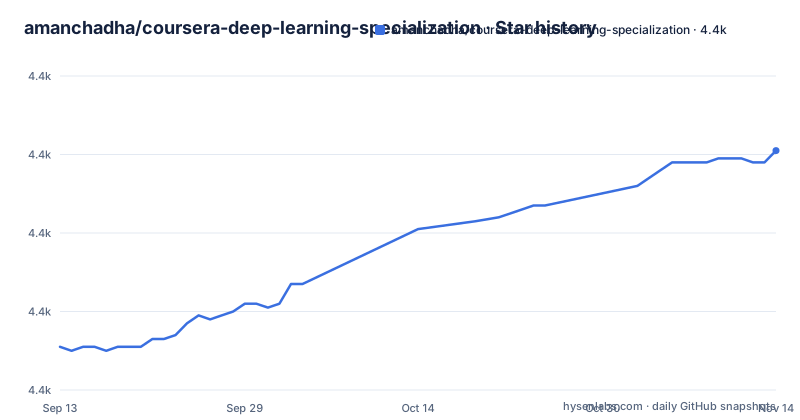
- amanchadha/coursera-deep-learning-specialization4,421 ★ · +50
| Repository | 2026-09-13 | 2026-11-14 |
|---|---|---|
| amanchadha/coursera-deep-learning-specialization | 4.4k | 4.4k |
50 Stars in the last 62 days, measured from the daily GitHub snapshot. Compare with other projects
Editorial analysis
What the repository holds: one notebook per assignment week
This is a folder of solved assignments, not a package. The top level is five directories named after the Coursera courses (C1 through C5), plus README.md, setup.sh and a loose notebook called Neural machine translation with attention_latest.ipynb sitting outside the C5 folder. Nothing in the tree is importable. A reader looking for a module to install will not find one, and the README's setup section names only setup.sh.
The unit of value is the individual notebook. Course 1 alone carries five: Python Basics with Numpy, Logistic Regression with a Neural Network mindset, Planar data classification with one hidden layer, Building your Deep Neural Network: Step by Step, and the image classification application. Course 2 adds Initialization, Regularization, Gradient Checking, Optimization Methods and a TensorFlow tutorial. Course 4 is the largest, running from a step-by-step convolutional model through ResNets, MobileNet transfer learning, YOLO car detection, U-Net segmentation, neural style transfer and face recognition. Course 5 covers sequence models.
Every link in the README points at nbviewer.jupyter.org rather than raw GitHub, so the intended reading mode is a rendered notebook in the browser with no clone required.
One shell script fetches weights, and it touches the network
The single documented action is running setup.sh, and its job is data rather than software. The README describes it as downloading a pre-trained VGG-19 dataset and extracting the zipped pre-trained models and datasets that the assignments need. Run it from the repository root, before opening any notebook:
setup.shThere is no pip install line and no requirements file in the top-level listing, so a fresh clone gives you notebooks that fail on their first model-loading cell until that script has run.
The README documents no arguments for the script, no output locations, and no way to ask whether it skips files that are already present. It also does not name the host the archives come from or say whether those links are frozen at a known point in time. Read the script before running it, since it is the only file here that reaches the network and writes to disk.
After that, opening a notebook is the whole first-use loop.
Course 3 has a directory and no notebooks, and the README admits it
The C3 folder exists at the top level, Structuring Machine Learning Projects, yet its entry in the programming assignment list is empty. The README states plainly that this course has no programming assignments and comes instead with case study quizzes. So anyone counting notebooks to gauge coverage finds a structural hole inside a five-course mirror.
The hole falls in an awkward place. What is missing is exactly the content that most rewards code review, since Structuring Machine Learning Projects is where error analysis, bias and variance diagnosis, and train/dev/test splitting get argued rather than implemented. The notebooks in C1 and C2 write functions; they do not record the decisions behind them.
The written half of the study notes lives elsewhere. A single line under Notes refers readers to www.aman.ai for interview-ready notes across all courses, which makes this GitHub repository the executable half of the split. That matters when deciding what to keep on your own disk: the prose and the notebooks have separate homes and separate lifecycles.
The TensorFlow 2 migration is dated to April 2021 and left unpinned
A README section titled 2021 Version states that the specialization was updated in April 2021, that the biggest change was the shift from TensorFlow 1 to TensorFlow 2, and that this repository was updated accordingly. That sentence is the entire compatibility story. No environment file appears in the top-level listing.
A close reading catches the gap between that claim and the tree. The Keras notebook in Course 4 and the TensorFlow tutorial in Course 2 are the cells most exposed to API churn, and there is no way to tell from the repository which Keras API generation they target. If you are on a framework build years past the 2021 switch, check those two notebooks first and not the numpy assignments in Course 1, which do not depend on a framework at all.
The last push was on 2026-06-10 and the repository is not archived, so nothing in those two signals says the work stopped. That date records a push, not a compatibility guarantee.
Two Course 4 notebooks share one PA 2 label
Read the Course 4 list closely and the numbering breaks. Week 2 carries two entries both labelled PA 2: Residual Networks, then Transfer Learning with MobileNet. The Week 2 PA 1 slot belongs to the Keras Happy House tutorial. Anyone building an index from these labels will mis-file the MobileNet notebook.
Filename versioning is inconsistent too. Some notebooks carry a suffix such as v6a, v8a or v2, others carry none at all. Where a suffix exists it looks like a mirror of the version marker the course itself handed out, which is useful when you are matching a notebook to the assignment PDF in front of you and useless when you are trying to work out which notebook is current. The filenames alone do not answer that.
The same problem appears at the root of the repository. Neural machine translation with attention_latest.ipynb sits at the top level, outside the C5 folder, with the word latest spelled into the filename. Its position tells you nothing about which week or which course it belongs to, and whether it supersedes anything inside C5 cannot be established from the name.
What you gain against the graded Coursera notebooks is review surface, not correctness
On Coursera the assignment notebooks ship with functions missing and a hidden test cell that grades you. Here the functions are written out, so you can diff your version against a finished one line by line, and that review surface is the only real use case. The grading harness is absent, so this repository cannot tell you whether an implementation was correct. It can only show you a different shape of the answer.
Against the published deeplearning.ai course files, the difference is editorial. The credit section states that the code base, quiz questions and diagrams come from the specialization itself unless specified otherwise, which means these are the course's own exercises with the blanks filled, not a redesign of them.
The stricter alternative is to keep using the official Coursera notebooks, because their autograded cells score you and these do not. A second option is to write the same helper functions from the assignment text before opening any file here, which turns the repository into a check rather than a source. The README credits Andrew Ng and links the specialization page, which is the route to the graded versions.
The README is a flat link list, and nbviewer is the only map
There is no directory tree in the README, only a flat list of full nbviewer URLs, so the rendered page is the map. Each target carries percent-encoded directory names, including a C2 path that encodes commas and spaces inside the course title. Reading the list as plain text is unpleasant; clicking through is fine.
That design choice has one good consequence. You can read any assignment in the browser without cloning, installing a framework or even having Git installed, which makes the repository a fast way to see how a working answer to a specific exercise is put together.
It also hides the shape of the tree from you. The top-level listing shows .gitattributes, a .github directory, README.md, setup.sh and the five course folders, but the README never shows what sits inside a week folder beyond the notebooks it links. Files that are not linked are effectively invisible unless you go looking on GitHub yourself, and the Course 3 situation shows what that costs: a folder with a name and a README entry that points at nothing.
Editorial conclusion
Adopt this repository if you are working through the same specialization now and want a finished implementation to compare cell by cell against your own. Skip it if you need tested code for production, and skip it outright if you never took the course. Before anything else, open setup.sh and check the archive URLs still resolve, because nothing recorded here says when they were last reachable, and a dead link leaves you with notebooks that fail on their first weight-loading cell.
Frequently asked questions
Does amanchadha/coursera-deep-learning-specialization include a package I can pip install?
No. The repository is a set of Jupyter notebooks arranged by course and week, with no package, requirements file or importable module in the top-level listing. The only setup step is a setup.sh script that downloads a pre-trained VGG-19 dataset and extracts the zipped pre-trained models.
Which courses in amanchadha/coursera-deep-learning-specialization have programming assignments?
Courses 1, 2, 4 and 5 have notebooks listed week by week. The README states there are no programming assignments for Course 3, Structuring Machine Learning Projects, which comes instead with case study quizzes.
Do the amanchadha/coursera-deep-learning-specialization notebooks use TensorFlow 1 or TensorFlow 2?
The README states the specialization was updated in April 2021 with the biggest change being a shift from TensorFlow 1 to TensorFlow 2, and that this repository was updated accordingly. No specific TensorFlow version is pinned in the repository listing.
How do I read the amanchadha/coursera-deep-learning-specialization notebooks without installing anything?
Every link in the README points at nbviewer.jupyter.org, so each assignment renders in the browser straight from GitHub. Only setup.sh needs a local shell, and only when a notebook loads downloaded weights.
Can I reuse the solutions in amanchadha/coursera-deep-learning-specialization in my own project?
The repository has no licence file, so no terms of reuse are stated anywhere in it. The README credits the code base, quiz questions and diagrams to the Coursera specialization but says nothing about permission to republish the filled-in solutions.
Official sources
Add this badge to your README
If you maintain this project, the badge below links readers to this analysis and shows its maintenance status from the daily GitHub snapshot. Paste the markdown into your README; add ?metric=license or ?metric=stars to the image URL for a different field.

[](https://hysenlabs.com/projects/amanchadha-coursera-deep-learning-specialization)Star history chart for your README
[](https://hysenlabs.com/projects/amanchadha-coursera-deep-learning-specialization)Was this useful?