DEV-tools Scoop Bucket: A Personal Manifest Collection That Outgrew Its Name
📦 A versatile Scoop bucket that evolved from development tools into a comprehensive software sanctuary. Originally focused on DEV tools for applications and games, now expanded to include utilities, applications, and everyday software. Automated via GitHub CI/CD for reliable package management.
At a glance
- What is it?
- This Scoop bucket started as a set of development tool manifests and now carries games, utilities, and everyday apps. It is a one-person, CI-driven collection, so the value depends on how much you trust the maintainer's curation.
- Who is it for?
- Adopt this bucket if you already use Scoop and want a single command to install niche apps like GDevelop without hunting for manifests. Skip it if you need guaranteed freshness, signed installers, or a formal support channel, because this is a personal project with no release process.
- Can I use it commercially?
- Yes. CC0-1.0 is a permissive licence: you can use, modify and sell software built on it, as long as you keep its copyright and licence notices.
- Is it still maintained?
- Yes. The repository received new commits within the last day.
- What is it written in?
- Mainly PowerShell, according to GitHub's language statistics.
Answers come from the project's GitHub data, last synced on October 22, 2026, and from our analysis. They are not legal advice.
Star history
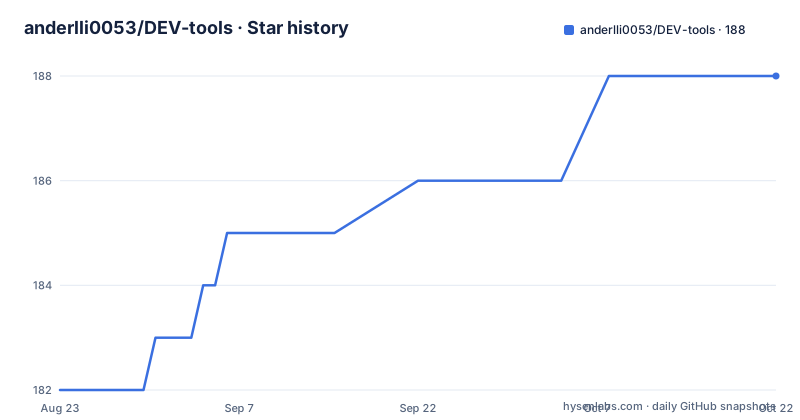
- anderlli0053/DEV-tools188 ★ · +6
| Repository | 2026-08-23 | 2026-10-22 |
|---|---|---|
| anderlli0053/DEV-tools | 182 | 188 |
6 Stars in the last 60 days, measured from the daily GitHub snapshot. Compare with other projects
Editorial analysis
What This Bucket Actually Solves
Scoop installs software from manifests, and manifests are organized into buckets. The official Scoop buckets cover a narrow set of well-known tools. If you want a less common app, you either write your own manifest or find a bucket that already has it. DEV-tools is exactly that kind of third-party bucket. It began as a personal stash of development tool manifests and, according to the README, expanded into a general collection that includes games and everyday utilities. The target user is a Windows user who already runs Scoop and wants to install something like GDevelop with one command instead of downloading an installer by hand. This is not a package manager itself. It is a catalog of package definitions that Scoop interprets. The value is convenience, not novelty: you gain access to manifests that someone else maintains.
How a Scoop Bucket Works Under the Hood
A bucket is just a Git repository full of JSON manifest files. Each manifest describes where to download an app, what version it is, and how to install it. When you run `scoop install gdevelop`, Scoop reads the manifest from the bucket, downloads the installer from the URL listed in that manifest, and runs it in a controlled way. The README does not show a sample manifest, so the exact fields are not confirmed, but the standard Scoop format includes `url`, `version`, and `bin`. The bucket itself is updated by a GitHub Actions workflow called `smart-updater.yml`, which the README references but does not explain in detail. That workflow presumably checks for new versions of each app and updates the manifests automatically. This is the core mechanism that keeps the bucket usable. Without it, the manifests would go stale and installs would fail or fetch outdated versions. The design is straightforward: a repository of text files plus a scheduled bot.
Getting Started: Commands from the README
The README gives three concrete commands. First, add the bucket: `scoop bucket add anderlli0053_DEV-tools https://github.com/anderlli0053/DEV-tools.git`. Second, update Scoop so it sees the new bucket: `scoop update`. Third, install an app: `scoop install gdevelop` or `scoop install <any-app-name-in-bucket>`. There is also a one-liner that chains the add and update steps: `scoop bucket add anderlli0053_DEV-tools https://github.com/anderlli0053/DEV-tools.git && scoop update && scoop install <app-name>`. The prerequisites are minimal: Scoop installed and in your system PATH, plus any command-line interface such as CMD or PowerShell. The README does not list the apps that are actually in the bucket. It only names GDevelop as an example. If you want to know what else is available, you would need to inspect the repository directly or run `scoop search` after adding the bucket. That missing inventory is a real gap for a project that claims to be a comprehensive collection.
The CI/CD Pipeline: Automation Without Visibility
The README states that the bucket is automatically maintained using GitHub's CI/CD pipeline, and it links to a workflow file named `smart-updater.yml`. That is all the documentation says. There is no description of what the workflow does, how often it runs, or what happens when an upstream app changes its download URL. In practice, a smart updater for Scoop typically parses each manifest, checks the upstream version, and opens a pull request or commits directly. But that is speculation. The visible fact is that the workflow exists and the README presents it as the maintenance mechanism. The lack of detail matters because a broken updater can silently break every manifest in the bucket. If the workflow stops running, the bucket freezes and users keep installing old versions. Since the repository has no releases and the last push date is unknown, there is no way to tell from the README whether the automation is currently healthy. You would have to check the Actions tab on GitHub yourself.
Limitations and Failure Modes
The biggest limitation is the lack of an app list. The README says the bucket contains apps, games, and utilities, but it never names more than GDevelop. You cannot evaluate the collection without browsing the repository. A second limitation is trust. This is a personal bucket maintained by one person, Andrew Poženel. There is no review process, no signing, and no guarantee that a manifest points to the official source. Scoop installs run with user privileges, which reduces risk, but a malicious or outdated manifest could still download a wrong file. A third failure mode is staleness. If the smart updater misses a version or the upstream URL changes, the manifest breaks and `scoop install` fails. The README offers no troubleshooting guidance beyond `scoop update`. For a project that claims to be a comprehensive sanctuary, the documentation is thin. You are expected to trust the automation and the maintainer.
Alternatives: Official Buckets and Direct Install
The direct alternative is the official Scoop buckets, specifically `main` and `extras`. These are maintained by the ScoopInstaller organization, have a larger contributor base, and follow a stricter review process for manifests. If the app you want is in `extras`, you get the same one-command install without the risk of a personal bucket. The difference in approach is governance: official buckets rely on community review and a structured PR process, while DEV-tools relies on a single maintainer and an automated updater. Another alternative is to skip Scoop entirely and download the installer from the app's official website. That gives you the latest version directly and removes the manifest as a point of failure, but you lose the convenience of update checks and portable installs. For a niche app like GDevelop, the official bucket may not have it, which is where DEV-tools fills a gap. But you should check the official buckets first, because the README of DEV-tools does not compare itself to them.
License and Maintenance Cost
The repository is licensed under CC0-1.0, which means the manifests are dedicated to the public domain. That is a permissive choice: you can copy, modify, and redistribute the manifests without attribution. For a collection of JSON files, this is sensible. The maintenance cost is on the maintainer, not the user. Users pay a small cost every time they run `scoop update`, because Scoop pulls the bucket from Git and checks for changes. The README instructs you to run `scoop update` to refresh the bucket, which is a standard Scoop command. The real cost is uncertainty. There is no release cadence, no changelog, and no stated policy for handling broken manifests. If the maintainer stops updating, the bucket degrades silently. You can fork the repository and maintain your own copy, which the CC0 license permits, but that is a significant effort for a personal tool. The license does not protect you from broken installs; it only protects the code.
Editorial conclusion
Adopt this bucket if you already use Scoop and want a single command to install niche apps like GDevelop without hunting for manifests. Skip it if you need guaranteed freshness, signed installers, or a formal support channel, because this is a personal project with no release process. Before relying on it, verify that the manifest for your target app points to the official download URL and check the last commit date on the master branch, since the README does not state how often the CI updater runs.
Frequently asked questions
How do I add the DEV-tools bucket to Scoop?
Run `scoop bucket add anderlli0053_DEV-tools https://github.com/anderlli0053/DEV-tools.git`, then `scoop update` so the new bucket is picked up. Scoop has to be installed and on your PATH, and any command-line interface such as CMD or PowerShell will do.
What do I install from DEV-tools, and with what command?
A manifest name from the bucket, with `scoop install gdevelop` given as the example. The general form is `scoop install <any-app-name-in-bucket>`, and the address is a manifest key rather than a display name.
How does DEV-tools keep its manifests current?
Through a GitHub Actions workflow named `smart-updater.yml`, which the documentation badge points at. The maintenance step on the user side is `scoop update`; typing `scoop` alone and pressing Enter lists every available command.
What is DEV-tools built on, PowerShell or Python?
Both, and the recorded primary language is PowerShell. The update and test scripts are `.ps1` files, two Java jars handle updating and JSON copying, and the larger set of helpers is Python, covering JSON analysis, deduplication, version URL checks and manifest cleanup.
What licence applies to the DEV-tools manifests?
CC0-1.0, with a LICENSE and a LICENSE.md at the top of the repository. No GitHub releases have been published, so there is no version to pin; the last push was on 2026-09-28.
Official sources
Add this badge to your README
If you maintain this project, the badge below links readers to this analysis and shows its maintenance status from the daily GitHub snapshot. Paste the markdown into your README; add ?metric=license or ?metric=stars to the image URL for a different field.

[](https://hysenlabs.com/projects/anderlli0053-dev-tools)Star history chart for your README
[](https://hysenlabs.com/projects/anderlli0053-dev-tools)