Android Code Studio for Building Android Apps on Android
Android Code Studio is an IDE for Android to develop full featured Android apps.
At a glance
- What is it?
- Android Code Studio is an Android-hosted IDE for Gradle-based application development, with editing, SDK management, language servers, Git, and project-aware AI. It remains a beta-stage project and has documented AGP and NDK constraints.
- Who is it for?
- Android Code Studio fits developers who want to build Gradle-based Android applications on an Android device and can accept beta-stage constraints. It is a poor fit for projects below AGP v7.2.0 or workflows that require installing tools such as the NDK through the built-in manager.
- Can I use it commercially?
- Yes, with conditions. GPL-3.0 is a copyleft licence: if you distribute software that includes it, you must release that software's source code under the same licence. Running it internally without distributing it does not trigger that obligation.
- Is it still maintained?
- Yes. The repository last received commits 121 days ago.
- What is it written in?
- Mainly Java, according to GitHub's language statistics.
Answers come from the project's GitHub data, last synced on November 6, 2026, and from our analysis. They are not legal advice.
Star history
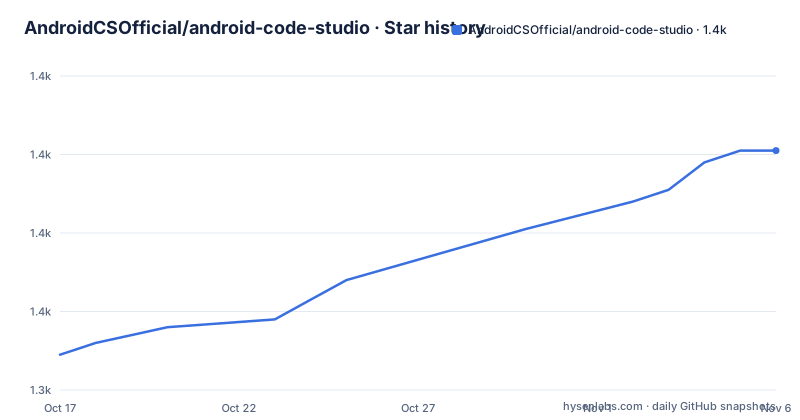
- AndroidCSOfficial/android-code-studio1,401 ★ · +52
| Repository | 2026-10-17 | 2026-11-06 |
|---|---|---|
| AndroidCSOfficial/android-code-studio | 1.3k | 1.4k |
52 Stars in the last 20 days, measured from the daily GitHub snapshot. Compare with other projects
Editorial analysis
Why Android Code Studio Runs the Build on Android
Android Code Studio targets a specific development constraint: creating full-featured Android applications without relying on a separate desktop IDE. It is designed for Android developers who want to edit source code, inspect Android APIs, run a terminal, and manage a Gradle project from an Android device. The repository describes it as an IDE for real, Gradle-based Android applications, rather than as a code viewer or a lightweight editor.
The available feature set covers much of a mobile Android development workflow. Gradle support is central because it supplies the project model expected by modern Android builds. The project also includes JDK 11 and JDK 17, language servers for Java, XML, and Kotlin, a terminal with essential packages, custom environment variables for builds and terminal sessions, and an SDK Manager accessible from that terminal. Those pieces address different parts of the same loop: editing code, resolving project information, supplying build dependencies, and inspecting an installed application.
This is useful for developers who already understand Android application structure and want that work to travel with an Android device. It does not remove the requirements of Android development itself. Projects still need compatible Gradle configuration, supported versions of the Android Gradle Plugin, and the necessary SDK components. Android Code Studio changes where that work happens, not which rules a Gradle Android project must follow.
Editing, Language Services, and Android Project Inspection
Android Code Studio organizes its development environment around source editing and Android-specific assistance. The feature list identifies Java, XML, and Kotlin language servers as implemented. API information for classes and members includes indications such as whether an item was added, removed, or deprecated. For an Android developer, that matters because SDK API availability can determine whether code is valid for the application's minimum and target API levels.
The Android UI Designer area has several documented pieces: a layout inflater, resource-reference resolution, attribute value completion, drag and drop editing, a visual attribute editor, and Android widgets. These features target resource-heavy Android interfaces, where layouts, drawable resources, strings, dimensions, and widget attributes must agree with one another. The Asset Studio covers drawable and icon creation, while Git integration places version-control actions inside the same mobile-oriented environment.
The AI Agent is described as project-aware and able to understand code, modules, and project structure. That scope is broader than a generic chat prompt attached to one open file, although the README does not document its provider, invocation interface, model configuration, or data-handling policy. Those details require verification before relying on it with proprietary source code. The log reader is documented as providing real-time application logs, which gives developers a way to inspect app behavior without treating the IDE as only an editor.
Gradle, SDK Management, and Build Environment Constraints
The build environment is the practical center of Android Code Studio. The IDE supports Gradle, offers JDK 11 and JDK 17, and accepts custom environment variables for builds and terminal sessions. The SDK Manager is included through Android SDK and can be accessed from the terminal. Together, these features allow an Android project to be opened and built in an environment that resembles the build structure required by Android tooling.
There is a firm version boundary. Android Code Studio requires Android Gradle Plugin v7.2.0 or newer. A project using an older AGP version must be migrated before it can work in the IDE. This makes version compatibility the first technical screening step for an existing codebase. It also means developers should inspect their root Gradle files before treating device-based development as a drop-in replacement for a desktop workflow.
The SDK Manager has a more specific limitation. Some tools, including the NDK, cannot be installed through it because those tools are not built for Android. The README does not claim a workaround or prescribe a particular installation route, so an NDK-dependent build cannot be assumed to work simply because SDK management is available. Projects that need native compilation should verify all toolchain components before adoption. This limitation is more consequential for native Android applications than for projects limited to standard Java, Kotlin, resources, and Gradle tasks.
Installing the APK and Preparing Build Tools
The README directs users to install Android Code Studio from trusted sources and specifically identifies GitHub Releases. The repository's release list includes APK-oriented release artifacts such as v1.0.0+gh.r4, but the README does not provide an exact filename, Android OS requirement, or command-line installer. Those details should be confirmed on the release page before installation.
After downloading the APK, the documented next step is to follow the linked Android IDE getting-started instructions to install the build tools. The README does not enumerate the SDK packages or provide a complete first-build configuration. The user must install the build components required by the project being developed.
A practical first use is therefore a compatibility check. Create or select a Gradle-based Android project that already uses AGP v7.2.0 or newer, install its required build tools through the linked setup guidance, and open the project in Android Code Studio. Then inspect the terminal and project settings before attempting a full build. The expected first useful confirmation is that the Gradle environment and required SDK components are available. The README does not document a guaranteed command or a test project, so a result beyond that compatibility check should not be presented as guaranteed.
Release Maturity, Upgrades, and GPL Obligations
The repository is not archived. Its last push was on 2026-07-09, and the README describes the application as being in active development and beta stage. Recent releases include v1.0.0+gh.r4 on 2026-07-09, v1.0.0+gh.r3 on 2025-12-18, and v1.0.0+gh.r02-hotfix on 2025-11-19. This indicates recent release activity, but the README also warns that beta-stage software may not be stable. Recent commits and releases should therefore be treated as evidence of ongoing work, not as a guarantee of production reliability.
The repository uses the GPL-3.0 license. The README states that redistribution and modification are permitted under the terms of the GNU General Public License and points to the GNU license text. That has implications for distributing a modified build, but this review does not provide legal advice. Anyone embedding or redistributing the project should review the license requirements applicable to the exact distribution method.
Upgrade planning also needs attention. The documented compatibility requirement is tied to AGP version, while the application itself is distributed as an Android APK. A newer Android Code Studio release may therefore interact differently with an older project, and an older project may require migration. The README does not define an upgrade policy, migration guide for application installation, or rollback procedure. Developers should keep their project configuration under version control and verify release notes and build instructions before moving between Android Code Studio versions.
Android Code Studio Compared with Its AndroidIDE Origin
The repository credits Itsaky as the original developer of AndroidIDE and states that Android Code Studio is a fork now maintained by the Android Code Studio project. That relationship gives users a meaningful alternative comparison. AndroidIDE is the upstream-oriented project named in the acknowledgements, while Android Code Studio presents its own feature list, release history, issue links, documentation links, and maintenance identity.
The difference is not a change from a desktop IDE to a mobile IDE. Both names in this context refer to Android-oriented development work. Android Code Studio's stated additions and current project identity include the project-aware AI Agent, the listed JDK options, SDK and NDK management access through the terminal, language servers for Java, XML, and Kotlin, and the feature set listed for UI editing. The README does not provide a complete feature-by-feature comparison with AndroidIDE, so it is not possible to claim that one project is universally more capable.
For a team choosing between them, the comparison should be based on concrete requirements: the minimum supported AGP version, availability of a buildable release, documented handling of required SDK and NDK components, and whether the maintained fork includes the workflow the team needs. Android Code Studio's own fork status is useful provenance, but the beta warning and missing installation details for some components still require direct verification.
Editorial conclusion
Android Code Studio fits developers who want to build Gradle-based Android applications on an Android device and can accept beta-stage constraints. It is a poor fit for projects below AGP v7.2.0 or workflows that require installing tools such as the NDK through the built-in manager. Before adoption, verify a release with your required Android build tools on the target Android device, then confirm that the language servers and Gradle build workflow cover the project's actual stack.
Frequently asked questions
What is Android Code Studio?
Android Code Studio is an IDE for developing full-featured, Gradle-based Android applications on Android devices. It includes editing, language servers, a terminal, SDK management, Git integration, UI features, and a project-aware AI Agent.
What version of Android Gradle Plugin does Android Code Studio require?
Android Code Studio requires Android Gradle Plugin v7.2.0 or newer. Projects using an older AGP version must be migrated to a newer version before they can work in the IDE.
Can Android Code Studio install the NDK?
The README says that some SDK tools, including the NDK, cannot be installed through the built-in SDK Manager because they are not built for Android. An NDK-dependent project needs its toolchain requirements verified separately.
Official sources
Add this badge to your README
If you maintain this project, the badge below links readers to this analysis and shows its maintenance status from the daily GitHub snapshot. Paste the markdown into your README; add ?metric=license or ?metric=stars to the image URL for a different field.

[](https://hysenlabs.com/projects/androidcsofficial-android-code-studio)Star history chart for your README
[](https://hysenlabs.com/projects/androidcsofficial-android-code-studio)Was this useful?