Ultimate Vocal Remover installs outside C:\ at your own risk, and its last release is v5.6 from September 2023
GUI for a Vocal Remover that uses Deep Neural Networks.
At a glance
- What is it?
- Ultimate Vocal Remover GUI is an MIT-licensed Python desktop app that strips vocals from audio files with neural-network models. Its installers bundle Python and PyTorch, and its newest tagged release dates from 2023-09-26.
- Who is it for?
- UVR suits anyone who wants vocals separated on their own Windows 10+ or macOS Big Sur+ machine with a ready bundle and no Python setup. It does not suit Windows 7 users, Intel Pentium or Celeron systems, or anyone who wants a recent tagged release, since the last one is v5.6 from 2023-09-26.
- Can I use it commercially?
- Yes. MIT is a permissive licence: you can use, modify and sell software built on it, as long as you keep its copyright and licence notices.
- Is it still maintained?
- Yes. The repository last received commits 32 days ago.
- What is it written in?
- Mainly Python, according to GitHub's language statistics.
Answers come from the project's GitHub data, last synced on November 7, 2026, and from our analysis. They are not legal advice.
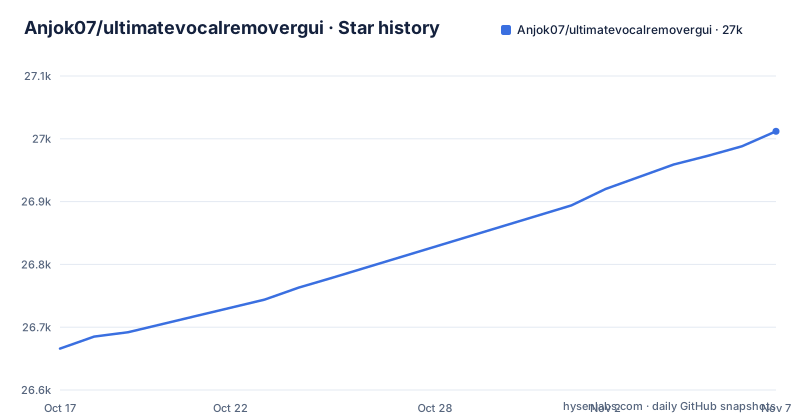
Star history
- Anjok07/ultimatevocalremovergui27,012 ★ · +346
| Repository | 2026-10-17 | 2026-11-07 |
|---|---|---|
| Anjok07/ultimatevocalremovergui | 26.7k | 27k |
346 Stars in the last 21 days, measured from the daily GitHub snapshot. Compare with other projects
Editorial analysis
Trained models, not filters, do the separation
UVR runs source separation models over an audio file and returns the stems. The README states that the core developers, Anjok07 and aufr33, trained all of the models in the package, with two exceptions: the Demucs v3 and v4 4-stem models, which come from elsewhere.
The repository layout reflects that. Top-level entries include UVR.py, separate.py, a demucs/ folder, lib_v5/, models/ and gui_data/. UVR.py is the GUI entry point and separate.py holds the separation code. The requirements list pulls in torch, onnx, onnxruntime and onnx2pytorch, so both PyTorch and ONNX model formats are in play.
The application also lists matchering==2.0.6, librosa==0.9.2 and pyrubberband==0.3.0. Those cover reference-based mastering, audio analysis and the Time Stretch and Change Pitch tools.
Two more requirements entries matter for speed. onnxruntime and onnxruntime-gpu are both listed, and torch is listed without a version. That last line means a plain pip install takes whatever PyTorch build pip resolves, which is why the Windows instructions follow up with a CUDA-specific wheel for Nvidia owners. The file also includes Dora==0.0.3 and diffq.
The Windows installer breaks if you put it on a secondary drive
The Windows bundle includes the UVR interface, Python, PyTorch and the other dependencies, and the README says no prerequisites are required. It targets Windows 10 or higher. Windows 7 or lower is not guaranteed, and neither are systems with Intel Pentium or Celeron CPUs.
The sharpest restriction: you must install UVR to the main C:\ drive. Installing to a secondary drive will cause instability. If your C: drive is small and your audio lives elsewhere, the audio can stay where it is, but the program itself cannot move.
The installer for v5.6 is UVR_v5.6.0_setup.exe, with a MediaFire mirror. Owners of an AMD Radeon or Intel Arc card can try a separate DirectML build, UVR_1_15_25_22_30_BETA_full.exe, and the README calls it a version you can try rather than a supported default. Existing installs can take the patch UVR_Patch_10_6_23_4_27.exe or update from inside the application.
Manual Windows setup pins Python 3.9.8 and a CUDA 11.7 wheel
The manual route starts with downloading the repository zip and installing Python 3.9.8, ticking Add python.exe to PATH. Then, from the extracted directory:
python.exe -m pip install -r requirements.txtWith a compatible Nvidia GPU, the next command swaps in a CUDA build of PyTorch:
python.exe -m pip install --upgrade torch --extra-index-url https://download.pytorch.org/whl/cu117The cu117 wheel index is tied to CUDA 11.7, so a very new GPU generation may need something the README does not cover. FFmpeg and Rubber Band are separate downloads. FFmpeg means extracting ffmpeg-5.1.2-essentials_build/bin/ffmpeg.exe into the UVR application directory. Rubber Band is needed only for Time Stretch and Change Pitch: rubberband.exe and sndfile.dll from the rubberband-3.1.2-gpl-executable-windows archive go in the same folder.
Most of requirements.txt is pinned to 2022 and early 2023 versions, numpy==1.23.5 and Pillow==9.3.0 among them, so a manual install into a shared Python environment can collide with newer packages.
macOS needs Big Sur, and the first launch can take 5 to 10 minutes
The macOS bundle is meant for Big Sur and above. Catalina or lower is not guaranteed, and neither are older or budget Macs. After installing, the first start may take up to 5 to 10 minutes depending on the MacBook, so a blank window is not necessarily a hang.
There are two dmg files: Ultimate_Vocal_Remover_v5_6_MacOS_arm64.dmg for M1 and Ultimate_Vocal_Remover_v5_6_MacOS_x86_64.dmg for Intel. The notes say MPS (GPU) acceleration for Mac M1 now works with Demucs v4 and all MDX-Net models, and that the Sonoma mouse clicking issue has been fixed.
The manual route uses Python 3.10 and pip3 install -r requirements.txt. M1 users must also copy libsndfile_arm64.dylib over libsndfile.dylib inside the Python 3.10 site-packages/_soundfile_data folder, then place a matching FFmpeg binary from osxexperts.net in the application directory.
Gatekeeper blocks the app, and the fix turns off a system-wide check
Because of Apple's application security, macOS may refuse to open UVR. The README gives two Terminal steps. The first allows applications from all sources:
sudo spctl --master-disableThe second removes the quarantine attribute from the app:
sudo xattr -rd com.apple.quarantine /Applications/Ultimate\ Vocal\ Remover.appThe first command changes a machine-wide setting, not just UVR. The README itself recommends re-enabling the check once UVR opens properly. Anyone who skips that step leaves the whole Mac accepting unsigned software from any source. The second command is scoped to the one application and may be enough alone, though the README presents the two as a sequence.
The newest tag is v5.6 from 2023, and status lives in a GitHub issue
Recent releases are v5.6 (2023-09-26), v5.5.0 (2022-12-19) and v5.4.0 (2022-07-23). The repository was last pushed on 2026-10-06 and is not archived, yet no release tag has followed v5.6.
A note at the top of the README dated October 6th, 2026 sends readers to issue 2399 for the latest development update. The README does not say what that update contains, so the plan for new models, new platforms and the dependency pins is not visible from the repository files alone.
The project asks for donations through Buy Me a Coffee. The license is MIT.
On safety, the repository answers part of the question: the source and requirements.txt are public, and the installers are linked from the project's own release page, with MediaFire mirrors alongside.
The practical check before running any installer is the file name. The README names exact files for each platform, so compare what you downloaded with UVR_v5.6.0_setup.exe or the two dmg names above, and fetch from the github.com/Anjok07/ultimatevocalremovergui release page rather than a re-upload.
Editorial conclusion
UVR suits anyone who wants vocals separated on their own Windows 10+ or macOS Big Sur+ machine with a ready bundle and no Python setup. It does not suit Windows 7 users, Intel Pentium or Celeron systems, or anyone who wants a recent tagged release, since the last one is v5.6 from 2023-09-26. Before installing, read the development update in issue 2399 that the README points to, because it is the only place the maintainers report current status.
Frequently asked questions
Is the Ultimate vocal Remover safe?
The source is public under the MIT license and the main installers are hosted on the project's GitHub release page, with MediaFire mirrors. The macOS fix involves sudo spctl --master-disable, which the README recommends re-enabling after UVR opens.
What is the best free vocal remover?
Ultimate Vocal Remover GUI is MIT-licensed and runs trained models on your own machine. The README lists a Buy Me a Coffee link for donations.
What does Ultimate Vocal Remover need to run on Windows?
Windows 10 or higher, installed on the main C:\ drive. The bundle ships with Python, PyTorch and the other dependencies, so no prerequisites are required.
Official sources
Add this badge to your README
If you maintain this project, the badge below links readers to this analysis and shows its maintenance status from the daily GitHub snapshot. Paste the markdown into your README; add ?metric=license or ?metric=stars to the image URL for a different field.

[](https://hysenlabs.com/projects/anjok07-ultimatevocalremovergui)Star history chart for your README
[](https://hysenlabs.com/projects/anjok07-ultimatevocalremovergui)Was this useful?