CloakHQ/CloakBrowser: a Chromium fork with 87 C++ fingerprint patches and a Playwright-shaped API
Stealth Chromium that passes every bot detection test. Drop-in Playwright replacement with source-level fingerprint patches. 30/30 tests passed.
At a glance
- What is it?
- CloakBrowser ships its own Chromium binary with fingerprint changes made at the C++ source level, wrapped in a Python and JavaScript API that mirrors Playwright. The design is more interesting than the marketing, and the licensing split between free and Pro decides who can actually use it.
- Who is it for?
- Adopt CloakBrowser if your automation already runs on Playwright and you need the browser itself to carry the fingerprint work, rather than a script layer you maintain. Do not adopt it if you need a browser you can build and audit from source, or if you cannot tolerate a binary distribution gated on a license key.
- Can I use it commercially?
- Yes. MIT is a permissive licence: you can use, modify and sell software built on it, as long as you keep its copyright and licence notices.
- Is it still maintained?
- Yes. The repository last received commits 1 day ago.
- What is it written in?
- Mainly Python, according to GitHub's language statistics.
Answers come from the project's GitHub data, last synced on November 13, 2026, and from our analysis. They are not legal advice.
Star history
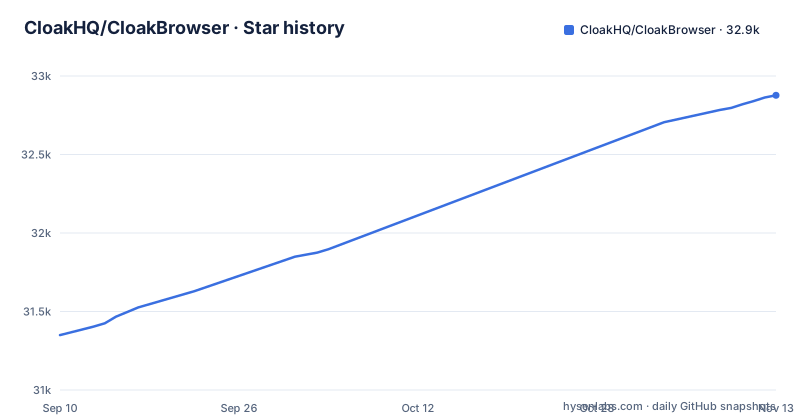
- CloakHQ/CloakBrowser32,877 ★ · +1,527
| Repository | 2026-09-10 | 2026-11-13 |
|---|---|---|
| CloakHQ/CloakBrowser | 31.4k | 32.9k |
1,527 Stars in the last 64 days, measured from the daily GitHub snapshot. Compare with other projects
Editorial analysis
The problem is that patched configs and JS injections are detectable by construction
Most anti-detect tooling works the same way. You take stock Chromium, then at runtime you override navigator properties, spoof WebGL vendor strings, or inject a script before page load. The README draws the line explicitly: "Not a patched config. Not a JS injection. A real Chromium binary with fingerprints modified at the C++ source level." That distinction matters because runtime overrides leave traces. A property defined by an injected script can be inspected for its descriptor, its toString output, or the order in which the page's own code observes it. CloakBrowser's claim is that by changing values where Chromium itself sets them, the browser does not present a second layer to detect.
The audience is narrow and specific. This is for people running browser automation against sites that actively try to stop it: scraping teams, QA engineers testing bot defences, and the AI agent projects listed in the repository topics. It is not a general-purpose headless browser. If your targets have no anti-bot layer, the binary download and the license machinery are pure overhead over plain Playwright.
What the 73 patches cover, and where the wrapper sits
The patch set is enumerated in the README: canvas, WebGL, audio, fonts, GPU, screen, WebRTC, network timing, automation signals, and CDP input behaviour. The release notes for v0.7.0 add detail on the direction of travel: rendering consistency across Linux and Windows, corrected GPU, display and graphics parameters to match stock Chrome profiles, and Windows native GPU passthrough where real hardware values are passed through rather than spoofed. That last item is the most telling. Passing through real values is a different engineering posture from fabricating them.
The wrapper is the second layer. `launch()` returns something Playwright-shaped, and the migration diff in the README is a small swap: replace the `sync_playwright` import and the `pw.chromium.launch()` call with `from cloakbrowser import launch` and `browser = launch()`. Everything after that, per the README, "works unchanged." The wrapper's job is to resolve which binary you are entitled to, download it, and start it with the right flags. The JavaScript side exposes the same surface plus `buildLaunchOptions()` and `humanizeBrowser()` for people wiring it into an existing Playwright setup rather than replacing the entry point.
Installing it and the flags that change behaviour
The install path is conventional. `pip install cloakbrowser` for Python, or `npm install cloakbrowser playwright-core` for Node. There is also a NuGet package, `CloakBrowser`, which the README describes as a community-maintained .NET client built on Microsoft.Playwright, so the .NET surface is not maintained by the same people as the Python and JS wrappers. On first run the stealth Chromium binary downloads automatically, roughly 200MB, and is cached locally. A Docker image exists for a zero-install check: `docker run --rm -it cloakhq/cloakbrowser cloaktest`.
The launch signature is where the real configuration lives. For protected sites the README recommends a residential proxy plus four flags:
`proxy="http://user:pass@residential-proxy:port"`, `geoip=True`, `headless=False`, `humanize=True`.
Each does something concrete. `geoip=True` matches timezone and locale to the proxy IP, and requires the optional extra `pip install 'cloakbrowser[geoip]'`. `humanize=True` switches mouse movement, keyboard timing and scroll behaviour to human-like patterns, and the v0.7.0 notes add that humanized actions now auto-wait for visible, enabled and stable elements, with per-call overrides through `human_config`. `headless=False` is the admission worth reading twice: the README states plainly that some sites detect headless even with the C++ patches, so the recommended configuration for hard targets is a headed browser. SOCKS5 works directly via `proxy="socks5://user:pass@host:port"`, and `extension_paths` loads Chrome extensions across all launch functions.
The free and Pro split is a licensing gate, not a feature flag
This is the part that decides whether CloakBrowser fits your project, and it is easy to skim past. The README says every launch needs a license key, and that a free key takes one email at cloakbrowser.dev/free. The Pro Stable build is selected by setting a `license_key` in Python, `licenseKey` in JavaScript, or the `CLOAKBROWSER_LICENSE_KEY` environment variable, and the wrapper then fetches the latest Stable build for your platform automatically.
The README's headline Pro claim is a 0.9 reCAPTCHA v3 score, described as human-level and server-verified. Treat that as a vendor-reported figure from a specific test configuration, not a property of the software.
The recent releases show the cadence: chromium-v154.0.8037.57.2-pro on 2026-10-13, chromium-v155.0.8059.39.1-pro on 2026-10-20 and chromium-v155.0.8059.39.2-pro on 2026-10-27. The README says Pro Stable on Chromium 155.0.8059.39.1 covers Linux x64, Linux ARM64, Windows x64 and macOS (Apple Silicon and Intel).
A closed binary is the trade you make for source-level patches
The licence is MIT, but MIT applies to the wrapper code in the repository. The Chromium binary itself is downloaded, not built by you, and the Pro binary is gated behind a key. That combination produces a specific failure mode: when a target site changes its detection and your sessions start failing, you cannot read the patch that is now wrong. You can file an issue and wait for a release, and the release cadence above suggests the maintainers move quickly, but you are dependent on that cadence.
There is a second failure mode the README itself concedes. The recommended configuration for protected sites includes `headless=False`. If your workload runs on a headless server fleet, that recommendation turns into either a virtual display layer or a change of infrastructure. The C++ patches reduce the number of headless signals but, per the project's own guidance, do not eliminate them for every site.
The third is operational weight. A 200MB binary download on first run, per platform, cached locally, means container images and CI runners need either a warm cache or a build step that performs the download. The Docker image sidesteps this for evaluation, but production deployments have to plan for it.
How this differs from Camoufox and from patched-Playwright approaches
The closest comparison in this space is Camoufox, a Firefox-based anti-detect browser that also makes its modifications below the JavaScript layer. The difference in approach is the engine and the surface area. Camoufox starts from Firefox and its fingerprint changes target Gecko's rendering and API surface. CloakBrowser starts from Chromium, which means the fingerprint profile it has to match is stock Chrome, and its patches are aimed at making the binary indistinguishable from Chrome rather than from Firefox. That matters practically: a site that expects Chrome traffic and sees a Firefox fingerprint is anomalous regardless of how clean the Firefox fingerprint is.
The second comparison is the more common one, which is Playwright with `playwright-stealth` or hand-written `add_init_script` overrides. Those keep you on a browser you can build and audit, and they cost nothing to modify. They also operate at exactly the layer CloakBrowser's README argues is detectable. Choosing between them is choosing which risk you prefer: maintainability and auditability on one side, or a binary you cannot inspect on the other. Neither is obviously right, and the answer depends on whether your targets are checking for runtime overrides specifically.
Upgrade cost tracks Chromium, not the wrapper
The release history shows three Pro builds in roughly three weeks, moving from Chromium 154.0.8037.57.2 to 155.0.8059.39.1 and 155.0.8059.39.2. When Chromium itself moves, the work is larger: the v0.7.0 notes describe rebasing the full patch set onto Chromium 155 on every platform. Rebasing 87 patches is the expensive operation, and it is the maintainers' cost, not yours, until it slips.
For you, the upgrade path is mostly automatic. If a license key is set, the wrapper fetches the latest Stable build for your platform, so a `pip install --upgrade cloakbrowser` plus a process restart moves you forward. Pinning matters if you have validated against a specific build, so if reproducibility across deploys is a requirement, confirm how to pin a binary version before you build a pipeline around it. The MIT licence on the wrapper imposes no obligations on your own code, but the binary's terms are separate and live in BINARY-LICENSE.md. That is a question for the project, not for a licence summary.
Editorial conclusion
Adopt CloakBrowser if your automation already runs on Playwright and you need the browser itself to carry the fingerprint work, rather than a script layer you maintain. Do not adopt it if you need a browser you can build and audit from source, or if you cannot tolerate a binary distribution gated on a license key. Before committing, verify three things: which platforms the Pro build actually covers (the README lists Linux x64, Linux ARM64, Windows x64 and macOS on Apple Silicon and Intel), whether your target sites still require headless=False even with the C++ patches applied, and what the Pro license key permits for the number of concurrent sessions you intend to run.
Frequently asked questions
What is a cloak browser?
CloakBrowser describes itself as a real Chromium binary with fingerprints modified at the C++ source level, rather than a patched config or injected JavaScript, wrapped in a Playwright and Puppeteer compatible API. The current release applies 87 patches across canvas, WebGL, audio, fonts, GPU, screen, WebRTC, network timing, automation signals, and CDP input behavior.
How to install cloakbrowser?
Use pip install cloakbrowser for Python, npm install cloakbrowser playwright-core or npm install cloakbrowser puppeteer-core for Node, or dotnet add package CloakBrowser for .NET and C#. On first run the stealth Chromium binary downloads automatically at roughly 200MB and is cached locally.
How do I use cloakbrowser?
Import launch and call it instead of Playwright's launch, then drive the browser as usual: browser.new_page() and page.goto() in Python, or await browser.newPage() and await page.goto() in JavaScript. Add proxy, geoip, humanize, or headless options when a target needs them.
Is cloakbrowser safe?
The Python wrapper is MIT licensed and depends on playwright, httpx, and cryptography, where cryptography verifies an Ed25519 signature on SHA256SUMS before a downloaded binary is trusted. The patched Chromium ships under a separate BINARY-LICENSE.md at the repository root rather than under the wrapper's MIT license.
How does cloakbrowser compare with Playwright?
It is positioned as a drop-in replacement: the migration is described as a one-line change where from cloakbrowser import launch and a single launch() call replace the sync_playwright start and chromium.launch, and the rest of the script works unchanged. The difference is the browser underneath, a Chromium binary patched at the C++ source level instead of a stock build.
Official sources
Add this badge to your README
If you maintain this project, the badge below links readers to this analysis and shows its maintenance status from the daily GitHub snapshot. Paste the markdown into your README; add ?metric=license or ?metric=stars to the image URL for a different field.

[](https://hysenlabs.com/projects/cloakhq-cloakbrowser)Star history chart for your README
[](https://hysenlabs.com/projects/cloakhq-cloakbrowser)Was this useful?