Claude Code Plugins Directory: A Curated Marketplace with a Security Caveat
Official, Anthropic-managed directory of high quality Claude Code Plugins.
At a glance
- What is it?
- Anthropic's official plugin directory for Claude Code organizes internal and third-party plugins, but its trust model depends entirely on the user. This review covers its structure, installation flow, and the immutable-name constraint.
- Who is it for?
- Adopt this directory if you use Claude Code and want a single marketplace for both Anthropic-maintained plugins and vetted third-party ones. Do not adopt it if you expect Anthropic to guarantee plugin safety; the README explicitly disclaims control over MCP servers and included software.
- Can I use it commercially?
- Yes. Apache-2.0 is a permissive licence: you can use, modify and sell software built on it, as long as you keep its copyright and licence notices.
- Is it still maintained?
- Yes. The repository received new commits within the last day.
- What is it written in?
- Mainly Python, according to GitHub's language statistics.
Answers come from the project's GitHub data, last synced on November 14, 2026, and from our analysis. They are not legal advice.
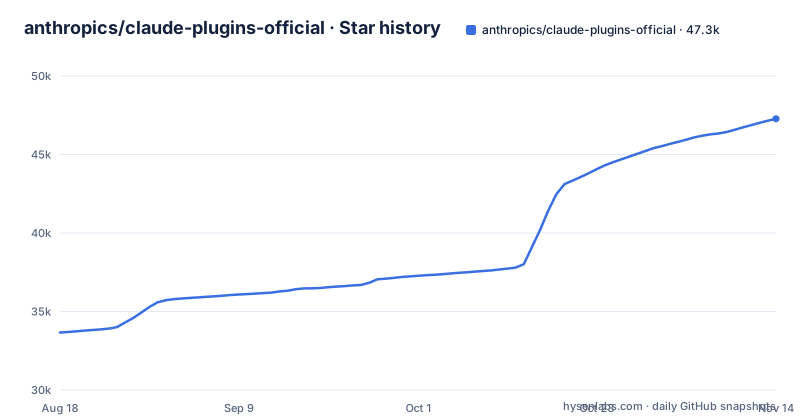
Star history
- anthropics/claude-plugins-official47,274 ★ · +13,611
| Repository | 2026-08-18 | 2026-11-14 |
|---|---|---|
| anthropics/claude-plugins-official | 33.7k | 47.3k |
13,611 Stars in the last 88 days, measured from the daily GitHub snapshot. Compare with other projects
Editorial analysis
What This Repository Actually Is
The claude-plugins-official repository is not a plugin itself. It is a directory, or marketplace, that Claude Code's plugin system reads to offer installable plugins. The README describes it as a curated directory of high-quality plugins, split into two folders: /plugins for internal plugins maintained by Anthropic, and /external_plugins for third-party submissions from partners and the community. The license is Apache-2.0 for the repository, but the README states that each linked plugin has its own license. This matters: adopting the directory does not adopt a uniform license for the plugins you install.
The Installation Flow and Its One Command
Installation happens through Claude Code's own interface, not through pip or a package manager. The README gives a single command: /plugin install {plugin-name}@claude-plugins-official. Alternatively, you can browse and install via /plugin > Discover. That command implies the marketplace is registered under the name claude-plugins-official. There is no mention of a setup step for adding the marketplace, which suggests it may be built into Claude Code or configured elsewhere. The command syntax is specific: the plugin name is the immutable slug, and the marketplace name follows the @ symbol. If you mistype either, the install will fail, and renaming a plugin later will break existing installs.
The Immutable Name Constraint and Its Failure Mode
A key design decision is that the name field in a marketplace entry is immutable. Once published, the slug cannot change because users have it installed under that slug. Renaming it breaks existing installs with a plugin-not-found error. This is a real operational constraint for plugin authors. The README offers two mitigations: update displayName for UI labeling changes, or, if a rename is unavoidable, add an entry to the renames map in .claude-plugin/marketplace.json. That map looks like {"old-name": "new-name"}. The Claude Code plugin loader reads it and rewrites the old slug to the new one during the next sync. This is a concrete mechanism, but it only works if the rename is declared before users sync. If you change a plugin name without updating the renames map, you break installs. This is the kind of edge case that documentation warns about, but it is easy to miss in a fast-moving project.
Skill-Bundle Plugins: A Looser Path for Repositories Without Manifests
Not every plugin ships with a .claude-plugin/plugin.json manifest. The README describes a skill-bundle variant for source repositories that contain SKILL.md files but no manifest. In that case, the marketplace entry can declare skills directly using strict: false and an explicit skills array. The example shows a source pointing at a git subdirectory, with a sha commit reference and a list of skill paths like "./skill-a". Each path is relative to the source.path and must point at a directory containing a SKILL.md. Paths can go deeper, so you can expose a curated subset from multiple library subdirectories. Each skill is registered as <plugin-name>:<skill-name>. This is a useful escape hatch for teams that have skills in a monorepo and do not want to add manifests to every package. But strict: false means the loader is not enforcing the full plugin structure, which could lead to inconsistent behavior if a skill directory lacks expected metadata.
The Security Warning Is the Most Important Part
The README opens with a warning in bold: make sure you trust a plugin before installing, updating, or using it. Anthropic explicitly states it does not control what MCP servers, files, or other software are included in plugins, and cannot verify that they will work as intended or that they won't change. This is a blunt disclaimer. It means the directory is curated in some sense, but curation does not equal security review. The README says external plugins must meet quality and security standards for approval, but it does not describe what those standards are. There is no mention of code signing, checksum verification, or sandboxing. For an engineer evaluating this project, the practical takeaway is that installing a plugin is equivalent to running third-party code with access to your Claude Code session. The trust model is entirely on the user. This is a genuine limitation, and it is refreshing that the README states it so plainly.
Contribution Paths and the Reference Implementation
Contributing differs by plugin type. Internal plugins are developed by Anthropic team members, and the README points to /plugins/example-plugin as a reference implementation. That example is the best place to learn the expected structure. External plugins are submitted through a separate form at https://clau.de/plugin-directory-submission. The README does not detail the review process or timeline for external submissions. It only says they must meet quality and security standards. This is thin. If you are a third-party developer wanting to publish a plugin, you have a form URL and a vague promise of approval. There is no public checklist or test suite mentioned. The repository structure itself is the only guide, and the skill-bundle section is the most concrete specification available.
Maintenance and Upgrade Cost
The repository has no GitHub releases, and the last push was on 2026-11-02. That means there is no release cadence to rely on. The maintenance cost is borne by plugin authors, not the directory itself. Upgrading a plugin is not described in the README, but the immutable name rule implies that updates happen under the same slug. The renames map is the only migration mechanism, and it only handles name changes, not API changes. For adopters, this means you should pin or verify plugin versions if your workflow depends on specific behavior. The Apache-2.0 license on the repository does not cover the plugins, so you must check each plugin's license separately, especially for external plugins that may have different terms.
Editorial conclusion
Adopt this directory if you use Claude Code and want a single marketplace for both Anthropic-maintained plugins and vetted third-party ones. Do not adopt it if you expect Anthropic to guarantee plugin safety; the README explicitly disclaims control over MCP servers and included software. Before installing any plugin, verify its homepage, review the source in the repository, and check the plugin's license separately, since the directory license does not cover individual plugins. Confirm that the plugin name matches the immutable slug in the marketplace entry to avoid a plugin-not-found error on future syncs.
Frequently asked questions
what is claude plugins official
It is an official, Anthropic-managed curated directory of high-quality plugins for Claude Code, split into a `plugins` folder for internal plugins developed and maintained by Anthropic and an `external_plugins` folder for third-party plugins from partners and the community. It publishes no GitHub releases.
how to install claude-plugins-official
Plugins install through Claude Code's plugin system rather than by cloning. Run `/plugin install {plugin-name}@claude-plugins-official`, or browse for the plugin under `/plugin > Discover`.
What are the official Claude Code plugins?
The `plugins` directory holds the internal plugins developed and maintained by Anthropic, and `external_plugins` holds third-party plugins from partners and the community. The repository points to `plugins/example-plugin` as a reference implementation for what an internal one looks like.
What exactly is a Claude plugin?
A plugin is a directory whose `.claude-plugin/plugin.json` manifest is the only required file. Everything else is optional: `.mcp.json` for MCP server configuration, and `commands/`, `agents/`, and `skills/` directories for slash commands, agent definitions, and skill definitions, alongside a README.
how to add claude plugins official marketplace
External plugins are submitted by third-party partners through the plugin directory submission form and must meet quality and security standards for approval. Internal plugins are developed by Anthropic team members rather than submitted, and the repository provides a reference implementation for them.
Official sources
Add this badge to your README
If you maintain this project, the badge below links readers to this analysis and shows its maintenance status from the daily GitHub snapshot. Paste the markdown into your README; add ?metric=license or ?metric=stars to the image URL for a different field.

[](https://hysenlabs.com/projects/anthropics-claude-plugins-official)Star history chart for your README
[](https://hysenlabs.com/projects/anthropics-claude-plugins-official)Was this useful?