SnapmakerU1 Extended Firmware patches the software of a 3D printer
Custom and repackaged Snapmaker U1 firmware
At a glance
- What is it?
- This is an independent project that builds custom firmware for the Snapmaker U1 printer, adding things the stock image does not have, most visibly SSH access. The interesting part is the build system, an overlay model where a stock squashfs image is extracted, patched and repacked, selected by a make profile rather than a single build command.
- Who is it for?
- SnapmakerU1 Extended Firmware is worth adopting if you own a Snapmaker U1 and you want the things the stock image leaves out, especially SSH access, a usable camera stack and Prometheus metrics from Klipper, because nobody else is going to add them to the vendor image. It is the wrong choice if you want a supported product, since the project is explicitly independent and unconnected to Snapmaker, and the warranty position is stated plainly.
- Can I use it commercially?
- Yes, with conditions. GPL-3.0 is a copyleft licence: if you distribute software that includes it, you must release that software's source code under the same licence. Running it internally without distributing it does not trigger that obligation.
- Is it still maintained?
- Yes. The repository received new commits within the last day.
- What is it written in?
- Mainly Python, according to GitHub's language statistics.
Answers come from the project's GitHub data, last synced on November 7, 2026, and from our analysis. They are not legal advice.
Star history
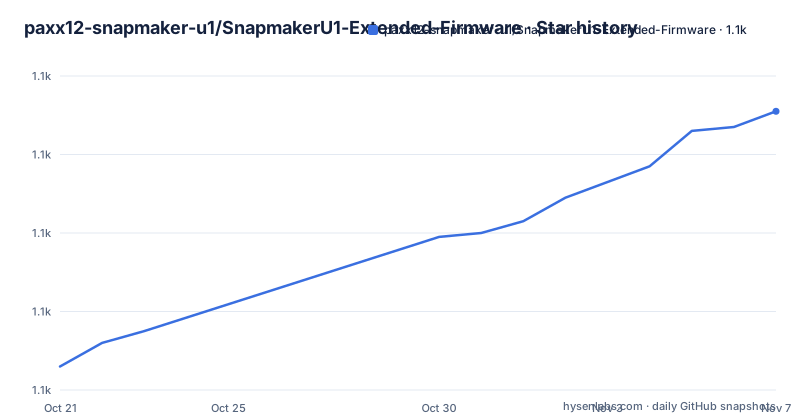
- paxx12-snapmaker-u1/SnapmakerU1-Extended-Firmware1,131 ★ · +65
| Repository | 2026-10-21 | 2026-11-07 |
|---|---|---|
| paxx12-snapmaker-u1/SnapmakerU1-Extended-Firmware | 1.1k | 1.1k |
65 Stars in the last 17 days, measured from the daily GitHub snapshot. Compare with other projects
Editorial analysis
An independent project for a printer you already own
The SnapmakerU1 Extended Firmware project builds custom firmware for the Snapmaker U1 3D printer, enabling debug features like SSH access and adding additional capabilities. The readme states in one line that this is an independent project and is not affiliated with Snapmaker, and the topic list on the repository is short and telling: firmware, snapmaker, ssh.
So the situation is a specific one. The U1 runs Linux, the stock image is what the vendor ships, and this project takes that image apart and rebuilds it with more in it. The primary addition named is SSH access, which turns a device with a touchscreen into something you can actually administer, and the dependent projects list shows the other additions: a hardware accelerated camera stack with WebRTC streaming, V4L2 controls and settings persistence, touchscreen applications and UI components, a Prometheus metrics exporter for Klipper, and a tool to recover corrupted timelapse videos.
That last group is the real story. The features of this firmware are mostly not in this repository, they are in the satellites around it, and this repository is the thing that assembles them into an image the printer can boot.
The audience is therefore two groups. The first is the owner of a U1 who wants more than the vendor image offers, and who is comfortable with SSH and firmware images. The second is a developer who wants to add a capability to the printer and needs a reproducible way to build and ship an image for other people.
The warning in the readme is worth repeating because it defines the deal. Installing custom firmware does not automatically void the product warranty, but any damage caused by or attributable to the installation or use of custom firmware is not covered under warranty, and the project says to use it at your own risk and to make sure you understand the implications. It also says custom firmware is intended for users with appropriate technical knowledge.
Overlays on top of a stock image, not a fork of the source
The build system is the interesting part of this repository, and it is not a conventional firmware tree.
The top level listing gives the shape: an overlays directory, a deps directory, scripts, tools, docs, a Makefile, a vars.mk, a dev.sh, .gitmodules, and two release documents. The overlays directory is the heart of it, and the Makefile reveals its structure. Firmware variants come from overlays/firmware-* and modifications come from overlays/mods/*/, and when a profile is given, the overlay set is assembled as overlays/common plus the directory for the chosen firmware plus the directory for each requested mod.
That is an overlay model in the strict sense. The stock firmware is not modified in place and it is not reimplemented. It is taken as the base, and the overlays are the differences you want on top of it. The practical consequences are worth spelling out.
First, a new capability is a new directory, not a patch to a large tree. A contributor adds an overlay, and the build picks it up.
Second, the profile mechanism means the built image is a function of its inputs, and the same source tree produces the stock-like image, the image with SSH, and the image with a mod. The Makefile even lists the available firmwares and mods when you get it wrong, and it fails with a message naming what is valid rather than a compiler error.
Third, and this is the constraint, the whole approach depends on the stock image remaining extractable and on the overlay targets remaining valid. A vendor image that changes its layout, or a build step whose output paths move, breaks the overlay rather than merging with it.
The .gitmodules file and the deps directory point the same way. The dependencies are not vendored source in the usual sense, they are fetched components, and the same applies to the Rockchip kernel source that the dependent projects list points at for building additional kernel modules.
One make variable selects the image you get
The Makefile at the root is the interface, and the build is driven by a single variable.
The output is firmware/firmware.bin and the working directory is tmp/firmware by default. If no profile is given, the build stops and tells you to specify a firmware using make PROFILE=<firmware>[-<mod>]* and prints the list of available firmwares and mods. If the firmware name is not one of the available ones, or a mod name is not valid, the build fails with the same kind of message, so the error tells you what you could have asked for instead.
With a profile in hand, the actual work is a call to the shell script that assembles the image:
make PROFILE=<firmware>[-<mod>]*and the script invoked is scripts/create_firmware.sh with the firmware image, the build directory, the output file and the overlay list. There is a separate target for the opposite direction, extract, which runs scripts/extract_squashfs.sh against the firmware file into a directory named after the firmware version, tmp/extracted-$(FIRMWARE_VERSION).
That extract target tells you the format. The firmware is a SquashFS image, and the build is a repack: extract the stock root filesystem, apply the overlays, and produce a new image. That also tells you the risk profile. A repack of a SquashFS image is a well understood operation, but the result is a filesystem you assembled, and the readme's advice to build it yourself before flashing it is exactly the right instinct.
There is a tools target, a targets list that echoes the available firmwares and mods, and a vars.mk that carries the shared variables. The documented build route for a normal user is Docker, with the details in docs/development.md, and the source repositories are on GitHub under paxx12 and mirrored on Codeberg at codeberg.org/paxx12-snapmaker-u1, which is a sensible arrangement for a project whose users are exactly the kind of people who hit a network problem on a Saturday.
The features live in the satellite repositories
The dependent projects section is short and it is the clearest statement of what this firmware actually gives you.
v4l2-mpp is a hardware accelerated camera stack with WebRTC streaming, V4L2 controls and settings persistence. That is a real feature: the stock image's camera handling is a common complaint area, and a hardware accelerated path with a browser based stream changes what the printer's camera can be used for. screen-apps holds the U1 touchscreen applications and UI components, which is where the device's own interface comes from. prometheus-klipper-exporter exposes Klipper's metrics in Prometheus format, which is what turns the printer into something your monitoring can scrape. snapmaker-u1-timelapse-recovery is a tool to recover corrupted timelapse videos, which tells you that timelapse recording on this printer is a thing people care about enough to lose.
And the last entry is the Rockchip kernel source, listed not as an application but as a component needed for building additional kernel modules, which is the sign of a project that has gone past the userland into the kernel.
That spread is the point. The Snapmaker U1 is a single board computer from a vendor whose Linux is a support cost rather than a product, and the extended firmware project is the place where the community puts the improvements. The firmware image is the delivery mechanism, not the substance.
For a user deciding whether to install it, the useful question is therefore not what this repository does but which of the satellites you actually want, because each one is separately maintained by someone else and the firmware is what carries them.
The warranty position and the triage policy are both explicit
Two passages in the readme deal with the parts of this project that are not technical, and both are unusually direct.
The first is the warranty warning. Installing custom firmware does not automatically void the product warranty, but any damage caused by or attributable to the installation or use of custom firmware is not covered, and the readme points at the Snapmaker terms of use for the details. It also says to make sure you understand the implications before proceeding.
The second is the issue policy, and it is a triage instruction that saves a lot of time. For bug reports, you are asked to validate the issue against the stock firmware first, because that determines whether the issue is specific to the custom firmware or exists in the stock firmware as well. And then the rule that matters most for anyone hoping to propose something: the repository does not accept feature requests or support issues in general, and pull requests are the desired way to propose new changes, which may be accepted after review.
So the support model is: no general support, validate against stock first, propose changes as a pull request. The community channel is the Snapmaker Discord, in the #u1-printer channel, which is where the actual conversation with other users of the custom firmware happens, and there is a separate issue tracker for bugs.
There is also a support link for the project itself, a Buy Me a Coffee page, and a note that ordering a printer through the linked stores supports the project, with an optional discount code. The HEROES.md file at the root credits contributors who made significant contributions to each release, and the two release documents, RELEASE.md and RELEASE.dev.md, separate the user facing release notes from the development ones.
A rolling channel, a version suffix, and a GPL core
The release naming is worth understanding, because it is not a plain semver line.
The releases listed are v1.5.2-paxx12-21 from 2026-08-02, v1.6.0-paxx12-22 from 2026-09-07, and a release named rolling, tagged Rolling: v2.0.0-paxx12-develop-c344817, from 2026-09-09. The pattern is a version, a suffix naming the fork or maintainer, and a build number, and the rolling release is a snapshot of the develop branch identified by a commit hash, c344817 in that case.
That gives a user two channels. The tagged builds are the ones to install, with a version you can point at later and a build number that changes when the maintainer rebuilds. The rolling release is the develop branch, which is what you want if you are testing a change or need something that has not been tagged yet, and which you should not put on a printer you rely on.
The default branch is develop, and the latest release badge points at a different repository, paxx12/SnapmakerU1, which is where the releases are actually published.
The licence is GPL-3.0 for the main project, with the Makefile carrying an SPDX identifier of GPL-3.0-or-later and a copyright line for 2025 naming @paxx12 and @horzadome, and the readme says the licence of individual tools and dependencies is in their respective directories. That last sentence is the one to read before you ship anything: a firmware image that bundles a kernel, a toolchain and a set of applications carries the terms of all of them, and the project is explicit that it does not unify them.
The repository is not archived and the last push was on 2026-10-14, five days before this writing, so this is an active fork with a recent commit and a rolling channel that never stops.
Editorial conclusion
SnapmakerU1 Extended Firmware is worth adopting if you own a Snapmaker U1 and you want the things the stock image leaves out, especially SSH access, a usable camera stack and Prometheus metrics from Klipper, because nobody else is going to add them to the vendor image. It is the wrong choice if you want a supported product, since the project is explicitly independent and unconnected to Snapmaker, and the warranty position is stated plainly. Before you flash anything, read the user documentation for the installation steps, build it yourself first from docs/development.md so you can reproduce the image, and note that the repository was pushed to on 2026-10-14 with a rolling release channel alongside tagged builds.
Frequently asked questions
What does the SnapmakerU1 Extended Firmware project add to the stock printer?
It builds custom firmware for the Snapmaker U1 that enables debug features such as SSH access and adds extra capabilities. The readme states the project is independent and is not affiliated with Snapmaker, and that damage attributable to installing or using custom firmware is not covered by the warranty.
How do I build the custom firmware?
The Makefile takes a single profile variable, so you run make PROFILE=<firmware>[-<mod>]* and the build assembles overlays/common, the chosen firmware overlay and each requested mod, then calls scripts/create_firmware.sh to produce firmware/firmware.bin. The documented route for most users is Docker, with the steps in docs/development.md.
What is the overlay model in this firmware project?
The stock firmware is treated as the base image and the overlays directory holds the differences. Firmware variants come from overlays/firmware-* and modifications from overlays/mods/*/, and the extract target runs scripts/extract_squashfs.sh, which shows the stock image is a SquashFS filesystem that is unpacked and repacked.
Where do the actual features of the custom firmware come from?
From the dependent projects: v4l2-mpp for a hardware accelerated camera stack with WebRTC streaming, screen-apps for the touchscreen applications and UI, prometheus-klipper-exporter for metrics, snapmaker-u1-timelapse-recovery for damaged timelapse files, and the Rockchip kernel source for additional kernel modules.
Can I report a bug or request a feature in the SnapmakerU1 firmware repository?
Bugs are accepted after you validate the issue against the stock firmware first, so it is clear whether it is specific to the custom firmware. The repository does not accept feature requests or general support issues, and pull requests are the desired way to propose new changes. The Snapmaker Discord channel #u1-printer is where the community talks.
Official sources
Add this badge to your README
If you maintain this project, the badge below links readers to this analysis and shows its maintenance status from the daily GitHub snapshot. Paste the markdown into your README; add ?metric=license or ?metric=stars to the image URL for a different field.

[](https://hysenlabs.com/projects/paxx12-snapmaker-u1-snapmakeru1-extended-firmware)Star history chart for your README
[](https://hysenlabs.com/projects/paxx12-snapmaker-u1-snapmakeru1-extended-firmware)Was this useful?