Anthropic's claude-quickstarts: worked examples for the Claude API, from support bots to scheduled agents
A collection of projects designed to help developers quickly get started with building deployable applications using the Claude API
At a glance
- What is it?
- A monorepo of small deployable reference projects, each isolating one agent pattern so you can read a single folder and lift the approach into your own stack.
- Who is it for?
- Treat this repository as a pattern library rather than a framework. No directory depends on another, each one exists to make a single agent capability legible in isolation, and the interesting reading is picking the two or three that match the problem you have.
- Can I use it commercially?
- Yes. MIT is a permissive licence: you can use, modify and sell software built on it, as long as you keep its copyright and licence notices.
- Is it still maintained?
- Yes. The repository last received commits 9 days ago.
- What is it written in?
- Mainly TypeScript, according to GitHub's language statistics.
Answers come from the project's GitHub data, last synced on November 15, 2026, and from our analysis. They are not legal advice.
Star history
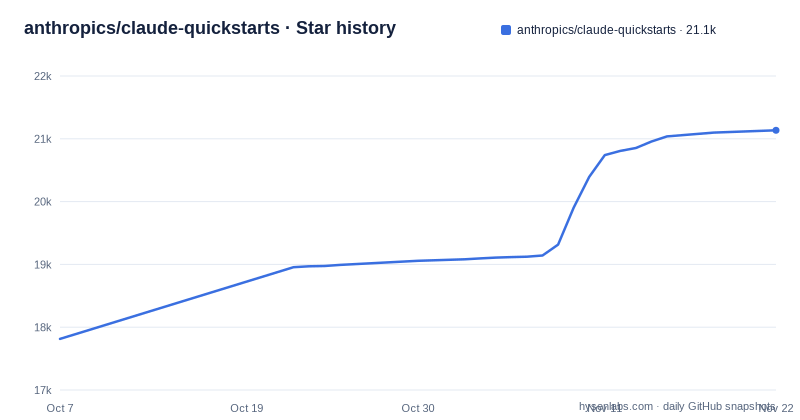
- anthropics/claude-quickstarts21,038 ★ · +3,225
| Repository | 2026-10-07 | 2026-11-15 |
|---|---|---|
| anthropics/claude-quickstarts | 17.8k | 21k |
3,225 Stars in the last 39 days, measured from the daily GitHub snapshot. Compare with other projects
Editorial analysis
A collection, not a framework, with no shared runtime
The repository description says it plainly: a collection of projects designed to help developers get started building applications with the Claude API, where each quickstart provides a foundation you can build upon. The top-level tree confirms the reading. Every entry is a self-contained project directory rather than a package:
git clone https://github.com/anthropics/claude-quickstarts.git
cd claude-quickstarts
The directories are `customer-support-agent/`, `financial-data-analyst/`, `computer-use-demo/`, `computer-use-best-practices/`, `computer-toolset/`, `browser-use-demo/`, `browser-toolset/`, `autonomous-coding/`, `managed-agents/`, plus an `agents/` folder. There is no `src/`, no shared library and no build step at the root. That is a deliberate choice for a teaching repository: nothing you read is hidden behind an abstraction, so what you learn in one folder transfers cleanly to a codebase that is not this one.
The practical consequence is that installing one project installs only that project. The root also carries `LICENSE` (MIT), a `CLAUDE.md`, a `.pre-commit-config.yaml` and a `pyproject.toml`, and that last file is worth noticing because it configures Pyright with `venvPath = "computer-use-demo"` and `venv = ".venv"`. One type-checker setting, pointed at a single example, tells you that the repository's editor tooling assumes you are working inside one quickstart at a time. The last push was on 2026-11-02 on the `main` branch, and the repository publishes no GitHub releases, so there is no tag to pin and no changelog to read between versions.
Computer use, taught twice at different risk levels
Two main directories cover computer control, alongside a minimal `computer-toolset/` VNC example, and the split between the first two is the most instructive decision in the collection. `computer-use-demo/` is described as an environment and tools Claude can use to control a desktop computer, with support for the `computer_toolset_20260801` toolset shape, where each computer action is a member tool the model calls by name. That is the general pattern: you expose named tools and let the model choose among them.
`computer-use-best-practices/` is the odd one out, and it is the one to read. The README calls it a pedagogical, native-macOS reference implementation, and unlike the containerized demo it runs directly against the macOS desktop. The README's own parenthetical about running it in a virtual machine is not decoration; an agent with screenshot, mouse and keyboard control running unconfined on your real desktop is exactly as dangerous as it sounds.
What makes it worth the read is the list of techniques it demonstrates, which is a cost and reliability checklist rather than a feature list: explicit tool definitions, correct image sizing and pruning, prompt caching, server-side compaction, batched tool calls, a sandboxed shell and trajectory recording. Each of those exists to solve a specific failure. Screenshots are expensive in tokens, so images get sized and pruned; long sessions overflow, so compaction is handled server-side; sequential tool calls waste latency, so they are batched. The project pairs with Anthropic's public computer-use best-practices guide.
Managed Agents examples that each teach one API feature
The `managed-agents/` directory holds the largest cluster, and the pattern is consistent: each project exists to demonstrate a small number of specific API behaviours rather than to build a finished product. The MCP server example exposes the Managed Agents Sessions API as nine tools so that Claude Desktop, Claude Code or claude.ai can drive agents in your workspace, over stdio or Streamable HTTP. One detail in that description is a `wait_for_idle` tool that works on the session's event stream.
The Daily Brief example is a scheduled agent that reads Slack channels and GitHub pull requests each weekday and posts one short brief to Slack, with the whole deployment defined as files applied with `ant apply`.
The CopilotKit example bridges a managed-agent session to the AG-UI protocol, streams replies token by token with event deltas, and renders agent tool calls as interactive generative UI components. The knowledge wiki example distils a document corpus once into a versioned memory store using parallel extraction sessions, a resolve pass and a steered consolidation step, then answers repeated questions with provenance, and its worked example is a real M&A data room taken from public SEC EDGAR filings. The Linear example is a stateless webhook bridge installed through Linear OAuth with `actor=app`. The chat SDK example pairs one persistent session per conversation with a chat surface, and the same handler runs on Slack, Teams, Discord, Telegram or WhatsApp by swapping the Chat SDK adapter.
Getting an API key, and what that costs before any code runs
The README's Getting Started section is three lines long and names only one prerequisite: a Claude API key, with a link to sign up for free at console.anthropic.com. There is no shared setup script, no monorepo install, no version matrix and no requirements file at the root. You get a key, you choose a directory, and you follow that directory's own README.
That is the right shape for this kind of repository and also its main limitation. Because the projects are independent, they drift at different speeds and there is no single commit that represents a known-good state across all of them. Each example also talks to the live API, so the first thing you learn after installing is what a given agent pattern costs per run. The computer-use best-practices project is the most candid about this, since prompt caching, image pruning and batched tool calls are all cost and latency mitigations, and that project also covers trajectory recording so you can inspect what the agent actually did.
Two other projects are worth singling out because they solve problems that a plain chatbot demo does not. The autonomous coding agent demonstrates a two-agent pattern, an initializer plus a coding agent, that can build a complete application across multiple sessions with progress persisted via git and a feature list the agent works through incrementally. That is a genuinely different shape from a single prompt, and it is the pattern most teams end up wanting. The browser use demo gives Claude a custom Playwright-backed browser tool so it can navigate sites, inspect DOM elements, extract content and fill forms, which keeps the browser integration explicit rather than hiding it behind a vendor SDK.
Where this repository stops
The README is an index, not a manual. It tells you what each project demonstrates in a paragraph and links you into the folder. Once you are inside a project you are on that project's own documentation, and the top-level README will not answer questions about deployment, cost ceilings, evaluation or production hardening. Nothing here is a managed service and nothing here is a library you depend on at a fixed version.
It is also a sample repository with sample limitations. The customer support agent and financial data analyst projects are described in the same terms as everything else, which means they are demonstrations of capability rather than reference architectures: neither is presented with authentication, rate limiting, multi-tenant isolation or observability. If you take the customer support agent as a starting point for a real support product, the knowledge base access pattern is the transferable part and the surrounding application is a starting skeleton.
The repository carries 227 open issues, which is what you would expect from a collection where every example is a separate dependency tree that ages independently. The MIT licence means you can take any folder into a commercial project without negotiation, which is the strongest thing this repository has going for it if you are planning to build on one of the patterns rather than use the examples as they ship.
How this differs from the official SDK docs
The API reference tells you what every endpoint accepts and returns. This repository tells you what a working combination looks like, which is a different and harder thing to get from documentation. The Managed Agents examples are the clearest case: the CopilotKit example shows token-by-token streaming with event deltas and tool calls rendered as UI, and the Linear example shows session metadata carrying IDs from a webhook to the reply.
The computer-use pair does the same job for a harder domain. A toolset-shaped interface where each action is a member tool is a design choice with real consequences, and seeing one implementation of it next to a best-practices version of the same capability makes the trade-off visible in a way an endpoint list cannot.
What you should not expect from any of it is a comparison between these approaches and competing agent frameworks, or guidance on when not to use an agent. That choice is left entirely to you, which is the honest position for a repository whose stated purpose is getting you started quickly. The most efficient way through the collection is to pick the two directories that match what you are building, read those fully, and treat the rest as a catalogue to return to later.
Editorial conclusion
Treat this repository as a pattern library rather than a framework. No directory depends on another, each one exists to make a single agent capability legible in isolation, and the interesting reading is picking the two or three that match the problem you have. The Managed Agents examples are the most self-contained, the Daily Brief one shows a scheduled deployment defined entirely as files, and the computer-use projects are where the collection controls a desktop. Two practical notes before you copy anything: the repository has no GitHub releases, so you have nothing to pin to and no changelog to diff, and every project costs real API calls, which is why the computer-use best-practices project spends its length on prompt caching, image pruning and batched tool calls. Start by cloning and opening the folder closest to your problem, and read its own README before the top-level one.
Frequently asked questions
What is Claude, and what does this repository assume about it?
Claude is Anthropic's model family, and this repository assumes you already have an API key for it and want to see a working application rather than read an endpoint reference. The README's only stated prerequisite is a key, signable up for free at console.anthropic.com. Everything else depends on which of the quickstart directories you open.
Is there a quick start guide for Claude Code in this repository?
No, this collection covers the Claude API rather than the Claude Code CLI. What it contains is one project per agent pattern, including a Managed Agents MCP server that exposes the sessions API so Claude Desktop, Claude Code or claude.ai can drive agents in your workspace. Installing Claude Code itself is a separate matter from anything documented here.
Can Claude handle very long input, and does this repository show how?
The repository does not attempt to answer that directly, but the computer-use best-practices project covers the machinery that makes long sessions workable, including server-side compaction, prompt caching and pruning oversized images before they are sent. The CopilotKit example additionally streams replies token by token with event deltas.
Official sources
Add this badge to your README
If you maintain this project, the badge below links readers to this analysis and shows its maintenance status from the daily GitHub snapshot. Paste the markdown into your README; add ?metric=license or ?metric=stars to the image URL for a different field.

[](https://hysenlabs.com/projects/anthropics-claude-quickstarts)Star history chart for your README
[](https://hysenlabs.com/projects/anthropics-claude-quickstarts)Was this useful?