Rowboat bundles a local index, a mail client, and a team room into one desktop app
Open-source AI coworker, with memory
At a glance
- What is it?
- Rowboat is an Apache-2.0 desktop assistant that indexes your email, meetings and Slack into a local graph, then drafts replies, drives a browser and runs background agents. The interesting boundary is Harbor, the small server that holds the shared Space while each person's Brain, email, meetings and notes stay on their own machine.
- Who is it for?
- Rowboat fits a small team that already runs Claude Code or Codex, wants mail, meetings and Slack in one local index, and accepts a desktop app as the owner of that context. It does not fit a team that needs a shared model budget, because every teammate runs Rowboat with their own model keys.
- Can I use it commercially?
- Yes. Apache-2.0 is a permissive licence: you can use, modify and sell software built on it, as long as you keep its copyright and licence notices.
- Is it still maintained?
- Yes. The repository last received commits 1 day ago.
- What is it written in?
- Mainly TypeScript, according to GitHub's language statistics.
Answers come from the project's GitHub data, last synced on November 13, 2026, and from our analysis. They are not legal advice.
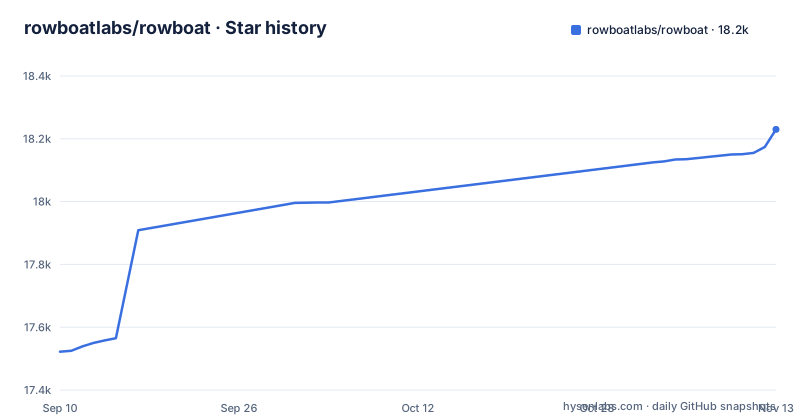
Star history
- rowboatlabs/rowboat18,230 ★ · +708
| Repository | 2026-09-10 | 2026-11-13 |
|---|---|---|
| rowboatlabs/rowboat | 17.5k | 18.2k |
708 Stars in the last 64 days, measured from the daily GitHub snapshot. Compare with other projects
Editorial analysis
Rowboat installs as a download, so there is no version to pin
The only distribution channel the project names is a downloads page for Mac, Windows and Linux at rowboatlabs.com/downloads. The source itself sits in an `apps/` directory at the top of the repository.
That fact matters before any feature gets evaluated. What a team can record is the release tag. v1.0.5 landed on 2026-09-30, then v1.0.6 and v1.0.7 both on 2026-11-03, and the last push to main was on 2026-11-02. Two point releases on the same day is a brisk cadence for a desktop app that reads your inbox.
Rowboat itself is a desktop application. If you want the tour in another language, localized readmes live in `docs/readme/` for Chinese, Japanese, Korean, Spanish, French and Portuguese.
Harbor has three doors and your own agent gets no privileged one
Harbor is the piece to understand first. Each teammate runs a full local Rowboat, and the shared Space lives on a small server called Harbor, described as one core with three doors: HTTP, a live WebSocket, and an MCP server.
The design choice worth naming is that Rowboat's own agent gets no privileged path into that room. It reaches the Space through the same MCP door any other agent would use, so anything Rowboat can do in a Space, your own agent can do too. That symmetry removes an entire category of backdoor questions, and it is unusual to see stated this plainly.
It also puts the whole weight of team security on that one surface. Harbor holds the messages, threads, DMs, uploads and whiteboards for everyone. If you plan to put a Space on a shared host, settle how Harbor authenticates a client, what scopes a credential carries, and who operates the server before you invite a single teammate.
Your context stays local, but the question you ask does not
Addressing your own assistant inside a room is the most interesting feature here. Type `@rowboat what is missing?` in a Space and it wakes the Rowboat on your own machine, gathers context from your Brain, email, meetings and notes, none of which ever leave your computer, then posts the answer back as "You (via Rowboat)". Every teammate gets their own agent answering into the same thread.
The exposure is the ask. When you address your Rowboat in a thread, the whole room saw the ask. So a question typed into a channel is team-visible even when the answer behind it is assembled from material nobody else can read. That is a defensible default, and a surprising one the first time it happens.
Before relying on this, check what limits exist on what an agent may quote: which indexed sources an answer may draw on and how much of your context a single reply carries into a room that other people read.
The important and everything else split has no visible classifier
The built-in mail client sorts every message into two buckets, important and everything else, and drafts replies for the important pile using all the work context.
The README's overview does not describe what makes a message important, whether you can add rules, or how a wrong decision is corrected. The draft is the second problem: the context behind it is the same index that holds email, meetings, Slack and your own conversations with the assistant, so an auto-drafted reply can carry a detail from a meeting the recipient has never heard of and cannot see. Check whether that draft waits for your approval before relying on it.
For anyone who has to stand behind what their assistant wrote to an external contact, that gap is the entire review problem in a single paragraph.
The Brain takes four input streams and documents no way to purge one
Rowboat calls its index the Brain, and four things feed it: email, meetings, Slack, and your conversations with the assistant, all folded into an Obsidian-style backlinked knowledge graph. The meeting note taker is the most automatic feeder. It runs locally, taps mic and speaker, produces a live transcript, writes a summary to a markdown file, and updates the graph.
The result is a detailed record of your working life, so find out how to exclude a source, delete a single node, or see what the Brain holds about a given person or project before connecting everything. Because the note taker writes both a markdown file and a graph update, a retraction may involve two separate things.
The recorder also captures everyone else in the room. The local capture and the summary are described in the overview; check for a consent prompt, a retention window and a way to keep a conversation out of the index before recording other people.
A scheduled background agent holds a browser session and a code runner
Background agents are where the risk concentrates. They trigger on events such as new email, or on a schedule such as every day at 8am, and when they fire they can connect to tools, search the web, use the browser, and write code with Claude Code or Codex. Code mode pushes further and runs parallel coding agents that Rowboat drives with your work context.
One boundary does exist, and it is the right one. The built-in browser is isolated from your main browser precisely so you can log in only to the accounts you want the assistant to reach. That is a cleaner split than pointing an agent at your everyday profile. But isolation is a login boundary, not a permission boundary. Once an account is logged in there, it is within the assistant's reach, and the README's overview does not describe a per-account or per-agent allowlist on top of that.
For a scheduled agent, the same omission costs more, because it fires when nobody is watching. Before scheduling one, find out whether it has a run log, a spend cap, a retry policy and a kill switch.
The alternative is the coding agent you already have, with none of the surroundings
The honest alternative here is not a competing assistant. It is Claude Code or Codex plus an MCP client, because that is exactly the layer Rowboat sits on: the project states that anything Rowboat can do in a Space, your own agent can do too through Harbor's MCP door.
That path gives you the agent and nothing around it. No index over mail and meetings, no mail client that drafts from your work history, no isolated browser profile, no meeting recorder, no room with shared files and whiteboards. You assemble those pieces yourself, and this repository offers no help with any of them.
Rowboat's approach is to bundle all of it into one Apache-2.0 desktop app and let that app own your context, then hand work down to an agent you choose. The price of the bundle is that one app indexes your inbox, holds the browser session, schedules the agents and renders the shared files. The price of the bare agent is that the index, which is the part that actually makes an assistant useful, is yours to build.
A Space has no shared model, so spend and coverage are both per person
Every teammate runs their own Rowboat on their own machine, with their own memory of their work and their own model keys. A Space does not change that. `@rowboat implement the proposal` hands the work to Claude Code or Codex on that teammate's machine, with the Space's files as context, and the changes come back to the thread ready for review.
Two consequences follow. Spend is per person, so a background agent left on an 8am schedule bills whoever configured it, and a team cannot cap a Space the way it caps a shared service account. Coverage is per person too: a question gets a real answer only from a teammate whose Rowboat is running and whose key is configured, and the room sees that answer attributed to "You (via Rowboat)" from that one person.
Files, messages and whiteboards do live in one place, on Harbor. Agents edit those same files, and the README says concurrent edits merge line by line rather than overwriting, with an agent's change landing on everyone's canvas within one event round trip.
Editorial conclusion
Rowboat fits a small team that already runs Claude Code or Codex, wants mail, meetings and Slack in one local index, and accepts a desktop app as the owner of that context. It does not fit a team that needs a shared model budget, because every teammate runs Rowboat with their own model keys. Before inviting anyone, open one Space, post `@rowboat what is missing?` from a throwaway account, and read what the reply quotes back out of your index. If that reply contains something you would not put in a channel, the index is already too wide, and you have found the answer before the rest of the team does.
Frequently asked questions
how to use rowboat ai
Rowboat is an open-source AI assistant with built-in docs, a whiteboard and an email client, licensed under Apache-2.0. It indexes email, meetings, Slack and assistant conversations into a backlinked knowledge graph, then uses that context to draft replies, drive an isolated browser, run background agents and hand coding work to Claude Code or Codex.
how to use rowboat
The project points you at a downloads page offering Mac, Windows and Linux builds, and ships localized readmes in `docs/readme/` for Chinese, Japanese, Korean, Spanish, French and Portuguese. It is a desktop application, so the first run is a local install followed by connecting your own mail, meetings and Slack accounts to the index it calls the Brain.
Does Rowboat send my email to a server?
Your Brain, email, meetings and notes stay on your machine, and a Space agent gathers from them locally. What crosses to Harbor, the small server where a Space lives, is what you or your agent chose to post, which means the answer you get in the room, and the question that produced it, are the parts that leave.
What is a Space in Rowboat?
A Space is a channel plus a shared folder. One side holds messages, threads, DMs, reactions, polls, scheduled messages and mentions; the other holds markdown files rendered as a wiki, uploads and whiteboards. It runs on a server called Harbor with an HTTP door, a live WebSocket and an MCP server.
Official sources
Add this badge to your README
If you maintain this project, the badge below links readers to this analysis and shows its maintenance status from the daily GitHub snapshot. Paste the markdown into your README; add ?metric=license or ?metric=stars to the image URL for a different field.

[](https://hysenlabs.com/projects/rowboatlabs-rowboat)Star history chart for your README
[](https://hysenlabs.com/projects/rowboatlabs-rowboat)Was this useful?