MySigMail is a browser signature editor whose S3 keys are meant to ship to the client
A free and open-source email signature generator for Gmail, Outlook, Apple Mail, etc.
At a glance
- What is it?
- MySigMail is a Vue and Vite application that builds HTML email signatures for Gmail, Outlook and Apple Mail. Image uploads go straight to S3 using VITE_AWS_S3_ID and VITE_AWS_S3_KEY, which are inlined into the browser bundle.
- Who is it for?
- Run MySigMail yourself when you want the signature editor and its templates without handing staff email content to a hosted SaaS, and when you can afford to run a bucket that only accepts writes. Do not adopt it expecting the hosted features, since multiple saved signatures, shared signatures, click analytics and image hosting are described as part of the commercial product at mysigmail.com rather than the repository.
- Can I use it commercially?
- Yes, with strict conditions. AGPL-3.0 is a network copyleft licence: if people use a modified version over a network, for example as a hosted service, you must offer them its source code under the same licence.
- Is it still maintained?
- Yes. The repository last received commits 158 days ago.
- What is it written in?
- Mainly Vue, according to GitHub's language statistics.
Answers come from the project's GitHub data, last synced on November 7, 2026, and from our analysis. They are not legal advice.
Star history
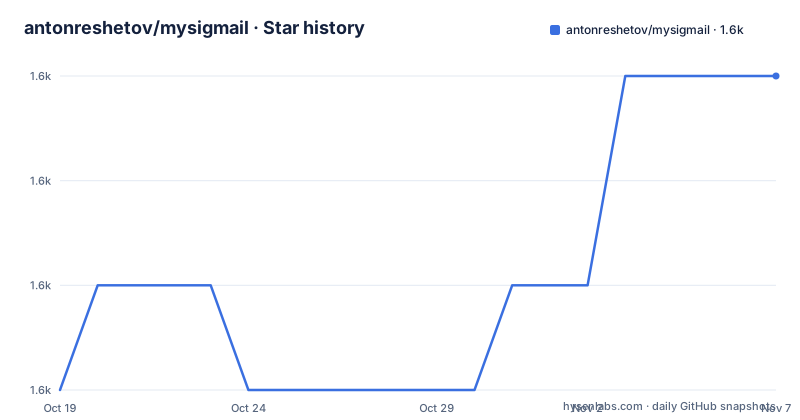
- antonreshetov/mysigmail1,558 ★ · +3
| Repository | 2026-10-19 | 2026-11-07 |
|---|---|---|
| antonreshetov/mysigmail | 1.6k | 1.6k |
3 Stars in the last 19 days, measured from the daily GitHub snapshot. Compare with other projects
Editorial analysis
What the editor produces, and where it stops
MySigMail solves a narrow problem: composing an HTML email signature and getting markup you can paste into a mail client. The README describes customization across fonts, colors, avatar shapes, social icons and custom fields, a set of ready made templates for a quick start, and add-ons such as a disclaimer and a call to action.
The reason this exists as an open source project is stated plainly in the About section: creating an email signature is not trivial, especially for non technical people, and most existing solutions are paid or closed source. That framing matters for how you evaluate it. This is a small front end tool, not a mail platform, and the README does not describe any delivery, list management or tracking capability in the open-source half.
The boundary becomes explicit in the SaaS section, which lists what the hosted product adds over the repository: managing multiple saved signatures stored on the vendor's servers, shared signatures teammates can copy, analytics that track clicks from the signature, a presets library, and image hosting on a CDN. Tools listed there include a Sign Off feature for a handwritten signature, a URL Builder that generates UTM tagged URLs, and a Banner Maker marked coming soon. None of that is described as part of the repository. If you self-host, you get the editor and you supply the storage.
Why image upload puts AWS credentials in the browser
The dependency list in package.json includes @aws-sdk/client-s3 and @aws-sdk/lib-storage, and the README says image upload needs AWS S3 credentials supplied through environment variables in a .env file:
VITE_AWS_S3_URL=
VITE_AWS_S3_BASKET=
VITE_AWS_S3_ID=
VITE_AWS_S3_KEY=
VITE_AWS_S3_REGION=
The VITE_ prefix is the crux. Vite inlines variables carrying that prefix into the client bundle at build time, so VITE_AWS_S3_ID and VITE_AWS_S3_KEY are not server side secrets; they are values shipped to every visitor's browser, and they are meant to be, since the SDK runs on the client. That is the architecture of a static site talking to a bucket directly, and it changes the threat model in a way the README does not discuss.
Concretely, anyone who can read the JavaScript bundle can read the access key id and secret access key, and the S3 URL tells them which bucket and which region to aim at. What protects the bucket is not secrecy of the key but the policy attached to it. The repository does not document an expected bucket policy, so that decision is yours, and it is the first thing to get right when you deploy this yourself. Note also that the variable name is spelled BASKET, so any search or documentation you write about this configuration has to match that spelling.
That same prefix covers VITE_AWS_S3_URL and VITE_AWS_S3_REGION, which point the client SDK at your bucket and region rather than the default AWS endpoints.
Running it locally with Bun and Vite
The build tool is Bun, not npm, and the README asks you to have it installed before anything else. The quick start is four commands:
git clone https://github.com/antonreshetov/mysigmail
cd mysigmail
bun install
bun run dev
The dev script in package.json is vite, so what you get is the Vite development server with hot reloading. The production path is `vue-tsc -b && vite build`, which type checks the Vue sources before bundling, and `vite preview` serves the built output locally. Linting is `vue-tsc --noEmit && eslint .`, configured through eslint.config.js with the @antfu/eslint-config preset, plus prettier through .prettierrc.
Two conventions in the scripts are worth noting if you plan to contribute. Releases use bumpp with the commit message prefix 'build: release v' and a tag, and the changelog is generated with conventional-changelog using the angular preset and rewritten into CHANGELOG.md from version zero. Commits are validated by commitlint through simple-git-hooks, so a commit message that does not follow the conventional format can be rejected locally rather than at review time. The add:shadcn script pulls shadcn-vue at a pinned 2.0.1 with pnpm dlx even though the rest of the project uses Bun, a small inconsistency in an otherwise Bun-native setup.
A Vue 3 rewrite, judging by the tree
The primary language is Vue and the current dependency set describes a full modern rewrite rather than an incremental update. The application uses vue 3.5, vue-router 4, @vueuse/core for composables, reka-ui as the headless component layer, class-variance-authority with clsx and tailwind-merge for variant handling, and lucide-vue-next for icons. Tailwind CSS 4 arrives through @tailwindcss/vite rather than a separate PostCSS plugin, with tw-animate-css for animation utilities.
Two dependencies say what the editor actually does. cropperjs is the image cropping surface for avatars and logos, and vuedraggable is what makes elements reorderable inside the signature builder. vee-validate handles form state and vue-sonner provides toasts. vanilla-colorful is the colour maths library behind the color pickers.
The TypeScript configuration is split three ways: tsconfig.json, tsconfig.app.json and tsconfig.node.json, the usual Vite arrangement separating browser code from build tooling. components.json at the repository root is the shadcn-vue configuration, which is how the add:shadcn script knows where to place generated components.
The version history shows the scale of the change. Releases v1.11.1 and v1.12.0 both date from June 2019, then nothing until v2.0.0 on 2025-09-18. That multi-year gap is the context for anyone still running an older self-hosted copy.
Contributions are limited to bug fixes, and that shapes your fork plan
The Contribution Policy section states that the project is open source but is only accepting contributions for bug fixes, with CONTRIBUTING.md linked for details. That is the project's stated policy, not an inference, and it has direct consequences.
If your plan is to add a feature, upstream will not take it, so the work is a permanent fork with no upstream merge path for that change. A team that needs, say, self-hosted multi user signature storage or its own analytics endpoint should plan for a fork from the start rather than submitting a pull request and waiting. Note that the tools listed in the README, Sign Off, URL Builder and the coming soon Banner Maker, are described as part of the SaaS product rather than as repository features, which is consistent with that boundary.
The 2.0.0 rewrite also means an upgrade from a 1.x deployment is a migration rather than a version bump, since the framework tooling, the state management and the styling stack all changed. The README does not document a migration path between the two majors.
The AGPL-3.0 licence and the commercial licence request, side by side
The repository states its licence as AGPL-3.0 with a LICENSE file, and the README repeats it. The same README then adds a Commercial Use section: for commercial use, contact the author for a commercial license at [email protected], followed by a line that using the software means agreeing to the terms of the license. Copyright runs from 2019 to the present under Anton Reshetov.
Those two statements sit in tension, and no legal advice is offered here. AGPL-3.0 is a copyleft licence that permits commercial use by anyone who complies with its conditions, including offering the software as a network service. A repository that is AGPL-3.0 and also asks commercial users to come back for a separate license leaves the actual terms ambiguous for exactly the users it names. For an internal deployment at a company, whether that counts as commercial use is a question for whoever handles licensing at your organisation, not something the README settles.
What is unambiguous is the practical split. Internal self-hosting is free to attempt under the published licence, and any plan to host it as a service or to build a product on top of it needs that conversation first. Either way, the source is available and forkable, which is what the AGPL grant guarantees at minimum.
Maintenance pace and the gap since the last push
The repository is not archived and the last push was on 2026-06-03. The newest release is v2.0.0 from 2025-09-18, so there has been code movement since the tag without a new version, and the changelog is generated into CHANGELOG.md by a script rather than curated.
That combination describes a maintenance mode rather than an active release line. The self-hosting story is therefore a fork story: you are tracking a repository whose commits arrive occasionally, whose tags do not follow those commits, and whose upstream contribution window is limited to bug fixes. None of that makes the tool unusable, since the editor itself is a self-contained front end with no server component in the repository, but it does mean you should decide early whether you are running the upstream master or your own copy.
The README does not document deployment beyond the local dev flow, does not give a production hosting or container recipe, and does not state Node or Bun version requirements. For a static Vite build those gaps are mostly easy to fill, since the output of `bun run build` is ordinary static assets.
Editorial conclusion
Run MySigMail yourself when you want the signature editor and its templates without handing staff email content to a hosted SaaS, and when you can afford to run a bucket that only accepts writes. Do not adopt it expecting the hosted features, since multiple saved signatures, shared signatures, click analytics and image hosting are described as part of the commercial product at mysigmail.com rather than the repository. Verify first how you want to license it: the repository states AGPL-3.0 and simultaneously asks commercial users to contact the author for a commercial license, so settle that question before you deploy it internally.
Frequently asked questions
How do I run MySigMail locally?
Bun is the required runtime. Clone the repository, run `bun install`, then `bun run dev`, which starts Vite. The dev script is vite, and the production build is `vue-tsc -b && vite build`.
What environment variables does MySigMail need?
Image upload requires a .env file in the root with VITE_AWS_S3_URL, VITE_AWS_S3_BASKET, VITE_AWS_S3_ID, VITE_AWS_S3_KEY and VITE_AWS_S3_REGION. Because of the VITE_ prefix these values are inlined into the client bundle at build time rather than staying on a server.
Is MySigMail free for commercial use?
The repository is licensed AGPL-3.0, while the README also says that commercial users should contact the author for a commercial license. The two statements are not reconciled in the README, so check with whoever handles licensing before deploying it in a company.
Does the open source version include signature analytics and image hosting?
No. The README lists multiple saved signatures, shared signatures, analytics, a presets library and image hosting as features of the hosted SaaS product at mysigmail.com, along with the Sign Off, URL Builder and coming soon Banner Maker tools.
Can I contribute features to MySigMail?
The Contribution Policy states the project only accepts contributions for bug fixes, with CONTRIBUTING.md holding the details. Anything beyond a bug fix would need to be maintained as your own fork.
Official sources
Add this badge to your README
If you maintain this project, the badge below links readers to this analysis and shows its maintenance status from the daily GitHub snapshot. Paste the markdown into your README; add ?metric=license or ?metric=stars to the image URL for a different field.

[](https://hysenlabs.com/projects/antonreshetov-mysigmail)Star history chart for your README
[](https://hysenlabs.com/projects/antonreshetov-mysigmail)Was this useful?