Timeful self-hosting and availability polling with Vue and Go
Timeful (formerly Schej) is a scheduling platform helps you find the best time for a group to meet. It is a free availability poll that is easy to use and integrates with your calendar.
At a glance
- What is it?
- Timeful, formerly Schej, is a group scheduling platform that turns calendar availability into a shared poll. It suits groups that need a common meeting window, while self-hosting adds MongoDB, a Go server and a Vue frontend to operate.
- Who is it for?
- Timeful fits groups that need a dedicated availability poll rather than a conventional one-to-one booking link. Operators should not adopt it without first reviewing `DEPLOYMENT.md`, `server/.env` and the required calendar credentials.
- Can I use it commercially?
- Yes, with strict conditions. AGPL-3.0 is a network copyleft licence: if people use a modified version over a network, for example as a hosted service, you must offer them its source code under the same licence.
- Is it still maintained?
- Yes. The repository last received commits 16 days ago.
- What is it written in?
- Mainly Vue, according to GitHub's language statistics.
Answers come from the project's GitHub data, last synced on October 23, 2026, and from our analysis. They are not legal advice.
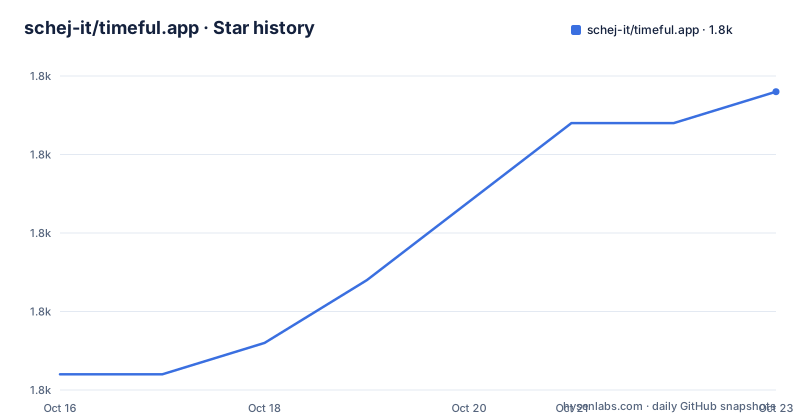
Star history
- schej-it/timeful.app1,787 ★ · +9
| Repository | 2026-10-16 | 2026-10-23 |
|---|---|---|
| schej-it/timeful.app | 1.8k | 1.8k |
9 Stars in the last 7 days, measured from the daily GitHub snapshot. Compare with other projects
Editorial analysis
What Timeful solves for group scheduling
Timeful addresses the gap between sending a message asking everyone for availability and manually comparing replies. The README describes it as a free availability poll for finding the best time for a group to meet. Its intended users are participants coordinating a shared event and event creators who need a clearer picture of who can attend.
The scheduling model is based on overlap rather than a fixed appointment selected by one person. Participants can specify date and time ranges, mark times as "Available" or "If needed," and account for different time zones. A poll can also target a subset of people rather than requiring every invitee to attend. These options make Timeful closer to a calendar intersection tool than a standard appointment scheduler.
Calendar providers are part of the central workflow. The README lists Google calendar, Outlook and Apple calendar integration, while availability groups can stay current with participants' real-time calendar availability. Email notifications and reminders can support follow-up, and poll duplication reduces the work involved when another event follows the same pattern. CSV export is documented for taking availability data elsewhere, while an option can restrict displayed responses to the event creator.
That feature set also defines the product boundary. Timeful is aimed at collective availability and group scheduling. The README does not describe video-call creation, payment collection, attendee registration or the full workflow of a conventional booking service, so those should not be assumed.
Timeful's Vue, Go and MongoDB architecture
The repository identifies Vue 2, MongoDB, Go and TailwindCSS as its main technologies. The deployment layout reinforces that division. A `frontend` service builds the browser application, while a `server` service exposes the application API on port `3002`. A MongoDB service persists data in the `mongo_data` volume.
The frontend build receives configuration through build arguments. `VUE_APP_POSTHOG_API_KEY`, `VUE_APP_GOOGLE_CLIENT_ID` and `VUE_APP_MICROSOFT_CLIENT_ID` are accepted, with the client identifiers populated from `CLIENT_ID` and `MICROSOFT_CLIENT_ID`. The built frontend assets are copied into a shared `frontend_dist` volume. The Go server mounts that same volume at `/app/frontend/dist` in read-only mode, indicating that the server serves the compiled frontend together with its API rather than requiring a separate public web application container.
Startup order is explicit in `compose.yaml`. The server waits for MongoDB's health check to succeed and for the frontend service to start. MongoDB is checked by running a ping command with `mongosh`, while the server is checked against `http://localhost:3002/api/health`. The server container runs with `GIN_MODE: release` and receives its other configuration from `./server/.env`.
This is a conventional multi-service deployment shape, but it creates several operational surfaces. An operator must maintain the frontend build, server environment, MongoDB storage, calendar client credentials for supported integrations and persistent volumes. Reverse proxy and TLS details are not defined in `compose.yaml`; the repository includes `Caddyfile.example`, but the README does not explain its required configuration.
Installing Timeful through the repository deployment files
The README directs self-hosters to `DEPLOYMENT.md` for Docker Compose and NixOS setup instructions. It does not provide a complete first-run command, so this article does not invent one. Begin with that guide and use the checked-in `compose.yaml` as the service definition.
The server configuration file is named explicitly in `compose.yaml`:
env_file:
  - ./server/.env
The README and deployment excerpt do not document the complete list of keys that must be placed in this file. Do not assume that the two server environment entries in `compose.yaml` are the full configuration. Those confirmed settings are:
MONGODB_URI: mongodb://mongo:27017
GIN_MODE: release
Calendar integration may also require client values. The frontend build maps `CLIENT_ID` to `VUE_APP_GOOGLE_CLIENT_ID` and `MICROSOFT_CLIENT_ID` to `VUE_APP_MICROSOFT_CLIENT_ID`. The repository confirms the mapping, but `DEPLOYMENT.md` details needed to configure redirect URLs, Apple integration or provider consoles should be followed rather than inferred.
A real first use starts after the deployment is reachable: create an availability poll, enter a date and time range, invite participants, and let them mark availability. The exact web form flow is not documented in the README. For a first operational check, the health endpoint named by `compose.yaml` is `/api/health`, and the server is exposed through host port `3002`. Whether a reverse proxy should expose that port publicly is a deployment decision that the README leaves open.
Plugin API and calendar data flows
Timeful has a documented plugin API intended for browser plugins that can get and set availability on Timeful events programmatically. The README links to `PLUGIN_API_README.md` as the authoritative source. This matters because availability polling is not limited to manually marking a grid of time slots in the hosted interface.
The calendar integrations listed in the README are Google calendar, Outlook and Apple calendar. Availability groups are described as a way to stay up to date with people's real-time calendar availability. That indicates a connection between external calendar information and a Timeful event, although the documentation does not explain token storage, synchronization frequency, conflict handling or the exact permissions requested from each provider.
The application's data flow can be traced from its deployment boundaries. The Vue client obtains configuration and interacts with the application surface served by the Go service. MongoDB stores application data through `MONGODB_URI: mongodb://mongo:27017`. Email is used for notifications and reminders. Export produces CSV, and the plugin interface provides a programmatic path for availability changes.
There are meaningful boundaries here. The README does not claim that Timeful is a complete calendar replacement, does not describe two-way write access to every calendar provider, and does not state whether availability is continuously synchronized or refreshed during a session. The plugin API documentation must be checked before designing a plugin because the article cannot confirm endpoint names, authentication requirements, event schemas or rate limits.
Limits of Timeful for bookings and privacy-sensitive coordination
The clearest limitation is scope. Timeful solves shared availability collection, but the README does not describe ordinary calendar events being booked automatically after a poll closes. Teams that only need to publish a consultation link or assign a recurring meeting to selected participants may find the availability-focused workflow more involved than a direct scheduling page.
Calendar integration also introduces operational dependencies. The frontend build accepts Google and Microsoft client identifiers, but the repository files do not explain how Apple calendar integration is configured. If provider credentials, redirect URLs or consent settings are incomplete, the deployment can still start while calendar-dependent behavior remains unavailable or fails later. The health check confirms that the server endpoint responds, not that every calendar provider has been configured correctly.
The README lists an option to show responses only to the event creator. That is a useful privacy boundary for some polls, but it is not a full account of access control. The documentation does not state who can discover a poll, whether a link is private by default, how long data is retained or how deletion requests are handled. Organizations with formal retention and identity requirements should not infer compliance from the feature list.
Timeful is also not documented as a local-first application. Self-hosting places MongoDB and the server within the operator's environment, but each client still depends on the deployed web application. The repository does not document offline response collection, mobile-specific behavior or an export-driven recovery process.
Timeful compared with conventional scheduling links
A conventional scheduling-link product commonly presents preconfigured appointment slots and lets one attendee reserve one slot. Timeful takes a different approach: multiple people submit or import availability, and the useful result is the overlap among those ranges. This suits a committee, interview panel or project group that must find a shared window.
The distinction changes both the data and the workflow. Direct booking usually produces one reservation against an organizer's calendar. Timeful produces a response poll with states such as "Available" and "If needed," and can evaluate a subset of participants. Scheduling across time zones is explicit, while direct booking can conceal that complexity behind a single user's calendar.
Timeful does not replace every scheduling link. If the organizer already knows the exact time and only needs attendance acceptance, a conventional event invitation may be sufficient. If the main requirement is complex subscriber calendar feeds, routing forms or direct one-to-one reservations, the README provides no evidence that Timeful covers those cases. Its documented advantage is specifically collaborative availability resolution, with calendar data, poll duplication, reminders and availability groups supporting that job.
Maintenance signals and AGPL-3.0 implications
The repository is not archived. Its last push was on 2026-10-07. However, the repository has no GitHub releases. Operators cannot use a published release sequence to identify stable deployment versions or upgrade deltas from the repository metadata alone, and there are no release notes to summarize breaking changes.
The README's self-hosting section refers to `DEPLOYMENT.md` for setup instructions but does not describe an upgrade procedure. The Compose file uses an unpinned `mongo:7` image tag and builds the frontend and server from local contexts. It also defines persistent `mongo_data`, `frontend_dist` and `server_logs` volumes. Before changing an existing deployment, an operator needs to determine from the deployment guide and repository history how database migrations, image builds and environment changes are handled. Those procedures are not confirmed by the README.
Timeful is licensed under AGPL-3.0. For operators modifying and offering the software over a network, the applicable AGPL source-offer obligations are a relevant review item. This is not legal advice. The exact compliance path depends on the distribution and modification model, so teams should read `LICENSE` and obtain appropriate review before exposing a modified deployment. The plugin directory and any separately licensed integrations should also be checked for their own license terms.
Editorial conclusion
Timeful fits groups that need a dedicated availability poll rather than a conventional one-to-one booking link. Operators should not adopt it without first reviewing `DEPLOYMENT.md`, `server/.env` and the required calendar credentials. The project is not archived, and the last push was on 2026-10-07, but the repository has no GitHub releases, so its current maintenance signal is commit activity rather than a published release history.
Frequently asked questions
What is Timeful used for?
Timeful is a group scheduling and availability-poll platform. It helps participants identify overlapping date and time ranges, including across time zones.
Can I self-host Timeful?
Yes. The repository points to `DEPLOYMENT.md` for Docker Compose and NixOS instructions and includes a `compose.yaml` with MongoDB, frontend and Go server services.
Which calendar services can Timeful integrate with?
The README lists Google calendar, Outlook and Apple calendar integration. The deployment file explicitly exposes build arguments for Google and Microsoft client IDs, but it does not detail the Apple calendar configuration.
Does Timeful have a plugin API?
Yes. The README links to `PLUGIN_API_README.md` for browser plugins that can programmatically get and set availability on Timeful events.
What license does Timeful use?
The repository identifies Timeful under the AGPL-3.0 license. Operators considering source modifications should review `LICENSE` and assess their specific obligations.
Official sources
Add this badge to your README
If you maintain this project, the badge below links readers to this analysis and shows its maintenance status from the daily GitHub snapshot. Paste the markdown into your README; add ?metric=license or ?metric=stars to the image URL for a different field.

[](https://hysenlabs.com/projects/schej-it-timeful-app)Star history chart for your README
[](https://hysenlabs.com/projects/schej-it-timeful-app)Was this useful?