Aegis: An OS-Level Observer for AI Agents That Does Not Trust the Agent
Open-source EDR for AI agents. Monitor processes, files, network, and behavior of autonomous AI agents.
At a glance
- What is it?
- Aegis watches processes, files, and network activity from outside AI coding agents, attributing every event to a specific agent instance with auditable evidence. It is a camera, not a guard: no blocking, no hooks, and notable platform gaps.
- Who is it for?
- Adopt Aegis if you need independent, auditable visibility into what AI agents actually do on a Windows machine, especially for compliance or incident review, and you accept a monitoring-only tool. Do not adopt it if you need enforcement, macOS or Linux instance identity, or coverage for agents that do not match its signatures.
- Can I use it commercially?
- Yes. MIT is a permissive licence: you can use, modify and sell software built on it, as long as you keep its copyright and licence notices.
- Is it still maintained?
- Yes. The repository last received commits 22 days ago.
- What is it written in?
- Mainly JavaScript, according to GitHub's language statistics.
Answers come from the project's GitHub data, last synced on October 4, 2026, and from our analysis. They are not legal advice.
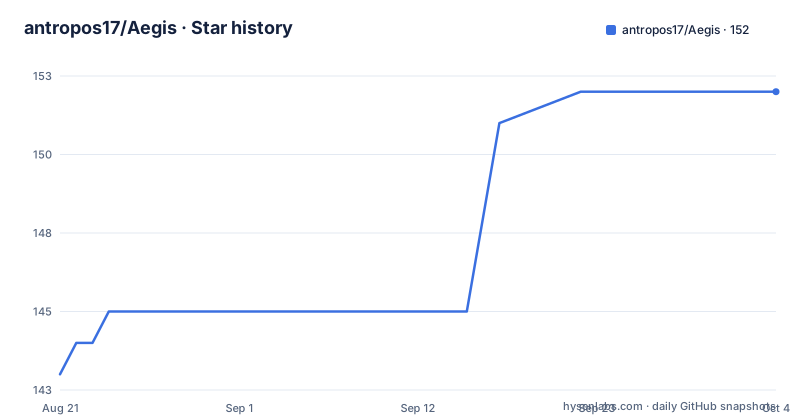
Star history
- antropos17/Aegis152 ★ · +9
| Repository | 2026-08-21 | 2026-10-04 |
|---|---|---|
| antropos17/Aegis | 143 | 152 |
9 Stars in the last 44 days, measured from the daily GitHub snapshot. Compare with other projects
Editorial analysis
The Problem: Agents That Do Not Cooperate with Oversight
Most AI-agent oversight tools instrument the agent itself: a Claude Code plugin, an IDE extension, or an SDK wrapper. That approach has a structural blind spot. An agent only shows up if it, or its user, installed the hook. A raw python autogpt.py, an unwrapped binary, or a tool that simply does not cooperate is invisible to in-agent instrumentation. Aegis addresses this by sitting at the OS layer. It watches process, file, and network activity from outside the agents, so what it sees does not depend on the agent's cooperation. It only depends on Aegis's own coverage, which is signature- and heuristic-based. The intended user is someone who needs to audit what an AI agent did on a machine, regardless of whether the agent was built to be monitored.
The Evidence Graph: Instance Identity and Attribution
The core differentiator is not the sensors. It is that every event is attached to an agent instance, with evidence you can audit. An agent is keyed as pid plus OS birth time, called instanceId. A recycled PID becomes a new instance, not a continuation of the old one's history. This prevents a common failure mode where a process ID reused by a different process inherits the previous owner's audit trail. Identity caching is gated by a witness, and CI runs an injection proof with 4 mutants that goes red if an identity could ever be served from a stale cache. Every audit record carries pid, instanceId, and an attribution object with one of three statuses: confirmed, inferred, or unattributed. These are backed by a closed registry of evidence codes. When Aegis does not know which agent touched a file, it says unattributed. It never invents an owner. That is a deliberate design choice, and it is the right one for an audit tool.
What Aegis Observes: Processes, Files, Network, Behavior
The README breaks observation into four layers. Processes: detection covers 110 agents with 262 process-name signatures, parent-chain resolution, IDE host detection, and WSL and IDE-extension discovery. Files: a chokidar watch on sensitive directories like .ssh, .aws, .gnupg, .env files, and cloud configs, plus the registered config paths of known agents. On Windows, it also detects open handles and Restart-Manager read detection. Network: outbound TCP per agent process, forward-confirmed reverse DNS, and a verdict per endpoint: allowlisted, unknown, or flagged. An unidentified endpoint is never displayed as safe. Behavior: 73 detection rules across 8 categories, defined in YAML and hot-reloaded. It uses rolling 10-session baselines and anomaly scoring over four axes: network, filesystem, process, and baseline. Local LLMs are probed at runtime for Ollama and LM Studio, including loaded models. Other runtimes like vLLM and llama.cpp are detected by process signature. The counted facts are not hand-maintained: npm run counts:check re-derives every documented counter from the tree on each CI run and fails the build if a number drifts.
Getting It Running: Commands and Configuration
The repository is a JavaScript project with a CommonJS monitoring engine, TypeScript in the renderer and shared types. The README does not give a full installation walkthrough, but it points to a Download link and a releases page. The latest release is aegis-v0.13.0-alpha, dated 2026-08-23. The project uses npm scripts for verification. The README names two: npm run counts:check, which re-derives documented counters and fails the build on drift, and npm run verify:gate, which runs an injection proof for identity caching. These are not optional extras; they are part of the CI pipeline. The behavior rules are YAML files that are hot-reloaded, so you can edit detection rules without restarting the application. The configuration keys are not documented in the README beyond the sensitive directory list. You would need to inspect the repository or the docs folder for a full config reference. The homepage is aegisprotect.vercel.app, but the README does not describe what is there.
Known Limits: Polling Gaps and Platform Degradation
The README is unusually honest about limitations. Coverage is signature- and heuristic-based, so an agent binary that matches none of the 110 agents is not detected. Polling has a blind spot: a process born and dead between scan ticks, which are about 10 seconds, is never observed. Per-event capture via ETW is on the roadmap, with a static recon already in docs/recon/kernel-file-etw.md. The most serious limit is on macOS and Linux: those platforms currently supply no OS birth time, so instance identity falls back to PID only and is unsafe under PID reuse. Token-cost tracking is Windows-only. The renderer keeps bounded event windows that can disagree with totals, and there is no mention of a fix. These are not hidden caveats; they are stated in the README and in the correctness audit. For a monitoring tool, this level of transparency is a feature, but it also means you cannot trust it blindly on non-Windows platforms.
Monitor-First: A Camera, Not a Guard
The README is explicit: Aegis is a camera, not a guard. It observes and logs, but it does not block agents at the OS level today. There are no kernel hooks and no automatic enforcement. Process control, such as kill, suspend, or resume, is manual and user-invoked only. Active blocking is on the roadmap, not in the current release. This is a critical scoping decision. If you need to stop an agent from exfiltrating data, Aegis will not do that. It will give you a log of the connection and the file access, but the action is yours. The README advises pairing it with sandboxing when you need enforcement. That is honest positioning, but it also means Aegis is not a complete security solution. It is an audit trail generator.
Alternatives and the Trade-off with Hook-Based Tools
Aegis is not the only tool observing agents locally. The README names AgentSight, which observes from the eBPF layer on Linux. AgentSight takes a different approach: eBPF gives it kernel-level visibility on Linux, which can catch events that polling misses. However, eBPF is Linux-specific and requires kernel privileges. Aegis is cross-platform in principle, though with degraded identity on macOS and Linux. Hook-based tools, such as a Claude Code plugin or an SDK wrapper, see intent: prompts and tool calls inside the agents that opted in. Aegis sees effects: processes, files, and connections, for whatever runs on the machine, without requiring cooperation. The README argues these are complementary rather than competing. That is accurate. If you need to know why an agent made a decision, you need hooks. If you need to know what it actually did, you need an OS-level observer. The choice depends on your threat model.
Maintenance, Licensing, and Upgrade Cost
Aegis is licensed under MIT, which is permissive and imposes few obligations beyond preserving the copyright notice. The project is actively maintained, with three alpha releases in the two weeks before the last push: v0.11.0-alpha on 2026-08-11, v0.12.0-alpha on 2026-08-22, and v0.13.0-alpha on 2026-08-23. The alpha status means APIs and behavior can change between releases. The README mentions a correctness audit and benchmark pages, which suggests a serious engineering process, but it also means you should check the changelog before upgrading. The hot-reloaded YAML rules reduce the cost of rule updates, but the core engine is versioned. The documentation includes a note that some labels have been renamed since the demo was recorded, so screenshots may not match the current UI. There is no stated upgrade path or migration guide in the README. For a tool that is still in alpha, you should budget time for breaking changes.
Editorial conclusion
Adopt Aegis if you need independent, auditable visibility into what AI agents actually do on a Windows machine, especially for compliance or incident review, and you accept a monitoring-only tool. Do not adopt it if you need enforcement, macOS or Linux instance identity, or coverage for agents that do not match its signatures. Before relying on it, verify that your agents are in the 110-agent signature list, test the polling interval against your workloads, and confirm the Windows-specific identity and token-cost features are essential for your use case, since those are degraded elsewhere.
Frequently asked questions
What is Aegis in the antropos17 repository?
Aegis is a desktop application for monitoring and action review around local AI agents. It records processes, file activity, TCP endpoints and attribution evidence for agents running on the machine, without requiring an agent plugin.
Does Aegis block or contain an AI agent automatically?
No. Default monitoring observes and logs, and kill, suspend and resume are manual actions. The opt in routes that control execution cover only selected launches that an operator has explicitly configured.
What does Aegis send outside the local machine?
Monitoring data is stored locally with no usage telemetry and no cloud sync. Endpoint naming uses DNS queries, optional AI analysis sends activity metadata to Anthropic on request, and update checks contact GitHub.
How does Aegis decide an endpoint is safe to see?
It records TCP endpoints for detected agent PIDs, applies forward confirmed reverse DNS, and labels each one allowlisted, unknown or flagged. An allowlisted endpoint is a network observation, and the project states that endpoint allowlists do not establish that an agent is safe.
When does an Aegis action actually launch?
An explicit CLI launch happens on allow only. Ask, deny and preparation failures do not launch, and a policy deny cannot be overridden through terminal confirmation, which reviews the complete effective action and confirms one launch attempt.
How many actions can the Aegis MCP catalog expose?
Up to eight operator selected actions, each offered with empty tool arguments. An optional terminal review broker requires fresh confirmation per eligible call, and setup is configured explicitly from a terminal.
Official sources
Add this badge to your README
If you maintain this project, the badge below links readers to this analysis and shows its maintenance status from the daily GitHub snapshot. Paste the markdown into your README; add ?metric=license or ?metric=stars to the image URL for a different field.

[](https://hysenlabs.com/projects/antropos17-aegis)Star history chart for your README
[](https://hysenlabs.com/projects/antropos17-aegis)