OpenPencil keeps the design file as JSON and lets agents edit it
The world's first open-source AI-native vector design tool and the first to feature concurrent Agent Teams. Design-as-Code. Turn prompts into UI directly on the live canvas. A modern alternative to Pencil.
At a glance
- What is it?
- OpenPencil is a Rust vector design tool that calls itself AI native: prompts land on an infinite canvas, an orchestrator splits a page into regions several agents work at once, and the design itself lives in `.op` files that are JSON, diffable, and exportable to React, Tailwind, Flutter, SwiftUI and more. It ships as one self contained binary, a web app, a CLI and an MCP server.
- Who is it for?
- OpenPencil is worth trying if you want a design artefact in version control that diffs like code, or if you want an agent to read and modify `.op` files through the MCP server from the CLI you already use. Check your toolchain first: the workspace declares a rust-version floor of 1.94, the crates live under a crates/* glob with four vendored directories excluded, and the newest published tag is v0.8.4 while Cargo.toml already reads 0.8.5.
- Can I use it commercially?
- Yes. MIT is a permissive licence: you can use, modify and sell software built on it, as long as you keep its copyright and licence notices.
- Is it still maintained?
- Yes. The repository received new commits within the last day.
- What is it written in?
- Mainly Rust, according to GitHub's language statistics.
Answers come from the project's GitHub data, last synced on October 22, 2026, and from our analysis. They are not legal advice.
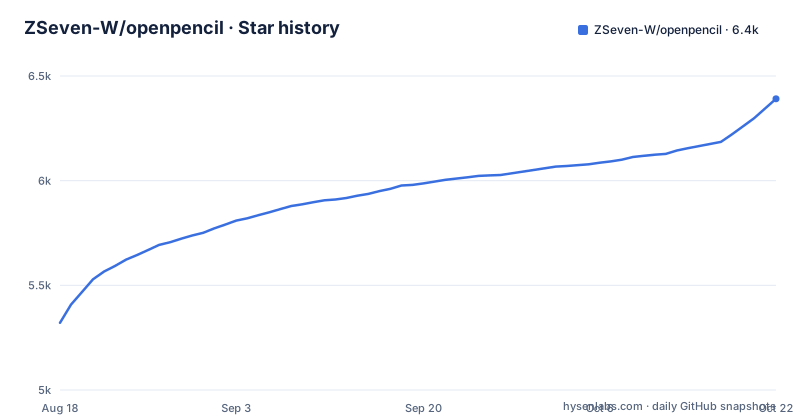
Star history
- ZSeven-W/openpencil6,391 ★ · +1,070
| Repository | 2026-08-18 | 2026-10-22 |
|---|---|---|
| ZSeven-W/openpencil | 5.3k | 6.4k |
1,070 Stars in the last 65 days, measured from the daily GitHub snapshot. Compare with other projects
Editorial analysis
.op files are JSON, which is the design-as-code claim
The core bet is the file format. A `.op` file is JSON, described as human readable, Git friendly and diffable, and design variables in it generate CSS custom properties. That single decision is what separates this from a canvas that only exports at the end: the design is text in a repository, so two people can review a change to it the way they review code. The repository root even carries a checked in document called lumina-landing.op, which is what that looks like in practice. Code export is named in the same breath, starting with React and Tailwind or HTML and CSS. Note the neighbouring format too: the Design System Kit imports and exports kits from `.pen` files, so there are two file conventions in play, one of them a file the tool reads but does not write as its own native document.
An orchestrator splits a page into regions and streams in parallel
The headline feature is concurrency, and the mechanism is spatial. The orchestrator decomposes a complex page into sub-tasks by region, so several agents work on different sections at the same time, with hero, features and footer named as the examples, each streaming in parallel and each carrying its own canvas indicator. The simpler path is Prompt to Canvas: describe a UI in natural language and watch it appear on the infinite canvas in real time with streaming animation, then select elements and chat to modify what is already there. What the file does not describe is what happens when one of those parallel sub-tasks goes wrong, so the ergonomics of a partially finished page are something you would learn by using it rather than by reading.
Prompts are rewritten per model family before they leave
Multi-model intelligence is described as automatic adaptation to each model's capabilities, and three cases are spelled out. Claude gets the full prompts with thinking enabled. GPT-4o and Gemini have thinking disabled. Smaller models, naming MiniMax, Qwen and Llama, receive simplified prompts for reliable output. That means the instruction you type is not the instruction the model receives, and the same page request can produce materially different results depending on which model is configured. It also means the quality ceiling of a small model is partly a prompt problem the tool tries to solve rather than a limit you have to accept. The file does not say who selects the model or how that choice is made per task.
One binary, no browser engine, and a wasm renderer for embedding
Distribution is deliberately narrow. There is a web app plus a native desktop build for macOS, Windows and Linux, all sharing one Rust core, delivered as a single self contained binary with no browser engine, and `.op` files are associated with the app so a double click opens them. The embeddable side is `op-web-sdk` in vanilla form plus React and Vue adapters, and what you embed is a read only `.op` viewer powered by the same wasm renderer the editor ships. That is the limit to plan around: you can drop a live preview of a design into your own product, not an editor. Collaboration runs over authenticated peer to peer sessions with a public relay and built in regional hubs, joined with a short pairing code, with live remote cursors and conflicts resolved through per edit detail and replay.
The MCP server is the bridge, and the export list is long
Agents reach the design file through a built in MCP server with one click install into Claude Code, Codex, OpenCode, Kiro or Copilot CLIs, letting any MCP compatible agent read, create and modify `.op` files from the terminal. The same idea is available to your own scripts through a CLI named `op`, where `op design` and `op insert` drive a batch design DSL and node manipulation, and input can be piped in from files or standard input, working against either the desktop app or a web server. Export is where the file format pays off: one `.op` file exports to React and Tailwind, HTML and CSS, Vue, Svelte, Flutter, SwiftUI, Jetpack Compose and React Native, with design variables becoming CSS custom properties in the output.
A crates glob with three default members and a Rust 1.94 floor
The build is a Cargo workspace whose members are a glob rather than a written list:
members = ["crates/*"]Four vendored directories are excluded, vendor/agent, vendor/anthropic-agent-sdk, vendor/casement and vendor/jian, along with node_modules. The default members are exactly three crates, op-host-desktop, op-cli and op-host-web-server, which the comments explain so that a bare cargo build or cargo test compiles only the shippable native artifacts. The wasm host is built on purpose instead:
cargo build -p op-host-web --target wasm32-unknown-unknownCI and the package.json cargo scripts pass --workspace explicitly, which overrides the default set. The workspace declares version 0.8.5, edition 2021 and a rust-version floor of 1.94, chosen because the official github-copilot-sdk requires it. That floor is the practical prerequisite for building from source.
Two package managers, a releases page, and a separate Windows build doc
Installation is documented per platform. On macOS through Homebrew:
brew tap zseven-w/openpencil
brew install --cask openpencil
On Windows through Scoop:
scoop bucket add openpencil https://github.com/zseven-w/scoop-openpencil
scoop install openpencil
Linux and Windows users can also take a direct download from the GitHub releases, and building from source on Windows is delegated to a separate document at docs/build_windows/BUILD_WINDOWS.md. Everything after that is packaging detail: a Dockerfile.web-rust and a matching ignore file sit at the root, and the tree also carries flake.nix with flake.lock for Nix, a deny.toml, a .githooks directory and three top level directories named 3210, 3211 and 3212 that nothing in the file explains.
The README opens with model API sponsors, not with instructions
Before any documentation, the file shows two sponsor panels. One is for Infestar.cc, written in Chinese and described as sponsoring OpenPencil and providing model service support, the other for Fluxion AI offering one unified API across models with credits for people who sign up through the link. Both panels are referral links with promotional codes in the URLs. That is worth knowing as a reader, because it tells you where model access is meant to come from: a third party API you configure, not something the binary carries. The rest of the front page is badges and a demo video link, then fifteen translated versions of the README in languages from Simplified Chinese to Hindi, with a Discord invite for chat.
Editorial conclusion
OpenPencil is worth trying if you want a design artefact in version control that diffs like code, or if you want an agent to read and modify `.op` files through the MCP server from the CLI you already use. Check your toolchain first: the workspace declares a rust-version floor of 1.94, the crates live under a crates/* glob with four vendored directories excluded, and the newest published tag is v0.8.4 while Cargo.toml already reads 0.8.5. Also decide who hosts your model access before you design anything, because the file promotes third party model APIs rather than bundling one, and remember the embeddable SDK gives you a read only viewer rather than an editor inside your own app. The project is MIT licensed and its last push to main is dated 2026-10-03.
Frequently asked questions
What is OpenPencil?
It describes itself as an open source AI native vector design tool with concurrent agent teams, Design-as-Code, a built-in MCP server and multi model intelligence. A `.op` file is JSON, so a design is diffable text, and the app runs as a web app or a native desktop build from one Rust core packaged as a single self contained binary with no browser engine.
How do I use open pencil day to day?
Install it with `brew install --cask openpencil` on macOS or `scoop install openpencil` on Windows, or download from the releases, then describe a UI in natural language and watch it appear on the infinite canvas. From the terminal you can drive the same file through the `op` CLI with `op design` and `op insert`, or install the MCP server into Claude Code, Codex, OpenCode, Kiro or Copilot.
How does OpenPencil compare with pencil.dev?
The repository calls itself a modern alternative to Pencil and does not lay out a feature by feature comparison. What it states about itself is a Rust core with a single self contained binary, `.op` files stored as JSON, concurrent agent teams working on page regions at once, and export from one file to React and Tailwind, HTML and CSS, Vue, Svelte, Flutter, SwiftUI, Jetpack Compose and React Native.
What is an alternative to open pencil for design as code?
OpenPencil presents itself as that alternative, with JSON `.op` files, design variables that become CSS custom properties, a batch design DSL in the `op` CLI and an MCP server for editing those files from an agent CLI. It also offers a style guide library with tag based fuzzy matching for glassmorphism, brutalist and retro styles, plus a Design System Kit that imports and exports from `.pen` files.
Official sources
Add this badge to your README
If you maintain this project, the badge below links readers to this analysis and shows its maintenance status from the daily GitHub snapshot. Paste the markdown into your README; add ?metric=license or ?metric=stars to the image URL for a different field.

[](https://hysenlabs.com/projects/zseven-w-openpencil)Star history chart for your README
[](https://hysenlabs.com/projects/zseven-w-openpencil)