Hubble.md: an Electron notepad whose folder is the API for your agent
The best notepad for you and your agents
At a glance
- What is it?
- Hubble is a desktop notepad that keeps your notes as Markdown and HTML files, lets a coding agent point at the notes folder and live reload as the agent edits, and can turn a folder into an HTML app. Sync is the unfinished part: both the filesystem sync engine and the browser app are marked heavily work in progress.
- Who is it for?
- Hubble earns its place if your notes are a plain folder of files and you want an agent to edit them alongside you, since live reload turns that folder from a static archive into a shared workspace, and the HTML app layer turns the same folder into something interactive.
- Can I use it commercially?
- Yes. MIT is a permissive licence: you can use, modify and sell software built on it, as long as you keep its copyright and licence notices.
- Is it still maintained?
- Yes. The repository last received commits 1 day ago.
- What is it written in?
- Mainly TypeScript, according to GitHub's language statistics.
Answers come from the project's GitHub data, last synced on October 23, 2026, and from our analysis. They are not legal advice.
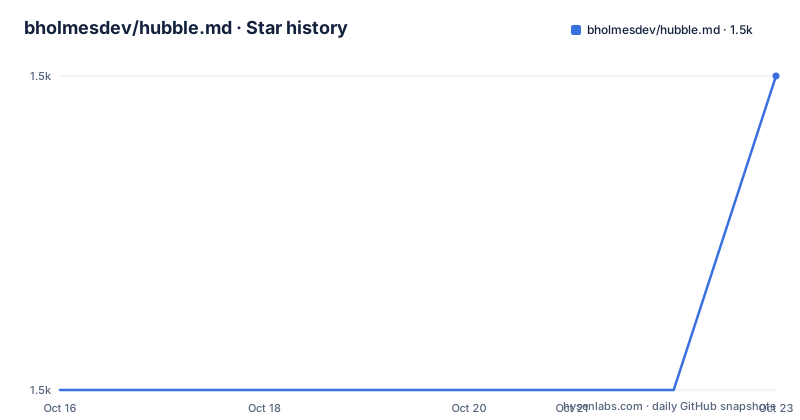
Star history
- bholmesdev/hubble.md1,484 ★ · +1
| Repository | 2026-10-16 | 2026-10-23 |
|---|---|---|
| bholmesdev/hubble.md | 1.5k | 1.5k |
1 Stars in the last 7 days, measured from the daily GitHub snapshot. Compare with other projects
Editorial analysis
The editor core is Tiptap with a Markdown conversion layer
The package list describes the architecture better than the feature list does. packages/editor is a framework agnostic Markdown editor core built on Tiptap plus Markdown conversion, and packages/ui is the shared React editor UI sitting on that core. Separating them is what lets a React app, the Electron shell and any future surface share one editor without sharing one framework. What the user sees is described as familiar: the writing experience from Notion or Apple Notes but for Markdown, with slash commands, Markdown shortcuts, and file properties through frontmatter. That combination is the actual product claim. Most editors give you raw Markdown and no structured editing; most rich text editors give you a proprietary document format. Hubble combines structured editing with Markdown files, which also supports the agent workflow.
Point an agent at the folder and the window follows its edits
The agent ready claim is mechanical: point your agent at your notes folder to start collaborating, and Hubble live reloads as your agent edits. No import step, no copy paste, no sync conflict dialog, because the folder is the document store and the app is a viewer over it. That changes what an agent is useful for in a notes app. It is not a chatbot that summarises your notes; it is a second writer with file access, doing the reformatting, the filing and the bulk edits that you would otherwise do by hand, with the window updating as it works. The limitation is the mirror image of the feature. Because there is no transaction around it, an agent that rewrites files badly shows you the damage live, and the safety net is version control rather than anything inside the app.
HTML apps and embeds get their own injected runtime
Beyond Markdown, the app lets you build and view HTML based apps. The mechanics are a separate repository of skills you install and a runtime package injected into those apps and embeds: packages/runtime is described as the runtime injected into HTML Apps and Embeds, and packages/cli is a hubble command for syncing a folder from the terminal. The intent is to turn a folder of notes into a table, a bookshelf, a map, or whatever you can describe to a coding agent. So the note folder becomes data for a small application, and the app is not limited to rendering Markdown. CONTEXT.md exists as the shared glossary for terms such as Workspace, HTML App and Embed, which is a hint that this is a defined model rather than a loose convention, and is the file to read if you are writing anything against it.
Sync is the part that is not finished
Two packages carry an explicit warning in the repository structure listing. packages/sync, the filesystem sync engine, is marked heavily work in progress, and apps/www, the React plus Convex web app that is Hubble in the browser, is marked heavily work in progress as well. The supporting pieces are named: packages/convex-client is the Convex client the sync engine uses, and packages/sync-backend is the Convex backend powering Cloud Sync. Read that as the adoption boundary. The desktop app working against a local folder is the finished path; a browser version and multi device sync are the paths being built. If your notes must be reachable from a machine that is not the one running the desktop app, this is not the answer yet, and the Convex dependency is worth evaluating on its own terms before you depend on it.
Building is three pnpm bundle scripts and a lot of package.json
Prerequisites are Node.js, pnpm, and on macOS the Xcode Command Line Tools via xcode-select --install. From the repo root the desktop bundle is one command per target:
pnpm install
pnpm bundle:desktop:mac
# or for windows:
pnpm bundle:desktop:win
# or for linux:
pnpm bundle:desktop:linux
The result lands under apps/desktop/release/, and the day to day commands sit alongside it:
pnpm dev:desktop      # run the desktop app in dev
pnpm build            # check, build all packages, and typecheck
pnpm check            # run Biome
The root package.json shows why those scripts exist rather than being one long pipeline. bundle:desktop:mac first builds every dependency of the desktop package with pnpm --filter @hubble.md/desktop... --if-present build, then runs the bundle script inside that package. build itself is pnpm check, then a filtered build across packages, then typecheck, so a type error fails your bundle rather than shipping. There are also arm64 variants for Windows and Linux, and a postinstall hook that runs install-electron in the desktop package.
macOS is signed, Windows and Linux are not
The download section covers macOS, Windows and Linux from the releases page, and distinguishes the three in one sentence: macOS builds are signed and notarized, while Windows and Linux builds are unsigned, so your operating system may warn before the first launch. That is a real difference in first run experience, and on Linux it means you are deciding whether to trust an unsigned binary from a GitHub release. Signing infrastructure for those two platforms is not something the README promises, so treat it as the current state rather than something likely to change next month. If your organisation blocks unsigned binaries outright, only the macOS path is frictionless today.
Repository automation is agent run, and says so
A section that most projects of this size leave implicit, Hubble states plainly. Repository automation runs on Warp Factory agents, and when you open an issue or a pull request an agent handles it: new issues get a triage state label and a comment explaining the decision, issues labelled ready-to-implement get a draft pull request, and pull requests get a code review before a human looks at them. Every comment, review and pull request an agent produces is signed with a link back to Warp, so it is always clear what a person wrote and what an agent wrote, and the workflows live in .github/workflows. The repository also carries .agents/, .claude/ and .codex/ directories alongside AGENTS.md, CLAUDE.md and skills-lock.json, which is the shape of a project that expects coding agents to work in it. TELEMETRY.md at the root is the file to read if you care what the app sends.
Against a folder of Markdown files and an editor
The honest baseline is what you already have: a directory of .md files, your editor of choice, and an agent with shell access to that directory. That setup has no live reload, no slash commands and no HTML app layer, but it has no dependency, no unsigned binary and no half finished sync engine. Hubble's advantage is the viewer experience, particularly the rich editing on top of Tiptap and the fact that an agent's edits appear without a manual reload. Its cost is that your notes now depend on an app whose sync path is unfinished, and in exchange for that you get a nicer window. If you write your notes in a folder you control and open them in whatever editor you like, this project is optional. If you want the app and the agent in the same window, it is the point.
Editorial conclusion
Hubble earns its place if your notes are a plain folder of files and you want an agent to edit them alongside you, since live reload turns that folder from a static archive into a shared workspace, and the HTML app layer turns the same folder into something interactive. Skip it if you need reliable multi device sync today, because both packages/sync and apps/www are marked heavily work in progress, and expect an OS warning on Windows and Linux since those builds are unsigned while only macOS builds are signed and notarized. Before building from source, install Node.js, pnpm and on macOS the Xcode Command Line Tools, then run pnpm bundle:desktop:linux or the matching target script. The last push was on 2026-10-11 and the newest tag is desktop-v0.2.1 from 2026-09-28.
Frequently asked questions
How do I build the Hubble desktop app from source?
Install Node.js, pnpm and, on macOS, the Xcode Command Line Tools with xcode-select --install, then run pnpm install followed by pnpm bundle:desktop:mac, pnpm bundle:desktop:win or pnpm bundle:desktop:linux from the repo root. The production bundle is written under apps/desktop/release/.
Can an AI agent edit my notes in Hubble?
Yes. The README says you point your agent at your notes folder to start collaborating, and Hubble live reloads as the agent edits. You can also install the hubble-skills repository and tell a coding agent to build HTML based apps over your notes folder.
Is Hubble sync between devices finished?
Not yet. The repository structure marks packages/sync, the filesystem sync engine, and apps/www, the React plus Convex web app, as heavily work in progress, with sync-backend described as the Convex backend powering Cloud Sync.
Official sources
Add this badge to your README
If you maintain this project, the badge below links readers to this analysis and shows its maintenance status from the daily GitHub snapshot. Paste the markdown into your README; add ?metric=license or ?metric=stars to the image URL for a different field.

[](https://hysenlabs.com/projects/bholmesdev-hubble-md)Star history chart for your README
[](https://hysenlabs.com/projects/bholmesdev-hubble-md)Was this useful?