GitHub Readme Stats: A Handy Badge Generator That Is Now Officially Unmaintained
:zap: Dynamically generated stats for your github readmes. Use &theme=THEME_NAME parameter like so : All inbuilt themes GitHub Readme Stats comes with several built-in themes (e.g.
At a glance
- What is it?
- GitHub Readme Stats generates dynamic stats cards for profile READMEs. The project is no longer maintained, and the README directs users to a fork. This review covers how it works, how to run it, and what to check before adopting it.
- Who is it for?
- Adopt GitHub Readme Stats only if you accept its unmaintained status and plan to self-host or use the GitHub Actions workflow. Do not rely on the public Vercel instance for production profiles.
- Can I use it commercially?
- Yes. MIT is a permissive licence: you can use, modify and sell software built on it, as long as you keep its copyright and licence notices.
- Is it still maintained?
- Yes. The repository last received commits 44 days ago.
- What is it written in?
- Mainly JavaScript, according to GitHub's language statistics.
Answers come from the project's GitHub data, last synced on November 13, 2026, and from our analysis. They are not legal advice.
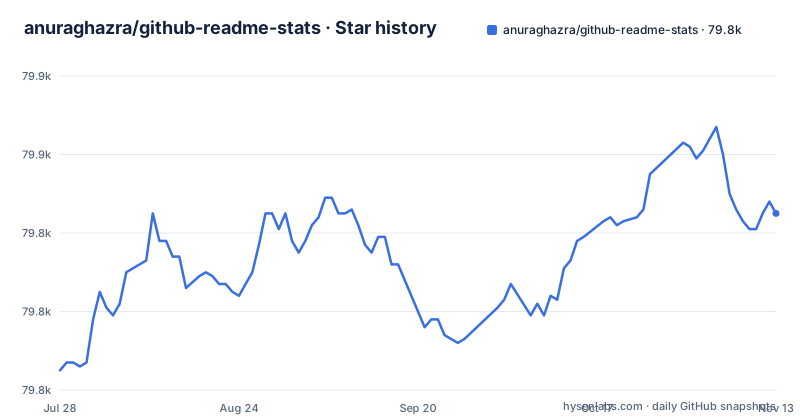
Star history
- anuraghazra/github-readme-stats79,845 ★ · +40
| Repository | 2026-07-28 | 2026-11-13 |
|---|---|---|
| anuraghazra/github-readme-stats | 79.8k | 79.8k |
40 Stars in the last 108 days, measured from the daily GitHub snapshot. Compare with other projects
Editorial analysis
What This Project Solves and Who It Is For
GitHub Readme Stats solves a narrow but common problem: profile READMEs are static, and developers want live metrics without manual updates. This project generates SVG cards that show stats like stars, commits, and pull requests, plus top languages and pinned repositories. The target audience is GitHub users who maintain a profile README and want a quick visual summary of their activity. The README describes it as a way to get dynamically generated stats on your READMEs. It is not a general analytics tool. It is a badge generator with a specific output format. The project is written in JavaScript and distributed under the MIT license. The homepage points to a public Vercel instance, but that instance is explicitly labeled as best-effort and unreliable under load.
The Core Mechanism: Image Endpoints and Query Parameters
The system works by exposing HTTP endpoints that return SVG images. The README shows a markdown image tag that references the public instance at `https://github-readme-stats.vercel.app/api` with a `?username=` value. The endpoint reads the username, queries the GitHub API, and renders a card. The README lists several card types: GitHub Stats Card, Top Languages Card, Extra Pins, Gist Pins, and WakaTime Stats Card. Each has its own endpoint and parameters. For example, the stats card supports `?username=` and options to hide individual stats, show icons, or set a theme. The top languages card has a documented algorithm and options to exclude repositories or hide specific languages. The ranking system on the stats card uses a weighted sum of percentiles based on exponential and log-normal distributions, with ranks from S to C. This is a specific implementation detail visible in the source file `src/calculateRank.js`. The data flow is straightforward: the client requests an image, the server fetches from the GitHub API, and returns a generated SVG.
Getting It Running: Self-Hosting and GitHub Actions
The README recommends two deployment methods. The first is GitHub Actions, which generates cards in your profile repository. The second is self-hosting on Vercel or another platform. For self-hosting, you need a GitHub Personal Access Token (PAT). On Vercel, you set the token as an environment variable and deploy. For other platforms, the same token is required. The public instance at `https://github-readme-stats.vercel.app/api` is available, but the README warns it can be unreliable due to rate limits and traffic spikes. The recommended approach is to deploy your own instance. The README also mentions keeping your fork up to date, which implies you may need to maintain a fork if you customize the code.
The Unmaintained Notice: A Hard Stop for New Users
The most important fact in the README is the caution at the top: the repository is no longer maintained. The message directs users to a successor project called GitHub Stats Extended, described as an actively maintained fork with additional features and improved stability. This is not a subtle hint. The original project is effectively frozen. The documentation is kept for reference only, as stated in the collapsible section. This changes the adoption calculus. If you start a new profile today, you are building on a project whose maintainer has walked away. The README does not say why it is unmaintained, but the notice is unambiguous. For an engineer evaluating dependencies, this is a red flag. The public instance may still work, but there is no one fixing bugs or responding to issues. The issue tracker and pull request system remain open, but the top issues dashboard is mentioned as a way to prioritize work, which suggests the team was already stretched before the unmaintained notice.
Limitations: Rate Limits, Private Stats, and the Public Instance
The README documents several limitations. The public Vercel instance is best-effort and can be unreliable due to rate limits and traffic spikes. This is a concrete failure mode: if you embed the public URL in your README, your card may not load during peak times. The README says the project uses caching to improve stability, and recommends self-hosting or the GitHub Actions workflow for reliable cards. Another limitation is that the stats card only shows public repository statistics by default. To show private statistics, you must deploy your own instance with your own GitHub API token. This is a significant constraint for users who want a complete picture of their activity. The top languages card has a documented language stats algorithm, and options to exclude individual repositories and hide individual languages. The project is also not a good fit for users who want a static badge that never changes; it is inherently dynamic and requires a server or an Action run.
Alternatives: The Fork and the Action
The README itself names two alternatives. The first is GitHub Stats Extended, the actively maintained fork. The second is GitHub Readme Stats Action, which is a GitHub Action that generates cards. The difference in approach is significant. The original project is a hosted service, either public or self-hosted, that generates images on request. The Action runs as part of a workflow and writes the cards to the repository, making them static files. This means the Action avoids the need for a server, but it requires a workflow run to update the cards. The README does not compare the features in detail, but it states the fork has additional features and improved stability. For a new user, the choice is between a static generation approach (Action) and a dynamic service (fork or self-hosted original). The original project is the wrong tool if you want a maintained dependency; the fork or the Action are the right directions.
Maintenance and Upgrade Costs
The maintenance cost is currently zero because the project is unmaintained. There are no recent releases listed. The README includes a section on keeping your fork up to date, which implies that self-hosting requires you to track upstream changes. Since upstream is frozen, that cost disappears, but so does the benefit of updates. The license is MIT, which permits reuse and modification, so forking is legally straightforward. The README mentions a donation link for the original creator, but that is not a maintenance commitment. The upgrade path is clear: migrate to GitHub Stats Extended or use the Action. The documentation is explicitly marked as outdated, so any features described may not reflect the current state of the fork. If you adopt this project, you are adopting a snapshot. The cost is not in maintaining the code but in accepting that any bug you find will not be fixed here. The alternative is to invest time in evaluating the fork's documentation and testing its stability.
Editorial conclusion
Adopt GitHub Readme Stats only if you accept its unmaintained status and plan to self-host or use the GitHub Actions workflow. Do not rely on the public Vercel instance for production profiles. Before adopting, verify the fork GitHub Stats Extended for active maintenance and check the license terms. If you need reliable cards today, deploy your own instance or switch to the fork.
Frequently asked questions
How can I see my GitHub Readme Stats?
Paste the card markup into your README and change the `?username=` value to your GitHub username. Without any deployment of your own, that card is served from the project's public Vercel instance at `https://github-readme-stats.vercel.app/api`.
How do I use GitHub Readme Stats?
The basic use is a markdown image in your README with the `?username=` parameter set to your account. For cards that stay available, the README points to self-hosting on Vercel or another platform, or to the GitHub Actions workflow that generates cards in your profile repository.
Is GitHub Readme Stats down?
The project describes the public instance as best-effort and says it can be unreliable because of rate limits and traffic spikes, tracked in issue 1471. Caching is used to improve stability, and self-hosting or the GitHub Actions workflow is the documented path when a card will not render.
Official sources
Add this badge to your README
If you maintain this project, the badge below links readers to this analysis and shows its maintenance status from the daily GitHub snapshot. Paste the markdown into your README; add ?metric=license or ?metric=stars to the image URL for a different field.

[](https://hysenlabs.com/projects/anuraghazra-github-readme-stats)Star history chart for your README
[](https://hysenlabs.com/projects/anuraghazra-github-readme-stats)Was this useful?