FxEmbed: A Self-Hostable Fix for Broken X and Bluesky Embeds
Fix X/Twitter and Bluesky embeds! Use multiple images, videos, polls, translations and more on Discord, Telegram and others.
At a glance
- What is it?
- FxEmbed is a Cloudflare Worker that rewrites X, Twitter, and Bluesky links into rich embeds for Discord, Telegram, and other platforms. It is MIT-licensed, self-hostable via Docker, and worth a look if you are tired of single-image previews.
- Who is it for?
- Adopt FxEmbed if you run a Discord or Telegram community that regularly shares X, Twitter, or Bluesky links and you want richer embeds without relying on a third-party public service. Skip it if you cannot handle the operational burden of running a Cloudflare Worker or if your traffic is trivial and the public fxtwitter.com instance is reliable enough.
- Can I use it commercially?
- Yes. MIT is a permissive licence: you can use, modify and sell software built on it, as long as you keep its copyright and licence notices.
- Is it still maintained?
- Yes. The repository received new commits within the last day.
- What is it written in?
- Mainly TypeScript, according to GitHub's language statistics.
Answers come from the project's GitHub data, last synced on November 14, 2026, and from our analysis. They are not legal advice.
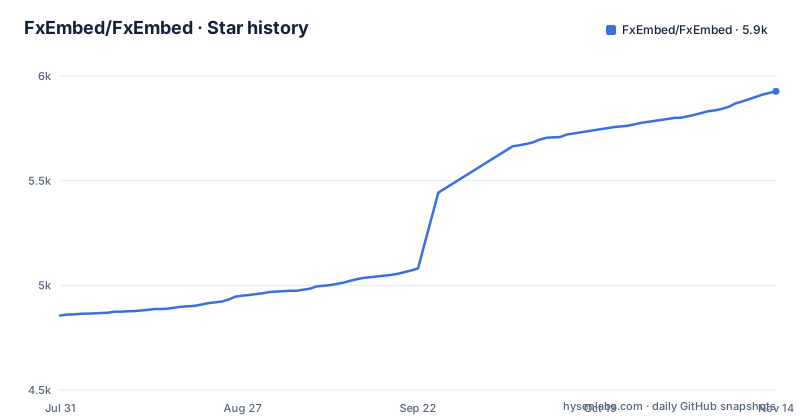
Star history
- FxEmbed/FxEmbed5,927 ★ · +1,071
| Repository | 2026-07-31 | 2026-11-14 |
|---|---|---|
| FxEmbed/FxEmbed | 4.9k | 5.9k |
1,071 Stars in the last 106 days, measured from the daily GitHub snapshot. Compare with other projects
Editorial analysis
The Problem: Link Previews That Lose Most of the Post
When you paste a link to an X post or a Bluesky post into Discord or Telegram, the platform fetches a preview. For X, that preview is often a single image and a short text snippet. Videos, polls, multiple images, and quoted posts are missing. FxEmbed exists to fix that. It is a service that re-renders the link as a richer embed, showing videos, polls, translations, and multiple images. The intended users are community moderators, bot operators, and anyone who runs a chat server where people share social media links frequently. The README positions it as the home of FxTwitter, FixupX, and FxBluesky, which are the three URL rewriting schemes it supports.
How It Works: Host-Header Routing and URL Prefixes
FxEmbed is a Cloudflare Worker, not a conventional web server. It routes requests based on the Host header, which is how it distinguishes between the fxtwitter.com, fixupx.com, and fxbsky.app realms. The user-facing mechanism is simple: you add a prefix to the original link. For twitter.com, you insert 'fx' before the domain, so twitter.com/user/status/123 becomes fxtwitter.com/user/status/123. For x.com, you insert 'fixup', so x.com/user/status/123 becomes fixupx.com/user/status/123. For bsky.app, you add 'fx', so bsky.app/profile/user/post/abc becomes fxbsky.app/profile/user/post/abc. The worker then fetches the original post and generates an embed that Discord or Telegram can render. The README shows a curl command with a Host header and a Discordbot User-Agent, with the User-Agent set to Discordbot/2.0.
Running It: Docker and the Local Workers Runtime
The README gives a clear path to a local deployment. You copy three configuration files: .env.example to .env, wrangler.example.toml to wrangler.toml, and branding.example.json to branding.json. The .env file holds environment variables, wrangler.toml holds worker configuration, and branding.json is for custom branding. Then you run 'docker compose up -d --build'. The README says the Docker image uses node:24-bookworm-slim (the Dockerfile now uses node:26.12.0-bookworm-slim) because the Wrangler workerd binary is glibc-linked and does not run reliably on Alpine. That is a concrete detail: if you are used to Alpine-based images for size, you cannot use them here. The worker listens on localhost:8787. Because routing is by Host header, you test a specific realm with a curl command that sets the Host to fxtwitter.com and the User-Agent to Discordbot/2.0. Environment variables are bundled at build time, so changing domain lists requires a rebuild. Runtime secrets like CREDENTIAL_KEY and EXCEPTION_DISCORD_WEBHOOK can be passed through the shell or a Compose .env file.
Configuration Keys and Customization
The three configuration files are the core of customization. The .env file contains environment variables, and the README names two specific runtime secrets: CREDENTIAL_KEY and EXCEPTION_DISCORD_WEBHOOK. The README does not explain CREDENTIAL_KEY's exact role; the repository also ships a credentials.example.json and credentials:* scripts in package.json. EXCEPTION_DISCORD_WEBHOOK appears to be a webhook URL for sending error notifications to Discord. The branding.example.json file suggests you can customize the appearance of the embed, perhaps the footer or the icon, but the README gives no details on its schema. The wrangler.example.toml is the standard Cloudflare Wrangler configuration, which you would edit to set your own domains or zones. The documentation site, docs.fxembed.com, has an API reference and a deployment guide, but the README does not list the API endpoints. If you need to change the domain list, you edit the domain lists in .env (such as STANDARD_DOMAIN_LIST) and rebuild the Docker image, because those values are baked in at build time.
Limitations and Failure Modes
The most obvious limitation is that FxEmbed depends on the Host header to decide which realm to serve. If you open http://localhost:8787/ without a Host header, the README says you see the local realm prefixes rather than a specific realm. That is why the README shows the curl command with a Host header. In production, you need to have DNS pointing the fxtwitter.com, fixupx.com, and fxbsky.app domains (or your own domains) to your worker. Another limitation is that the worker fetches the original post, so if X or Bluesky changes their API or blocks the worker's requests, embeds will break. The README does not mention any fallback behavior. Also, the Docker image runs Wrangler's local runtime, which is not the same as the Cloudflare edge environment. That means performance and behavior may differ between local and production deployments. The README does not state whether the worker handles rate limits from Discord or Telegram, so you may need to add your own caching or throttling if you expect high traffic.
Alternatives: Public Instances and Other Embed Services
The most direct alternative is to use the public fxtwitter.com instance that the FxEmbed project runs. The README links to a status page at status.fxtwitter.com, so you can check uptime. Using the public instance requires no setup, but you are at the mercy of the project's availability and any rate limits it imposes. Another alternative is to use Discord's native embed system, which works for some links but does not handle multiple images or videos well. The key difference is that FxEmbed is self-hostable and open source, so you control the deployment and can customize the branding. The trade-off is that you have to maintain a worker and keep up with changes to X and Bluesky's platforms.
Maintenance, License, and Upgrade Path
FxEmbed is licensed under the MIT license, which is permissive and allows commercial use, modification, and redistribution, with the requirement to preserve the copyright notice. The README explicitly says 'Licensed under the permissive MIT license. Feel free to send a pull request!', so the project welcomes contributions. There are no recent releases listed, but the repository has an active build and tests workflow, as shown by the badges. That means you are likely to get updates via the main branch rather than tagged releases. The upgrade path is to pull the latest code and rebuild the Docker image. Because environment variables are bundled at build time, you must rebuild after any configuration change. The README does not mention a migration guide or a changelog, so you should check the commit history before upgrading. The project also credits a multi-image combiner called Mosaic, which is a separate component, so if you fork or modify, you need to keep that dependency in mind.
Editorial conclusion
Adopt FxEmbed if you run a Discord or Telegram community that regularly shares X, Twitter, or Bluesky links and you want richer embeds without relying on a third-party public service. Skip it if you cannot handle the operational burden of running a Cloudflare Worker or if your traffic is trivial and the public fxtwitter.com instance is reliable enough. Before committing, verify that your expected link patterns (including quotes, polls, and translations) work with the current build, and check the documentation for any rate limits or host-header routing quirks. The project is MIT-licensed and actively maintained, but it is a worker, not a traditional server, so plan your deployment accordingly.
Frequently asked questions
What does fxTwitter mean in FxEmbed?
fxTwitter is the default X and Twitter domain in FxEmbed. STANDARD_DOMAIN_LIST sets it to fxtwitter.com,fixupx.com,twittpr.com, and you produce an embed by adding fx in front of a twitter.com link.
What is fixupx used for in FxEmbed?
It is the same service reached under the x.com name. You add fixup before an x.com link where you would add fx before a twitter.com one, and both hostnames live in STANDARD_DOMAIN_LIST.
What is the difference between vxTwitter and FxEmbed's fxTwitter?
This repository does not document a comparison with vxTwitter. What it does set out is fxTwitter's own scope: three X and Twitter domains plus a Bluesky list, a subdomain per output mode covering text only, gallery, instant view, direct media, mosaic and video transcode, and a Docker image that runs the Worker through Wrangler.
How do you fix a Twitter link embed with FxEmbed?
Add fx before the twitter.com part of the link, or fixup before an x.com one. FxEmbed returns embed markup instead of a bare link, and the request is keyed off the hostname rather than the path, which is why local testing needs a Host header.
Official sources
Add this badge to your README
If you maintain this project, the badge below links readers to this analysis and shows its maintenance status from the daily GitHub snapshot. Paste the markdown into your README; add ?metric=license or ?metric=stars to the image URL for a different field.

[](https://hysenlabs.com/projects/fxembed-fxembed)Star history chart for your README
[](https://hysenlabs.com/projects/fxembed-fxembed)Was this useful?