anytype-kotlin is the Android client, and its build has a manual step
Official Anytype client for Android
At a glance
- What is it?
- anytype-kotlin is the official Android client for Anytype, a local-first, end to end encrypted, peer to peer workspace. It is a large Gradle project split into one module per feature area, but building it locally means supplying two property files with credentials, and the middleware dependency is updated by hand rather than resolved by the build.
- Who is it for?
- anytype-kotlin fits a developer who wants to work on the official Android client for a local-first, encrypted workspace, and the module layout, the Gradle task names and the documentation of the middleware update path make the workflow learnable.
- Can I use it commercially?
- Check first. The repository uses a licence we do not classify automatically, so read its LICENSE file before any commercial use.
- Is it still maintained?
- Yes. The repository last received commits 2 days ago.
- What is it written in?
- Mainly Kotlin, according to GitHub's language statistics.
Answers come from the project's GitHub data, last synced on November 7, 2026, and from our analysis. They are not legal advice.
Star history
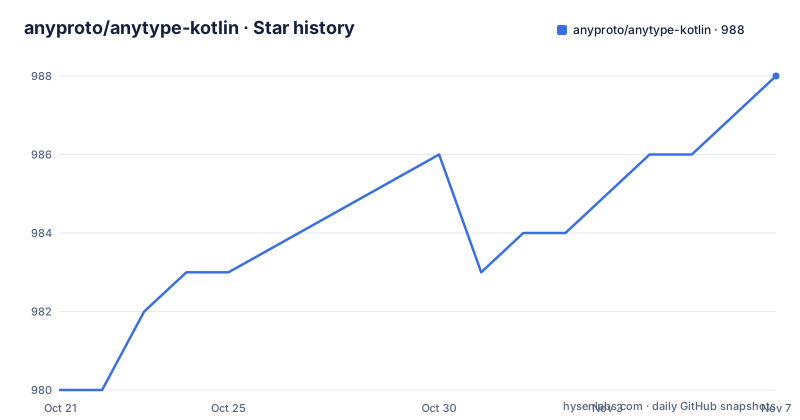
- anyproto/anytype-kotlin988 ★ · +8
| Repository | 2026-10-21 | 2026-11-07 |
|---|---|---|
| anyproto/anytype-kotlin | 980 | 988 |
8 Stars in the last 17 days, measured from the daily GitHub snapshot. Compare with other projects
Editorial analysis
A local-first client with a large module tree
anytype-kotlin is the official Anytype client for Android, and the topics the repository carries describe the product it belongs to: local-first, offline-first, end to end encrypted and peer to peer. That combination is what makes the build interesting, because a client for a local-first system still has to talk to a peer to peer network and to a middleware layer, which is where the two required property files come in. The module layout shows the scale of the effort. The top level has one feature module per area of the product, including feature-all-content, feature-chats, feature-create-object, feature-discussions, feature-object-type, feature-os-widgets, feature-properties, feature-search, feature-ui-settings and feature-vault, alongside shared layers named core-ai, core-models, core-ui and core-utils, and infrastructure directories for the domain, presentation, persistence, protocol, middleware, analytics, crash-reporting and payments code. There is also a sample application, a localisation setup through crowdin, and a versioning.gradle file at the root.
Two property files gate the build
The build documentation starts with prerequisites, and the first of them is not a tool but a set of credentials. You have to create a github.properties file in the root project folder, and the README gives the two keys it needs:
gpr.usr=GITHUB_USER_ID
gpr.key=GITHUB_PERSONAL_ACCESS_TOKEN
The ID is your GitHub identifier, which the README explains can start with a hash character, and the token is a personal access token that you generate in the developer settings of your GitHub profile. The second file is apikeys.properties, which carries the analytics and crash reporting keys:
amplitude.debug="AMPLITUDE_DEBUG_KEY"
amplitude.release="AMPLITUDE_RELEASE_KEY"
sentry_dsn="SENTRY_DSN_KEY"
The separate debug and release Amplitude keys is the detail that suggests these are wired per build type rather than shared. A reader planning to build this should note that the project is wired for telemetry and crash reporting by design, which is a choice worth being comfortable with in a product whose selling point is that your data stays on your device.
The generated protocol classes break IntelliSense
There is one IDE workaround documented, and it is a good example of a project telling you what its own pain is. Based on your IDE setup, you might experience problems while accessing or importing auto-generated Kotlin classes from the protocol module, because those classes are currently declared in very large files that the IDE might not process as expected. The fix is to raise a limit in the Android Studio Help section, in Edit Custom Properties, where you set one property:
idea.max.intellisense.filesize=3500This tells you something about the codebase that the module list alone does not. The protocol module holds the generated data model shared with the middleware, and the generated Kotlin is not split into small files, which is why code completion struggles on it. It also explains why the middleware update procedure in the README asks you to make sure the proto files compile before anything else, since the generated sources are the interface between the app and the middleware, and a mismatch there is a compile error rather than a runtime surprise.
Gradle targets for tests, distribution and signing
The Makefile is the developer entry point and its targets map onto the Gradle tasks the project uses. Compiling the Android test sources and running the debug unit tests are separate targets, and there is a combined target that does both, which is the one a pull request check would run:
pr_check: compile_android_test_sources test_debug_allDistribution is handled by bundling the debug variant and uploading it, with a variant that adds a version postfix, which is how several builds of the same day are told apart:
distribute_debug:
	./gradlew bundleDebug appDistributionUploadDebug -Pversion.useDatedVersionName=true
There is also a target that flips the analytics flag in the analytics module properties in both directions, which is a reminder that debug builds ship telemetry under a separate key. Signing is not in the Makefile but in scripts, with an encryption target that runs the common encrypt script and a decryption target for the reverse, presumably wrapping the signing material. The worktree management commands at the bottom of the Makefile, with targets for listing, adding, creating and removing worktrees, show that the team works on this codebase with several parallel branches.
The middleware is updated by hand
The most unusual part of the build is the middleware integration, and the README documents it as a basics guide for updating anytype-heart. The prerequisite is jq, installed with brew, and then a single command does the work in the terminal or through the Makefile:
make update_mwThe steps that follow are manual checks rather than automation. You have to make sure the proto files located in protocol/main/proto/ compile, and you have to update the middlewareVersion version in libs.versions.toml. The Makefile shows how the pieces fit together, because the update target is a composition of three other targets:
update_mw: download_mw_artefacts normalize_mw_imports clean_protosSo the process downloads the middleware artefacts, normalises the imports so the generated code matches the new API, and cleans the protos. A second target, update_mw_custom, exists for a custom, not yet released middleware library, and it downloads only the library so that you update the proto files yourself. There is also a setup_local_mw target that publishes the library to the local Maven repository. The point to take away is that the app and the middleware are versioned separately, and a developer working on the app is expected to be able to move between middleware versions by hand.
Conventions that tell you how the team works
The README documents a working agreement as precisely as it documents the build. Pull request titles have a fixed three part structure made of a task identifier, an application area and the nature of the change, with the permitted areas listed as App, Editor, Sets, Relations, Auth, Settings, Analytics and Tech, where Tech covers CI, dependency injection and scripting. The listed case is an Editor fix about showing a meaningful message when a file fails to open in an existing application, and a rule like that is what makes a large commit history navigable. Branch names follow a task id and a concise description. There is also a build flag, com.anytype.ci=true, that marks a build as part of the CI/CD pipeline, which is a detail that usually exists because a bug report once needed reproducing a build. The repository also carries a CLAUDE.md file for coding agents, a PerfTests.md, a RELATIONS_REFACTORING.md describing work in progress on the relations area, and a pre-commit configuration.
Source available, not open source
The final lines of the README carry the licence and the provenance, and the licence is the first thing to settle for anyone considering building this client. The project is licensed under the Any Source Available License 1.0, in the LICENSE.md file at the root, and the copyright line reads Made by Any, a Swiss association. The licence field is recorded as one that GitHub cannot classify, which is consistent with a source available licence rather than one of the OSI approved ones. That distinction is the practical point, because the terms of use, distribution and any commercial deployment are the ones in that file rather than the freedoms of an open source licence. The release history is also worth reading. The listed versions are 0.50.4 published on 2026-09-28, 0.50.3 on 2026-09-23 and 0.49.0 on 2026-08-17, with the last push to the repository on 2026-10-18, so there is no long term support branch to pin a fork to, and the changelog linked from the README is where you find out what moved.
Editorial conclusion
anytype-kotlin fits a developer who wants to work on the official Android client for a local-first, encrypted workspace, and the module layout, the Gradle task names and the documentation of the middleware update path make the workflow learnable. It does not fit a user looking for a downloadable APK, since this is the source tree and the build requires credentials you have to generate, and it does not fit a company that needs a permissive licence, because the project is published under the Any Source Available License 1.0 rather than an OSI approved one. Before you start, read the LICENSE.md file, since that is the term that decides whether you can ship what you build, generate a GitHub personal access token and the Amplitude and Sentry keys, and note the release state, with 0.50.4 published on 2026-09-28 and the last push on 2026-10-18.
Frequently asked questions
What do I need to build anytype-kotlin?
A github.properties file in the root with gpr.usr and gpr.key holding your GitHub ID and a personal access token, an apikeys.properties file with the Amplitude debug and release keys and a Sentry DSN, and the Anytype middleware artefact updated through make update_mw.
Why does Android Studio struggle with the protocol module?
The auto-generated Kotlin classes from the protocol module are declared in very large files that the IDE does not always process as expected. The documented workaround is to set idea.max.intellisense.filesize to 3500 in the Android Studio custom properties.
How is the middleware updated?
With make update_mw, which downloads the middleware artefacts, normalises the imports and cleans the protos. After that you have to check that the proto files in protocol/main/proto/ compile and bump the middlewareVersion in libs.versions.toml yourself.
What licence is anytype-kotlin under?
The Any Source Available License 1.0, which is a source available licence rather than one of the OSI approved open source licences, so the terms in LICENSE.md decide what you can do with a build or a fork.
Is the Anytype Android client still being updated?
The repository is not archived and the last push was on 2026-10-18, with 0.50.4 published on 2026-09-28, 0.50.3 on 2026-09-23 and 0.49.0 on 2026-08-17.
Official sources
Add this badge to your README
If you maintain this project, the badge below links readers to this analysis and shows its maintenance status from the daily GitHub snapshot. Paste the markdown into your README; add ?metric=license or ?metric=stars to the image URL for a different field.

[](https://hysenlabs.com/projects/anyproto-anytype-kotlin)Star history chart for your README
[](https://hysenlabs.com/projects/anyproto-anytype-kotlin)Was this useful?