react-native-ease: declarative animations that run on the platform
🍃 Lightweight declarative animations powered by platform APIs
At a glance
- What is it?
- react-native-ease is a small React Native library that animates with Core Animation on iOS and Animator on Android, driven by an animate prop instead of a JavaScript frame loop. It covers fade, slide and scale work, and it deliberately refuses layout and gesture animation.
- Who is it for?
- react-native-ease fits teams that ship ordinary enter, exit, fade and scale transitions and want them to run natively without pulling in a worklet runtime. It does not fit work that depends on gesture-driven values, layout animation or shared element transitions, and it will not run on the old architecture.
- Can I use it commercially?
- Yes. MIT is a permissive licence: you can use, modify and sell software built on it, as long as you keep its copyright and licence notices.
- Is it still maintained?
- Yes. The repository last received commits 22 days ago.
- What is it written in?
- Mainly TypeScript, according to GitHub's language statistics.
Answers come from the project's GitHub data, last synced on November 7, 2026, and from our analysis. They are not legal advice.
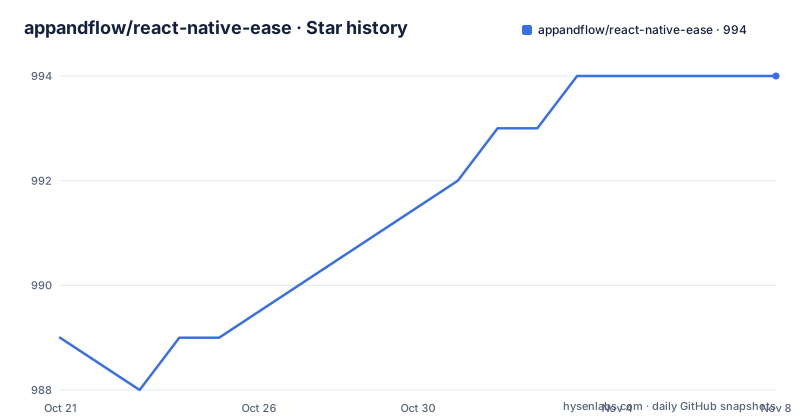
Star history
- appandflow/react-native-ease994 ★ · +5
| Repository | 2026-10-21 | 2026-11-07 |
|---|---|---|
| appandflow/react-native-ease | 989 | 994 |
5 Stars in the last 17 days, measured from the daily GitHub snapshot. Compare with other projects
Editorial analysis
One component, two props, no animation runtime
The entire public surface of react-native-ease is a single component called EaseView. It accepts children, styles and the usual view props, and it adds two of its own. The animate prop holds target values, and the transition prop describes how to get there. When the values in animate change, the component hands the work to the platform animation system rather than driving it from JavaScript.
The library is described as lightweight, and the repository layout supports that description. The package publishes src, lib, android, ios and cpp directories alongside a podspec, with a skills folder and a .claude-plugin directory for the migration tooling. The build runs through bob, and the test script runs jest.
The stated goals are fast, simple, lightweight and interruptible. The last one is the interesting claim: changing a target value while an animation is in flight redirects the animation rather than snapping, which is the behaviour people usually end up hand-rolling when they need it.
What the library is not is worth as much attention. There is no JavaScript animation loop, no worklets and no shared values. The README lists four explicit non-goals: gesture driven animation, layout animation, shared element transitions, and the old architecture. The last one is a hard floor. Fabric only.
Core Animation on one side, Animator on the other
The mechanism is deliberately thin, and the README is explicit about what it uses. On iOS the animations run on Core Animation, and on Android they run on the platform Animator, with the spring variant of that API for physics based motion. The stated benefit is zero JavaScript overhead at animation time, since the values are pushed to the native layer and the native layer owns the frames.
The contrast drawn in the documentation is with libraries that keep a shared value in JavaScript and synchronise it with a worklet runtime on every frame. According to the project, that machinery is unnecessary for the class of animation it targets, and the trade is that the library cannot be used for anything that needs a live value in JavaScript during the animation.
Timing transitions take a duration in milliseconds, an easing curve, an optional delay and a loop mode. The loop value is either repeat, which restarts from the beginning, or reverse, which alternates direction. The default duration is 300 and the default easing is easeInOut.
Easing can be a preset name or a tuple of four numbers. The presets are linear, easeIn, easeOut and easeInOut. A tuple is a cubic bezier with the same meaning as the CSS cubic-bezier function, so the two control x values have to stay between zero and one while the y values are free to leave that range, which is how an overshoot is expressed:
<EaseView
  animate={{ scale: active ? 1.2 : 1 }}
  transition={{ type: 'timing', duration: 500, easing: [0.68, -0.55, 0.265, 1.55] }}
/>
animate and transition are the whole API
A typical use is short enough to read in one breath. The component takes a conditional value in animate and a timing transition beside it:
import { EaseView } from 'react-native-ease';

function FadeCard({ visible, children }) {
  return (
    <EaseView
      animate={{ opacity: visible ? 1 : 0 }}
      transition={{ type: 'timing', duration: 300 }}
      style={styles.card}
    >
      {children}
    </EaseView>
  );
}
Because the target is expressed as plain React state, the animation is driven by a re-render rather than by a gesture or a shared value. That is the central trade the library makes, and the decision table in the documentation keeps it visible. Fade, slide and scale on a state change belong to Ease. Gesture driven animation, layout animation of width and height, and complex interpolation and chaining belong to Reanimated.
The package also ships two entry points beyond the main one, declared in package.json under exports. The ./uniwind entry exposes an EaseView wrapped with Uniwind's withUniwind helper so that a className is converted into styles. The ./nativewind entry registers EaseView with NativeWind's cssInterop for the same reason, and it is a side effect import rather than a component:
import 'react-native-ease/nativewind';That import belongs once in the app entry point, such as _layout.tsx or App.tsx. The documentation notes that the migration skill detects NativeWind and adds the import for you if you use the skill path.
Installing the package and the coding agent skill
The package installs the way any React Native library does, and the README gives both package managers:
npm install react-native-ease
# or
yarn add react-native-ease
The more unusual part of the setup is the migration tooling. The project includes an agent skill that scans an existing codebase for Reanimated and Animated usage, classifies each animation as migratable or not with a reason, produces a report showing before and after details, lets you pick which components to convert, and then applies the changes while preserving the non-animation logic.
The skill is installed through the skills CLI:
npx skills add appandflow/react-native-easeAfter that you invoke it in your agent, for example as /react-native-ease-refactor in Claude Code. The flow is explicitly gated on your selection, so the agent proposes and classifies rather than rewriting the whole repository unattended.
For the Uniwind path the order matters. The documentation says to follow the Uniwind quickstart first, because that setup includes the CSS entry file, the app-root CSS import and the bundler configuration. Only then do you import the component from the dedicated entry point:
import { EaseView } from 'react-native-ease/uniwind';The repository carries an example app under example/ with its own Metro and Babel configuration, and the scripts section of package.json exposes yarn workspaces for the example and the docs site, along with a docs build that runs in the docs directory.
The boundaries are stated in the project itself
It is unusual to see a library list its own non-goals this plainly, and the list saves a lot of evaluation time. Layout animation is out: animating width, height or layout changes is not supported. Gesture driven animation is out: pan and pinch work, animation worklets and values shared across components all belong to a different library. Shared element transitions are out, and the documentation points at Reanimated or React Navigation for those.
The old architecture is out as well, which is the constraint most likely to decide the question for an existing app. A team still on the old bridge cannot use this component at all.
There is also a licensing and support profile worth weighing. The project is MIT licensed, the homepage is a dedicated documentation site, and the maintainers describe themselves as a Montreal based React Native engineering and consulting studio. The last push was on 2026-10-16, and the recent release line is short and moving: v0.8.0 on 2026-08-03, v0.8.1 on 2026-09-25 and v0.9.0 on 2026-10-15, with the published package version matching the newest release.
A release cadence like that is worth watching closely for a library that sits in the rendering path of every screen you animate. Version 0.9.0 signals an API that is still moving.
Editorial conclusion
react-native-ease fits teams that ship ordinary enter, exit, fade and scale transitions and want them to run natively without pulling in a worklet runtime. It does not fit work that depends on gesture-driven values, layout animation or shared element transitions, and it will not run on the old architecture. Before you adopt it, check that your project is on Fabric, and run the migration skill in a branch to see which of your existing animations it considers replaceable.
Frequently asked questions
What is the difference between react-native-ease and react-native-reanimated?
Ease animates with Core Animation on iOS and the Android Animator, so it needs no JavaScript frame loop, worklets or shared values, and it targets fade, slide and scale transitions on state change. Reanimated is the option the documentation points to for gesture driven animation, layout animation of width and height, and complex interpolation and chaining.
Does react-native-ease work with NativeWind and Uniwind?
Both are supported through separate entry points. For NativeWind you add the side effect import 'react-native-ease/nativewind' once in the app entry point, and for Uniwind you import EaseView from 'react-native-ease/uniwind' after completing the Uniwind quickstart.
Can react-native-ease animate layout changes such as width and height?
No. Layout animation is listed as an explicit non-goal, along with gesture driven animation, shared element transitions and the old architecture. The library requires Fabric and it will not animate width, height or layout changes.
How do I migrate existing Reanimated animations to react-native-ease?
The project ships an agent skill. You install it with npx skills add appandflow/react-native-ease, then invoke it in your agent, for example as /react-native-ease-refactor in Claude Code. It scans for Reanimated and Animated usage, classifies each animation as migratable or not with a reason, shows a before and after report, and applies only the components you select.
Official sources
Add this badge to your README
If you maintain this project, the badge below links readers to this analysis and shows its maintenance status from the daily GitHub snapshot. Paste the markdown into your README; add ?metric=license or ?metric=stars to the image URL for a different field.

[](https://hysenlabs.com/projects/appandflow-react-native-ease)Star history chart for your README
[](https://hysenlabs.com/projects/appandflow-react-native-ease)Was this useful?