Whiteboard gives a coding agent a canvas to draw on, but you cannot edit a file in it
open-source canvas for thoughtful software design
At a glance
- What is it?
- Whiteboard is an MIT-licensed desktop app from devdotfast where a coding agent such as Claude Code or Codex draws diagrams and reviews of its own work. It bundles an AST-aware diff viewer, a decision log and a vendored Code OSS editor, and it states three limits up front.
- Who is it for?
- Use Whiteboard when you review a coding agent's branch and want diagrams, a semantic diff and a decision log tied to the code. Do not use it when you need to edit files in the same window or review changes across several repos at once.
- Can I use it commercially?
- Yes. MIT is a permissive licence: you can use, modify and sell software built on it, as long as you keep its copyright and licence notices.
- Is it still maintained?
- Yes. The repository last received commits 3 days ago.
- What is it written in?
- Mainly TypeScript, according to GitHub's language statistics.
Answers come from the project's GitHub data, last synced on November 24, 2026, and from our analysis. They are not legal advice.
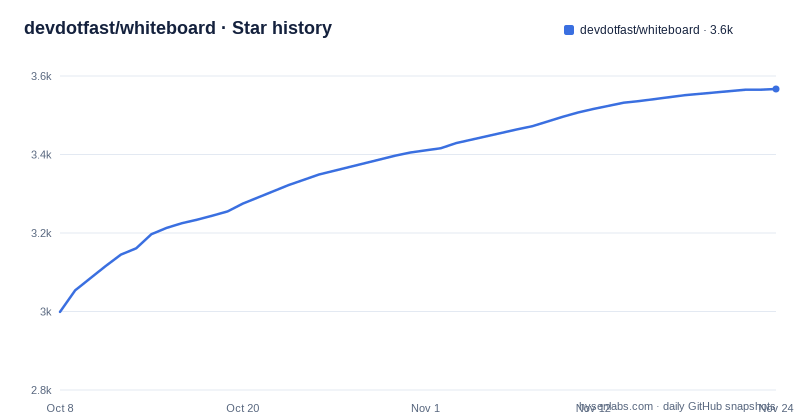
Star history
- devdotfast/whiteboard3,567 ★ · +568
| Repository | 2026-10-08 | 2026-11-24 |
|---|---|---|
| devdotfast/whiteboard | 3k | 3.6k |
568 Stars in the last 47 days, measured from the daily GitHub snapshot. Compare with other projects
Editorial analysis
The agent draws on an in-app canvas through an SDK
Whiteboard is an open-source desktop app where humans and agents architect software together in a common workspace. It plugs into tools already in use, such as Claude Code and Codex, and gives the agent an SDK to draw on an in-app canvas to describe its work.
The quickstart has three steps. Download the app and open it; on macOS there is also a Homebrew route:
brew install --cask devdotfast/tap/whiteboardThen connect Claude Code, Codex or another coding agent from the welcome screen. Finally, ask the agent to review your current branch against up-to-date main and open the result in Whiteboard.
Builds are listed for macOS, Windows and Linux. The project also publishes a short demo video, a roadmap on its wiki and a Discord server for questions.
Diagrams link back to the code they describe
One stated reason for the project is that pure HTML tools made it hard to connect a spec or diagram to code. Tradeoffs often appear only after a first implementation pass, so a diagram that cannot reach the code goes stale.
In Whiteboard, clicking a visualization such as a sequence diagram, an entity relationship diagram or a quote from the agent's trace jumps to the underlying code directly. When you navigate code there, you get keybindings and LSP support from VS Code out of the box.
The practical effect is that a reviewer does not copy a file name out of a diagram and search for it. The diagram is the entry point, and the code is one click away.
A Rust semantic diff viewer hides tests and summarizes large additions
Raw diffs can be noisy, so the team wrote a semantic, AST-aware diff viewer in Rust. The goal is to show only the code changes that matter to you.
The defaults are specific. Large added functions are summarized as pseudocode. Unit tests and documentation changes are collapsed or hidden. All of this is customizable through a WASM-based plugin system.
The tradeoff: anything hidden by default is a change you did not look at. If a bug lives in a test file or in documentation that the viewer collapses, a reviewer relying on the default view will pass over it. Adjust the plugin settings before using the viewer as the only review pass. The repository keeps this component in a diffr directory, whose tags such as diffr/0.1.22 are released separately from the app.
A decision log shows what the agent chose without asking
The authors found it hard to reason about which decisions their agents made autonomously and how those affected a change. Whiteboard therefore gives agents tools to query and link their own traces on the canvas.
The result lets a reviewer visualize the requirements that were set, see how each was implemented, and read which decisions the agent made on its own. This is a review aid. It does not stop an agent from making a decision silently, it only records the decision where you can find it.
The guidance section offers two sample prompts. One asks for a proposed API, examples and motivations for a new API change. Another asks the agent to explain telemetry changes from a pull request and say what is tracked. If you dislike something on the canvas, highlight it, copy it to the clipboard and hand it to the agent to redraw.
Three known limits are listed in the project itself
The README names its limitations. You cannot currently edit files in Whiteboard, and the project asks users who want that to file an issue. Working in and browsing files across multiple repos in a single review is not well supported.
Sharing has a gap. A share button lets you pass a review between machines, but updates made after sharing do not appear for others, so you re-share to deliver changes.
The first limit sets the workflow: review in Whiteboard, then fix in your editor or through the agent. The second rules it out for a change that spans a service and its client library in separate repositories. The third means a review that continues over several days needs a fresh share each time you want a teammate to see current state.
Code OSS is vendored instead of patched
The editor inside Whiteboard is a vendored copy of Code OSS. The stated reasoning: most work now happens in agent terminals and desktop apps, so a text editor is used mainly for reviewing diffs line by line, which suggests building an editor meant for review.
The team vendors the source instead of maintaining patches, because coding agents struggle with patches and stock VS Code carries a lot they do not need. They say they monitor upstream Code OSS and merge security and feature patches.
The licensing consequence is in the repository: the vendored fork keeps Microsoft's MIT license and third-party notices, found under apps/review-desktop. Whiteboard itself is MIT. The root listing also contains packages, tools and a pnpm workspace, and the root package.json is private at version 0.0.0.
Telemetry is anonymous and releases move daily
Whiteboard runs against local checkouts. Anonymous telemetry does not include your code, diffs, Whiteboard text, prompts or model output, and telemetry can be turned off at any time. The privacy overview is at docs/privacy.md and the full reference is at docs/telemetry.md.
A hosted product for teams is planned, and the project says everything will always remain self-hostable. The README recommends models such as GPT-6 Sol and Claude Opus 5.5 for their intelligence, cost and speed tradeoff.
The tags are recent. Whiteboard 0.4.0 was released on 2026-10-23, and diffr/0.1.22 followed on 2026-10-26. The last push was on 2026-10-25. A version number below 1.0 and releases a few days apart mean behavior can change between updates.
Editorial conclusion
Use Whiteboard when you review a coding agent's branch and want diagrams, a semantic diff and a decision log tied to the code. Do not use it when you need to edit files in the same window or review changes across several repos at once. Before sharing a review with a teammate, remember that later updates do not reach them and you must re-share.
Frequently asked questions
How do I install Whiteboard from devdotfast?
Download it from dev.fast/install for macOS, Windows or Linux. On macOS you can also run brew install --cask devdotfast/tap/whiteboard, then connect Claude Code or Codex from the welcome screen.
Can I edit files inside Whiteboard?
No. The project lists file editing as a current limitation and asks users who want it to file an issue.
Does Whiteboard send my code in telemetry?
No. Anonymous telemetry does not include your code, diffs, Whiteboard text, prompts or model output, and it can be turned off at any time.
Official sources
Where developers are discussing it
Posts on Hacker News, dev.to and Lobsters that link to this repository, found by our scan of those communities. 0 in the last 30 days; newest first.
- Show HN: Whiteboard (YC W26) – An open-source IDE for thoughtful software designHacker News · Sep 24, 2026 · 424 points · 143 comments
Add this badge to your README
If you maintain this project, the badge below links readers to this analysis and shows its maintenance status from the daily GitHub snapshot. Paste the markdown into your README; add ?metric=license or ?metric=stars to the image URL for a different field.

[](https://hysenlabs.com/projects/devdotfast-whiteboard)Star history chart for your README
[](https://hysenlabs.com/projects/devdotfast-whiteboard)Was this useful?