Appwrite Console 8.8: A Svelte-Based Admin UI for Self-Hosted Backend Management
The Console that makes Appwrite tick from the browser 🖥
At a glance
- What is it?
- The Appwrite Console is the browser-based admin interface for Appwrite instances, rebuilt with Svelte and SvelteKit to prioritize simplicity, accessibility, and community contribution. This review covers its architecture, setup, and trade-offs for engineers evaluating adoption.
- Who is it for?
- Adopt the Appwrite Console if you run a self-hosted Appwrite instance and want a modern, accessible admin interface that is easy to extend via pull requests. Skip it if you need a standalone UI independent of Appwrite, because it is tightly coupled to the Appwrite ecosystem.
- Can I use it commercially?
- Yes. BSD-3-Clause is a permissive licence: you can use, modify and sell software built on it, as long as you keep its copyright and licence notices.
- Is it still maintained?
- No. The owners have archived the repository on GitHub, so it is read-only and no longer receives changes.
- What is it written in?
- Mainly Svelte, according to GitHub's language statistics.
Answers come from the project's GitHub data, last synced on November 13, 2026, and from our analysis. They are not legal advice.
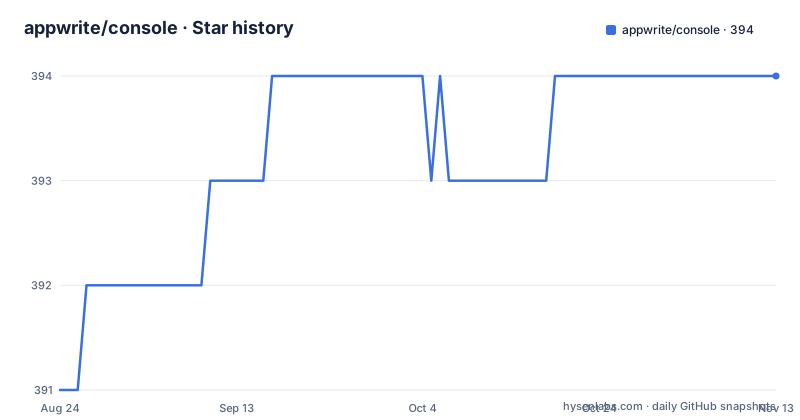
Star history
- appwrite/console394 ★ · +3
| Repository | 2026-08-24 | 2026-11-13 |
|---|---|---|
| appwrite/console | 391 | 394 |
3 Stars in the last 81 days, measured from the daily GitHub snapshot. Compare with other projects
Editorial analysis
The Problem: Managing an Appwrite Backend Without a CLI
Appwrite is a self-hosted backend-as-a-service platform that handles authentication, databases, storage, and functions. Developers need a way to create projects, manage users, configure collections, and monitor usage. Without a graphical interface, every operation would require API calls or a CLI, which is slow and error-prone for routine tasks. The Console solves this by providing a web-based GUI that runs in the browser and talks to the Appwrite server. It is built for developers who use Appwrite daily and need a clear, fast way to inspect and change their backend configuration. The README positions it as 'the Graphical User Interface that developers interact with when accessing their Appwrite instance', which makes the target audience explicit: Appwrite users, not generic admin panel seekers.
Architecture: Svelte and SvelteKit as the Foundation
The Console is built with Svelte and SvelteKit, a component framework and meta-framework that compiles to efficient JavaScript. The README states these are the two frameworks used, and it explains the choice: Svelte is 'better documented and well-known' compared to Appwrite's previous in-house library. The shift to a mainstream framework is a deliberate move to lower the barrier for community contributions. The architecture is a typical SvelteKit application: pages are components, routing is file-based, and data fetching happens through load functions. The console is not a standalone app; it is the front end that connects to an Appwrite backend, so the data flow is: browser loads the SvelteKit app, the app calls Appwrite's REST API, and the UI renders the results. The use of SvelteKit means the console can be deployed as a static site or server-rendered, though the README does not specify deployment details. The key takeaway is that the console is a thin client over Appwrite's API, and its maintainability depends on Svelte's component model.
Getting It Running: From Source or Release
The README does not include explicit installation commands, but the repository layout and release history indicate how to get it running. You clone the repository, install dependencies with npm, and run the development server. A typical SvelteKit workflow applies: npm install, then npm run dev for local development, and npm run build for production. The Console is versioned with releases like 8.8.5, 8.8.4, and 8.8.3, which you can download from the releases page. For production, you would build the app and serve it, but the README does not specify how to connect it to an Appwrite server. The console is designed to be served by Appwrite itself, likely as part of the Appwrite installation, so you may not need to run it separately. The lack of setup instructions in the README is a gap; you must consult the Appwrite documentation or the repository's CONTRIBUTING.md for specific commands. Those releases are historical: the repository was archived on 21 September 2026 and is read-only.
Developer Experience: Simplicity, Consistency, and Accessibility
The README emphasizes developer experience as a core goal. It lists four pillars: Simplicity, Consistency, Accessibility, and Scalability and Collaboration. Simplicity means 'reduces visual load with more purposeful color use and more selective inclusion of information'. This is a design choice that affects how quickly you can scan a page. Consistency comes from using a 'consistent UI library', which likely refers to a shared component set within the Console. Accessibility is a stated priority 'from design to code', which is rare for admin panels and worth verifying in practice. Scalability and Collaboration is about making the codebase easier to contribute to, not about server scaling. The switch from a custom library to Svelte is the main enabler. For an engineer evaluating this, the practical question is whether these claims hold. The README gives no metrics or tests, so you must inspect the code or run it to judge accessibility. The consistent UI library is a plus for maintainability, but it also means a learning curve if you need to customize components.
Limitations: Tied to Appwrite, No Standalone Value
The most significant limitation is that the Console is useless without an Appwrite instance. It is not a general-purpose admin panel; it is the official UI for Appwrite. If you are not using Appwrite, this project has no value. Even if you are using Appwrite, the Console may not cover every feature or may lag behind server releases. The README does not list any feature set or limitations, so you cannot know what management tasks are unsupported. The console is also a front-end only; it does not include backend logic, so you must run Appwrite separately. The repository was archived on 21 September 2026 and is read-only, so the contribution process described in its existing documentation is historical. The README mentions that the console is 'designed to be accessible to developers of all skill levels', but that is a design goal, not a guarantee. For a production environment, you should test the console against your specific Appwrite version before relying on it.
Alternatives: Appwrite CLI or Direct API Access
The main alternative to the Console is using the Appwrite CLI or directly calling the Appwrite REST API. The CLI is a command-line tool that can perform many of the same tasks, such as creating projects, managing users, and deploying functions. The difference in approach is significant: the CLI is scriptable and suitable for automation, while the Console is interactive and better for visual inspection. The API is the lowest level; you can write custom scripts or integrate with CI/CD pipelines. For developers who prefer code over clicking, the CLI is faster for repetitive tasks. For non-technical team members, the Console is more approachable. The README does not mention the CLI, but it is a known part of the Appwrite ecosystem. Choosing between them depends on your workflow: if you need to audit a database visually, use the Console; if you need to automate provisioning, use the CLI or API. The separate appwrite/console repository was archived on 21 September 2026 and is read-only; check the current Appwrite documentation before relying on this repository for updates.
Maintenance and License: BSD-3-Clause and Archived Repository
The repository uses the BSD-3-Clause license, which permits commercial use, modification and distribution subject to its conditions. Read the LICENSE file for the full terms. GitHub reports that appwrite/console was archived on 21 September 2026 and is now read-only. Its release history and contribution guide describe this repository before archival; do not assume new fixes or releases will appear there. Consult current Appwrite documentation for supported installation and upgrade paths.
Editorial conclusion
Adopt the Appwrite Console if you run a self-hosted Appwrite instance and want a modern, accessible admin interface that is easy to extend via pull requests. Skip it if you need a standalone UI independent of Appwrite, because it is tightly coupled to the Appwrite ecosystem. Before adopting, verify that your Appwrite server version matches the console release, check the BSD-3-Clause license terms for your use case, and review the CONTRIBUTING.md for contribution rules. The console is not a general-purpose admin tool; it is the front door to Appwrite and nothing more.
Frequently asked questions
Is Appwrite Console still maintained?
The repository is archived. Its last push was on 2026-09-21, after releases 8.9.0, 8.9.1 and 8.9.2 shipped in early September 2026, so the code is frozen and nothing in it will be fixed.
What framework is the Appwrite Console built with?
Svelte and SvelteKit, with Vite for the build. The project moved to Svelte from its own component library, arguing that Svelte is better documented and better known, which makes it easier for outside developers to contribute.
How is the Appwrite Console configured?
Entirely at build time. Values such as the console mode, feature flags, Appwrite endpoint and multi-region setting are public variables substituted into the bundle during the build, and the Dockerfile declares them as build arguments before running it.
What does the Appwrite Console container run in production?
Nginx on Alpine exposing port 80, serving a directory of built static files. The build stage uses Bun Alpine, and the runtime image contains no Node runtime, so configuration cannot change when the container starts.
How do I run the Appwrite Console tests?
Unit tests run under vitest with the timezone forced, and end-to-end tests run through Playwright. The combined `tests` script runs both in sequence, so a full run needs a browser available.
Official sources
Add this badge to your README
If you maintain this project, the badge below links readers to this analysis and shows its maintenance status from the daily GitHub snapshot. Paste the markdown into your README; add ?metric=license or ?metric=stars to the image URL for a different field.

[](https://hysenlabs.com/projects/appwrite-console)Star history chart for your README
[](https://hysenlabs.com/projects/appwrite-console)Was this useful?