skills/communicate-using-markdown: A GitHub Markdown Course
Organize ideas and collaborate using Markdown, a lightweight language for text formatting.
At a glance
- What is it?
- skills/communicate-using-markdown is a less-than-one-hour GitHub course for beginners who want to format issues, pull requests, text files, and an initial GitHub Pages project with Markdown. It is a guided template exercise rather than a Markdown library or runtime tool.
- Who is it for?
- Beginners who want a short, GitHub-centered Markdown exercise should adopt this course, while experienced Markdown users should use their existing documentation. Before starting, verify that the generated repository has opened the expected Actions run and that its step-by-step issue is available, because those generated resources are the basis of the course experience.
- Can I use it commercially?
- Yes. MIT is a permissive licence: you can use, modify and sell software built on it, as long as you keep its copyright and licence notices.
- Is it still maintained?
- Yes. The repository last received commits 173 days ago.
- What is it written in?
- GitHub does not report a main language for this repository.
Answers come from the project's GitHub data, last synced on November 7, 2026, and from our analysis. They are not legal advice.
Star history
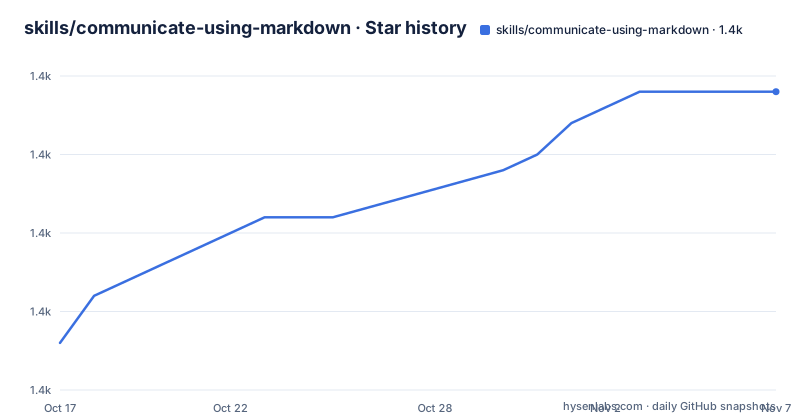
- skills/communicate-using-markdown1,434 ★ · +16
| Repository | 2026-10-17 | 2026-11-07 |
|---|---|---|
| skills/communicate-using-markdown | 1.4k | 1.4k |
16 Stars in the last 21 days, measured from the daily GitHub snapshot. Compare with other projects
Editorial analysis
The GitHub exercise skills/communicate-using-markdown creates
skills/communicate-using-markdown addresses a specific gap between knowing that GitHub accepts Markdown and understanding how to use it in normal collaboration. Its audience is new developers, people new to GitHub, and students. The practical outcome is a plain text file converted into a formatted Markdown document through the course's pull request workflow. That file can also serve as the starting point for a GitHub Pages site.
The repository is not a parser, editor extension, command-line program, or package. Its top-level structure consists of `.github/`, `.gitignore`, `LICENSE`, and `README.md`. That layout is consistent with a course repository and its GitHub automation rather than an installable application. There are no documented packages to install and no executable interface described in the README.
The scope is deliberately narrow. The course covers headings, bulleted lists, images, links, code examples, and task lists. Those are common communication needs for issues and pull requests, but they represent only part of Markdown syntax. Readers looking for a full reference to every Markdown extension, renderer-specific behavior, or publishing pipeline will need another source.
Its GitHub-centered delivery is also important. The exercise combines text formatting with repository creation, file editing, a pull request, and a merge. A learner therefore sees Markdown inside the collaboration environment where the README says developers commonly use it, rather than studying syntax in isolation. That makes the course useful for beginners, although it is less suitable for developers seeking parser internals or advanced Markdown conformance details.
Template copying, Actions, and the generated issue workflow
The course begins when the reader copies the exercise to a GitHub account. The README links to a GitHub repository creation template with the template owner set to `skills` and the template name set to `communicate-using-markdown`. The created repository is named `skills-communicate-using-markdown` by the linked form. The description identifies it as an exercise for communicating with Markdown, and the linked form sets visibility to public.
After repository creation, GitHub prepares the first lesson in about 20 seconds. The instructions then tell the learner to refresh the page and follow the step-by-step issue created in the new repository. This means the central course content is not fully contained in the course README. The generated issue appears to supply the lesson sequence, while the copied repository supplies the files and GitHub configuration needed to complete it.
The README's troubleshooting path confirms that automated preparation is part of the architecture. If the exercise is not ready, it instructs the reader to wait about 20 seconds, refresh the page, and inspect the `Actions` tab. If the page does not refresh automatically, the reader is told to check whether a job is running. A failed job is directed to the repository's issue tracker.
This workflow has a practical consequence: successful repository creation does not necessarily mean the exercise is ready. The learner must also allow the preparation job to complete. The README recommends public repository visibility because private repositories use Actions minutes. It does not document a local installation route, offline setup process, or manual recovery procedure for the generated issue.
Starting the course and completing the first Markdown file
There are no installation commands to run. The README's documented starting method is to use its “Copy Exercise” link, which opens GitHub's new-repository page for this course template. Choose a personal account or an organization to own the resulting repository, then create the repository with the settings supplied by the linked form.
For the first real use, wait about 20 seconds after GitHub creates the repository and refresh the browser page. The reader should see or be able to open a step-by-step issue generated for the exercise. If the page still does not update, open the repository's `Actions` tab and confirm that the preparation job is running or has completed.
The README does not reproduce the issue's exact editing instructions, so this article cannot responsibly invent Markdown syntax or claim which file each issue step changes. Based on the course description, the activity culminates in a pull request that is then merged. The stated deliverables provide useful checkpoints: add headers, add an image, add a code example, make a task list, and merge the pull request.
A beginner can judge whether the generated exercise loaded correctly by checking for the step-by-step issue before editing files. If GitHub shows a failed Actions job, the README says to submit an issue. That is the documented path for a failed preparation run, although it does not specify the issue form fields or a guarantee of response time.
What learners practice in the Markdown pull request
The exercise teaches formatting through changes to a plain text file. Headings organize sections, bulleted lists arrange related points, images and links add external references, code examples present implementation content, and task lists communicate completion status. The README explicitly connects these techniques with clearer communication in issues and pull requests.
The pull request is not incidental to the course. Editing, proposing changes, reviewing the proposed change, and merging it form the practical sequence through which the Markdown work is completed. This gives beginners a reason to format a repository document within GitHub's collaboration model. It also teaches that Markdown is not limited to documentation pages: the same formatting can be used in a comment, issue, pull request description, or text file.
The final file can become the beginning of a GitHub Pages site according to the README. However, the README does not document the exact Pages configuration command, settings path, required repository toggle, or deployment behavior. It would therefore be inaccurate to promise that completing the listed course steps alone publishes a site. What is confirmed is that the file can serve as a starting point.
The course is estimated at less than one hour. That duration includes creating the exercise, following the generated issue, modifying the file, and merging the pull request. It is a short guided exercise, not a comprehensive curriculum for documentation systems or static site generators.
The boundary between this course and a full Markdown reference
The clearest limitation is the difference between a guided first exercise and a complete Markdown tool. The README names headings, lists, images, links, code, and task lists, but it does not claim exhaustive syntax coverage or renderer-independent behavior. It also does not discuss CommonMark, Markdown extensions, HTML handling, table rules, syntax conflicts, or validation tools.
The repository also does not present itself as an editor. It cannot be inferred that `skills/communicate-using-markdown` supplies syntax highlighting, preview, linting, conversion, or automated Markdown checks. Those capabilities would require a different project or separate software. For a user who only needs to format a GitHub issue, adding an editor package may be unnecessary, but for a documentation team seeking enforced style and CI validation, this repository does not document those features.
GitHub Pages is mentioned as a possible next step, not as the course's main runtime. The README provides no confirmed deployment settings or maintenance schedule for a generated site. Likewise, it does not document rollback for a pull request, recovery after an incorrectly merged change, or offline access to the generated lesson. Those operations cannot be assumed from the course description.
Its GitHub template model is appropriate for a short beginner lesson, but it creates a dependency on repository creation and GitHub Actions preparation. A learner without a GitHub account, or an organization that blocks public repository creation, cannot follow the documented start method as written. The README discusses personal or organizational ownership but does not describe a non-GitHub delivery path.
MIT licensing, repository activity, and upgrade expectations
The repository identifies the MIT License in its metadata and README footer. Its repository also contains a `LICENSE` file. Any organization planning to reuse the course should read that file and account for its required notice and license terms in its own distribution process. The MIT designation is a licensing fact, not a claim that the content is free of third-party conditions.
The repository is not archived, and the last push was on 2026-05-18. It has no GitHub releases, so there is no documented release line or packaged upgrade path to follow. Course maintenance is tied directly to the contents of the repository and the GitHub template mechanism rather than to versioned artifacts identified by the README.
The generated lesson and its Actions workflow add operational dependencies. A template change could affect the next copied repository without creating a conventional GitHub release. An existing copied repository may therefore require comparison with the current course files if lesson content changes. The README does not define backward compatibility, template versioning, or a formal migration procedure.
For personal learning, the maintenance cost is likely limited to following the generated issue. For organizations that redistribute the exercise, the relevant costs include preserving the `LICENSE`, reviewing changes to `.github/`, and checking whether copied repositories depend on older instructions. These repository-specific details matter more here than a conventional package upgrade because no releases or installable versions are documented.
Why GitHub-native Markdown differs from a documentation framework
A real alternative is a full documentation framework or static site generator rather than another beginner course. The present repository teaches Markdown inside GitHub and lets the resulting file seed a possible GitHub Pages site. A documentation framework would instead define its own component structure, configuration, templates, build process, and deployment conventions around that content.
That difference affects the amount of setup. This course starts with a GitHub template, a generated issue, a file edit, and a pull request. A framework may require project initialization, dependency installation, content routing, build output, and deployment settings. The README does not identify a particular framework or establish that one is required here, so the comparison concerns the architectural approaches rather than endorsing an unspecified product.
For a new developer who only wants clearer GitHub comments and pull requests, this narrower course is a closer fit. For a team that needs a multi-page documentation site with controlled navigation, templates, and an explicit build pipeline, the single-file exercise is only a starting point. The README supports the second use only at the level of saying the resulting file can start a GitHub Pages site.
Editorial conclusion
Beginners who want a short, GitHub-centered Markdown exercise should adopt this course, while experienced Markdown users should use their existing documentation. Before starting, verify that the generated repository has opened the expected Actions run and that its step-by-step issue is available, because those generated resources are the basis of the course experience.
Frequently asked questions
Who is the skills/communicate-using-markdown course for?
The README identifies new developers, new GitHub users, and students as the intended audience. It assumes learners will edit files and work with pull requests.
How long does skills/communicate-using-markdown take?
The README estimates that the course takes less than one hour to complete. Its listed activities include changing a text file, adding Markdown formatting, and merging a pull request.
What should I do if the skills/communicate-using-markdown exercise does not load?
Wait about 20 seconds and refresh the page. If it still does not update, check the repository's `Actions` tab, and submit an issue if the page shows a failed job.
Official sources
Add this badge to your README
If you maintain this project, the badge below links readers to this analysis and shows its maintenance status from the daily GitHub snapshot. Paste the markdown into your README; add ?metric=license or ?metric=stars to the image URL for a different field.

[](https://hysenlabs.com/projects/skills-communicate-using-markdown)Star history chart for your README
[](https://hysenlabs.com/projects/skills-communicate-using-markdown)Was this useful?