nvim-scrollbar draws a position handle and stacks marks on the edge of the buffer
Extensible Neovim Scrollbar
At a glance
- What is it?
- nvim-scrollbar is a Neovim plugin in Lua that puts a scrollbar in the window, and the interesting part is what it puts on that scrollbar: the cursor, diagnostics, search matches, git changes and, optionally, ALE markers. The handlers are separate, optional, and each one needs a companion plugin, so you enable exactly the marks you care about.
- Who is it for?
- nvim-scrollbar fits someone who works in long buffers and wants to know at a glance where the errors, the search matches and the uncommitted changes are, without a separate minimap plugin. It is the wrong tool for a small file or a workflow that already has a buffer overview plugin doing the same job.
- Can I use it commercially?
- Yes. MIT is a permissive licence: you can use, modify and sell software built on it, as long as you keep its copyright and licence notices.
- Is it still maintained?
- Yes. The repository last received commits 6 days ago.
- What is it written in?
- Mainly Lua, according to GitHub's language statistics.
Answers come from the project's GitHub data, last synced on November 7, 2026, and from our analysis. They are not legal advice.
Star history
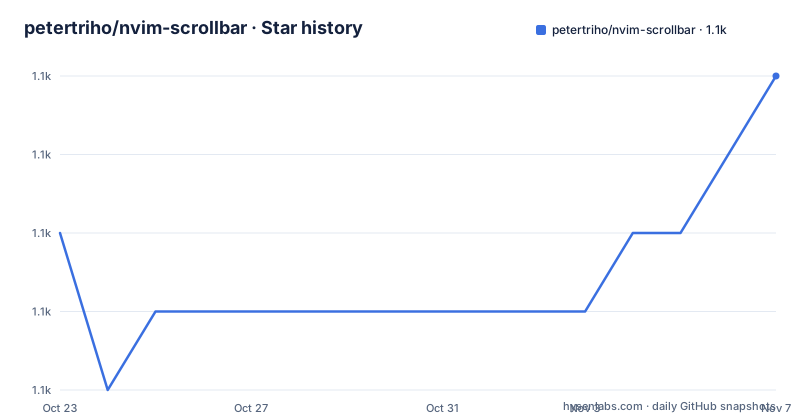
- petertriho/nvim-scrollbar1,076 ★ · +2
| Repository | 2026-10-23 | 2026-11-07 |
|---|---|---|
| petertriho/nvim-scrollbar | 1.1k | 1.1k |
2 Stars in the last 15 days, measured from the daily GitHub snapshot. Compare with other projects
Editorial analysis
A scrollbar is a position indicator, this one also reports content
The plugin's own subtitle is Extensible Neovim Scrollbar, and the extension word is doing the work. A plain scrollbar answers one question, which is where in the buffer you are. This one answers a second set of questions about what is in the buffer.
The feature list names the sources. ALE. Cursor. Diagnostics, from both COC and the native Neovim diagnostics. Git, which requires gitsigns.nvim. And search, which requires nvim-hlslens.
Two of those are built in or nearly so. The cursor mark is the plugin's own, and the diagnostics handler works with either the Coc plugin or the native diagnostics, so most people get error, warning and info marks without installing anything extra. The other two, git and search, are tied to specific companion plugins, which is why the requirements list calls nvim-hlslens and gitsigns.nvim optional.
The design that follows from that is worth naming. A handler is a separate module with its own setup function, and the plugin ships with the handler disabled by default when it needs a companion plugin you do not have. The defaults set cursor, diagnostic and handle to true, and gitsigns, search and ale to false, with a comment on each line naming the requirement.
That is a considered choice rather than laziness. A plugin that assumed ALE, gitsigns and hlslens would break for anyone without them, and one that ignored their state would show marks that no longer exist.
Marks are a table of text, priority and highlight
The configuration for the marks is the longest part of the README, and it is the part that shows the design. Every mark type has the same shape.
    marks = {
        Cursor = {
            text = "•",
            priority = 0,
            gui = nil,
            color = nil,
            cterm = nil,
            color_nr = nil, -- cterm
            highlight = "Normal",
        },
        Search = {
            text = { "-", "=" },
            priority = 1,
            gui = nil,
            color = nil,
            cterm = nil,
            color_nr = nil, -- cterm
            highlight = "Search",
        },
The priority field is how the mark types are ordered when several land on the same line of the scrollbar, and the values are consecutive from zero: Cursor at 0, Search at 1, Error at 2, Warn at 3, Info at 4, Hint at 5, Misc at 6, and the three git types at 7.
The text field is either a single character or a list of characters, and the list form is the neat part. Search, Error, Warn, Info, Hint and Misc all default to a two character list of "-" and "=", which is what draws a bar of consistent width at the mark's position instead of a single glyph in a narrow column.
The highlight field names the highlight group to use, and for the diagnostic marks those are the native Neovim groups: DiagnosticVirtualTextError, DiagnosticVirtualTextWarn, DiagnosticVirtualTextInfo and DiagnosticVirtualTextHint. The git marks use GitSignsAdd, GitSignsChange and GitSignsDelete.
So a mark is a symbol, a place in the priority order and a colour source, and the same structure covers everything from the cursor to a deleted line.
Rendering is driven by autocommands and throttled
The scrollbar cannot redraw itself on every keystroke, so the plugin attaches to a specific set of events.
The render list is BufWinEnter, TabEnter, TermEnter, WinEnter, CmdwinLeave, TextChanged, VimResized and WinScrolled. The clear list is BufWinLeave, TabLeave, TermLeave and WinLeave. The split is sensible: the render events are the ones where something in the buffer or the window changed, and the clear events are the ones where the window is going away and the marks should be torn down rather than left behind.
The throttle_ms option defaults to 100, which caps how often the scrollbar is actually redrawn. That matters more than it looks, because a scrollbar that redraws on every TextChanged event is a redraw on every keystroke, and the whole point of the plugin is to add information without adding a lag you notice.
Two more options control the scope of what is drawn. folds defaults to 1000, and the comment explains it as handle folds, set to number to disable folds if the number of lines in the buffer exceeds this, so folded regions are accounted for in the scrollbar position but the plugin stops trying to render fold markers in very large buffers. max_lines is false by default, and disables the plugin if the number of lines in the buffer exceeds the value you set.
There is also hide_if_all_visible, which hides everything when all lines are visible, since a scrollbar for a buffer that fits on screen is noise. The handle has its own copy of that option, so you can keep the position handle visible while hiding the marks.
Colour wins over highlight, and set_highlights is the escape hatch
The Colors and Highlights section is short and answers a question every plugin of this kind has to answer, which is what happens when you want the mark to be a specific colour.
The rule is that colour takes precedence over highlight, so if color is defined, that is used to define the highlight instead of the highlight field. Each mark entry has color for the GUI, color_nr for cterm, and cterm as a separate boolean, which is the standard way of doing colour in Neovim, where the terminal colour palette is a different beast from the 24 bit one.
The generated highlight groups follow a naming scheme, and it is worth knowing the names because you will want them in your own colourscheme. Mark type highlights are in the format Scrollbar<MarkType> and Scrollbar<MarkType>Handle, and the README lists them: ScrollbarHandle, ScrollbarCursorHandle, ScrollbarCursor, ScrollbarSearchHandle, ScrollbarSearch, ScrollbarErrorHandle, ScrollbarError, ScrollbarWarnHandle, ScrollbarWarn, ScrollbarInfoHandle, ScrollbarInfo, ScrollbarHintHandle, ScrollbarHint, ScrollbarMiscHandle, ScrollbarMisc, and the git ones ScrollbarGitAdd, ScrollbarGitChange and ScrollbarGitDelete.
If you would rather define those groups yourself, set_highlights = false in the setup call and the plugin stops creating them. The default is true, so set_highlights is the switch to flip first if your colourscheme is being overridden.
The handle itself has its own settings, including a blend value of 30, an integer between 0 and 100 where 0 is fully opaque and 100 fully transparent, and a default highlight of CursorColumn.
Two plugin managers and one setup call
Installation is short, and the requirements are modest. Neovim 0.5.1 or newer is the only hard requirement, and nvim-hlslens and gitsigns.nvim are listed as optional.
With vim-plug it is a single line.
Plug 'petertriho/nvim-scrollbar'With packer.nvim it is a use call.
use("petertriho/nvim-scrollbar")The setup call has no arguments at all, because every option has a default.
require("scrollbar").setup()That is the whole path for the cursor, the diagnostics and the handle. The search handler needs one extra step, because it has to be told where the search results are.
use {
  "kevinhwang91/nvim-hlslens",
  config = function()
    require("scrollbar.handlers.search").setup({
        -- hlslens config overrides
    })
  end,
}
The comment in that example is worth reading, because it says that require('hlslens').setup() is not required, and the alternative form of the same configuration passes a build_position_cb into the hlslens setup that calls the handler's show function with the start position. The advanced version also registers an autocommand group, scrollbar_search_hide, that hides the search marks when the command line is left.
The git handler follows the same pattern, calling require('gitsigns').setup() and then require("scrollbar.handlers.gitsigns").setup().
Where it does not fit, and what the exclusions are for
There are two exclusion lists, and they tell you what the author expects to be running alongside it.
excluded_buftypes contains terminal, so the scrollbar does not appear in a terminal buffer, where a vertical strip of marks makes no sense. excluded_filetypes is a longer list of interface buffers: blink-cmp-menu, dropbar_menu, dropbar_menu_fzf, DressingInput, cmp_docs, cmp_menu, noice, prompt and TelescopePrompt.
Every one of those is the menu or prompt of another plugin, and the dropbar entries are the giveaway. The author expects buffer overview plugins to be in use, and wants the scrollbar to stay out of their menus. That is the difference in approach between the two kinds of plugin, and it is worth stating plainly: a minimap style plugin shows a picture of the buffer, while this one shows a position handle with marks for the things you care about, and the two answer different questions.
The configuration also tells you what the plugin will not do. excluded_filetypes and excluded_buftypes are hard lists rather than patterns, so a plugin whose popup you would want to exclude is not covered by default. The folds option has a numeric ceiling, and max_lines is a global off switch for very large buffers. The search handler has the override_lens option, which the README shows being set to an empty function to leave only the search marks and disable the virtual text that hlslens normally draws.
The project is MIT licensed, the last push was on 2026-08-16, the repository has no GitHub releases, and it carries a selene.toml for linting and a stylua.toml for formatting, which is the usual sign of a Lua project that takes its own style checks seriously.
Editorial conclusion
nvim-scrollbar fits someone who works in long buffers and wants to know at a glance where the errors, the search matches and the uncommitted changes are, without a separate minimap plugin. It is the wrong tool for a small file or a workflow that already has a buffer overview plugin doing the same job. Verify first that the marks you want come from plugins the handler expects, since gitsigns, hlslens and ALE are all optional and disabled by default, and set set_highlights to false before you start redefining the highlight groups.
Frequently asked questions
What does nvim-scrollbar show?
The position handle plus marks for the cursor, diagnostics from COC or the native Neovim diagnostics, search matches and git changes. ALE is supported as well. The git and search handlers are disabled by default because they require gitsigns.nvim and nvim-hlslens respectively.
How do I install nvim-scrollbar?
With vim-plug, add Plug 'petertriho/nvim-scrollbar' to your plugin list, and with packer.nvim use("petertriho/nvim-scrollbar"). Then call require("scrollbar").setup(). The only hard requirement is Neovim 0.5.1 or newer.
How do I change the colours of the scrollbar marks?
Colour takes precedence over the highlight field, so setting color or color_nr on a mark defines its highlight instead. The plugin generates groups named Scrollbar<MarkType> and Scrollbar<MarkType>Handle, and if you want to define those groups yourself, set set_highlights = false in the setup call.
What is the priority option for in nvim-scrollbar?
It orders the mark types when several of them land on the same line of the scrollbar. The defaults run from Cursor at 0 through Search, Error, Warn, Info, Hint and Misc up to the three git mark types at 7.
How does nvim-scrollbar avoid slowing down the editor?
It redraws on a specific set of autocommands such as TextChanged and WinScrolled, and throttle_ms defaults to 100, which limits how often the scrollbar is actually redrawn. There is also a max_lines option that disables the plugin entirely once a buffer exceeds a line count you set.
Official sources
Add this badge to your README
If you maintain this project, the badge below links readers to this analysis and shows its maintenance status from the daily GitHub snapshot. Paste the markdown into your README; add ?metric=license or ?metric=stars to the image URL for a different field.

[](https://hysenlabs.com/projects/petertriho-nvim-scrollbar)Star history chart for your README
[](https://hysenlabs.com/projects/petertriho-nvim-scrollbar)Was this useful?