react-native-appwrite: the Appwrite SDK for React Native apps
[READ ONLY] Official Appwrite React Native SDK 💙 ⚛︎
At a glance
- What is it?
- The official Appwrite client for React Native, published as react-native-appwrite and installed through Expo. It wraps the Appwrite REST API in typed services, and it is pinned to Appwrite server 2.6.x, which is the constraint that decides whether you can use it.
- Who is it for?
- Adopt it if your app already talks to Appwrite Cloud or a self-hosted server on the 2.6.x line and you want typed database calls instead of hand-written fetch wrappers. Do not adopt it if you need the SDK to work against an older self-hosted Appwrite, or if you cannot add Expo modules: the SDK uses Expo modules, and a project created without Expo must run npx install-expo-modules@latest first.
- Can I use it commercially?
- Yes. BSD-3-Clause is a permissive licence: you can use, modify and sell software built on it, as long as you keep its copyright and licence notices.
- Is it still maintained?
- Yes. The repository last received commits 9 days ago.
- What is it written in?
- Mainly TypeScript, according to GitHub's language statistics.
Answers come from the project's GitHub data, last synced on November 14, 2026, and from our analysis. They are not legal advice.
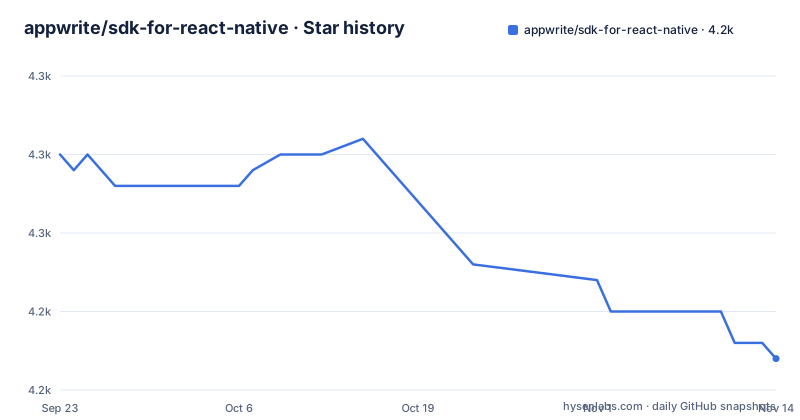
Star history
- appwrite/sdk-for-react-native4,242 ★ · -13
| Repository | 2026-09-23 | 2026-11-14 |
|---|---|---|
| appwrite/sdk-for-react-native | 4.3k | 4.2k |
-13 Stars in the last 52 days, measured from the daily GitHub snapshot. Compare with other projects
Editorial analysis
What react-native-appwrite is for
Appwrite is a backend server that exposes accounts, databases, storage and other services over REST. The React Native SDK is the client half of that pair: it turns those endpoints into JavaScript methods you can call from a phone app. The package on npm is named react-native-appwrite, not appwrite, which matters because the web SDK and this one are separate artifacts with separate release histories.
The audience is narrow and specific. You are building a React Native app, you have an Appwrite project, and you want registration, sessions and document reads without writing your own HTTP layer. The README's first example is exactly that: create a Client, point it at an endpoint and a project ID, then call account.create. If your backend is not Appwrite, nothing here applies to you.
The repository description labels it read only.
The version pin that decides everything
The README states plainly that the SDK targets Appwrite server version 2.6.x as shipped on Appwrite Cloud, and adds that self-hosted releases can lag behind Cloud. It then tells you what to do about it: if you run an older self-hosted build, use a matching older SDK from previous releases when APIs differ.
This is the single most consequential fact about the package. Appwrite Cloud and self-hosted Appwrite are the same software on different release cadences, and a client built against 2.6.x can hit APIs that differ on an older self-hosted server.
The release history backs the cadence claim. Version 3.1.1 landed on 2026-11-02, 3.1.0 on 2026-10-28, and 3.0.0 on 2026-10-20. The new major version does not loosen the server-side pin. If you self-host, check your server version before you pick an SDK version, not after.
Installing react-native-appwrite and making a first request
The README gives one install command, and it goes through Expo. The SDK supports Expo SDK 52 and later and uses Expo modules; in a React Native project created without Expo, the README says to run npx install-expo-modules@latest first.
npx expo install react-native-appwrite expo-file-system react-native-url-polyfillThat pulls in three packages: the SDK itself, expo-file-system for reading upload files, and a URL polyfill. The polyfill is not optional. The setup section says to import it once in your app's entry file (for example index.js or your root _layout.tsx), before any SDK code runs.
import 'react-native-url-polyfill/auto'Next, initialise the client. The endpoint and project ID come from your Appwrite project settings page, and setPlatform takes your application ID or bundle ID.
import { Client, Account } from 'react-native-appwrite';

const client = new Client()
    .setEndpoint('https://<REGION>.cloud.appwrite.io/v1')
    .setProject('<PROJECT_ID>')
    .setPlatform('com.example.myapp');

const account = new Account(client);
The README's first real call registers a user. Note that the example passes ID.unique() for the user ID.
const user = await account.create({
    userId: ID.unique(),
    email: '[email protected]',
    password: 'password',
    name: "Walter O'Brien",
});

console.log(user);
Before any of this works you have to register the app as a platform in the Appwrite console. The README walks through both cases: for iOS, add the app name and Bundle ID, found in the General tab of your primary target in Xcode, or in app.json for Expo projects. For Android, add the app name and package name, generally the applicationId in your app-level build.gradle, or again app.json for Expo.
Typed documents and the appwrite types command
The feature that separates this SDK from a thin REST wrapper is generic typing on database methods. Methods that return rows, such as listRows and getRow, accept a type parameter for your own row shape.
interface Book extends Models.Row {
    name: string;
    author: string;
    releaseYear?: string;
    genre?: string[];
    isCheckedOut: boolean;
}

const tablesDB = new TablesDB(client);

const result = await tablesDB.listRows<Book>({
    databaseId: '<DATABASE_ID>',
    tableId: '<TABLE_ID>',
});
One caveat: the generic parameter is a promise you make to the compiler, not something the SDK verifies at runtime. If your interface drifts from the collection schema, the types will not catch it. To close that gap, the README points at the appwrite types command, which generates TypeScript interfaces from your Appwrite database schema. That is the honest workflow: generate the interfaces, then pass them as the generic argument rather than hand-writing them.
Where it breaks: errors, versions and platform setup
Errors surface as an AppwriteException carrying message, code, type and response properties. The README's error-handling example catches the exception and prints error.code, error.type and error.message. That is fine for a console, and thin for a production screen. Mapping code values to user-facing text is your job; the README links a response codes page that lists every error type.
The version pin is the second failure mode, and it is the one that bites self-hosters. Because the SDK ships in lockstep with Appwrite Cloud releases, a self-hosted instance a few minor versions behind will reject calls the SDK is happy to make. The README's answer is to downgrade the SDK, which means reading the releases page and matching versions by hand.
Platform configuration is the third. setPlatform takes a bundle ID or Android package name that must match what you registered in the console.
Finally, this is the wrong tool if you are not on Appwrite. There is no adapter layer here for Supabase, Firebase or a custom backend. The SDK is a client for one server.
How it compares with supabase-js in React Native
The closest alternative for the same job is supabase-js, which also targets React Native and also wraps a hosted backend. The difference is in what the client is allowed to do.
Supabase leans on Postgres row-level security: the client holds an anon key, queries tables directly, and the database enforces who can read which row. Appwrite puts the policy in the server's collections and permissions, and the SDK calls named service methods like listRows against a database and table ID. If you want SQL-shaped access with policies expressed as database rules, supabase-js is the better fit. If you would rather call a method per operation and keep policy out of the client's query text, this SDK matches that model.
The typing story differs too. supabase-js generates types from your Postgres schema through its CLI. This SDK offers generics plus the appwrite types command. Both push you toward generating types rather than writing them, which is the right instinct either way.
A second option is writing fetch calls against the Appwrite REST API yourself. That removes the dependency and the version pin, at the cost of reimplementing request signing, the URL polyfill handling and the exception shape.
Licence and the cost of keeping it current
The package is BSD-3-Clause, and the LICENSE file sits at the repository root. That is a permissive licence: you can ship it inside a closed-source app, and the main obligation is retaining the copyright notice and licence text in distributions of the source. This is not legal advice; read the LICENSE file for the actual terms.
Upgrade cost is the part worth budgeting for. A new server release can produce a new SDK release with changed method signatures rather than deprecation shims. The README's own guidance for self-hosted users is to pick a matching older SDK when APIs differ, which is a manual process each time you move either side. If you are on Appwrite Cloud, the server moves for you and the SDK should follow; if you self-host, pin the SDK version in package.json and move it deliberately alongside the server, not ahead of it.
Editorial conclusion
Adopt it if your app already talks to Appwrite Cloud or a self-hosted server on the 2.6.x line and you want typed database calls instead of hand-written fetch wrappers. Do not adopt it if you need the SDK to work against an older self-hosted Appwrite, or if you cannot add Expo modules: the SDK uses Expo modules, and a project created without Expo must run npx install-expo-modules@latest first. Before writing app code, confirm your server version in the Appwrite console and add the platform entry (bundle ID or Android package name) that setPlatform expects.
Frequently asked questions
How do I install the Appwrite SDK for React Native?
The README gives this command: npx expo install react-native-appwrite expo-file-system react-native-url-polyfill. You then import 'react-native-url-polyfill/auto' once in your app's entry file, before any SDK code runs.
Which Appwrite server version does react-native-appwrite target?
The README states the SDK targets Appwrite server version 2.6.x as shipped on Appwrite Cloud, and warns that self-hosted releases can lag behind. For an older self-hosted build it directs you to a matching older SDK from previous releases.
Does react-native-appwrite support TypeScript types for database documents?
Yes. Methods that return rows, such as listRows and getRow, accept a type parameter, so you can pass your own interface extending Models.Row and get typed rows back.
How do I generate TypeScript interfaces from my Appwrite database schema?
The README points at the appwrite types command, which generates TypeScript interfaces based on your Appwrite database schema, and links to the type generation documentation for details.
What does react-native-appwrite raise when a request fails?
It raises an AppwriteException with message, code, type and response properties. The README's example catches the error and logs error.code, error.type and error.message.
Official sources
Add this badge to your README
If you maintain this project, the badge below links readers to this analysis and shows its maintenance status from the daily GitHub snapshot. Paste the markdown into your README; add ?metric=license or ?metric=stars to the image URL for a different field.

[](https://hysenlabs.com/projects/appwrite-sdk-for-react-native)Star history chart for your README
[](https://hysenlabs.com/projects/appwrite-sdk-for-react-native)Was this useful?