usage: pinning Claude Code, Codex and Antigravity quota to your menu bar
macOS menu bar & Windows tray app pinning Claude Code, Codex & Antigravity quota, burn rate, and cost to your screen. Local-first, no LLM API calls. HTML reports, 10 themes.
At a glance
- What is it?
- A local-first macOS menu bar and Windows tray app that reads Claude Code and Codex quota from log files already on disk, with Antigravity pulled from Google's quota endpoint. The design keeps token accounting off the network, but it only works where those logs exist.
- Who is it for?
- Adopt usage if you run Claude Code or Codex on macOS or Windows and want 5-hour and weekly quota visible without opening a dashboard; the log-reading approach means your token accounting never touches an LLM API. Skip it if you work on Linux and need the tray app rather than a terminal interface, or if you rely on a tool whose logs the project does not parse.
- Can I use it commercially?
- Yes, with strict conditions. AGPL-3.0 is a network copyleft licence: if people use a modified version over a network, for example as a hosted service, you must offer them its source code under the same licence.
- Is it still maintained?
- Yes. The repository received new commits within the last day.
- What is it written in?
- Mainly Python, according to GitHub's language statistics.
Answers come from the project's GitHub data, last synced on November 22, 2026, and from our analysis. They are not legal advice.
Star history
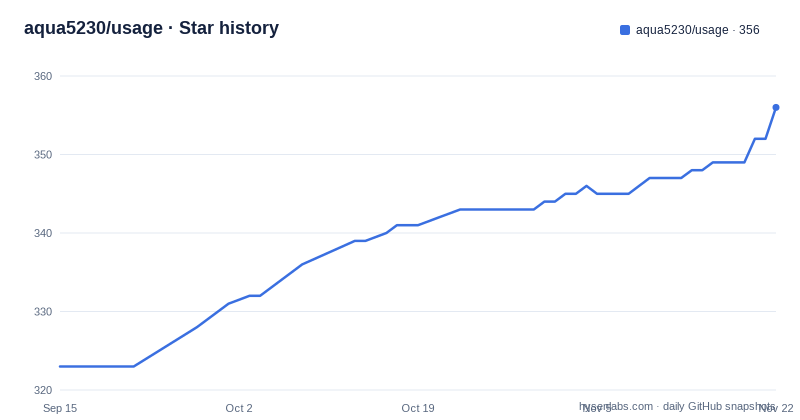
- aqua5230/usage356 ★ · +33
| Repository | 2026-09-15 | 2026-11-22 |
|---|---|---|
| aqua5230/usage | 323 | 356 |
33 Stars in the last 68 days, measured from the daily GitHub snapshot. Compare with other projects
Editorial analysis
The problem usage targets: quota walls you only see after hitting them
Claude Code and Codex enforce rolling 5-hour and weekly limits. The README frames the cost of that plainly: running out mid-session is expensive, particularly during a long refactor or a debugging run that depends on the tool. The failure is not that the limit exists, it is that you discover it at the moment the session dies.
usage puts the remaining quota where you already look. On macOS that is the menu bar; on Windows it is the system tray. The README describes the icon as colour-coded from green to red, with a click opening session, weekly and per-project breakdowns. That is the whole pitch: no command to run, no page to open.
The audience is narrow on purpose. This is for people who pay for Claude Code, Codex, Antigravity or Grok CLI and who work in long sessions where a quota wall is a real interruption. It assumes you are on macOS or Windows. The README's own escape hatch for everyone else is `uvx usage-cli`, which runs a terminal interface anywhere, Linux included.
How usage reads quota without calling an LLM API
The mechanism is passive log reading. Claude Code and Codex numbers come from log files already on the machine, which is why the README can state that watching your quota never calls Anthropic or OpenAI's LLM APIs and never costs a token. The repository layout supports this: there are separate `loaders/` and `quota/` directories, a `pricing.py` for cost conversion, and `project_resolver.py` to map log entries back to projects.
Antigravity is the exception the README calls out explicitly. Its quota comes from Google's official quota endpoint using the sign-in the Antigravity CLI already stores locally. The README characterises this as a metadata call that does not consume model quota. That is a different trust boundary from the other two tools, and worth understanding before you install: two of the four integrations are purely local, one makes an authenticated network call, and Grok CLI reads a local debug log with no network call at all.
The status line is a separate surface. `usage_statusline.py`, `usage_statusline_agy.py` and `usage_statusline_grok.py` are top-level modules, which matches the README's description of context nudges at 70% of the window and a prompt cache health segment that needs Claude Code 2.1.251 or newer. On older versions the README says the segment simply does not appear. That version gate is a useful signal about how tightly the status line tracks the host tool's internals.
For other tools, `usage status --json` exposes the same locally derived quota. The README lists Starship, tmux and custom scripts as consumers and points at snippets in `docs/DEVELOPMENT.md`.
Installing usage on macOS and running a first check
The README's primary install path is a Homebrew cask. It places the app in your Applications folder.
brew install --cask aqua5230/usage/usageAfter installation, the README says to right-click Open once to pass Gatekeeper, then click the menu bar icon. That right-click step matters: a normal double-click on a freshly installed cask app will not get you past Gatekeeper the first time.
If you are not on macOS, the same README offers a no-install route that runs the terminal interface on Linux as well:
uvx usage-cliThe package name is `usage-cli`, and `pyproject.toml` declares two console scripts, `usage` and `usage-cli`, both pointing at `usage_cli:main`. The project requires Python 3.13 or newer, which is a hard floor rather than a suggestion.
For scripting, the JSON status command is the one to reach for first, because it tells you whether the log parsing is working before you invest time in the menu bar:
usage status --jsonThe README states this reads the same local files as the menu bar and makes no network call. If the output is empty or missing a provider you expect, the problem is upstream of usage: the relevant CLI has not written logs it can parse.
Where usage is the wrong tool
The strongest limitation is structural. Everything except Antigravity depends on log files that other tools write. If Claude Code changes its log format, or you run it in an environment where those files are not present, usage has nothing to read. The README does not document a fallback for that case, and there is no indication of a compatibility matrix beyond the status line's Claude Code 2.1.251 note.
The platform split is the second constraint. The menu bar and tray experience is macOS and Windows only. Linux users get `uvx usage-cli` and the terminal interface, which is a genuinely different product surface. Windows support is also an optional dependency group in `pyproject.toml` (`pystray`, `pillow`, `pywebview`, `windows-toasts`), so it is a maintained but clearly secondary target compared with the PyObjC-based macOS path.
Coverage is uneven by design. Grok CLI exposes only a weekly credit percentage from its local debug log, with no session or burn-rate data, so that card is a single bar. Antigravity has no public status page, so the outage banner the README describes for Claude Code, Claude API and Codex API does not extend to it. If your work depends mainly on Antigravity, you get quota numbers but not service health.
Finally, usage reports the past. It reads logs, so it tells you what you have consumed, not what a given prompt will cost. The Token Saver toggle and context nudges are heuristics layered on top, not predictions.
usage compared with running your own token accounting
The obvious alternative is a script: parse the same Claude Code and Codex logs yourself, sum tokens, multiply by a price table, print the result in your shell prompt. That is what `usage status --json` already gives you, and the README links ready-made snippets in `docs/DEVELOPMENT.md` for Starship and tmux. If a single number in your prompt is all you want, the script is less machinery, and you avoid a background process entirely.
The difference is what the app adds on top of the number. usage ships a menu bar or tray process, colour-coded thresholds, per-project breakdowns, HTML and CSV and PNG reports, a theme gallery, and a set of workflow helpers that write back into your Claude Code session: a progress concierge that hands your last progress to a new session, a terse-mode toggle, and a daily token-waste diagnosis. Those are integration features, not measurement features, and they are the part a personal script will not reproduce without real work.
The second alternative is the vendor's own dashboard. Anthropic and OpenAI both show usage in a web console. usage's argument against that is latency and friction: the number is in the menu bar continuously rather than behind a login and a page load. Whether that matters depends on how often you actually check. If you look once a day, the dashboard is fine and you have installed nothing.
A third option worth naming is not measuring at all and relying on the host tool's own warnings. Claude Code surfaces context pressure itself. usage's contribution there is earlier and more visible signalling, plus the cache-expiry countdown, which the host tool does not show.
Maintenance, release cadence and the AGPL-3.0 licence
The repository is not archived and the last push was on 2026-09-14, the same day as the most recent state reflected here. Releases are frequent: v0.30.13, v0.30.14 and v0.30.15 landed on 2026-09-11, 2026-09-12 and 2026-09-13 respectively. That cadence cuts both ways. You get fixes quickly, and the version number moves under you often enough that pinning matters if you script against `usage status --json` output.
The upgrade path is the same as the install path on macOS (`brew install --cask aqua5230/usage/usage` upgrades the cask), and `uvx usage-cli` resolves the latest published version each run unless you pin it. The README does not document a rollback procedure, so if a release changes the JSON shape you depend on, your options are to pin a version or wait for a fix.
The licence is AGPL-3.0-only, declared both in `pyproject.toml` and as the repository licence. AGPL is a strong copyleft licence with a network clause: if you modify the code and let users interact with it over a network, the source of your modified version has to be offered to them. Running the app locally for yourself does not trigger that. Bundling it into a product you distribute, or hosting a modified version as a service, does raise obligations that a permissive licence would not. This is a description of the licence's scope, not legal advice; if you plan to redistribute or host it, read the LICENSE file and get proper counsel.
One maintenance detail worth noting from `pyproject.toml`: the `[tool.uv]` section pins lock environments for darwin, win32 and linux explicitly, with a comment explaining that without it a re-lock on Windows would drop the PyObjC dependencies and break the macOS build. That is a sign the maintainer is managing cross-platform packaging deliberately rather than by accident.
Editorial conclusion
Adopt usage if you run Claude Code or Codex on macOS or Windows and want 5-hour and weekly quota visible without opening a dashboard; the log-reading approach means your token accounting never touches an LLM API. Skip it if you work on Linux and need the tray app rather than a terminal interface, or if you rely on a tool whose logs the project does not parse. Before trusting the numbers, verify that the status line hook is installed and that the menu bar panel matches your actual remaining quota, since the whole design depends on log files the CLI tools write themselves.
Frequently asked questions
How do I use usage to check my Claude Code quota?
Install the macOS cask with `brew install --cask aqua5230/usage/usage`, right-click Open once to pass Gatekeeper, then click the menu bar icon. The README states the numbers are read passively from log files already on your machine, so the check costs no tokens.
Does usage cost tokens or call the Claude or OpenAI APIs?
No. The README states that Claude Code and Codex numbers are read from local log files and that watching your quota never calls Anthropic or OpenAI's LLM APIs. Antigravity is the exception: it uses Google's official quota endpoint with the sign-in the Antigravity CLI already stores, which the README describes as a metadata call that does not consume model quota.
Can I add a usage bar to Claude Code on Linux?
The menu bar and system tray are macOS and Windows only. On Linux the README points to `uvx usage-cli`, which runs the terminal interface with no install and no menu bar.
What Python version does usage-cli require?
The project metadata in `pyproject.toml` declares `requires-python = ">=3.13"`. The README's badge also lists Python 3.13, so an older interpreter will not install it.
Why is the Grok CLI card in usage only a single bar?
The README states that Grok CLI does not expose session or burn-rate data, so the card reads a single weekly credit percentage from its own local debug log with no network call. Its per-request token usage still counts toward cost and project totals.
Official sources
Add this badge to your README
If you maintain this project, the badge below links readers to this analysis and shows its maintenance status from the daily GitHub snapshot. Paste the markdown into your README; add ?metric=license or ?metric=stars to the image URL for a different field.

[](https://hysenlabs.com/projects/aqua5230-usage)Star history chart for your README
[](https://hysenlabs.com/projects/aqua5230-usage)Was this useful?