ArcDLP: A Desktop Wrapper for yt-dlp That Adds Queues, Playlists, and Sign-In
Open-source desktop video downloader powered by yt-dlp and electron. Download videos and audio from YouTube, Vimeo, Twitter, and thousands of sites. Works on macOS, Windows and Linux.
At a glance
- What is it?
- ArcDLP wraps yt-dlp and ffmpeg in an Electron app for macOS, Windows, and Linux. It adds a download queue, playlist picking, and built-in browser sign-in for YouTube and Instagram, with a few trade-offs around codec handling and platform trust.
- Who is it for?
- Adopt ArcDLP if you want a local, queue-based GUI for yt-dlp without touching the command line, especially for YouTube playlists, Instagram saved collections, or private videos that need sign-in. Skip it if you prefer the raw yt-dlp CLI, need hard codec guarantees, or cannot accept the macOS unsigned-app warning or the bundled-binary approach.
- Can I use it commercially?
- Yes. MIT is a permissive licence: you can use, modify and sell software built on it, as long as you keep its copyright and licence notices.
- Is it still maintained?
- Yes. The repository last received commits 57 days ago.
- What is it written in?
- Mainly JavaScript, according to GitHub's language statistics.
Answers come from the project's GitHub data, last synced on October 4, 2026, and from our analysis. They are not legal advice.
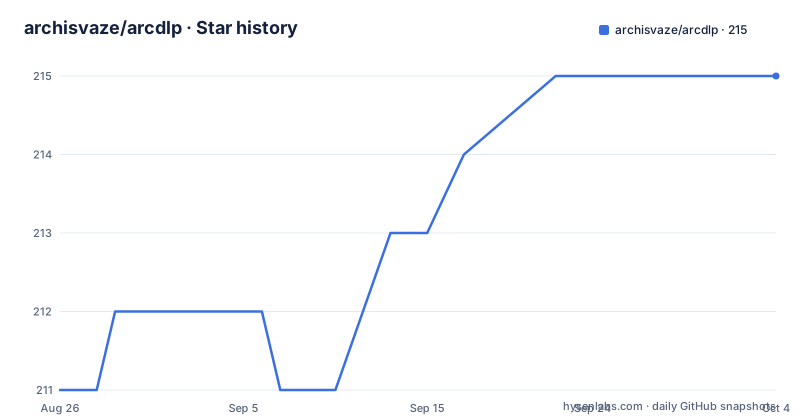
Star history
- archisvaze/arcdlp215 ★ · +4
| Repository | 2026-08-26 | 2026-10-04 |
|---|---|---|
| archisvaze/arcdlp | 211 | 215 |
4 Stars in the last 39 days, measured from the daily GitHub snapshot. Compare with other projects
Editorial analysis
What ArcDLP Actually Solves
ArcDLP is a desktop GUI for yt-dlp. The README positions it as a wrapper, not a competitor to yt-dlp. The problem it solves is that yt-dlp is a command-line tool; many users want to paste a URL, click a button, and get a file. ArcDLP bundles yt-dlp and ffmpeg inside the app, so you do not need to install either. It targets macOS, Windows, and Linux with a DMG, an EXE installer, and an AppImage. The intended user is someone who downloads videos regularly but does not want to memorize yt-dlp flags. The README claims support for YouTube, Vimeo, Twitter/X, SoundCloud, Instagram, and thousands of other sites, which is inherited from yt-dlp. The value ArcDLP adds is the interface, the queue, and the sign-in flows, not new extraction logic.
How the Download Pipeline Works
The app follows a fetch-then-queue flow. You paste a URL and click Fetch. The app retrieves video info and shows metadata in a side panel. You pick a quality from 4K down to 240p, or choose MP3 for audio extraction. Then you click Add to Queue. Downloads are processed sequentially, with per-item progress, retry, cancel, and skip. The README stresses that one failure never stops the rest of the queue. This is a deliberate design principle: resilience first. The queue is the core mechanism that separates ArcDLP from a simple yt-dlp frontend. Fetching multiple URLs back-to-back is supported; each result appears in the side panel, and adding one to the queue automatically loads the next. For playlists, you can select or deselect individual items before queueing the whole batch. The actual download work is delegated to yt-dlp, which handles format detection and site-specific extraction. The app is a GUI wrapper, and the README explicitly says it is not a competing downloader.
Getting It Running: Installers and First Launch
Installation is straightforward but platform-specific. On macOS, download the DMG, drag the app to Applications, then open it. The README warns that macOS will show a security warning because the app is not code-signed. You must go to System Settings, Privacy & Security, and click Open Anyway. This is a one-time step. On Windows, run the EXE installer, click More info then Run anyway. The installer is per-user and does not require admin rights. On Linux, download the AppImage, make it executable, and double-click. The README states no dependencies are needed because yt-dlp and ffmpeg are bundled. The default download location is ~/Downloads/ArcDLP, changeable in Settings. There is no mention of a portable mode or a CLI interface. The app checks for updates on startup and notifies you when a new release is available. That is the entire setup story.
Codec Selection Is a Preference, Not a Guarantee
Settings > Video lets you choose Auto, H.264, VP9, or AV1. The README is explicit that this is a preference, not a hard filter. If a site does not offer the chosen codec, the download still proceeds with the best available format, and the log records which qualities were affected. This is a real limitation. For example, H.264 is described as the most compatible option, playing in QuickTime and Windows Media Player, but YouTube only serves H.264 up to 1080p. So if you select H.264 and request 4K, the app will fall back to another codec. VP9 is saved as WebM, while H.264 and AV1 are saved as MP4. This means the output container depends on your codec choice. If you need a specific codec for a video editor, you cannot rely on ArcDLP to enforce it. You have to check the log after the download. The README does not promise a way to force a codec, so users with strict requirements should be aware.
Instagram Saved Collections: The One Custom Feature
yt-dlp has no extractor for Instagram saved collections, so ArcDLP includes a built-in scraper. After signing in via Settings > Instagram Account, you paste a saved collection URL. The app opens the collection page in a hidden browser window using your Instagram session, scrolls through the page, and collects all <a> tags with /p/ or /reel/ href patterns. The found posts appear in a playlist-style picker, and you can select or deselect items before adding them to the queue. Each post is then downloaded individually via yt-dlp with your Instagram cookies. The scraper stops after 5 consecutive scrolls with no new posts, or after a 3-minute timeout, returning partial results if any were found. The README warns that large collections may be rate-limited by Instagram. This is a meaningful addition, but it is also a fragile path: it depends on Instagram's page structure and your session staying valid. If Instagram changes its markup, the scraper will break until the app is updated. There is no mention of a fallback for collections that fail to load.
Sign-In for YouTube and Instagram: What It Does and Does Not Do
ArcDLP offers built-in browser login windows for YouTube and Instagram. The README says credentials go directly to Google or Instagram through their standard login pages. This is meant to access age-restricted, private, or members-only YouTube content, and private Instagram saved collections. The app does not store your password; it uses the session cookies for downloads. This is a practical approach, but it has limits. The README does not specify whether the session persists across app restarts, or how long the cookies remain valid. It also does not mention what happens if you sign out of the site in the embedded browser. The sign-in is optional; you can download public videos without it. For users who need private content, this feature is the differentiator. But it also introduces a trust question: the app is not code-signed on macOS, and you are entering credentials into an embedded browser. The README assures that credentials go directly to the provider, but you cannot verify that from the README alone. You would have to inspect the source code, which is available on GitHub.
Limitations and Failure Modes to Consider
ArcDLP has several constraints that are visible from the README. First, the codec preference is not enforced, as covered. Second, the Instagram scraper has a 3-minute timeout and stops after 5 empty scrolls, so very large collections may only be partially fetched. Third, the macOS app is not code-signed, which triggers a security warning. Fourth, the app bundles yt-dlp and ffmpeg, which means updates to those tools are tied to ArcDLP releases. The last push was 2026-08-26, and the version history shows regular releases, but you are still dependent on the maintainer to ship new yt-dlp versions. Fifth, the README mentions no proxy support, no custom ffmpeg location, and no batch URL file import. If you need those, ArcDLP is the wrong tool. The queue is sequential, so downloading 100 videos one by one will be slow. There is no parallel download option mentioned. The README also says nothing about download resumption after app restart, so if the app crashes mid-queue, you may have to re-add items.
Alternatives: Raw yt-dlp and Other GUIs
The obvious alternative is yt-dlp itself. The CLI gives you full control over codec selection with --format, parallel downloads with --concurrent-fragments, and cookie handling with --cookies-from-browser. ArcDLP is a wrapper, so anything yt-dlp does not support, ArcDLP cannot do either. The difference is that yt-dlp has no queue, no visual playlist picker, and no built-in Instagram saved collection scraper. You would have to script those yourself. Another alternative is a GUI like Tartube, which is also a yt-dlp wrapper but focuses on complex download lists and scheduled downloads. Tartube does not bundle ffmpeg or provide Instagram saved collection scraping. The key difference is that ArcDLP trades flexibility for simplicity: it has a clean, opinionated interface, while yt-dlp and Tartube give you more knobs. If you need hard codec guarantees or parallel downloads, you should use yt-dlp directly. If you want a simple queue and are willing to accept fallback behavior, ArcDLP is a reasonable choice.
Maintenance, Licensing, and What to Verify
The project is MIT-licensed, which is permissive for reuse. The README says the codebase is intentionally simple, with no frameworks and no build tools, vanilla JS throughout. That reduces maintenance burden for contributors. The project has an active release cadence, with v1.4.3 pushed on 2026-08-26, but the README does not specify a changelog or a migration path for users of older versions. The bundled yt-dlp and ffmpeg are separate projects with their own licenses (yt-dlp is Unlicense or MIT, ffmpeg is LGPL/GPL depending on build). If you redistribute ArcDLP, you need to check those licenses. The README also does not mention code signing for Windows or macOS, which is a trust and friction issue. Before adopting, verify that the release binary matches the source, if that matters to you. Also, test the Instagram scraper with a small collection first, because the README warns about rate limiting. The update notification feature only checks for new releases; it does not auto-update, so you have to download and install manually.
Editorial conclusion
Adopt ArcDLP if you want a local, queue-based GUI for yt-dlp without touching the command line, especially for YouTube playlists, Instagram saved collections, or private videos that need sign-in. Skip it if you prefer the raw yt-dlp CLI, need hard codec guarantees, or cannot accept the macOS unsigned-app warning or the bundled-binary approach. Before relying on it, verify the release you download matches the repository's checksums, test a single video on your target site, and confirm your antivirus or OS does not quarantine the AppImage or installer. The project is MIT-licensed, but the bundled yt-dlp and ffmpeg carry their own licenses, so check those if you redistribute the app.
Frequently asked questions
What does arcdlp need installed before it runs?
Nothing. yt-dlp and ffmpeg are bundled inside the app, and there are no dependencies to install. You download the `.dmg` on macOS, the `ArcDLP-Setup-x.x.x.exe` installer on Windows or the `.AppImage` on Linux, where the file has to be marked executable through its Permissions panel first.
Why does macOS warn me the first time I open arcdlp?
The app is not code-signed yet, so Gatekeeper blocks it on first launch. Dismiss the warning, open System Settings, go to Privacy and Security, scroll down to the entry for ArcDLP and click Open Anyway, then enter your password. It only has to be done once.
Can arcdlp download Instagram saved collections?
Yes, through a scraper it adds, since yt-dlp has no extractor for saved collections. The app opens the collection page in a hidden browser window using your session and collects post and reel links, stopping after five consecutive scrolls with nothing new or after a three-minute timeout, and returning partial results if it found any.
Why did my 4K download come out as WebM instead of MP4?
The codec setting is a preference rather than a filter, and YouTube only serves H.264 up to 1080p, so a 4K or 2K request falls back to another codec. VP9 is always saved as WebM while H.264 and AV1 are saved as MP4, and the log records which qualities were affected.
Where do arcdlp downloads go by default?
Into a folder called ArcDLP inside your Downloads directory, and the location is changeable in Settings. Queued items are processed sequentially with per-item progress, retry, cancel and skip, and one failure does not stop the rest.
Official sources
Add this badge to your README
If you maintain this project, the badge below links readers to this analysis and shows its maintenance status from the daily GitHub snapshot. Paste the markdown into your README; add ?metric=license or ?metric=stars to the image URL for a different field.

[](https://hysenlabs.com/projects/archisvaze-arcdlp)Star history chart for your README
[](https://hysenlabs.com/projects/archisvaze-arcdlp)Was this useful?