arkenfox user.js: a hardening template for desktop Firefox that will break some sites
Firefox privacy, security and anti-tracking: a comprehensive user.js template for configuration and hardening
At a glance
- What is it?
- arkenfox user.js is a Firefox configuration template aimed at maximum privacy, security and anti-fingerprinting with as little breakage as possible. It is built for desktop Firefox only, it expects you to read the wiki first, and since Firefox 150 some of its preferences can leak across profiles.
- Who is it for?
- arkenfox user.js fits desktop Firefox users who are prepared to read the wiki, accept some site breakage and adjust preferences themselves in exchange for reduced tracking and fingerprinting. It is the wrong tool for Tor Browser or other Gecko-based browsers, and for anyone who wants a configuration they never have to think about.
- Can I use it commercially?
- Yes. MIT is a permissive licence: you can use, modify and sell software built on it, as long as you keep its copyright and licence notices.
- Is it still maintained?
- Yes. The repository last received commits 22 days ago.
- What is it written in?
- Mainly JavaScript, according to GitHub's language statistics.
Answers come from the project's GitHub data, last synced on November 22, 2026, and from our analysis. They are not legal advice.
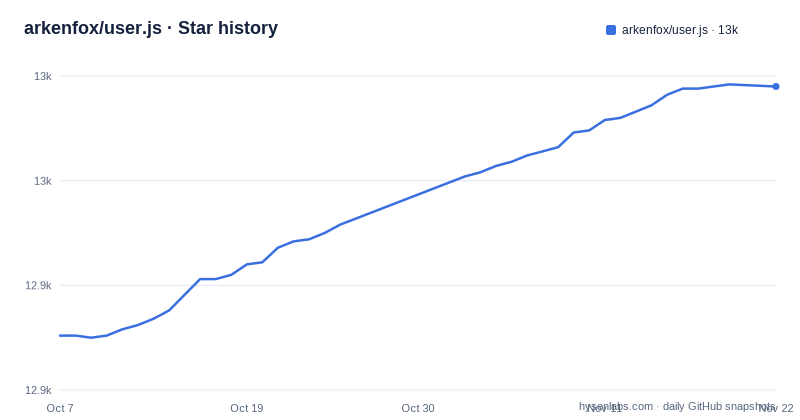
Star history
- arkenfox/user.js12,995 ★ · +119
| Repository | 2026-10-07 | 2026-11-22 |
|---|---|---|
| arkenfox/user.js | 12.9k | 13k |
119 Stars in the last 46 days, measured from the daily GitHub snapshot. Compare with other projects
Editorial analysis
A user.js file is a preference template, not an extension
A user.js is a configuration file that can control Firefox settings. arkenfox user.js is one such file, written as a template. Its stated goal is to provide as much privacy and enhanced security as possible and to reduce tracking and fingerprinting as much as possible, while minimizing loss of functionality and breakage.
The word template matters. This is a starting set of preferences that you are expected to read and adjust, not a product that decides everything for you. The project's own wording also concedes that breakage will happen despite the effort to minimize it. Anyone who applies the file unchanged and walks away will meet sites that misbehave and will not know which preference caused it.
The repository is small: the user.js file itself, updater.sh and updater.bat, prefsCleaner.sh and prefsCleaner.bat, a scratchpad-scripts directory and a wikipiki directory. Each helper script comes in a shell and a Windows batch version. Read any script before you run it against your profile.
The wiki is required reading, experts included
The project is blunt that everyone, experts included, should at least read the wiki, because it contains important information about a few of the settings in the file. The wiki page on user.js gives the technical explanation of how such a file works.
This is the main cost of adopting arkenfox. The useful knowledge is not in the README, which is short, and not in a settings screen. It sits in the wiki, in issues labelled as changelogs, in issues labelled as diffs, in sticky topics, and in a set of issues labelled as answered common questions. If you are not willing to read those, you will be applying hardening you cannot troubleshoot.
For browsing the preferences rather than reading raw JavaScript, there is an interactive view of the current release at arkenfox.github.io/gui, built by contributor icpantsparti2.
Only two official sources
The project names exactly two official sources: the GitHub repository and the interactive webpage. It warns not to trust any other site claiming to be arkenfox.
For a file that rewrites browser security settings, the risk is concrete. A copy hosted elsewhere could carry changed preferences, and because the file is long, few readers would notice a modified line. The consequence for readers searching for a download is simple: get the file from the releases page of arkenfox/user.js or from the master branch of that repository, and treat mirrors, blog attachments and repackaged versions as untrusted.
Firefox profiles can share preferences the template sets
Firefox's built-in profile feature, enabled since Firefox 150, can copy some preferences across profiles. That includes the data-reporting and Health Reports preferences arkenfox sets. The project warns not to assume these settings are independent per profile.
The practical effect: if you apply arkenfox in one profile and keep another profile less locked down, the data collection settings may not stay separated the way you expect. A change in one profile can show up in another. The exact list of shared preferences depends on the Firefox version, so a setup that behaved one way on one release may behave differently after an update. The project points to Mozilla bug 1933264 and the permanentSharedPrefs list in Firefox's SelectableProfileService source for details.
What to do about it is spelled out: open Firefox Settings, go to Permissions and data, then Firefox data collection and use, and verify the behavior in each profile yourself.
Built for desktop Firefox, not Tor or other Gecko browsers
arkenfox user.js is made specifically for desktop Firefox. Using it as-is in other Gecko-based browsers can be counterproductive, and the project calls out the Tor Browser in particular.
It also does not try to turn Firefox into Tor Browser. The project does not recommend connecting over Tor on Firefox. If your threat model calls for Tor, or you need hidden services, the advice is to use the Tor Browser itself.
The consequence is a clear boundary. arkenfox reduces tracking and fingerprinting in regular desktop Firefox. It is not an anonymity tool, and dropping it into a browser that already has its own hardening can make things worse rather than better.
Release numbers and the gap to current Firefox
Release numbers line up with Firefox major versions such as 140 and 144. The most recent tagged release is 144.0, published April 20, 2026. Before it came 140.1 on November 3, 2025 and 140.0 on August 13, 2025. Commits continue on the master branch, with the last push on October 31, 2026.
There is a visible gap. The README already discusses behavior introduced with Firefox 150, while the newest tagged release is numbered 144. If you run a newer Firefox than the release you downloaded, check the changelog and diff issues and the master branch before assuming the release file reflects your browser. The project is under active development, but the tagged release and the repository head are not the same thing.
Expect to own your overrides
Because breakage is expected, using arkenfox well means deciding which of its preferences you will change back for the sites you depend on. The template aims for as much privacy as possible, and the trade between privacy and convenience is left to you. The wiki carries the important notes on specific settings, and the answered common questions collect what other users have already run into.
This makes arkenfox a poor match for people who want a set-and-forget configuration, and a good match for people who already think about their threat model and want a documented, version-tracked baseline to start from. The license is MIT, so you can keep a modified copy for your own use. Thousands of sources, references and suggestions have fed into it, and the long tail of preferences reflects that.
Editorial conclusion
arkenfox user.js fits desktop Firefox users who are prepared to read the wiki, accept some site breakage and adjust preferences themselves in exchange for reduced tracking and fingerprinting. It is the wrong tool for Tor Browser or other Gecko-based browsers, and for anyone who wants a configuration they never have to think about. Before applying it, read the wiki, get the file only from the official repository or its interactive page, and if you use Firefox profiles, verify the data collection settings in each profile.
Frequently asked questions
What is arkenfox user.js?
arkenfox user.js is a user.js template for desktop Firefox that aims to provide as much privacy and enhanced security as possible and to reduce tracking and fingerprinting, while keeping breakage low. It is MIT licensed.
How do I install arkenfox user.js?
Get the file only from the arkenfox/user.js GitHub repository or its releases page, and read the wiki before applying it. The wiki's user.js page explains how the file works with Firefox.
What is a user.js file in Firefox, and how does arkenfox use it?
A user.js is a configuration file that can control Firefox settings. arkenfox user.js is a template of such settings focused on privacy, security and anti-tracking.
How do I use arkenfox user.js with Firefox profiles?
Since Firefox 150, profiles can share some preferences, including data-reporting and Health Reports settings arkenfox sets. Check Permissions and data, then Firefox data collection and use, in each profile.
Official sources
Add this badge to your README
If you maintain this project, the badge below links readers to this analysis and shows its maintenance status from the daily GitHub snapshot. Paste the markdown into your README; add ?metric=license or ?metric=stars to the image URL for a different field.

[](https://hysenlabs.com/projects/arkenfox-user-js)Star history chart for your README
[](https://hysenlabs.com/projects/arkenfox-user-js)Was this useful?