Saltcorn: a no-code database builder with install routes that disagree
Free and open source no-code application builder
At a glance
- What is it?
- Saltcorn lets you build database-backed web and mobile apps by editing tables, views, layouts and actions instead of writing migrations, and it ships several install routes that do not agree on node versions, database backends or how much memory a server needs.
- Who is it for?
- Saltcorn suits teams that need an internal tool this week and do not want to write a migration for every field. It does not suit anyone standardising infrastructure: the npm CLI, the saltcorn-install script, docker-compose and the hosted multitenant instance each assume a different layout, and the smallest documented machine is also the one with a known upgrade problem.
- Can I use it commercially?
- Yes. MIT is a permissive licence: you can use, modify and sell software built on it, as long as you keep its copyright and licence notices.
- Is it still maintained?
- Yes. The repository last received commits 2 days ago.
- What is it written in?
- Mainly JavaScript, according to GitHub's language statistics.
Answers come from the project's GitHub data, last synced on October 22, 2026, and from our analysis. They are not legal advice.
Star history
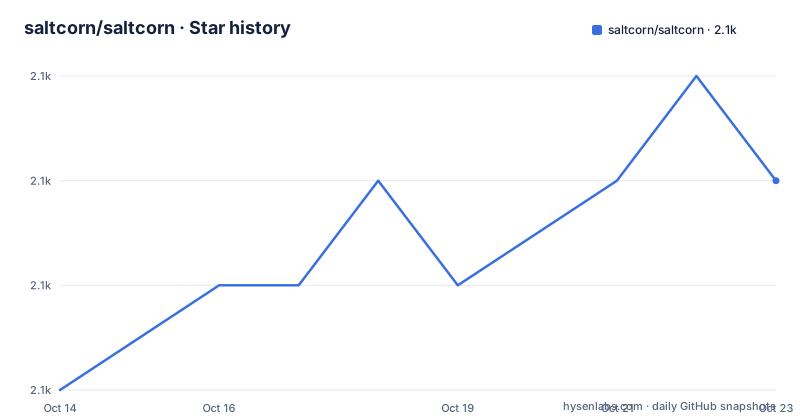
- saltcorn/saltcorn2,087 ★ · +3
| Repository | 2026-10-14 | 2026-10-22 |
|---|---|---|
| saltcorn/saltcorn | 2.1k | 2.1k |
3 Stars in the last 8 days, measured from the daily GitHub snapshot. Compare with other projects
Editorial analysis
No-code apps on top of three database backends
Saltcorn is an extensible open source no-code database application builder: you define tables, then views, layouts and actions on top of them, and end up with a web application, with mobile support in the same codebase. The person it is for is whoever needs an internal tool and refuses to hand-write a migration every time a field changes. The stack named in the acknowledgements explains the shape of it, with PostgreSQL and node-postgres for storage, express for the HTTP layer, craft.js and Blockly for the drag-and-drop editors, CodeMirror where you drop down to code, live-plugin-manager to load plugins at runtime and jQuery-Menu-Editor for menus.
Storage is where the documentation gets less tidy. The .env.example file at the repository root describes example local-testing config for saltcorn against Postgres / SQLite / MySQL and points at packages/mysql-backend/TESTING.md for a walkthrough across all 3 backends. The backend pick order documented in that same file, inside connect.ts, covers only DATABASE_URL, SQLITE_FILEPATH and a Postgres-style user, password and database. MySQL is offered as a third backend by one file and absent from the resolution order in another, and the npm install recipe compiles libpq-dev, the Postgres client headers, with no MySQL client library beside it.
The monorepo behind self-hosted and multitenant instances
One repository carries both jobs, since the core codebase includes what is needed to self-host an instance and to host a multitenant instance. The tree shows the weight of that: packages/ plus deploy/, five Dockerfiles named Dockerfile.dev, Dockerfile.isolated.dev, Dockerfile.isolated.release, Dockerfile.release and Dockerfile.mobile.release, typedoc_cfg.json, whale-ci.yml, infosec-scan/, SECURITY.md and a checked-in test-results/ directory.
The manifest is a private package called saltcorn-monorepo, and its devDependencies cover the whole tree rather than one app. Its dev script starts nodemon against packages/saltcorn/index.js watching js, json and css, with plugin_packages/, plugins_folder/ and git_plugins/ left out so plugin code gets loaded rather than watched. Reference documentation is generated rather than written: the jsondocs script sends typedoc output to packages/server/docs.json, typedoc is pinned at ^0.28.11 next to typedoc-plugin-rename-defaults, and lint-staged at ^15.2.10 runs eslint --fix on every staged js, ts, mjs or cjs file, with eslint at 8.57.0. A `bench:render` script points at packages/saltcorn-data/benchmarks/render.mjs, so render benchmarking lives in the repository too.
Desktop install with the CLI and a SQLite file
On a laptop the README asks for node.js 20+ and npm, then five commands. The prefix keeps the CLI in your home directory instead of a system path, the global install fetches the @saltcorn/cli package, and the SQLite file path makes storage zero-config, since no database server is needed.
npm config set prefix ~/.local
npm install -g @saltcorn/cli
export SQLITE_FILEPATH=~/saltcorn.sqlite
.local/bin/saltcorn reset-schema -f
.local/bin/saltcorn serve
`reset-schema -f` drops whatever is in that file so you start from an empty schema, and `serve` brings the app up. Open http://localhost:3000/ and the builder loads. Your data sits in the file named by SQLITE_FILEPATH, so a second run needs the export again, which is why the README also gives the single-line form `SQLITE_FILEPATH=~/saltcorn.sqlite .local/bin/saltcorn serve`. Watch the binary name: this route calls it `.local/bin/saltcorn`, a direct consequence of the ~/.local prefix, while the npm section further down invokes the same CLI as `saltcorn setup`.
The Linux installer runs Saltcorn as a service
For a fresh virtual machine, three lines run as root or as a user with sudo access. Nodesource installs Node.js 24 first, apt-get puts nodejs in place, and npx saltcorn-install -y then accepts every default, installing PostgreSQL and setting Saltcorn up as a service listening on port 80.
wget -qO - https://deb.nodesource.com/setup_24.x | sudo bash -
sudo apt-get install -qqy nodejs
npx saltcorn-install -y
Tested platforms are named rather than implied: Debian 11 and 12, Ubuntu 18.04, 20.04, 22.04, 24.04, OpenSuSE, AlmaLinux and Fedora, with Node 20 or 22 accepted in place of 24 as well. Drop the -y flag and the same script runs interactively, which is the only documented way to change the port, pick a different database backend or skip the service wrapper.
Memory advice here fights itself. One paragraph calls a 2 GB virtual private server sufficient unless traffic runs high, then concedes that 1 GB can run Saltcorn but there can be issues with upgrading. Further down, the npm package section states its instructions were tested on a 1 GB VM on Ubuntu 20.04. The smallest machine in the documentation is also the one carrying an upgrade problem, and no recovery path is offered for it.
Docker Compose starts a test instance, mobile optional
The fastest local stack is one command inside the repository's own deploy directory, and it leaves your global npm state alone.
cd ./deploy/examples/test && docker-compose up -dIt lands on http://localhost:3000 again, which makes the compose file a reasonable smoke test for a change. The image choice is the trap, and the README flags it in a NOTE: dependencies to build mobile apps are quite large and are not installed in the standard docker image, saltcorn/saltcorn. Use saltcorn/saltcorn-with-mobile directly, or replace saltcorn/saltcorn in the docker-compose file with it. The instruction stops there, and no compose variant is shipped for the mobile build, so anyone following the short path ends up with an image that cannot build apps.
Docker also sidesteps the two install failures the npm route admits to. Nothing needs libpq-dev, build-essential or python-is-python3, because no native module is compiled on the host, and the sd-notify library used for systemd integration is never fetched at all.
How DATABASE_URL outranks SQLITE_FILEPATH in connect.ts
The .env.example file is the closest thing to a backend contract in this project, and it is blunt about the failure mode. It is not auto-loaded by saltcorn: copy it with `cp .env.example .env`, source it yourself, then run the CLI from packages/saltcorn-cli/bin/saltcorn. Two unset lines open the file because source only adds and overrides variables and never clears them, so a shell still exporting values from an earlier run keeps them after you comment a block out.
unset DATABASE_URL SQLITE_FILEPATH SALTCORN_DB_DRIVER SALTCORN_DEFAULT_SCHEMA
unset PGHOST PGPORT PGUSER PGPASSWORD PGDATABASE
export SALTCORN_SESSION_SECRET='hrh64b45b3'
export SQLITE_FILEPATH="$HOME/saltcorn_db.sqlite"
Precedence runs DATABASE_URL first, where it wins outright and discards user, password and database, then SQLITE_FILEPATH, then a Postgres-style user, password and database. Exactly one of the three blocks should be active at a time, because a stray uncommented variable from another block silently changes which backend you get. Secrets are handled casually on purpose: SALTCORN_SESSION_SECRET takes any non-empty string for local development, and a random one is generated, with a warning, when it is left unset.
The manual setup notes are marked out of date
A hand-rolled PostgreSQL route is still documented, and the README marks that section itself as somewhat out of date, redirecting to a wiki page on installing Saltcorn on Ubuntu at https://wiki.saltcorn.com/view/ShowPage?title=Install%20on%20Ubuntu and asking you to read its last section. It also tells you to skip the whole thing if you ran `saltcorn setup` or npx saltcorn-install, so the stale text applies only to the people already doing it the hard way.
What survives is the most precise connection description in the project. Install PostgreSQL with `sudo apt install postgresql postgresql-client`, then create a JSON file named .saltcorn in your XDG config directory, normally the home .config folder, holding host, port, database, user, password, sslmode, sslcert, sslkey and sslrootcert. Those nine keys mirror libpq's own connection parameters, so an existing connection string translates key by key, and the database password then lives in that JSON file in plain text. Compare that with the desktop route, where the whole storage configuration is one path in SQLITE_FILEPATH and no credential exists at all.
Jest covers three packages, not the server
The jest block in package.json names exactly three projects: packages/saltcorn-markup, packages/saltcorn-data and packages/saltcorn-sbadmin2. Nothing that serves HTTP, owns the CLI or bundles for mobile appears there, although the tree holds packages/server, packages/saltcorn-cli, packages/saltcorn-mobile-builder and packages/workflow-editor, and the nodemon ignore list still references packages/workflow-editor/dist/ and packages/saltcorn-mobile-builder/tests/. The test suite is therefore a data-layer and markup gate, not a whole-product gate.
The rest of the toolchain is ordinary for a JavaScript monorepo that still transpiles: typescript 5.9.2, webpack 5.97.1, webpack-cli 6.0.1, jest ^29.7.0, react and react-dom pinned exactly at 18.2.0 while @types/react and @types/react-dom float at ^18.2.0, fs-extra 11.3.5 and minipass 3.1.6. A checked-in test-results/ directory and whale-ci.yml at the root keep test output and CI configuration in the repository rather than in a hosted service.
That is the running cost in one paragraph: an install that can fail on libpq-dev or sd-notify, a lint fix on every staged file, and no published upgrade path. The repository publishes no GitHub releases, and the last push was on 2026-10-06.
Editorial conclusion
Saltcorn suits teams that need an internal tool this week and do not want to write a migration for every field. It does not suit anyone standardising infrastructure: the npm CLI, the saltcorn-install script, docker-compose and the hosted multitenant instance each assume a different layout, and the smallest documented machine is also the one with a known upgrade problem. Check which backend your data already lives in before the first deployment, because a SQLite file is not migrated for you and the .env.example precedence rules decide which store you actually get.
Frequently asked questions
Which databases can Saltcorn store data in?
The .env.example file describes example local-testing config against Postgres, SQLite and MySQL, and points at packages/mysql-backend/TESTING.md for the full walkthrough across all 3 backends. connect.ts picks the backend from DATABASE_URL first, then SQLITE_FILEPATH, then a Postgres-style user, password and database.
How do I run Saltcorn on my own laptop?
Install node.js 20+ and npm, then @saltcorn/cli through npm with a ~/.local prefix, export SQLITE_FILEPATH pointing at a SQLite file and start the server, which listens on http://localhost:3000/. SQLite needs no database server, so nothing else is required.
What does npx saltcorn-install do on a server?
With the -y flag it accepts all the defaults, installing PostgreSQL and setting Saltcorn up as a service listening on port 80. Without that flag the script runs interactively, which is how you choose a different port, a different database backend, or not installing as a service.
Can I build mobile apps with the standard Docker image?
Not with the standard one. The dependencies to build mobile apps are not installed in the saltcorn/saltcorn image, so you need saltcorn/saltcorn-with-mobile, either used directly or substituted into the docker-compose file.
How much memory does a self-hosted Saltcorn need?
A 2 GB virtual private server is called sufficient unless you expect high traffic, and 1 GB is said to work but to run into issues when upgrading. The npm package instructions were tested on a 1 GB VM on Ubuntu 20.04.
Where are the version notes for Saltcorn?
The repository has no GitHub releases, so versions come from the npm packages, such as @saltcorn/cli, and the CHANGELOG.md file at the repository root.
Official sources
Add this badge to your README
If you maintain this project, the badge below links readers to this analysis and shows its maintenance status from the daily GitHub snapshot. Paste the markdown into your README; add ?metric=license or ?metric=stars to the image URL for a different field.

[](https://hysenlabs.com/projects/saltcorn-saltcorn)Star history chart for your README
[](https://hysenlabs.com/projects/saltcorn-saltcorn)