Ship Safe: a local security scanner that argues with its own findings
The independent security agent for AI-written software. Finds issues, investigates whether they are real, and shows you the evidence. Deterministic core, no API key needed, JSON and SARIF output.
At a glance
- What is it?
- Ship Safe is an MIT-licensed JavaScript CLI that scans a repository for application, agent, MCP, secret and supply-chain issues, then runs an investigation layer that sorts each finding into confirmed, likely, unresolved or refuted. The interesting part is the ranking rule between passes, not the rule list.
- Who is it for?
- Adopt ship-safe if you already run a scanner and want a second opinion that distinguishes a traced data path from a rule match, or if you review agent-generated pull requests where the reviewer needs the evidence lines rather than a severity number. Do not adopt it as your only gate if your stack is not JavaScript-centric, and do not enable --verify against production credentials.
- Can I use it commercially?
- Yes. MIT is a permissive licence: you can use, modify and sell software built on it, as long as you keep its copyright and licence notices.
- Is it still maintained?
- Yes. The repository last received commits 40 days ago.
- What is it written in?
- Mainly JavaScript, according to GitHub's language statistics.
Answers come from the project's GitHub data, last synced on November 25, 2026, and from our analysis. They are not legal advice.
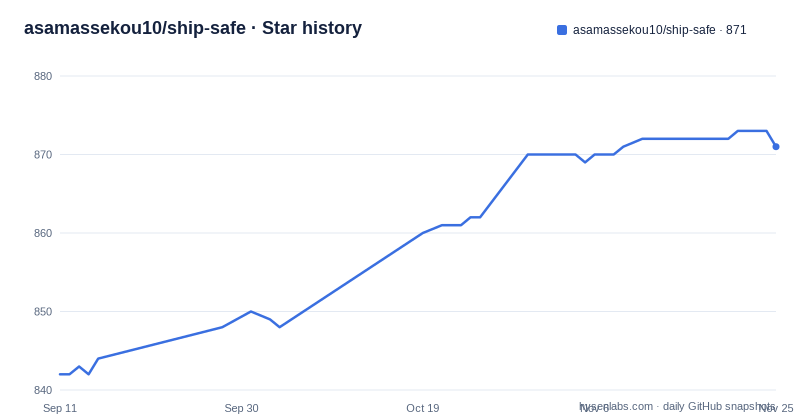
Star history
- asamassekou10/ship-safe871 ★ · +29
| Repository | 2026-09-11 | 2026-11-25 |
|---|---|---|
| asamassekou10/ship-safe | 842 | 871 |
29 Stars in the last 75 days, measured from the daily GitHub snapshot. Compare with other projects
Editorial analysis
The problem is not finding issues, it is believing them
Static analysis has a credibility problem that has nothing to do with detection rates. A scanner that emits four hundred findings gives a reviewer no way to tell which twelve matter, so the reviewer either reads all four hundred or reads none. Ship Safe's README frames the project around that second failure: the tool finds issues, then investigates whether they are real, and shows the evidence. The pitch is aimed at people reviewing AI-written software, where the volume of generated code outpaces the attention available to check it. It is also aimed at the narrower case of opening an unfamiliar folder, which the README addresses with a dedicated command: npx ship-safe trust ~/Downloads/take-home, described as answering what runs on open. That is a different job from auditing a codebase you own, and the command set reflects it.
Two layers, and a rule about which one wins
The architecture is split into a deterministic engine and an investigation layer. The engine is described as the sensor layer: targeted agents that inspect application code, AI agents, MCP configs, prompts, dependencies, CI/CD, secrets and cloud-adjacent configuration, skipping checks that do not apply. The investigation layer then decides what a finding is worth. According to the README it traces the value that reaches a sink, searches the project for controls a rule claims are missing, and builds attack chains across configuration that no single file contains. The design detail worth pausing on is the precedence rule: passes are ranked so a cheaper one never overturns a more expensive one. A traced data path outranks a model's reading of the same file, and a probe that authenticated outranks both. That ordering is the actual product. Plenty of tools combine rules with an LLM; far fewer publish a hierarchy stating which conclusion survives when the two disagree.
What a verdict looks like on disk
The README includes output from ship-safe investigate against OWASP NodeGoat, showing a NoSQL injection finding under a CONFIRMED heading, annotated as traced end to end. The entry carries a rule identifier (NOSQL_INJECTION_WHERE), a file and line (app/data/allocations-dao.js:78), a one-line reason, a 'decided by: dataflow' attribution, and a numbered chain: the value reaches the sink at line 78, the function is called with that value from app/routes/allocations.js:23, and the value is assigned at app/routes/allocations.js:20. A fix suggestion follows. The chain spans three directories, which is the case a single-file rule cannot establish. Two things are notable about the format. First, the 'decided by' field names the pass, so a reader can audit the reasoning rather than the conclusion. Second, the four verdict buckets (confirmed, likely, unresolved, refuted) are a coarser scale than a severity rating, and the README treats them as separate axes: severity says how bad a finding would be, the verdict says whether anyone established that it exists.
Getting it running, and the flags that change what leaves your machine
The entry point is npx ship-safe, which the README describes as an interactive REPL for scanning, fixing and asking questions in one session. No signup and no API key are required for scanning, and core checks work offline. The README states that AI-backed red-team modes use your configured provider when available, and that --no-ai guarantees a fully local scan. That distinction matters: provider-backed classification, deep analysis and GPT-Red send bounded context to the selected provider after what the README calls best-effort credential masking. Best-effort is the operative phrase, and the README points to a Security & Data Flow page for the exact boundaries and context limits rather than stating them inline. Beyond the REPL, the commands are audit, investigate, trust, capabilities, red-team, agent, undo and ci. investigate takes --all to detail unresolved and refuted findings, and --verify to probe leaked keys against their providers. agent takes --severity, --branch and --pr to fix on a branch and open a pull request, with undo reverting the last fix. ci writes SARIF via --sarif results.sarif and fails on critical findings by default, with --fail-on high to widen the gate.
The baseline diff, and what the artifact does not contain
The pull request workflow is the most concrete piece of engineering in the README. On a trusted base revision you run npx ship-safe ci . --fail-on none --no-deps --write-baseline-report /tmp/ship-safe-base.json. On the head you run npx ship-safe ci . --base-report /tmp/ship-safe-base.json --fail-on high. The README states the base artifact contains hashed finding identities, relative paths and rule metadata, and does not store raw matched secrets. Head results classify findings as introduced, resolved, unchanged or uncertain, and ambiguous matches are shown but do not block the pull request. That last choice is a deliberate trade: uncertain findings stay visible without becoming a merge gate, which avoids the common failure where a noisy diff check gets disabled within a week. The alternative gate is verdict-based rather than severity-based: --fail-on-verdict confirmed blocks only what was established, and --ignore-refuted declines to block on what was argued away. Those two flags are the clearest expression of the project's thesis, because they let a team set its bar at evidence rather than at a severity label.
Where the design strains
The investigation layer is only as good as the passes it can run, and the passes described in the README are oriented toward dataflow through JavaScript and TypeScript application code, plus configuration files. A repository in a language the engine does not parse well will produce findings that sit in unresolved indefinitely, because no pass can trace a path through code it cannot follow. The README does not state which languages the dataflow pass covers, so that boundary has to be established by running the tool rather than by reading about it. The --verify flag deserves separate caution: probing a leaked key against its provider means sending that credential to a third party, and a key that is live but belongs to a production environment will generate authentication attempts against production infrastructure. The README presents the flag as opt-in, which is the right default, but the decision to run it belongs to whoever owns the credential, not to whoever is running the scan. There is also a cost question the README does not answer. Precedence ordering implies multiple passes over the same finding, and provider-backed passes consume tokens.
What it is not, and what it overlaps with
Semgrep occupies adjacent ground and the difference is instructive. Semgrep's core is a pattern language: you write rules that match syntax, and the engine reports matches. Reachability and taint analysis exist there, but the tool's centre of gravity is rule authoring, and the output is a match with a location. Ship Safe inverts that. The rule is the input to a second stage, and the output is a verdict with an audit trail naming the pass that produced it. If your team already maintains a Semgrep ruleset tuned to your codebase, ship-safe does not replace that investment; it sits alongside it and argues about the results. If your problem is that you have no rules at all and no appetite to write them, ship-safe's bundled agents cover more ground out of the box, at the cost of less control over what counts as a match. Neither framing makes one tool better. They answer different questions: Semgrep asks whether this pattern appears, and ship-safe asks whether the appearance is exploitable.
Licence, release cadence, and what to check before relying on it
The project is MIT-licensed, which permits commercial use and modification with the copyright notice retained; this is a description of the licence text, not legal advice, and anyone embedding the tool in a product should read the licence themselves. It is published to npm as ship-safe. The release history shows v9.8.0 labelled 'the investigation layer', v9.9.0 three days later, and v10.0.0 four days after that, with the most recent push on 2026-09-07. A major version arriving days after the feature that defines it suggests active iteration rather than a settled interface, so pinning a version in CI is reasonable. The README also mentions a benchmarks page and a pricing page, which implies a hosted tier alongside the CLI. The practical first step is to run npx ship-safe investigate. --all on a repository with known defects and check whether the 'decided by' line on each verdict matches the reasoning you would have applied yourself. If the passes disagree with you on code you understand, they will not earn trust on code you do not.
Editorial conclusion
Adopt ship-safe if you already run a scanner and want a second opinion that distinguishes a traced data path from a rule match, or if you review agent-generated pull requests where the reviewer needs the evidence lines rather than a severity number. Do not adopt it as your only gate if your stack is not JavaScript-centric, and do not enable --verify against production credentials. Before trusting a verdict, run npx ship-safe investigate . --all on a repository whose bugs you already know, and confirm the pass named in each 'decided by' line matches what you would have concluded by hand.
Frequently asked questions
What does Ship Safe do and does it need an API key?
It is a local security scanner for AI-written software with two layers: a deterministic engine that finds candidate issues across application code, agents, MCP configuration, dependencies, pipelines and secrets, and an investigation layer that traces each finding and reports confirmed, likely, unresolved or refuted with the lines it read. No API key is required for scanning and core checks work offline, but provider-backed classification, deep analysis and a red-team mode send bounded context to a provider you configure.
How does Ship Safe decide whether a finding is real?
Investigations run as separate passes ranked by cost, so a cheaper one never overturns a more expensive one. A traced data path outranks a model's reading of the same file, and a probe that actually authenticated against a provider outranks both. Findings resolve to confirmed, likely, unresolved or refuted, each citing the lines the conclusion came from, and each carries the name of the pass that reached it.
Does Ship Safe block a pull request on pre-existing problems?
No. The CI mode writes a baseline report on a trusted base revision and compares the pull request head scan against it, classifying findings as introduced, resolved, unchanged or uncertain. The base report holds hashed finding identities, relative paths and rule metadata, and does not store raw matched secrets. Ambiguous matches are shown but do not block, and results can be uploaded as SARIF into GitHub code scanning.
What does the Ship Safe trust command do?
It is meant for a folder you have not opened yet. Pointed at a directory such as one in your downloads, it reports what would run if you opened it with an agent. A JSON output flag is available. The related capabilities command reads your MCP server configuration and launch permissions from outside the agent, and reports combinations that are unremarkable individually and dangerous together, such as repository-controlled instructions reaching a write capability that runs without per-action approval.
Will Ship Safe edit my files without asking?
The described fix path has the agent propose a plan and a diff, ask before writing anything, verify the result, and keep the changes reversible. Scanning and investigation run locally and do not modify the repository. Repository-level exclusions are handled through an ignore file at the root of the project.
Official sources
Add this badge to your README
If you maintain this project, the badge below links readers to this analysis and shows its maintenance status from the daily GitHub snapshot. Paste the markdown into your README; add ?metric=license or ?metric=stars to the image URL for a different field.

[](https://hysenlabs.com/projects/asamassekou10-ship-safe)Star history chart for your README
[](https://hysenlabs.com/projects/asamassekou10-ship-safe)Was this useful?