Aseprite: A Pixel Art Editor Built for Animation, Not General Illustration
GitHub describes it as Animated sprite editor & pixel art tool (Windows, macOS, Linux). The repository metadata lists C++ as its primary language. This article stays within the project description and details documented in the GitHub repository README.
At a glance
- What is it?
- Aseprite is a C++ sprite editor that separates layers from frames, offers pixel-specific tools, and ships a CLI and Lua scripting. This review covers its core mechanism, setup, licensing, and where it falls short.
- Who is it for?
- Adopt Aseprite if you make animated sprites, pixel art, or game assets and need a dedicated editor with onion skinning, sprite sheet export, and scripting. Do not adopt it if you need a general-purpose image editor or if the EULA-style license is unacceptable.
- Can I use it commercially?
- Not without permission. GitHub finds no licence file in the repository, and without a licence all rights are reserved by default: you may read the code but not reuse it. Check the README, or ask the authors, before using it.
- Is it still maintained?
- Yes. The repository last received commits 5 days ago.
- What is it written in?
- Mainly C++, according to GitHub's language statistics.
Answers come from the project's GitHub data, last synced on November 15, 2026, and from our analysis. They are not legal advice.
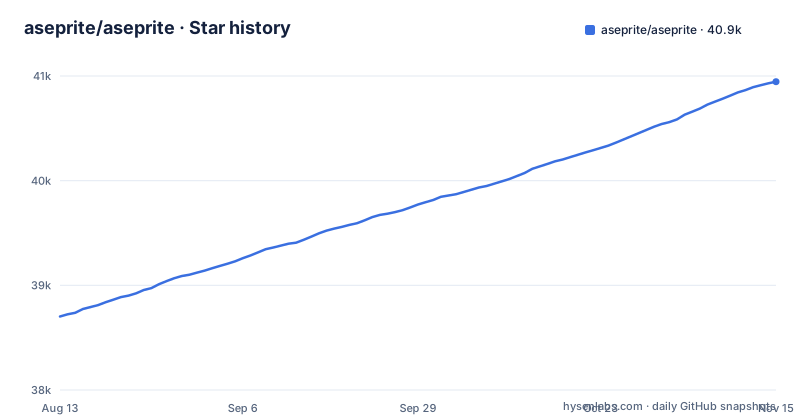
Star history
- aseprite/aseprite40,946 ★ · +2,244
| Repository | 2026-08-13 | 2026-11-15 |
|---|---|---|
| aseprite/aseprite | 38.7k | 40.9k |
2,244 Stars in the last 94 days, measured from the daily GitHub snapshot. Compare with other projects
Editorial analysis
The Problem Aseprite Solves: Animation Without a Timeline Mess
The README lists features that all orbit this animation core: real-time preview, onion skinning, sprite sheet export, and tiled mode for patterns. These are not generic editing tools. They are animation-specific. The preview window and onion skinning let you see motion without guessing. Sprite sheet export is a direct pipeline into game engines. Tiled mode helps with textures that repeat. That focus is the product's identity. It is not a clone of Photoshop with a pixel grid. It is a purpose-built tool, and the design choices reflect that.
How It Works: Layers, Frames, and the Spritesheet Pipeline
For output, the pipeline is export or import. You can export to sprite sheets, GIF, or a sequence of PNG files. You can also import from those formats. That covers the common game workflow: draw in Aseprite, export a sprite sheet, load it into your engine. The CLI and Lua scripting extend this. The CLI lets you automate tasks, so you can batch convert files or generate assets without opening the GUI. Lua scripting gives you programmatic control inside the editor, which is useful for repetitive operations or custom tools.
Getting It Running: Build from Source or Buy the Binary
If you are a developer evaluating this for a team, the practical path is to use the official binary under the EULA. The educational license is a narrow exception for classroom use. Steam releases fall under the Steam Subscriber Agreement. There is no free trial mentioned in the README. The README itself carries no build instructions, but the repository includes INSTALL.md and build.sh, build.cmd and build.ps1, and the source is distributed under the same EULA, so check its terms before building. The README's licensing section is the most important part of the repository for adoption decisions.
A Real Limitation: The License Is Not Open Source
Another limitation is scope. Aseprite is for pixel art and animation. It is not a vector editor. It is not a photo editor. The README lists color modes: RGBA, indexed, grayscale. The README lists no other color modes. If you need those, Aseprite is the wrong tool. The pixel-specific tools like Pixel Perfect freehand mode and Shading ink are excellent for their niche, but they do nothing for a photographer. That focus is a strength, but it is also a hard boundary.
The Alternative: A Generic Editor with Animation Plugins
Another alternative is a pure code approach: write a script to generate sprites or use a game engine's built-in animation tools. That works for simple cases, but it lacks the visual feedback of onion skinning and real-time preview. Aseprite's value is the combination of visual editing and automation. The CLI lets you script the export, but you still need the GUI for the drawing. The alternative is to skip the editor entirely and generate assets procedurally, which is a different workflow for a different problem.
Maintenance and Upgrade Cost: Active Releases, but a Closed Core
The repository shows recent releases: v1.3.18.6 on 2026-09-22, v1.3.18.5 and v1.3.18.4 both on 2026-09-09. That is a steady cadence of patch releases. The project is not archived, and the last push is recent. This suggests active maintenance. However, the source code is distributed under a EULA rather than an open source licence, so check its terms before relying on it. The README credits Igara Studio and contributors, so there is a company behind it. The known issues list on GitHub is the place to see what is broken. For a team, the cost is not just the price. It is the lock-in to a proprietary tool. What the EULA allows if development stops is set by EULA.txt, which is worth reading.
Who Should Adopt It, and What to Verify First
Adopt Aseprite if you are an indie game developer, a pixel artist, or an animator who works with sprites daily. The animation workflow, onion skinning, and sprite sheet export are worth the price. Do not adopt it if you need a general-purpose editor, if you require a permissive open source license for redistribution, or if you cannot accept the EULA. Before adopting, read the EULA.txt file in the repository. Check the known issues list for bugs that affect your platform. Verify that the CLI and Lua scripting cover your automation needs, because the README does not detail the scripting API. Also confirm the export formats you need: the README lists GIF, PNG sequences, sprite sheets, FLC, FLI, JPG, BMP, PCX, TGA. If you need WebP or APNG, the README does not mention them, so verify in the docs. The decision is about whether the animation-specific features justify the license constraints.
Editorial conclusion
Adopt Aseprite if you make animated sprites, pixel art, or game assets and need a dedicated editor with onion skinning, sprite sheet export, and scripting. Do not adopt it if you need a general-purpose image editor or if the EULA-style license is unacceptable. Verify first that the license terms match your use case, especially for commercial work or redistribution, and check the known issues list on GitHub for unresolved bugs. The core value is the animation workflow, not the editing basics.
Frequently asked questions
Is Aseprite for free?
Not as free software. The source code and official releases are under a custom End-User License Agreement, not an open source licence, and the MIT licence covers only named modules such as laf, clip, undo, observable and ui. A special educational licence can be requested for classroom use, and Steam copies fall under the Steam Subscriber Agreement.
Is Aseprite on mobile?
No mobile target is listed. The project describes itself as a pixel art and sprite editor for Windows, macOS and Linux.
how to install aseprite from github
The README carries no install command. Building is documented in INSTALL.md, and the repository provides build.sh, build.cmd and build.ps1 over a CMakeLists.txt, so a source build means following that file rather than a command given on the project page.
how to use aseprite
Sprites are built from layers and frames as separate concepts, with onion skinning and real-time preview for animation, colour modes of RGBA, Indexed up to 256 colours, and Grayscale, and export to sprite sheets, GIF or PNG sequences. There is Lua scripting and a command line interface for automating export and other repetitive work.
Official sources
Add this badge to your README
If you maintain this project, the badge below links readers to this analysis and shows its maintenance status from the daily GitHub snapshot. Paste the markdown into your README; add ?metric=license or ?metric=stars to the image URL for a different field.

[](https://hysenlabs.com/projects/aseprite-aseprite)Star history chart for your README
[](https://hysenlabs.com/projects/aseprite-aseprite)Was this useful?