Astral: self-hosting a tag-based organizer for your GitHub Stars
Organize Your GitHub Stars With Ease
At a glance
- What is it?
- Astral is a PHP and Vue application that replaces GitHub's flat star list with tags, notes and search. The README covers a hosted option and a short self-host path, but leaves deployment and upgrade questions open.
- Who is it for?
- Adopt Astral if you star repositories faster than you can remember why, and you are comfortable running a PHP 7 and Laravel stack with a MySQL database and your own GitHub OAuth app. Do not adopt it if you need a maintained release cadence, documented upgrades, or a stack you can run without PHP.
- Can I use it commercially?
- Yes. BSD-3-Clause is a permissive licence: you can use, modify and sell software built on it, as long as you keep its copyright and licence notices.
- Is it still maintained?
- Yes. The repository last received commits 17 days ago.
- What is it written in?
- Mainly PHP, according to GitHub's language statistics.
Answers come from the project's GitHub data, last synced on November 15, 2026, and from our analysis. They are not legal advice.
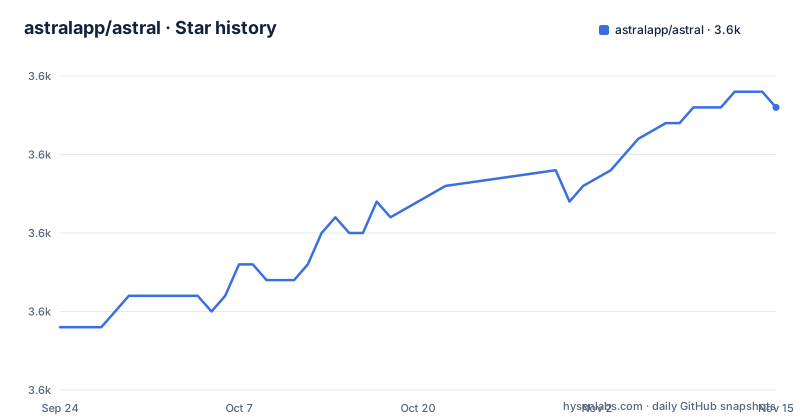
Star history
- astralapp/astral3,598 ★ · +14
| Repository | 2026-09-24 | 2026-11-15 |
|---|---|---|
| astralapp/astral | 3.6k | 3.6k |
14 Stars in the last 52 days, measured from the daily GitHub snapshot. Compare with other projects
Editorial analysis
What Astral is for
GitHub Stars are a single list. You can search them, and you can sort them by language or recency, but you cannot group them. Once you have starred a few hundred repositories, the list stops being a memory aid and becomes a pile. Astral exists to turn that pile into something with structure: tags you assign yourself, and a search that works across them.
The README describes it plainly as "an open source application that allows you to organize your GitHub Stars with ease." The intended user is someone who stars repositories deliberately and wants to find them again by intent rather than by name. That is a narrower audience than "every GitHub user." If you star a handful of projects a year and remember all of them, the setup cost here is not repaid.
The repository topics are github, organize, stars and tags, which matches the feature set rather than the broader developer-tooling category. There is also a hosted version at app.astralapp.com, so self-hosting is a choice, not a requirement.
How the tagging and sync mechanism is put together
Astral is a Laravel application with a Vue front end. The repository layout shows the Laravel conventions: app/, bootstrap/, config/, database/, routes/, storage/, and the artisan entry point at the root. The front end lives under resources/assets/js and is bundled by Laravel Mix, configured in webpack.mix.js. The package.json dependency list is a Vue 2 application: vue, vuex, vue-router, and a set of small UI libraries including vue-js-modal, vue-feather-icons and vue2-datepicker. Drag and drop for tag assignment is handled by dragula, and fuzzy search by fuzzysearch.
Because GitHub Stars live on GitHub, Astral has to read them through the GitHub API. The .env.example file carries GITHUB_CLIENT_ID, GITHUB_CLIENT_SECRET and GITHUB_CLIENT_CALLBACK_URL, which means the application authenticates users through a GitHub OAuth app you create yourself. The callback URL in the example points at /auth/github/callback on the app's own host.
What the README does not describe is the sync model. It does not say whether stars are fetched once at login, refreshed on a schedule, or pulled on demand, and it does not document how tag data is stored relative to the upstream star list. That matters: if you unstar a repository on GitHub, the README gives no indication of what happens to the tag you gave it. The application code is the only place that answer exists, and reading it is part of evaluating this project.
The data store is MySQL by default (DB_CONNECTION=mysql in .env.example), with file-based cache and session drivers and a sync queue driver. Those defaults are aimed at a single-server deployment, not a distributed one.
Installing Astral and tagging your first repository
The README lists three prerequisites: PHP 7, Node.js and Yarn. It also tells you to set up a host for a local domain, suggesting Laravel Homestead or Valet, and to create a GitHub OAuth app so you have API keys to plug in. The PHP 7 requirement is the first thing to check against your environment, since PHP 7 is old enough that many current hosts ship PHP 8 only.
Step 1 in the README is a single chained command. It clones the repository, installs Composer and Yarn dependencies, runs the project's own installer command, and builds the front-end assets in development mode.
git clone [email protected]:astralapp/astral.git
cd astral && composer install && yarn
php artisan astral:install
yarn dev
The astral:install artisan command is the project's own setup step. The README does not enumerate what it does, so expect it to handle application key generation and database setup rather than assuming it. If it prompts for database credentials, they map to the DB_* keys in .env.example.
Step 2 is to boot a server and visit the app. The README notes that with Laravel Valet the URL will likely default to http://astral.test, which matches APP_URL in .env.example. The .env.example file in the repository is the template for the environment configuration, and it is where the GitHub credentials from the OAuth app you created are entered.
APP_NAME=Astral
APP_URL=http://astral.test

GITHUB_CLIENT_ID=
GITHUB_CLIENT_SECRET=
GITHUB_CLIENT_CALLBACK_URL=https://astral.test/auth/github/callback
The callback URL must match what you registered in the GitHub OAuth app, including scheme and host, or the login round trip will fail. Once you are signed in, the first real use is assigning a tag to a starred repository and then searching for it; the front end's fuzzysearch and dragula dependencies are what make that interaction work.
The deployment story is thinner than the install story
The README's deployment section is one line: a 1-Click Install with Cloudron. There is no documented path for a plain VPS, no Dockerfile in the top-level entries, and no notes on running the queue worker, the scheduler, or a web server in production. The QUEUE_DRIVER=sync default means jobs run inline, which is fine for a single user and wrong the moment star syncing is slow enough to block a request.
The contributing section adds a constraint that affects anyone planning to run this long term. The README states that the next branch is "the future of this project" and asks contributors not to submit new-feature pull requests against master. A self-hoster therefore has to decide which branch to track. Tracking master means you are on the branch the maintainer treats as legacy; tracking next means you are on a branch explicitly described as the future, which usually means less stability. The README does not tell you which branch is deployed to the hosted version.
There is also no upgrade documentation. The README does not document rollback, migration ordering, or what happens to existing tag data when the schema changes. For a self-hosted instance holding months of your own annotations, that is the largest unquantified risk in the project.
Where Astral is the wrong tool
Astral is a single-user organizer built around one person's GitHub account. Nothing in the README describes sharing a tag set, assigning stars to teammates, or exporting annotations. If your goal is a team-curated reading list, this is the wrong shape of tool, and you would be fighting the data model rather than extending it.
It is also the wrong tool if you do not want to run PHP. The prerequisites are explicit: PHP 7, Node.js and Yarn, plus a web server host and a MySQL database. A static site generator or a local-first note app that stores links in plain files will cover a smaller version of the same problem with far less operational surface. The trade-off is real: Astral gives you GitHub integration out of the box, and a plain Markdown file does not, but a Markdown file also cannot break during an upgrade.
Finally, the PHP 7 requirement is a genuine constraint rather than a formality. If your host has moved to PHP 8, the README offers no guidance, and the repository's composer.json is the only place to check whether the constraint has been relaxed.
Compared with stars-based bookmark managers
The closest alternative in practice is not another web app but the browser-side approach: tag your GitHub links in a bookmark manager, or keep a curated Markdown list in a repository. The difference in approach is where the source of truth lives. In a bookmark manager, your annotations are the primary data and GitHub is just a link target. In Astral, GitHub is the source of truth for which repositories exist, and your tags are annotations layered on top of a list the application has to fetch.
That distinction decides failure modes. A bookmark manager keeps working if the GitHub API changes or your token expires. Astral depends on GitHub OAuth and the API for its core list, so an expired token or a revoked OAuth app means the list does not load. In exchange, Astral keeps the star list and the tags in sync with what you actually starred, which a manual list cannot do without discipline.
If you already maintain a curated list in a repository and it works, Astral's value is mostly the interface: drag-and-drop tagging, fuzzy search, and a date picker for filtering. That is a real convenience, but it is convenience over a stack you now have to operate.
Licence and the cost of keeping it running
Astral is licensed under BSD-3-Clause. That is a permissive licence: you can use, modify and redistribute the code, including in commercial settings, provided the copyright notice and licence text are retained and you do not use the project's name to endorse your derivative. There is no copyleft obligation to publish your modifications. This is a general description of the licence family, not legal advice; read the LICENSE file in the repository for the binding terms.
The maintenance picture is mixed. The repository is not archived, and the last push was on 2026-07-11, which is recent enough that the project is not dormant. The repository has no published GitHub releases, so there is no version tag to pin to and no changelog to read before upgrading. Practically, that means the branch you track is your version.
Upgrade cost therefore falls on you. Composer and Yarn dependencies will drift, the Vue 2 front end sits on a major version that is no longer the current line, and the PHP 7 prerequisite will become harder to satisfy on managed hosts over time. Budget for reading composer.json and package.json before each pull rather than for applying a release note.
Editorial conclusion
Adopt Astral if you star repositories faster than you can remember why, and you are comfortable running a PHP 7 and Laravel stack with a MySQL database and your own GitHub OAuth app. Do not adopt it if you need a maintained release cadence, documented upgrades, or a stack you can run without PHP. Before committing, verify that PHP 7 is still installable on your target host, check whether the next branch or the master branch is the one you want to track, and confirm your GitHub OAuth callback URL matches GITHUB_CLIENT_CALLBACK_URL in your environment file.
Frequently asked questions
What is Astral and what does it do with my GitHub Stars?
Astral is an open source application that organizes your GitHub Stars, according to the README. It connects to GitHub through an OAuth app you create, then lets you apply tags and search across the repositories you have starred.
How do I install Astral on my own server?
The README requires PHP 7, Node.js and Yarn, plus a host for a local domain such as Laravel Homestead or Valet. You clone the repository, run composer install and yarn, run php artisan astral:install, and then yarn dev before booting a server.
Does Astral need a GitHub OAuth app?
Yes. The README instructs you to create a new GitHub OAuth App so you can plug in your API keys, and .env.example carries GITHUB_CLIENT_ID, GITHUB_CLIENT_SECRET and GITHUB_CLIENT_CALLBACK_URL. The callback URL must match the one you registered with GitHub.
Can I use Astral without self-hosting it?
The README offers a hosted version at app.astralapp.com free of charge, and describes self-hosting as an alternative with the instructions given in the repository. Cloudron also provides a 1-Click Install according to the deploying section.
Which branch of Astral should I track?
The README states that the next branch is the future of the project and asks contributors not to submit new-feature pull requests to master. It does not say which branch the hosted version runs, so the choice between stability and currency is yours to make.
Official sources
Add this badge to your README
If you maintain this project, the badge below links readers to this analysis and shows its maintenance status from the daily GitHub snapshot. Paste the markdown into your README; add ?metric=license or ?metric=stars to the image URL for a different field.

[](https://hysenlabs.com/projects/astralapp-astral)Star history chart for your README
[](https://hysenlabs.com/projects/astralapp-astral)Was this useful?