Phalcon as a compiled extension: what the C delivery changes for your team
High performance, full-stack PHP framework delivered as a C extension.
At a glance
- What is it?
- Phalcon ships the framework as a compiled C extension rather than as PHP sources, which shapes how you install it, how you file bugs, how you get API reference, and where its community plugins live. This looks at the installer split, the development Compose matrix, and what the repository layout says about maintenance.
- Who is it for?
- Phalcon suits a team that treats the framework as an opaque compiled dependency, runs on one of the four named platforms, and prefers a binary package over a local build. It suits a team less well if you expect to read and patch framework internals in PHP, if you need a runtime container for deployment, or if you are on a platform outside the listed four.
- Can I use it commercially?
- Yes. BSD-3-Clause is a permissive licence: you can use, modify and sell software built on it, as long as you keep its copyright and licence notices.
- Is it still maintained?
- Yes. The repository received new commits within the last day.
- What is it written in?
- Mainly PHP, according to GitHub's language statistics.
Answers come from the project's GitHub data, last synced on November 13, 2026, and from our analysis. They are not legal advice.
Star history
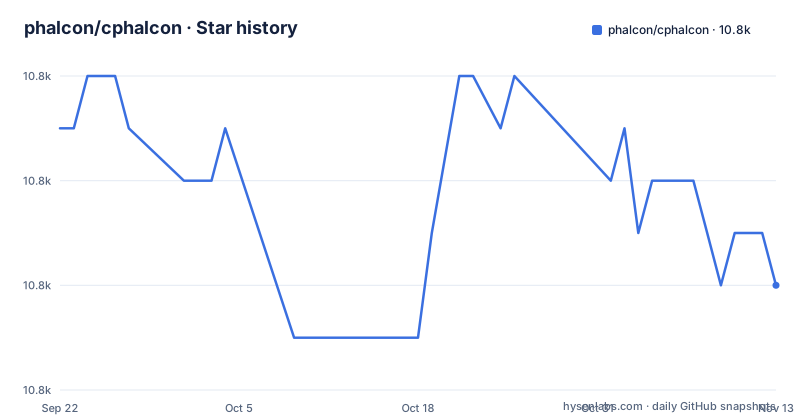
- phalcon/cphalcon10,818 ★ · -3
| Repository | 2026-09-22 | 2026-11-13 |
|---|---|---|
| phalcon/cphalcon | 10.8k | 10.8k |
-3 Stars in the last 52 days, measured from the daily GitHub snapshot. Compare with other projects
Editorial analysis
The framework arrives compiled, so its internals are not patchable in PHP
Phalcon does not arrive as PHP files you can open in an editor. It is delivered as a C extension for PHP, written in Zephir/C. That one choice cascades into everything else a team has to plan for. Your application calls into a compiled extension loaded by the PHP runtime, so a defect inside the framework is not something you fix by editing files in a vendor directory; changing the framework means obtaining a rebuilt extension. It also explains the shape of the root, where composer.json, composer.lock and config.json sit next to build/, package.xml and optimizers/: PHP-level tooling lives alongside a compiled core rather than inside it. The exception is the Incubator, which the project describes as community-driven plugins and classes that extend the framework, written in PHP. That split is the practical boundary: the core is compiled code you consume, the plugins are PHP code you can read.
PIE is recommended while PECL keeps carrying the 5.x line
Two installers exist, and the project is steering you off one of them. PIE is called the modern PHP extension installer and carries the recommended label:
pie install phalcon/cphalconPECL is marked deprecated, with an explicit instruction to switch to PIE, and the note carries its own end condition: releases continue on PECL until PECL is retired or v5.x reaches its end of life. That gives you two facts to plan around. The identifiers differ between the channels, phalcon/cphalcon for PIE and phalcon for PECL, so an install script written for one will not work against the other without edits. And the deprecation is bounded rather than immediate: a team still on PECL receives 5.x releases meanwhile, until PECL is retired or v5.x reaches its end of life. For automation, that argues for deciding the installer once, early, instead of carrying both package names in provisioning scripts.
Four platforms are named, and the source route is documented elsewhere
Platform coverage is stated as a short list, and the claim is about independence rather than a guarantee for every combination. Phalcon is available on Microsoft Windows, GNU/Linux, FreeBSD and macOS, and you can either download a binary package for the system of your choice or build it from source. The source route is not written out in the README, which sends readers to the installation page in the documentation instead, while the repository shows how the project itself handles builds through build/ and a development Dockerfile under resources/docker/develop/. The practical consequence is that a binary package is the short path and a source build is where your platform, compiler and PHP version begin to matter, one at a time.
The Compose file is a development matrix for PHP 8.1 through 8.4
One comment settles the Compose file's purpose: For local development only. It defines one service per PHP version, 8.1, 8.2, 8.3 and 8.4, each built from resources/docker/develop/Dockerfile with target dev, passing PHP_VERSION along with UID and GID build args, mounting the repository at /srv, and adding host.docker.internal:host-gateway so containers can reach host services. Project and container names derive from a PROJECT_PREFIX variable that defaults to cphalcon. Two details deserve attention. The 8.4 service also pins a PHP_DIGEST value while the earlier services pass only PHP_VERSION, so the newest PHP is the only one locked to an exact image digest. And because every service mounts the working tree into the container, this is a contributor tool bound to a source checkout, not a deployment path: there is no published runtime image in this repository, and a reader looking for one to ship will not find it here.
CI, issue labels and the docs branch still say 5.0 while releases say 5.22
The badges and query links trail the release line. The CI badge tracks the 5.x workflow on branch 5.0.x, and both the pull request badge and the issue badge are titled 5.0. Releases themselves are at v5.23.0 on 2026-10-15, with v5.22.1 on 2026-10-01 and v5.22.0 on 2026-09-22, and the repository is not archived with a last push dated 2026-11-02. The mismatch has a concrete effect on contributors. The changelog is split across CHANGELOG.md and CHANGELOG-5.0.md, so locating notes for a specific release means knowing which of the two files to open. Quality reporting is thin by comparison: the SonarCloud quality gate and coverage badges are the only quality signal shown, and the linked summary is scoped to new code rather than to a stated test pass rate.
API reference is regenerated per tag by a single PHP script
API documentation is generated, and generation is tied to a git tag rather than to whatever happens to be checked out. The steps are explicit: clone the repository, check out the tag you want documented, then run the script in bin/generate-api-docs.php.
php bin/generate-api-docs.phpThe output is a set of *.md files, and publishing to the Phalcon website goes through a separate repository branch, the 5.0/api tree of the docs repository. Two consequences follow. If you need reference material for a version other than your current checkout, the script has to be run again for that tag, since one run documents one tag. The publishing destination is the 5.0 API branch of the docs repository.
Core in C, plugins in PHP, and two layers of licensing
Core and extensions sit under different maintenance models. The framework is the compiled extension; the Incubator holds the community-driven plugins and classes that extend it, written in PHP, and the project points to it separately from the core documentation. So a capability you need may exist while being carried by community code rather than by the extension, which changes who maintains it and how quickly a fix reaches you. Licensing also has two layers. The framework is BSD 3-Clause, in LICENSE.txt, and the additional licenses of packages that Phalcon uses, is inspired by, or has adapted are gathered in the 3rdparty/licenses directory. That second directory is where a compliance review should start, because a single LICENSE.txt answers only the framework's own terms and not the obligations carried by the packages Phalcon uses, is inspired by, or has adapted.
Editorial conclusion
Phalcon suits a team that treats the framework as an opaque compiled dependency, runs on one of the four named platforms, and prefers a binary package over a local build. It suits a team less well if you expect to read and patch framework internals in PHP, if you need a runtime container for deployment, or if you are on a platform outside the listed four. Before committing, confirm on the installation page which PHP versions each binary package targets, read 3rdparty/licenses rather than relying on LICENSE.txt alone, and time your installer choice against the project's own end condition, since PECL support runs until PECL is retired or v5.x reaches end of life. The repository is not archived and its last push is dated 2026-11-02, and the latest release is v5.23.0 from 2026-10-15.
Frequently asked questions
What are the top 5 PHP frameworks?
Phalcon describes itself as a high performance full-stack PHP framework delivered as a C extension under a BSD 3-Clause license. The README does not rank frameworks or compare Phalcon against any other.
Which PHP framework is the fastest?
The project states that C extension delivery brings high performance and lower resource consumption, but no benchmark figure is given alongside that claim.
What is a PHP framework?
Phalcon is an open-source web framework delivered as a C extension for PHP, written in Zephir/C, available on Microsoft Windows, GNU/Linux, FreeBSD and macOS, and usable either as a downloaded binary package or built from source.
Official sources
Add this badge to your README
If you maintain this project, the badge below links readers to this analysis and shows its maintenance status from the daily GitHub snapshot. Paste the markdown into your README; add ?metric=license or ?metric=stars to the image URL for a different field.

[](https://hysenlabs.com/projects/phalcon-cphalcon)Star history chart for your README
[](https://hysenlabs.com/projects/phalcon-cphalcon)Was this useful?