asxez/DockerDesktop-CN: A Chinese Localization Package for Docker Desktop
Chinese localization of Docker Desktop, for Windows and Mac.
At a glance
- What is it?
- The repository ships translated app.asar archives that follow each Docker Desktop release, plus a matching executable or Info.plist to satisfy the integrity check. It is a file-replacement patch, not a plugin, and the README is explicit about what breaks if you replace only part of it, with one-click install scripts as the recommended route.
- Who is it for?
- Adopt it if you run Docker Desktop in a Chinese-language environment and are willing to replace three files under Program Files or /Applications on every upgrade, keeping backups so you can roll back. Do not use it if you cannot take administrator rights on Windows, or if you expect an in-app language switch that survives updates.
- Can I use it commercially?
- Yes, with conditions. GPL-3.0 is a copyleft licence: if you distribute software that includes it, you must release that software's source code under the same licence. Running it internally without distributing it does not trigger that obligation.
- Is it still maintained?
- Yes. The repository last received commits 5 days ago.
- What is it written in?
- GitHub does not report a main language for this repository.
Answers come from the project's GitHub data, last synced on November 14, 2026, and from our analysis. They are not legal advice.
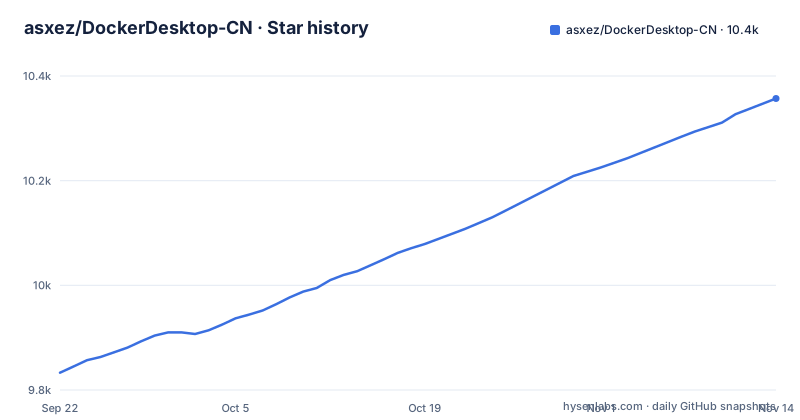
Star history
- asxez/DockerDesktop-CN10,357 ★ · +524
| Repository | 2026-09-22 | 2026-11-14 |
|---|---|---|
| asxez/DockerDesktop-CN | 9.8k | 10.4k |
524 Stars in the last 53 days, measured from the daily GitHub snapshot. Compare with other projects
Editorial analysis
What DockerDesktop-CN actually patches
Docker Desktop's interface is an Electron application, and its frontend code lives in an asar archive. This repository takes that archive, translates the interface strings into Chinese, and publishes the result as a zip attached to a GitHub Release. The README describes the project in one line: it provides a Chinese localization package for Docker Desktop, and the Releases page carries both the installer and the localization package for each Docker Desktop version.
The audience is narrow and practical. It is for engineers who already use Docker Desktop and want the menus, settings panels and dialogs in Chinese, usually because a team standardizes on a Chinese-language desktop or because the person operating the machine reads Chinese more comfortably than English. It is not a Docker distribution, not a fork of the engine, and not an alternative client. Everything below the UI, the daemon, the CLI and the container runtime, is untouched. If you only use the docker command line, this repository has nothing for you.
One detail in the README matters more than it looks. Since version 4.39, the localization archive is published together with the Docker Desktop installer on the Releases page, and the README states this in bold.
Why the integrity check forces a three-file swap
The mechanism is the interesting part, because a naive translation patch would be a single file copy. Docker Desktop 4.74.0 and later verifies the integrity of app.asar on Windows. The README states the failure mode directly: replacing only app.asar causes Docker Desktop to fail to start with the message Integrity check failed for asar archive.
So the archive alone is not enough. The zip for Windows contains app.asar, app.asar.unpacked, and a Docker Desktop.exe whose integrity checks have been synchronized with the modified archive. All three must be replaced. macOS performs the same verification, with the expected value stored in the inner Docker Desktop.app/Contents/Info.plist, so the macOS zip carries app.asar, app.asar.unpacked and a matching Info.plist. The Debian package is simpler and contains only app.asar and app.asar.unpacked.
The Windows instructions treat app.asar.unpacked as a directory: the README says to replace the entire frontend\resources\app.asar.unpacked directory with the one from the package.
This design also means the patch is version-locked. The synchronized executable or plist is tied to one Docker Desktop build, so a localization package from 4.90.0 is not a drop-in for 4.91.0. The release cadence in the repository, frequent tags through October 2026, reflects that constraint rather than enthusiasm.
Installing the Chinese language pack on Windows
The README's procedure starts by closing Docker Desktop. Then download the app-*.zip matching your current Docker Desktop version and platform from the Releases page and extract it. The Windows archive is app-Windows-x86.zip or app-Windows-arm.zip.
Back up the three files you are about to touch, so you can roll back. On Windows they live under the Docker installation directory:
C:\Program Files\Docker\Docker\frontend\resources\app.asar
C:\Program Files\Docker\Docker\frontend\resources\app.asar.unpacked
C:\Program Files\Docker\Docker\frontend\Docker Desktop.exe
Run the replacement with administrator rights. All three are replaced, and app.asar.unpacked is replaced as a whole directory. The README describes the destination of each file:
C:\Program Files\Docker\Docker\frontend\resources\app.asar
C:\Program Files\Docker\Docker\frontend\resources\app.asar.unpacked
C:\Program Files\Docker\Docker\frontend\Docker Desktop.exe
Start Docker Desktop. If the interface appears in Chinese, the patch applied. If it refuses to launch, the most likely cause is a missing or mismatched third file, and the fix is to restore all three backups together rather than only the archive. The README notes that restoring the original also requires putting back Docker Desktop.exe, app.asar and app.asar.unpacked as a set.
macOS and Debian paths, and the signing caveat
On macOS the resources live inside a nested bundle. The README lists app.asar and app.asar.unpacked under /Applications/Docker.app/Contents/MacOS/Docker Desktop.app/Contents/Resources, and Info.plist one level up at /Applications/Docker.app/Contents/MacOS/Docker Desktop.app/Contents/Info.plist. All three are replaced. The README warns against ad-hoc re-signing Docker Desktop, and says that if you have already re-signed it, you should restore the backup or reinstall the original Docker Desktop before applying the localization.
Debian and Ubuntu users have the lightest path. The localization package is app-Debian-x86.zip, and it contains only app.asar and app.asar.unpacked, which go into /opt/docker-desktop/resources. There is no integrity-checked third file to synchronize on that platform, which makes Linux the least fragile target of the three.
The README lists app-Mac-apple.zip and app-Mac-intel.zip as the macOS archives.
Where this approach breaks down
The central limitation is that this is a binary patch against a closed-source application, and it inherits every problem that implies. Docker Desktop updates itself or is updated by the user, and each update replaces the patched files. The localization disappears, and if the update lands on top of a partially restored set of files, the integrity check can fail. The repository's weekly release tags are the maintainer's race against that, not a sign that the patch is stable across versions.
Version matching is unforgiving. The only safe assumption is that the localization package must match the installed Docker Desktop version exactly. A user who is several releases behind may find no matching archive, and a user on a version newer than the latest tag has to wait.
It is also the wrong tool for several situations. If you only need the Docker CLI in Chinese, nothing here applies, because the patch touches the Electron frontend only. If your organization requires signed binaries and managed endpoints, replacing Docker Desktop.exe with a modified copy will conflict with that policy, and the macOS instructions explicitly rule out re-signing as a workaround. And if you cannot obtain administrator rights on Windows, the replacement step simply cannot be performed.
The README says the original script repository asxez/DDCS is archived and the script source has moved into this repository; ddcs.py locates the local Docker Desktop install, unpacks, replaces, repacks and synchronizes the integrity check, and needs Python 3.10 or newer and Node.js 22 or newer.
How it compares with running Docker Desktop in English
The realistic alternative is not another localization project, it is not localizing at all. This repository exists to supply a Chinese interface for Docker Desktop. It localizes after the fact by rewriting the Electron archive and re-synchronizing the integrity metadata recorded in Docker Desktop.exe or Info.plist.
That distinction drives every trade-off. A vendor-provided language option would survive updates and require no administrator file operations. This patch requires reapplication per version, carries a startup failure mode, and depends on one maintainer publishing a new archive quickly after each Docker Desktop release. In exchange, it works today, on the versions it is tagged for, without waiting for the vendor.
A second alternative for some users is to skip Docker Desktop entirely and use the Docker CLI with a terminal configured for Chinese output. That sidesteps the patching problem, but it also gives up the graphical interface, the settings panels and the container dashboard, which is usually the reason someone installs Docker Desktop in the first place.
Maintenance, licensing and what to check before you commit
The repository is not archived, and the last push was on 2026-10-28, with release 4.97.0 tagged the same day. Releases 4.94.0 and 4.93.0 arrived on 2026-10-06 and 2026-09-29, so the cadence tracks Docker Desktop versions closely. That is the maintenance cost from the user's side too: each Docker Desktop upgrade is a re-patch, and skipping upgrades is the only way to avoid it.
The repository is licensed under GPL-3.0 and ships a LICENSE file. Docker Desktop itself is governed by Docker's own terms, which are a separate matter. Both are worth reviewing internally before deploying the patch on managed machines; this is a description of what the repository says, not legal advice.
Before installing, verify three things: that a Release tag matches your installed Docker Desktop version, that the archive for your platform contains all three files where the platform requires them, and that you have a complete backup of the originals, since restoring only part of the set leaves the application in the same broken state as a partial patch. The README's own download guide is the checklist, and it is short enough to follow literally.
Editorial conclusion
Adopt it if you run Docker Desktop in a Chinese-language environment and are willing to replace three files under Program Files or /Applications on every upgrade, keeping backups so you can roll back. Do not use it if you cannot take administrator rights on Windows, or if you expect an in-app language switch that survives updates. Before touching anything, confirm that the Release tag matches your installed Docker Desktop version exactly, and verify that the archive you download contains app.asar, app.asar.unpacked and the platform-specific Docker Desktop.exe or Info.plist, because the integrity check fails without the third file.
Frequently asked questions
Do I really need Docker Desktop?
That depends on whether you want the graphical interface. This repository only localizes Docker Desktop's Electron frontend, so if you work through the docker command line alone, the language pack has nothing to change.
What is Docker Desktop and what is it used for?
Docker Desktop is the application whose interface this repository translates into Chinese. The localization replaces the asar archive and, on Windows and macOS, a synchronized executable or Info.plist so the integrity check still passes.
Why are people moving away from Docker?
The README does not discuss this. What it does say is that after version 4.39 the localization packages ship together with the Docker Desktop installer on the Releases page, and that each package is tied to a specific Docker Desktop version.
What is Docker and why would I need it?
The repository does not explain Docker itself. It only provides Chinese localization archives for Docker Desktop on Windows x86, Windows arm, macOS Apple Silicon, macOS Intel and Debian x86.
Official sources
Add this badge to your README
If you maintain this project, the badge below links readers to this analysis and shows its maintenance status from the daily GitHub snapshot. Paste the markdown into your README; add ?metric=license or ?metric=stars to the image URL for a different field.

[](https://hysenlabs.com/projects/asxez-dockerdesktop-cn)Star history chart for your README
[](https://hysenlabs.com/projects/asxez-dockerdesktop-cn)Was this useful?