Headlamp is a Kubernetes web UI that shows only what your RBAC role allows, now under SIG UI
A Kubernetes web UI that is fully-featured, user-friendly and extensible
At a glance
- What is it?
- Headlamp is an Apache-2.0, vendor-independent Kubernetes dashboard with a Go backend and a TypeScript frontend that runs in-cluster or as a desktop app for Linux, Mac and Windows. It moved to kubernetes-sigs recently, its images and plugins still live under headlamp-k8s, and how much of a cluster you see depends entirely on the token or kubeconfig you bring.
- Who is it for?
- Headlamp is a good fit for teams that want one vendor-independent Kubernetes UI across several clusters, either as a desktop app on top of an existing kubeconfig or deployed in-cluster for shared use, with plugins for anything specific to their stack. It is less suited to anyone who expects the UI to work with a minimal-permission token, since RBAC limits what it can display.
- Can I use it commercially?
- Yes. Apache-2.0 is a permissive licence: you can use, modify and sell software built on it, as long as you keep its copyright and licence notices.
- Is it still maintained?
- Yes. The repository received new commits within the last day.
- What is it written in?
- Mainly TypeScript, according to GitHub's language statistics.
Answers come from the project's GitHub data, last synced on November 25, 2026, and from our analysis. They are not legal advice.
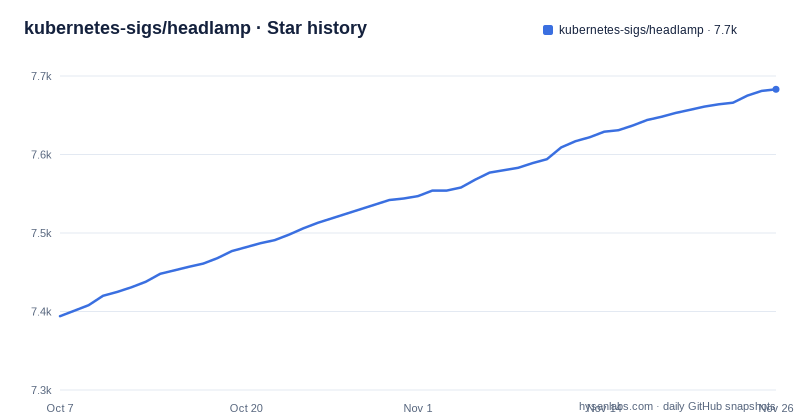
Star history
- kubernetes-sigs/headlamp7,681 ★ · +287
| Repository | 2026-10-07 | 2026-11-25 |
|---|---|---|
| kubernetes-sigs/headlamp | 7.4k | 7.7k |
287 Stars in the last 49 days, measured from the daily GitHub snapshot. Compare with other projects
Editorial analysis
A Go server and a TypeScript frontend that run in-cluster or on the desktop
Headlamp is a generic, vendor-independent Kubernetes web UI. It was built to cover the traditional dashboard job of listing and viewing resources and then go further: logs, exec, a resource editor with documentation, multi-cluster support, and creation, update and deletion operations that can be cancelled. The repository shows how it is put together. The backend is Go and compiles to a binary named headlamp-server; the frontend is TypeScript; app/ holds the desktop application. The same UI can therefore be deployed inside a cluster for a team, or installed locally as a desktop app for Linux, Mac or Windows. Beyond those two, the repository carries a docker-extension/ directory and a backstage-test/ directory, and the Makefile defines a separate Docker extension repository at docker.io/headlamp next to the main ghcr.io/headlamp-k8s image repository. Choosing between in-cluster and desktop is the first decision, because it changes where credentials come from.
The desktop app reads clusters from the default kubeconfig path
The fastest way to try Headlamp is the desktop application, and it depends on something you already have: a kubeconfig. The quickstart is explicit that the file must be set up with your clusters and sit in the default path so Headlamp can use it. If you are the kind of operator who keeps one kubeconfig per environment in a custom directory and switches between them, this is the first thing that will trip you up. The app will open, but your clusters will not be listed until a kubeconfig is where it expects one. The fix is to merge or link your configs into the default location before launching, or to read the desktop installation pages on headlamp.dev for Linux, Mac and Windows. Because the desktop app uses your kubeconfig credentials, it acts with your own permissions, which is a different trust model from an in-cluster deployment shared by several people.
RBAC decides what the UI shows, and a narrow token shows a narrow cluster
Headlamp uses Kubernetes RBAC to check every user's access to resources, and its controls reflect the user's role: if you are not allowed to delete or update something, those actions do not appear. That is good for safety and a source of confusion in practice. If you sign in with a token that has very limited permissions, you may not be able to view your cluster resources correctly, and the empty or partial screens look like a broken UI rather than a permissions problem. For in-cluster use, the documentation on headlamp.dev explains how to get a Service Account token for your cluster. The consequence for administrators is that rolling Headlamp out to a team is mostly an RBAC exercise. You have to decide which roles each group needs, bind them, and tell users which token to use. Headlamp will not show anything a role does not permit, so missing resources should be debugged as permissions first.
The move to kubernetes-sigs left images and plugins under headlamp-k8s
Headlamp recently moved under the Kubernetes SIG UI, and its repository now lives in the kubernetes-sigs organization. Not everything moved with it. Container images are still published at ghcr.io under the headlamp-k8s organization, and the Makefile sets DOCKER_REPO to ghcr.io/headlamp-k8s by default. The official plugins repository is headlamp-k8s/plugins, and the roadmap and release board are GitHub projects under the headlamp-k8s organization too. The project itself warns that some links may be broken during the transition. For readers this split has practical effects. Deployment manifests, CI pipelines and image allow-lists should reference ghcr.io/headlamp-k8s, not a kubernetes-sigs registry path. Bookmarks and documentation links may point to the old organization, and a link that fails today may have moved rather than disappeared. Check the current location before assuming a page or package is gone.
In-cluster deployment ships as root manifests and a Helm chart on its own tag
For running Headlamp inside a cluster, the in-cluster installation page on headlamp.dev holds the instructions, and the repository root carries the raw material: kubernetes-headlamp.yaml, kubernetes-headlamp-ingress-sample.yaml and kubernetes-headlamp-monitoring.yaml, alongside a charts/ directory. The Helm chart is released separately from the application. The app's v0.46.0 was published on 2026-10-15 and the chart's headlamp-helm-0.46.0 tag followed on 2026-10-16; the previous app release, v0.45.0, landed on 2026-08-20. The last push to the repository was on 2026-11-02, so the project is moving. When you pin versions, pin both the chart and the image tag, since they come from different release tags. The ingress file is labeled a sample, so treat it as a starting point that still needs your hostnames and your own access control in front of it. A list of tested Kubernetes platforms lives in docs/platforms.md, where users are invited to report regressions or add platforms they have tested.
Plugins extend the UI, and they build into their own container
Extensibility is central to Headlamp. Published plugins are listed on Artifact Hub, a set of official ones lives in the headlamp-k8s/plugins repository, and a plugin development guide on headlamp.dev covers tailoring the UI to your use cases. The repository has a plugins/ directory and a dedicated Dockerfile.plugins, and the Makefile builds a separate plugins image named plugins. That image follows the host platform by default, and DOCKER_PLUGINS_PLATFORM overrides it for cross-builds, for example to linux/amd64. The trade-off is ownership. Any plugin you add from Artifact Hub is code running inside the UI that your team uses to change cluster state, so review it the way you would review any other dependency, and keep track of which plugins depend on which Headlamp version when you upgrade.
Building from source requires Node 22.12, npm 11 and a Go toolchain
Contributors need more than one toolchain. The root package.json sets engines of node 22.12.0 or newer and npm 11.0.0 or newer. The backend:build script compiles headlamp-server with go build using -trimpath and stripped symbols, backend tests run with go test -p 1, and linting installs golangci-lint v2.12.2 into backend/tools. The start script uses concurrently to run backend and frontend together. The Dockerfile pins its base images by digest: alpine 3.24.3 for the final image, golang 1.26.10 for the backend stage with CGO_ENABLED=0, and node:22 for the frontend stage. You can swap the final base with the IMAGE_BASE build argument. On the Makefile side, macOS on arm64 defaults DOCKER_PLATFORM to linux/arm64, Intel Macs to linux/amd64, and Linux and Windows to local. CONTRIBUTING.md covers setting up a development environment, including tips for Apple Silicon and macOS.
Editorial conclusion
Headlamp is a good fit for teams that want one vendor-independent Kubernetes UI across several clusters, either as a desktop app on top of an existing kubeconfig or deployed in-cluster for shared use, with plugins for anything specific to their stack. It is less suited to anyone who expects the UI to work with a minimal-permission token, since RBAC limits what it can display. Before rolling it out, check that your platform appears in docs/platforms.md, pull images from ghcr.io/headlamp-k8s rather than a kubernetes-sigs path, and decide what Service Account permissions in-cluster users will get.
Frequently asked questions
How do I use Headlamp with Kubernetes?
Either deploy Headlamp in-cluster following the in-cluster instructions on headlamp.dev, or install the desktop app for Linux, Mac or Windows with a kubeconfig in the default path. Access is checked with RBAC, so use a token or kubeconfig with enough permissions.
How do I install Headlamp?
Headlamp's installation pages on headlamp.dev cover in-cluster deployment and desktop installation for Linux, Mac and Windows. A Helm chart is released under its own tag, such as headlamp-helm-0.46.0, and container images are at ghcr.io under headlamp-k8s.
How do I use Headlamp if I cannot see my resources?
Headlamp hides what your RBAC role does not allow, and a token with very limited permissions may not show cluster resources correctly. The Headlamp docs explain how to create a Service Account token for your cluster.
Official sources
Add this badge to your README
If you maintain this project, the badge below links readers to this analysis and shows its maintenance status from the daily GitHub snapshot. Paste the markdown into your README; add ?metric=license or ?metric=stars to the image URL for a different field.

[](https://hysenlabs.com/projects/kubernetes-sigs-headlamp)Star history chart for your README
[](https://hysenlabs.com/projects/kubernetes-sigs-headlamp)Was this useful?