OpenLiDARViewer: A Browser-Native Point-Cloud Inspector That Keeps Data Off the Server
Browser-based LiDAR and point-cloud viewer - measure, classify, profile, and export, entirely client-side on WebGPU with a WebGL2 fallback. Runs locally, no upload.
At a glance
- What is it?
- OpenLiDARViewer is a TypeScript-based web tool for inspecting, measuring, and analyzing LiDAR point clouds entirely in the browser, with WebGPU and a WebGL2 fallback. It emphasizes local processing, evidence-gated exports, and a clear statement of what it cannot do.
- Who is it for?
- Adopt OpenLiDARViewer if you need a zero-install, no-upload tool for inspecting and measuring point clouds in a browser, especially for large COPC or EPT datasets that stream progressively. Do not use it for survey-grade measurement or as a full GIS, because it explicitly refuses to claim those capabilities.
- Can I use it commercially?
- Yes, with strict conditions. AGPL-3.0 is a network copyleft licence: if people use a modified version over a network, for example as a hosted service, you must offer them its source code under the same licence.
- Is it still maintained?
- Yes. The repository last received commits 2 days ago.
- What is it written in?
- Mainly TypeScript, according to GitHub's language statistics.
Answers come from the project's GitHub data, last synced on October 20, 2026, and from our analysis. They are not legal advice.
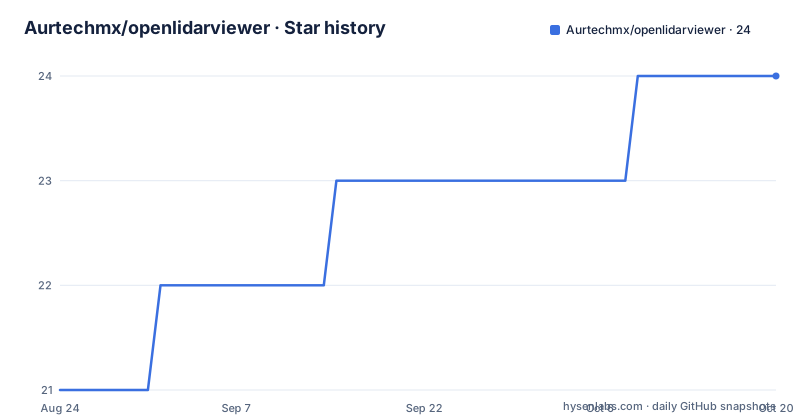
Star history
- Aurtechmx/openlidarviewer24 ★ · +3
| Repository | 2026-08-24 | 2026-10-20 |
|---|---|---|
| Aurtechmx/openlidarviewer | 21 | 24 |
3 Stars in the last 57 days, measured from the daily GitHub snapshot. Compare with other projects
Editorial analysis
The Problem: Point Cloud Inspection Should Not Require a Desktop GIS
LiDAR data has traditionally lived in desktop applications with heavy installation requirements and a steep learning curve. OpenLiDARViewer addresses a specific gap: quick, local inspection of point clouds without uploading files to a server or setting up a processing pipeline. It is built for engineers, surveyors, and researchers who need to open a scan, navigate it, measure distances or volumes, and export results, all from a browser tab. The project is explicit that it is a viewer and inspection tool, not a GIS or a survey-grade processing suite. That distinction matters. It means the tool is honest about its scope, which is refreshing in a field where every product claims to do everything. The core value proposition is simplicity: opening a point cloud should feel like opening an image, while still providing the spatial tools that LiDAR work requires.
How It Works: WebGPU Rendering, Local File Reading, and Progressive Streaming
The rendering engine uses WebGPU with an automatic WebGL2 fallback, which lets the viewer run on modern hardware without a native plugin. Files are read directly on the client, so nothing is uploaded. For large datasets, the tool does not load the entire file into memory. Instead, it streams COPC and EPT datasets progressively, octree node by octree node, with bounded memory. The README describes a budget-aware loading strategy for large LAS/LAZ surveys: header preflight, stride decoding, a memory-safety guard, staged progress, and a cancellable load. For text-based point clouds like XYZ or CSV, it uses chunked, bounded-memory reading. The result is that a large survey reduces in density rather than crashing on weak devices. There is also a coordinate bridge that keeps large georeferenced coordinates numerically stable, which is a non-trivial problem when dealing with UTM-scale values. The architecture is clearly designed around the constraint of running in a browser, and the streaming approach is the key to making that work.
Getting It Running: No Install, Just a Browser and a File
The fastest way to try OpenLiDARViewer is to open the hosted instance at lidar.aurtech.mx and drag a .las, .laz, or .copc.laz file onto the page. You can also paste a remote COPC or ept.json URL. There is no account, no upload, and no installation. The file never leaves your device. For a deeper look, the User Guide at docs/USER_GUIDE.md walks through opening a scan, measuring, terrain analysis, and comparing scans. The project is MIT licensed, so you can also clone the repository and run it locally. The README mentions a command palette driven by Cmd-K, which suggests a keyboard-centric workflow. The documentation site at aurtechmx.github.io/openlidarviewer/ contains the full format matrix and scientific validation record. The barrier to entry is genuinely low: a browser and a file. That is the point.
Measurement and Analysis: Confidence-Aware, But Not Survey-Grade
The tool includes a range of measurement tools: distance, polyline, area, height, angle, slope, cross-section profile, and volume cut/fill. Points are editable, and sessions can be exported and imported as JSON. The terrain pipeline is described as confidence-aware: it runs ground classification, builds a gridded DTM with hold-out RMSE, and produces surface models. Contour and DEM exports are evidence-gated, meaning they refuse to over-claim. That is a genuine differentiator. Many tools will happily export a contour line with no indication of how reliable it is. OpenLiDARViewer instead discloses coverage, method, and uncertainty for every result. This is a limitation in disguise: it will not produce a clean contour if the data does not support it. That is the right trade-off for a tool that explicitly does not claim survey-grade accuracy, but it may frustrate users who expect a one-click contour regardless of data quality.
Streaming Formats: COPC, EPT, and 3D Tiles, With Explicit Refusals
Streaming is where OpenLiDARViewer shows its depth. COPC files, whether local or hosted, open through octree-based, view-dependent streaming with worker-based decoding. EPT tiles, both binary and laszip, are supported. For 3D Tiles, the tool handles .pnts files and tileset.json hierarchies whose content is PNTS. The scheduler culls against the camera, selects tiles based on a point budget, and fetches and decodes tile bodies as needed. Tile placement respects RTC_CENTER and cumulative transforms in float64. What stands out is the list of explicit refusals: mesh content like B3DM, I3DM, CMPT, and glTF is refused by name, as are nested external tilesets and Draco compression. A tileset that refines by REPLACE into tiles with their own content is also refused. This is a deliberate scope decision. The tool is a point-cloud viewer, not a general 3D tiles renderer. The documentation at docs/supported-formats.md details the limits of the subset, and the README notes that a streamed tileset reports no source point total because a tileset.json never states one. That level of honesty about what the tool can and cannot count is rare.
Limitations and Failure Modes: What It Will Not Do
The README is explicit about limitations. OpenLiDARViewer does not claim survey-grade measurement or support for every LiDAR format. The evidence-gated contour and DEM exports mean that if the data is sparse or noisy, the tool will refuse to produce a confident result. That is a deliberate design choice, but it is a failure mode for users who need a contour regardless of quality. Another limitation is the 3D Tiles subset: mesh content, Draco, and nested external tilesets are refused. If your tileset uses those features, this tool is the wrong choice. The streaming scheduler works within a point budget, so on very dense datasets, the view will reduce density rather than load everything, which is a trade-off for bounded memory. The coordinate bridge handles UTM-scale stability, but the README does not claim to handle every projection or datum. For a user with a custom projection, verification is needed. The project is honest about these boundaries, which means there are no surprises, but it also means the tool will not stretch to fit a use case it was not designed for.
Alternatives and the Difference in Approach
The most common alternative is a desktop GIS like QGIS with a LiDAR plugin, or a commercial tool like CloudCompare. QGIS is a full GIS, which means it can do much more than view point clouds, but it requires installation, a learning curve, and a workflow that is not local-first by default. CloudCompare is a dedicated point-cloud tool with powerful processing, but it is a native desktop application. The difference in approach is fundamental: OpenLiDARViewer is built for the browser and for zero-install, zero-upload inspection. It sacrifices the depth of a desktop tool for the convenience of a URL. Another alternative is Potree, which is also browser-based and streams point clouds, but Potree uses its own octree format and requires a server to convert data. OpenLiDARViewer reads COPC and EPT directly, which are open standards, and can open a local file without any server. That is a meaningful difference for users who want to inspect a file on their own machine without setting up a pipeline. The trade-off is that OpenLiDARViewer does not attempt the full processing suite of CloudCompare or QGIS.
Maintenance, Licensing, and What to Verify Before Adopting
The repository is MIT licensed, which is permissive and allows commercial use with attribution. The project has a CI workflow, a clean-clone test, a portability benchmark, and a security workflow, which suggests an active maintenance culture. The release cadence is steady: v0.6.7 on 2026-08-29, v0.6.6 on 2026-08-22, and v0.6.5 on 2026-08-14, so updates come roughly weekly. The README links to a DOI (10.5281/zenodo.21544619), which indicates the project is citable and has a scientific validation record. Before adopting it for a production workflow, verify that your specific file formats are in the supported matrix, especially if you use E57 or PCD, which are listed but may have edge cases. Check the docs/supported-formats.md for the 3D Tiles subset limits if you rely on tilesets. The project's honesty about its limitations is a strength, but it means you must read the docs to know what you are getting. The maintenance signals are positive, but the tool is still at version 0.6.x, so expect breaking changes as it evolves.
Editorial conclusion
Adopt OpenLiDARViewer if you need a zero-install, no-upload tool for inspecting and measuring point clouds in a browser, especially for large COPC or EPT datasets that stream progressively. Do not use it for survey-grade measurement or as a full GIS, because it explicitly refuses to claim those capabilities. Before relying on any terrain or contour export, verify the hold-out RMSE and the evidence-gating criteria, and confirm that your specific file format is in the supported matrix. The project's honesty about its limits is a feature, not a bug, so read the limitations section first.
Frequently asked questions
Does OpenLiDARViewer upload my point cloud file anywhere?
No. Files are read and rendered locally in the browser, and the app is described as no install, no account, no upload. A remote COPC or `ept.json` URL can be opened straight from the start screen instead of dragging a file in.
Which point cloud formats can OpenLiDARViewer import and export?
Import covers LAS, LAZ, E57, PLY, OBJ, GLB, GLTF, XYZ, CSV, PCD, PTX and PTS. Export covers LAS 1.2 and 1.4, PLY, OBJ, XYZ, CSV and PNG snapshots. In 3D Tiles, mesh content such as B3DM, I3DM, CMPT and glTF and Draco compression are refused by name.
Can I run OpenLiDARViewer from source, and what does it need?
Yes. It is a TypeScript ES module project with a lockfile, built on Vite and tested with Vitest. `package.json` requires Node `^22.18.0 || >=24.11.0` and pins npm 10.9.3, and `npm run dev` starts the development server.
Official sources
Add this badge to your README
If you maintain this project, the badge below links readers to this analysis and shows its maintenance status from the daily GitHub snapshot. Paste the markdown into your README; add ?metric=license or ?metric=stars to the image URL for a different field.

[](https://hysenlabs.com/projects/aurtechmx-openlidarviewer)Star history chart for your README
[](https://hysenlabs.com/projects/aurtechmx-openlidarviewer)