ScopeSentry: a plugin-driven asset mapping platform split across four repositories
ScopeSentry-Cyberspace mapping, subdomain enumeration, port scanning, sensitive information discovery, vulnerability scanning, distributed nodes
At a glance
- What is it?
- ScopeSentry is a cyberspace mapping and vulnerability scanning platform that separates its Go scanner, its FastAPI server, its Vue frontend and its plugin template into different repositories. Understanding that split, and its licensing terms, matters more than its feature list.
- Who is it for?
- Adopt ScopeSentry if your team runs authorised recon and vulnerability scanning across many assets and wants to extend the toolchain through plugins instead of maintaining glue scripts, because the scan node is designed to be replicated and the plugin market is part of the design.
- Can I use it commercially?
- Not without permission. GitHub finds no licence file in the repository, and without a licence all rights are reserved by default: you may read the code but not reuse it. Check the README, or ask the authors, before using it.
- Is it still maintained?
- Yes. The repository last received commits 28 days ago.
- What is it written in?
- Mainly Go, according to GitHub's language statistics.
Answers come from the project's GitHub data, last synced on November 7, 2026, and from our analysis. They are not legal advice.
Star history
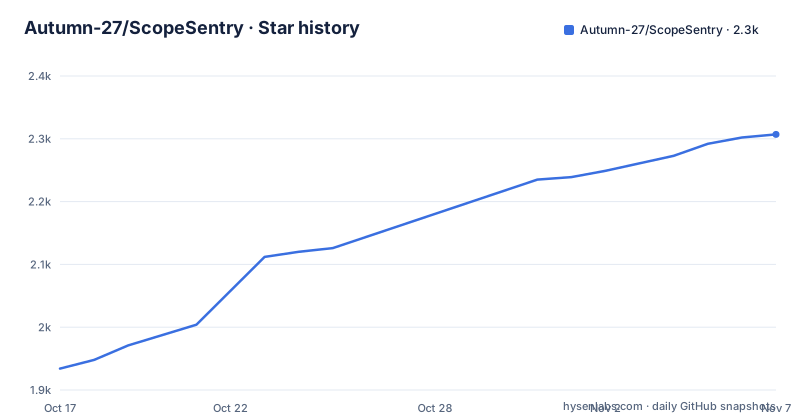
- Autumn-27/ScopeSentry2,307 ★ · +373
| Repository | 2026-10-17 | 2026-11-07 |
|---|---|---|
| Autumn-27/ScopeSentry | 1.9k | 2.3k |
373 Stars in the last 21 days, measured from the daily GitHub snapshot. Compare with other projects
Editorial analysis
One product, four repositories
The most surprising thing about ScopeSentry is that the repository you clone is not the whole product. The README lists four separate projects: the main ScopeSentry repository, ScopeSentry-Scan for the scanner source, ScopeSentry-UI for the frontend source, and ScopeSentry-Plugin-Template for authoring plugins. There is also a plugin market at plugin.scope-sentry.top and an official site at www.scope-sentry.top.
That split follows the language boundaries. The server is Python with FastAPI, the scanner is Go, and the frontend is Vue built on vue-element-plus-admin. The main repository's top-level entries confirm the split: `cmd/`, `internal/`, `pkg/`, `go.mod` and `dockerfile` for the Go side, a separate `frontend/` directory, and a `plugin-template/` directory checked in alongside the Go code.
This arrangement has a practical consequence for adoption. If you want to read the scanner, you are reading a different repository from the one whose README you started with. If you want to contribute a UI fix, you are in a third. Contributors should plan for that before they plan a pull request.
Deployment is four containers, and the .env file is yours to fix
The single-host path is short, which is a point in the project's favour. Clone, change the credentials, bring the stack up:
git clone https://github.com/Autumn-27/ScopeSentry.git
cd ScopeSentry
docker-compose -f single-host-deployment.yml up -d
The README is explicit that the MongoDB and Redis account passwords must be changed in the.env file first. The repository includes a root `.env` file, so its deployment configuration should be reviewed before the first scan runs.
After the command completes you should see four containers: mongodb, redis, scope-sentry for the server, and scopesentry-scan for the scanner. By default there is exactly one scanning node, which is the minimum viable configuration.
The initial credentials are not configured by you. To read the initial user password and the secondary verification password used for plugins, inspect the server logs:
docker logs scope-sentryThat is a genuine rough edge. Bootstrap secrets printed to container logs means anyone with log access on the host may be able to read those initial credentials, so log retention and log access control become part of your deployment hardening, not an afterthought.
Adding scan nodes: a second repo, a unique name
Scaling out is the reason the scanner lives in its own repository. To add a node, clone the scanner repo, edit the connection information for MongoDB and Redis in its .env file, and start it with a different compose file:
git clone https://github.com/Autumn-27/ScopeSentry-Scan.git
cd ScopeSentry-Scan/build
docker-compose -f scan-docker-compose.yml up -d
One field deserves attention: NodeName identifies the node and each name should be unique. If you leave it empty it is generated randomly, and you can change it later in the web interface. Random names work, but stable names matter for anything you build on top of node selection, because the model is that tasks are dispatched to whichever nodes you choose and you need to know which one reported what.
There is a small hint of operational maturity in the repository root: alongside `single-host-deployment.yml` there is a `single-host-deployment-fix.yml`, and `.goreleaser.yaml` indicates the Go side is released through GoReleaser. Releases follow the same pattern, with v1.9.2 on 2026-06-12, v1.9.3 on 2026-07-26 and v1.9.4 on 2026-08-23, and the last push was on 2026-10-11.
The scheduler side is also worth noting from go.mod: `github.com/go-co-op/gocron` is a direct dependency, which is consistent with a product that has scheduled and recurring scanning as part of its model rather than only manual runs.
The plugin system is the actual extension mechanism
The feature list covers the expected reconnaissance surface: subdomain enumeration, subdomain takeover detection, port scanning, asset identification, directory scanning, vulnerability scanning, sensitive information leakage detection, URL extraction, crawling, page monitoring, custom web fingerprinting, POC import, asset grouping, multi-node scanning and webhook output. Custom fingerprinting and POC import are the two entries that tell you this is aimed at people who already know what they are looking for.
What sits above all of that is the plugin system, which the README lists first and describes as the ability to add any tool through extension. There is a plugin market, a separate plugin template repository, and a secondary verification password that gates the plugin path, distinct from the user login password.
Two dependencies in go.mod explain how that is likely to work. `github.com/traefik/yaegi` and `github.com/modelcontextprotocol/go-sdk` are direct Go dependencies. Their presence suggests that the project uses Go-based extension and tooling integrations, but the README does not specify their runtime roles.
If you are evaluating whether the tool can be extended to cover a check that is not built in, the yaegi dependency is the detail that makes the answer plausibly yes. The template repository is where you would start.
What the stack says about the data model
go.mod is worth reading on its own, because the dependency list is an architecture summary. Go 1.24.0 with toolchain go1.24.6. `go.mongodb.org/mongo-driver` v1.14.0 and `github.com/redis/go-redis/v9` v9.5.1 for storage, matching the two required containers. `github.com/valyala/fasthttp` v1.61.0 alongside `github.com/gin-gonic/gin` v1.9.1, so there are two HTTP stacks rather than one.
The rest of the list maps onto specific features. `github.com/google/certificate-transparency-go` v1.3.2 is certificate transparency, which is how subdomain enumeration gets its seeds. `github.com/xuri/excelize/v2` is spreadsheet generation, consistent with asset grouping and export. `github.com/schollz/progressbar/v3` and `go.uber.org/zap` with `gopkg.in/natefinch/lumberjack.v2` handle progress reporting and rotating log files. `github.com/golang-jwt/jwt/v5` is authentication, `github.com/spf13/viper` is configuration, and `github.com/swaggo/swag` with `gin-swagger` generates the API documentation.
The two HTTP stacks are the detail to watch. Fast and standard net/http on the scanner side, Gin's full middleware chain on the server side. Anyone maintaining this in production inherits two sets of connection handling, proxy header behaviour and TLS configuration, which is real operational surface even though nothing in the README calls it out.
The licence is not plain AGPL-3.0
The repository's licence field is listed as unknown by the tooling that indexes it, and the README's licence section states AGPL-3.0 plus additional terms. It states that all branches follow AGPL-3.0 and that additional terms apply. Commercial use requires a separate commercial licence. Companies, organisations and for-profit entities must obtain one before using, distributing or modifying the software. Individuals and non-profit organisations are free to use it under AGPL-3.0. Commercial enquiries go to an address given in the README.
So this is AGPL-3.0 plus a use restriction, which is a different thing from AGPL-3.0 alone. The AGPL network copyleft obligations still apply to anyone running a modified version as a service, and the commercial gate sits on top of them. Whether the combination is enforceable, and what it means for your specific deployment, is a question for your own counsel rather than something to resolve from the README. What is not in doubt is that a company should not deploy this on the strength of the AGPL paragraph alone.
Note also that the licence section refers to all branches. That is worth reading as written rather than as an invitation to check out an older branch with different terms.
Where it fits against a plain command line scanner
The alternative approach is the one this tool is built to replace: a directory of shell scripts, each invocation of a specialised scanner, and a spreadsheet at the end. The difference in approach is not that ScopeSentry scans better than any given tool. On most of its listed capabilities it is wrapping tools that already exist and doing the orchestration, result normalisation and storage itself.
What it adds is state. Assets, subdomains, ports, URLs, crawler output, directory results, vulnerabilities and page-change history live in MongoDB, are grouped into projects, and can be viewed as an aggregated overview per project across subdomains, ports and services. Page monitoring with change detection only makes sense with a persistent store behind it. Webhooks only make sense if something downstream can be told when a result appears. Multi-node scanning only makes sense if the coordinator and the workers share a database.
So the trade-off is honest: you trade a handful of scripts you can read end to end for a persistent multi-user asset database with a web UI, and you take on MongoDB, Redis, a compose deployment, a plugin runtime and a licensing conversation as the price. If your recon is one engineer, one target, one afternoon, the scripts are the better tool. If you are tracking assets across engagements over months, that state is the actual product.
Editorial conclusion
Adopt ScopeSentry if your team runs authorised recon and vulnerability scanning across many assets and wants to extend the toolchain through plugins instead of maintaining glue scripts, because the scan node is designed to be replicated and the plugin market is part of the design. Do not adopt it in a company without arranging a commercial licence first, because the project states that for-profit entities must obtain one before using, distributing or modifying the software, and the GitHub licence field is not filled in. Check that `docker-compose -f single-host-deployment.yml up -d` is the deployment command for your setup, that you change the MongoDB and Redis passwords in the.env file before exposing anything, and that each added scan node has a unique NodeName.
Frequently asked questions
How do I install ScopeSentry?
Clone the repository, change the MongoDB and Redis account passwords in the .env file, then run `docker-compose -f single-host-deployment.yml up -d`. The result is four containers: mongodb, redis, scope-sentry and scopesentry-scan, with one scanning node by default.
Where is the ScopeSentry scanner source code?
The scanner lives in a separate repository, github.com/Autumn-27/ScopeSentry-Scan, with the Vue frontend in ScopeSentry-UI and plugin examples in ScopeSentry-Plugin-Template. The main ScopeSentry repository contains the Go and server side alongside a frontend directory.
Can companies use ScopeSentry for free?
No. The README states that all branches follow AGPL-3.0 with additional terms, that commercial use requires a separate commercial licence, and that companies, organisations and for-profit entities must obtain one before using, distributing or modifying the software. Individuals and non-profit organisations may use it under AGPL-3.0.
How do I add more scan nodes to ScopeSentry?
Clone ScopeSentry-Scan, edit the MongoDB and Redis connection information in the .env file in its build directory, and run `docker-compose -f scan-docker-compose.yml up -d`. NodeName identifies the node and should be unique; leaving it empty generates a random name that can be changed in the web interface.
How do I find the initial ScopeSentry login password?
The initial user password and the secondary verification password used for plugins are printed by the server container, so read them with `docker logs scope-sentry`. Anyone with access to those logs has the credentials until you rotate them.
Official sources
Add this badge to your README
If you maintain this project, the badge below links readers to this analysis and shows its maintenance status from the daily GitHub snapshot. Paste the markdown into your README; add ?metric=license or ?metric=stars to the image URL for a different field.

[](https://hysenlabs.com/projects/autumn-27-scopesentry)Star history chart for your README
[](https://hysenlabs.com/projects/autumn-27-scopesentry)Was this useful?