amass installs nine binaries behind one entrypoint on a floating base
In-depth attack surface mapping and asset discovery
At a glance
- What is it?
- Amass is the OWASP project's open-source tool for mapping attack surfaces and discovering external assets, written in Go and published under the Apache licence with a caveat about subcomponent terms. The code is a serious piece of reconnaissance tooling with WHOIS, RDAP and TLS fingerprinting among its direct dependencies. The packaging is where the surprises are, starting with a container image that copies nine binaries and runs one of them.
- Who is it for?
- Amass suits a team doing authorised external reconnaissance, where mapping what an organisation actually exposes is the first step of a security programme. Two things to check before you build a pipeline on it.
- Can I use it commercially?
- Check first. The repository uses a licence we do not classify automatically, so read its LICENSE file before any commercial use.
- Is it still maintained?
- Yes. The repository last received commits 1 day ago.
- What is it written in?
- Mainly Go, according to GitHub's language statistics.
Answers come from the project's GitHub data, last synced on November 14, 2026, and from our analysis. They are not legal advice.
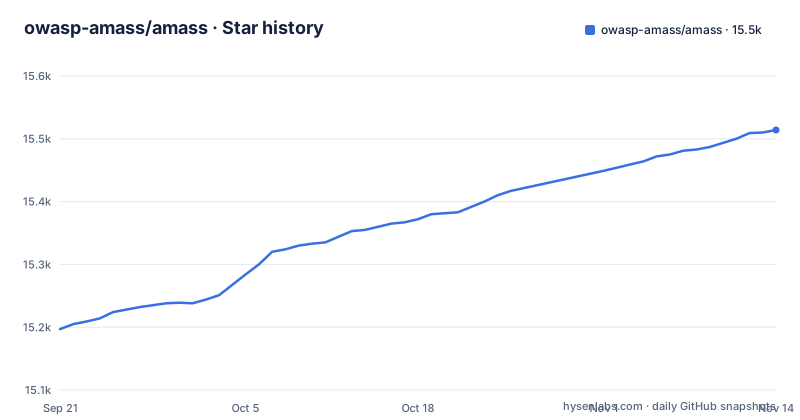
Star history
- owasp-amass/amass15,514 ★ · +317
| Repository | 2026-09-21 | 2026-11-14 |
|---|---|---|
| owasp-amass/amass | 15.2k | 15.5k |
317 Stars in the last 54 days, measured from the daily GitHub snapshot. Compare with other projects
Editorial analysis
The container copies nine binaries and runs one of them
The image definition is short and the list of copied files is the interesting part. The build stage compiles everything, and the runtime stage copies nine separate executables out of it.
One is the tool itself and becomes the entrypoint. The other eight are auxiliary commands, and their source names carry a common prefix that is dropped on the way in: a subscription updater becomes a short name, an association tool becomes a short name, a visualisation tool, a tracking tool and a converter all do the same. An engine binary becomes a single-word name, as does an enumerator, while the readiness check ae_isready keeps its name.
So the image is a toolbox rather than an application. Running it with no arguments gives you the mapping tool and nothing else, and the other commands are only reachable by overriding the entrypoint or executing into the container.
The renaming has one practical effect worth knowing: searching the image for an upstream binary name will not find it, because seven of the eight arrive with their oam_ or amass_ prefix dropped, for example oam_enum becomes enum.
The image does configure a home directory at the filesystem root and creates a configuration directory inside it, and it ends by switching to an unprivileged user with a working directory it owns.
The runtime stage floats while the build stage is pinned
The two stages of the image treat version pinning differently, and the difference is easy to miss because the build stage comes first.
The build stage is pinned to an exact Go release on Alpine, matching the minimum version the module manifest declares. That half is reproducible.
The runtime stage is not. It is built on Alpine's latest tag, and it then runs a package upgrade as part of the build itself, with the cache disabled so the upgrade genuinely reaches the network.
The practical consequence is that building this image twice from the same commit produces two different images. The tool inside will be identical, but the operating system libraries, the certificate bundle and the shell underneath it will not be.
That is a normal pattern for a base image and an unusual one for a security tool, where the set of libraries loaded next to your parser is precisely the thing you would want frozen.
There is one deliberate piece of signal handling in the runtime stage: the stop signal is set to interrupt rather than terminate, so a container stop reaches the tool as an interrupt. That matches how the tool is expected to be used, and it means the tool must handle that signal itself.
Several dependencies are pinned to commit hashes because they have no releases
The module manifest is worth scanning for the shape of its version numbers rather than the list of packages.
Most dependencies carry ordinary semantic version numbers. A handful do not, and instead carry a pseudo-version: a version prefix followed by a commit date and a commit hash.
Those dependencies are pinned to a commit rather than to a tagged release. A pseudo-version resolves to an exact commit, so the build is reproducible, but it also means the project is tracking a moving branch by hash rather than a version anyone can depend on deliberately.
The set is not trivial. Several of the author's own libraries appear this way, including the pipeline and queue packages and a set type, plus a JARM fingerprinting library and a name parser.
Two things follow. A change to any of those libraries can reach your build without a version bump, because there is no version to bump. And if you depend on Amass, those pseudo-versions are inherited rather than chosen by you.
The dependency list names the reconnaissance techniques it uses
The project describes itself as performing network mapping of attack surfaces and external asset discovery using open-source information gathering and active reconnaissance techniques. The dependency list is where you can see those techniques made specific.
There is a WHOIS client and a separate WHOIS parser, so registration records for discovered hosts are fetched and parsed rather than assumed. There is an RDAP client, the structured successor protocol for registration data. And there is a JARM library, which is a technique for fingerprinting a TLS server from the way it responds to a probe.
There is also a Swagger documentation generator, swaggo/swag, in the list.
None of this is objectionable for authorised reconnaissance, and it is the reason the tool is useful. But it is worth being explicit that this is an active tool rather than a passive one, and the project's own wording puts active reconnaissance in the first sentence of its description.
Installation instructions live in a different repository
The front page of this repository contains no install command.
The installation heading carries three badges linking to the Go download page, a container registry and the releases page, and then a single sentence saying that additional installation instructions and documentation can be found in the Amass Docs repository.
So the repository you are reading is the code, and the documentation you need to run it is somewhere else. The documentation link points at a documentation site hosted from a separate repository rather than this one.
That is a common arrangement for a project with a lot of surface area, and the install section here is a pointer rather than a procedure. The front page never tells you how to run the tool, what configuration it reads, or what a first enumeration looks like.
If you are evaluating this, the repository tells you what it is and what it depends on, and the documentation site tells you how to use it. Worth knowing before you assume the front page is the manual.
The issue tracker is closed to questions by explicit instruction
The support section carries an unusually direct instruction, marked with a stop sign emoji.
Please avoid opening GitHub issues for support requests or questions.
The rest of the section routes help to a chat server, where community members are said to help best, and the contributing section routes the same server for discussing project goals.
So the issue tracker is for bugs and feature work only, and support happens in chat.
For an open-source tool this is a defensible choice. Support questions on a tracker are usually answered once and then asked again, and a chat room lets people who have already solved your problem answer it directly.
The cost is that a searchable record of solved problems does not accumulate in the repository. Someone hitting your problem in two years will find the code, the releases and a chat server they cannot search, which is a real difference from a project whose answers live in closed issues.
The licence carries a subcomponent caveat
The licensing section states the standard terms and then adds a sentence that deserves attention.
The program is described as free software that you can redistribute or modify under the terms of the Apache licence, with the project and its contributions attributed to a named author across a date range.
The caveat is that some subcomponents have separate licences.
That sentence is doing a lot of work given what the dependency list contains. A reconnaissance tool pulling in a WHOIS parser, a TLS fingerprinting library, a progress bar library, a pure-Go SQLite driver and a colour library is not a single-licence artefact.
The project's own framing is accurate: it is Apache-licensed, and some subcomponents have separate licences. Anyone redistributing a built binary, particularly in a commercial product, needs to work through the terms of what came in rather than relying on the top-level grant.
It is also worth noting that the recorded licence metadata for the project carries no standard value, while the licence section in the README says Apache. So a scanner reading only the metadata will tell you nothing useful.
Editorial conclusion
Amass suits a team doing authorised external reconnaissance, where mapping what an organisation actually exposes is the first step of a security programme. Two things to check before you build a pipeline on it. That your dependencies are pinned to releases rather than commit hashes, because several of the libraries it uses are pinned to commit pseudo-versions rather than tagged releases. And that the container image is one you rebuild yourself rather than one you trust, since its runtime base floats and it upgrades packages during the build.
Frequently asked questions
how to install amass
The repository front page carries no install command. It links to the Go download page, a container registry and the releases page, and directs you to a separate documentation repository for installation instructions and full documentation. The container image builds from a pinned Go release and installs nine separate binaries.
how to use amass
Amass performs network mapping of attack surfaces and external asset discovery using open-source information gathering and active reconnaissance techniques. Usage instructions are not in the repository; they live in the separate Amass Docs repository, and support questions are directed to the project's chat server rather than the issue tracker.
how to use amass for subdomain enumeration
The repository describes external asset discovery and network mapping rather than a subdomain enumeration recipe, so the specifics would come from the separate documentation repository. The container image does ship a separate enumerator binary alongside the main tool, alongside tools for subscriptions, associations, visualisation and tracking.
how to use amass in kali linux
Nothing on the front page addresses Linux distribution packaging such as Kali, and no installation command for any distribution is given in the repository. The project points instead to the Go download page, its container registry, its releases page and a separate documentation repository.
Official sources
Add this badge to your README
If you maintain this project, the badge below links readers to this analysis and shows its maintenance status from the daily GitHub snapshot. Paste the markdown into your README; add ?metric=license or ?metric=stars to the image URL for a different field.

[](https://hysenlabs.com/projects/owasp-amass-amass)Star history chart for your README
[](https://hysenlabs.com/projects/owasp-amass-amass)Was this useful?